

The most effective way to manage multiple projects at once is to centralize every task in one hub, apply a clear prioritization rule, build estimates from a work breakdown structure, plan capacity before committing, and protect focus with time blocks. Research on attention and project workloads backs each piece. The sections below break down how to put this into practice this week.
TL;DR:
- Treat projects sharing people, budgets, or approvals as a connected set; track unrelated work separately to preserve clear ownership and expose resource conflicts early.
- Practitioners report effectiveness declines beyond roughly three major concurrent projects, while developer research found a productivity tipping point around four; treat both as warning lines.
- Use SASP for many short, similar tasks, MAXTWK or RSM when scarce resources constrain work, and Min LFT when complex dependencies make deadlines decisive.
- Estimate effort and calendar duration separately after dividing deliverables into owned work packages; eight hours of work may span three days when availability is limited.
- University of California research found that information workers typically stay focused in one connected work sphere for about 12 minutes before switching contexts.
Table of Contents
- What Multi-Project Management Actually Means
- Why Juggling Multiple Projects Gets Hard So Fast
- High-Impact Moves to Make This Week
- Which Prioritization Rule Fits Your Situation
- Build a Work Breakdown Structure Before You Estimate
- Audit Your Real Capacity Before You Commit to More
- Cut the Cost of Switching Between Projects
- Build the Minimum Toolset to Keep Everything Visible
- Delegate Without Becoming the Bottleneck
- How Often to Review, and What to Actually Check
- What Experience Teaches That Templates Don’t
- Try Prioritization Station to Put This Playbook on Autopilot
- FAQ
- Sources
What Multi-Project Management Actually Means
Multi-project management means running several independent projects at the same time, sharing your attention, your team, and often the same tools across all of them. It differs from program or portfolio management, where projects are formally grouped under one strategic goal with shared governance. It also differs from single-project work, where you only need to track one set of deliverables and one timeline.
The decision that matters early is whether your projects should be consolidated or kept separate. If two projects share the same team members, the same budget line, or the same stakeholder sign-off, treat them as a connected set and plan their resourcing together. If they are unrelated in scope, timeline, and audience, keep their tracking separate even if you personally oversee both, since merging unrelated work into one plan tends to blur accountability.
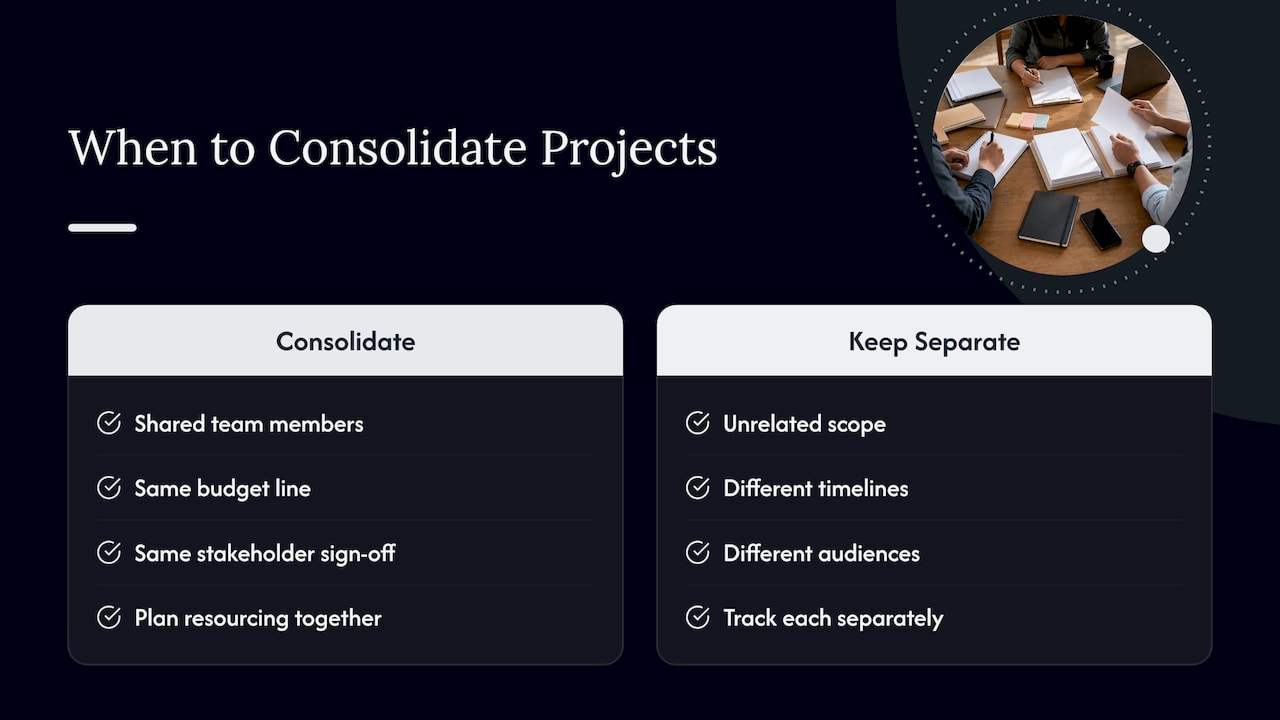
This distinction changes how much setup each project needs. A project that shares resources with three others needs a heavier kickoff: documented dependencies, a shared schedule, and a resourcing conversation before work starts. A standalone project can move faster through initiation because it isn’t waiting on anyone else’s capacity. Sorting this out before you build your tracking system saves you from rebuilding it later when you realize two “separate” projects were actually competing for the same developer’s time all along.
Why Juggling Multiple Projects Gets Hard So Fast
Most of the pain in multi-project work comes from a small set of repeating problems, and naming them makes the fixes later in this guide click into place faster.
Switching between projects carries a real cost. Research on interrupted work found that people complete tasks faster under interruption but report significantly higher stress and a greater sense of time pressure while doing it, according to a study on interruptions and attention. You might hit your deadlines while switching constantly, but you pay for it in exhaustion that builds quietly until it surfaces as burnout.
Beyond switching cost, four other patterns show up again and again:
- Resource conflicts: two projects need the same specialist in the same week, and nobody flagged it until it was urgent.
- Shifting stakeholder priorities: a sponsor reorders what matters mid-quarter, and your sequencing no longer matches anyone’s expectations.
- Estimation errors: tasks take longer than planned because nobody broke them down far enough to see the real effort.
- Burnout from sustained overload: steady low-grade stress across every project compounds instead of resolving.
Switching between tasks measurably raises stress and perceived time pressure, according to research from UCI, even when raw task completion speed holds up. Watch for rising irritability, slipping response times, or a growing backlog of “quick” tasks nobody has time to finish. Those are early signals, not just personality quirks.
High-Impact Moves to Make This Week
Before refining any system, get these six moves in place. Each one addresses a specific failure point from the challenges above, and the order matters: centralizing comes first because every later step depends on having one source of truth.
- Centralize every project and task in a single hub. Capture project name, owner, deadline, status, and current blocker in one place so nothing lives only in someone’s head or inbox.
- Set clear goals, owners, and success criteria at kickoff. Every project needs one accountable owner and a plain-language definition of “done” before work begins.
- Pick one prioritization rule and document it. Write down the rule you’re using to decide what gets worked on first, and apply it the same way every time.
- Build estimates from a work breakdown structure. Break each project into its component tasks before estimating, then feed those numbers into your capacity plan.
- Create buffers and protect focus time. Batch similar work, block uninterrupted stretches on your calendar, and leave slack for the inevitable surprise.
- Delegate with explicit acceptance criteria. State what “finished and acceptable” looks like when you hand off work, and keep visibility into progress without micromanaging it.
Practitioners commonly report that effectiveness drops once someone is assigned more than about three major concurrent projects, according to PMI’s project manager assignment research, which makes capacity planning and honest prioritization worth doing before you say yes to a fourth.
Pro Tip: Do the centralization step first, even if it takes a full afternoon. Every other tactic in this guide assumes you already have one place where all projects live.
Which Prioritization Rule Fits Your Situation
Not every prioritization method fits every kind of workload, and picking the wrong one causes as much friction as having no rule at all. A literature review on setting priorities across multiple projects identified seven distinct rules, each suited to different conditions, according to a PMC review of priority-setting rules.
- SASP (shortest average setup time) fits environments with many short, similar tasks arriving in a steady stream.
- FCFS (first come, first served) works when fairness matters more than optimization and task complexity is roughly even.
- MAXTWK (maximum total work content) suits situations where resource demand is heavy and you need to clear the biggest commitments first.
- RSM (resource scheduling method) fits constrained-resource environments where several projects compete for the same scarce people or equipment.
- Min LFT (minimum latest finish time) is built for complex, interdependent problems where deadline sequencing drives everything else.
- MTS (most total successors) prioritizes tasks that unblock the largest number of downstream activities.
A simple way to choose: if your tasks are short and arrive somewhat randomly, start with SASP. If resources are the bottleneck, test MAXTWK or RSM. If your projects are similar in scope and all kicked off around the same time, Min LFT keeps the most structurally important work moving first. For a deeper walkthrough of these trade-offs, our prioritization techniques breakdown and our guide to prioritizing multiple projects effectively both go further into matching rules to real scenarios.
Build a Work Breakdown Structure Before You Estimate
A work breakdown structure, or WBS, decomposes a project’s scope into progressively smaller pieces until each piece is small enough to estimate with confidence.
- Start with the major deliverables, not tasks. List the two or three biggest outputs each project must produce.
- Break each deliverable into work packages small enough that one person or small team can own each piece.
- Assign a work estimate and a duration estimate separately to each package, since effort hours and calendar time rarely match once you account for availability.
- Document assumptions and risk level (high, medium, or low) for each estimate so future planning can calibrate against what actually happened.
This approach follows estimation guidance that recommends running short workshops with the people who will actually do the work, using more than one estimating technique, and preserving a documented history for future projects, according to the State of Michigan project estimating guide.
The distinction between work and duration matters more than it sounds. A task might take 8 hours of actual effort (work) but span 3 calendar days (duration) because the person doing it also has two other project commitments. Scheduling off duration alone hides how much real capacity you’re consuming, which is exactly what capacity planning in the next section is meant to catch.
Pro Tip: Run your estimation workshop with a whiteboard and the actual task owners in the room. Estimates made alone, without the people doing the work, are usually optimistic by a wide margin.
Audit Your Real Capacity Before You Commit to More
Capacity planning starts with an honest audit, not a wish list. Subtract time spent on meetings, operational support, and administrative work from each person’s total hours, and what remains is their actual project-available capacity. Mixing operational duties into project capacity estimates is one of the most common reasons schedules fail, and separating the two is a recommended first step before allocating any project work, based on PMI case research on overworked project environments.
Once you know real available hours, three practices keep allocation realistic:
- Maintain a shared resource pool so every project owner can see who else is drawing on the same people.
- Keep one master schedule instead of separate calendars per project, so conflicts surface before they become emergencies.
- Allocate by percentage of time, not by task count, and leave a buffer rather than filling every available hour.
Developer multitasking research found that output can improve with a moderate amount of project switching, but productivity drops once the number of concurrent projects passes an observed tipping point around four projects, as shown in studies on multitasking across projects. This aligns with practitioners’ reports of a decline in effectiveness beyond roughly three projects, cited in PMI’s assignment model research. Treat either number as a warning line, not a hard rule for your specific team.
Watch utilization, burn rate against the plan, and upcoming bottlenecks where two projects will need the same person in the same week. When capacity is stretched thin, the healthier move is pausing or canceling a lower-value project rather than quietly overloading everyone, a step frequent portfolio reviews are built to catch early.
Cut the Cost of Switching Between Projects
Every time you jump from one project to another, you pay a hidden tax in lost focus and rising stress, and the research backs this up directly. Information workers typically spend only about 12 minutes in a single connected “working sphere” before switching contexts, averaging frequent task switches across a given week, according to University of California research on attention. That’s a short window to get meaningful work done before your attention fragments again.
A few concrete habits reduce the damage:
- Batch similar tasks together. Group all your status updates, all your email replies, or all your code reviews into single blocks instead of interleaving them with deep work.
- Time-block your calendar for specific projects. Dedicate named blocks to one project at a time rather than leaving your day open to whichever request arrives first.
- Limit notification windows. Check messages at set intervals rather than reacting the instant something arrives.
- Set meeting rules that protect mornings or another consistent stretch for uninterrupted work, and push routine syncs to the afternoon.
You don’t need to guess at your own limit. Run a two-week experiment: cap your active projects at three, measure how much you complete, then raise the cap by one and compare. Our breakdown of why reducing task switching boosts focus walks through how to structure that kind of test.
Pro Tip: Protect one two-hour block each morning as untouchable deep-work time before opening email or messaging apps. The cost of switching is highest first thing, before your attention has settled into anything.
Build the Minimum Toolset to Keep Everything Visible
You don’t need a sprawling software stack to run multiple projects well. You need one central hub with a small set of fields, kept current, and a few reusable templates that save you from rebuilding structure every time a new project starts.
A working hub needs at minimum:
- A project roster listing every active project with its owner and status.
- Milestones with dates for each project, visible at a glance.
- Current blockers, updated as they appear rather than batched into a weekly report.
- Next actions for each project, so anyone checking the hub knows what’s happening right now, not just what happened last week.
A few templates carry most of the weight: a kickoff checklist that forces goal and owner clarity before work starts, a WBS template that standardizes how you decompose scope, a weekly status snapshot that takes five minutes to fill out, and a change request form that captures scope shifts instead of letting them happen informally. Our guide to organizing multiple projects and our guide to organizing multiple work projects efficiently both include working examples of these templates.
Where a feature comparison helps, a breakdown of project management tools built for event planners illustrates how different tools weigh these same core fields differently depending on the type of work. Sync your calendar automatically wherever possible and automate routine status pulls so updating the hub doesn’t become its own project.
Delegate Without Becoming the Bottleneck
Delegation only works when the person receiving the task knows exactly what “done” looks like and when to escalate. A short RACI breakdown, naming who is responsible, accountable, consulted, and informed for each major task, removes most of the ambiguity that causes rework later.
- State acceptance criteria up front. Write down what finished work needs to include before handing off the task, not after reviewing a draft.
- Name the escalation point. Tell the person exactly when to flag an issue rather than sit on it until the deadline.
- Use short asynchronous updates instead of status meetings. A two-line written update often replaces a 30-minute call.
- Reserve one short cross-project sync for genuine exceptions. Save live meeting time for the handful of issues that actually need real-time discussion.
Giving teams real autonomy within those boundaries, rather than checking in constantly, tends to produce better throughput. Capacity-aware assignment research found that distinct competencies, including flexible leadership and comfort with interdependency, separate managers who delegate well from those who become single points of failure, according to PMI research on managers running multiple projects.
How Often to Review, and What to Actually Check
A short, consistent review cadence catches trouble while it’s still cheap to fix. Three layers cover most needs: a daily quick sync to surface blockers, a weekly portfolio review to check status across all active projects, and a monthly priority reset to confirm the ranking still matches current business needs.
- Daily sync: just blockers and what’s happening today, kept under ten minutes.
- Weekly portfolio review: status across every project, compared against the plan.
- Monthly priority reset: revisit your prioritization rule and reorder work if priorities have shifted.
Four metrics carry most of the signal: utilization against planned capacity, burn rate against the budgeted schedule, the percentage of tasks tracking on time, and a simple count of open blockers. Keep every review focused on decisions, not status recitation. If a meeting produces no action item, it probably didn’t need to happen.
What Experience Teaches That Templates Don’t
The hardest part of running several projects isn’t learning the frameworks. It’s deciding, in a specific busy quarter, which project gets your best hour today and which one waits. A manager with four active projects and one week of truly open capacity doesn’t solve that with a spreadsheet alone; they solve it by trusting a prioritization rule they set in advance, even when gut instinct pulls toward whichever stakeholder emailed last.
The trade-off that matters most is often invisible until you make it: pausing the project with the lowest near-term cost of delay, even if it’s the one you personally enjoy, to protect the one with a hard external deadline. That decision gets easier once you’ve written your priority rule down ahead of time, because you’re applying a standard instead of negotiating with yourself in the moment.
— Optiostation
Try Prioritization Station to Put This Playbook on Autopilot
Everything in this guide works better when the mechanics of tracking it stop eating your time. A product centralized every project and task into one hub, built around a prioritization-first workflow rather than a generic to-do list, with reminders and calendar integration so your time blocks and your task list stay in sync automatically.

The tactics you just read, centralizing, batching, protecting focus, running estimates before committing, only stick when the tool you use every day reinforces them instead of adding another thing to check. The app was built around that idea from the start, with a task, team, and time management system designed for students and young professionals juggling more than one priority at once.
- Centralize every active project and task in one place instead of across scattered apps and notebooks.
- Apply a prioritization workflow instead of reordering your list by whoever asked most recently.
- Sync deadlines directly to your calendar so your time blocks reflect what’s actually due.
See how it fits your own workload at Optiostation.
FAQ
How many projects can one person realistically manage at once?
Practitioners commonly report that effectiveness declines once someone takes on more than roughly three major concurrent projects, according to PMI’s assignment research. Your real limit depends on project complexity and how much of your time is already committed to operational work, so treat that number as a starting benchmark rather than a fixed rule.
What is the best way to track multiple projects at work?
The most reliable method is a single centralized hub listing every project, owner, deadline, status, and current blocker, updated regularly instead of scattered across separate tools. Pairing that hub with one documented prioritization rule prevents the tracking system itself from becoming another source of confusion.
Which prioritization rule should I use for multiple projects?
It depends on your environment: SASP fits many short, similar tasks, MAXTWK or RSM fit situations with heavy resource competition, and Min LFT fits complex, interdependent projects, based on a literature review of priority-setting rules. Pick one rule, document it, and apply it consistently rather than switching methods project by project.
How do I stop context switching from draining my focus?
Batch similar tasks, time-block your calendar by project, and limit how often you check notifications, since fragmented attention carries a measurable stress cost even when raw task speed holds up, according to UCI research on interrupted work. Protecting a daily uninterrupted block, especially earlier in the day, recovers most of that lost focus.
What should I track to catch a project slipping behind schedule?
Watch utilization against planned capacity, burn rate against budget, the percentage of tasks tracking on time, and the number of open blockers, reviewed on a consistent weekly cadence. Catching a shift in any of these four early is usually enough to adjust before a delay becomes a crisis.
Sources
- Project Manager Assignment Model | PMI
- G. Mark — Study on interruptions and attention (CHI paper) | UCI
- Managing Multiple Projects: A Literature Review of Setting Priorities and a Pilot Survey | PMC
- State of Michigan Project Estimating Guide — WBS and estimation
