

TL;DR:
- Organizing multiple work projects requires a centralized system that links all responsibilities and statuses for clarity. Implementing a portfolio dashboard and uniform structures reduces confusion and prevents duplicated effort. Regular updates and task batching improve focus, while setting WIP limits prevents burnout and keeps projects on track.
Organizing multiple work projects means building a single connected system that links every timeline, responsibility, and status across all your active work. Without that system, you lose hours to context switching, missed deadlines, and duplicated effort. The good news is that knowing how to organize multiple work projects is a method problem, not a talent problem. Apply the right structure and you can manage five projects with the same clarity most people struggle to bring to two.
How to organize multiple work projects with a centralized system
The single most effective move you can make is consolidating all your projects into one digital workspace. Standardized folder hierarchies and uniform board layouts reduce confusion and duplicated effort across every project you run. When every project lives in the same structure, you spend zero time hunting for files or reconstructing context.

A portfolio dashboard takes this further. It connects timelines, responsibilities, and statuses in one view so you can spot conflicts before they become crises. High-performing teams reduce friction by building exactly this kind of cross-project visibility. A student juggling a thesis, a part-time job, and a club leadership role gets the same benefit as a junior analyst tracking three client deliverables.
The table below shows the core features worth building into any centralized system, regardless of which tool you use.
| Feature | What it does | Why it matters |
|---|---|---|
| Portfolio dashboard | Shows all project statuses in one view | Catches timeline conflicts early |
| Unified folder structure | Consistent naming and hierarchy | Reduces search time and duplication |
| Shared task boards | Visible responsibilities per project | Prevents dropped handoffs |
| Deadline calendar | Cross-project date overlay | Surfaces competing deadlines at a glance |
| Access permission tiers | Controls who sees what | Protects sensitive project details |
Pro Tip: Set access permission tiers from day one. Not every collaborator needs to see every project. Limiting visibility reduces noise and protects sensitive information without slowing anyone down.
How do you prioritize tasks when managing multiple priorities?
Priority is not the same as urgency. True project priority depends on strategic value, not on which stakeholder is loudest or which meeting just ended. This distinction is the single most common mistake young professionals make when they first start managing multiple projects simultaneously.
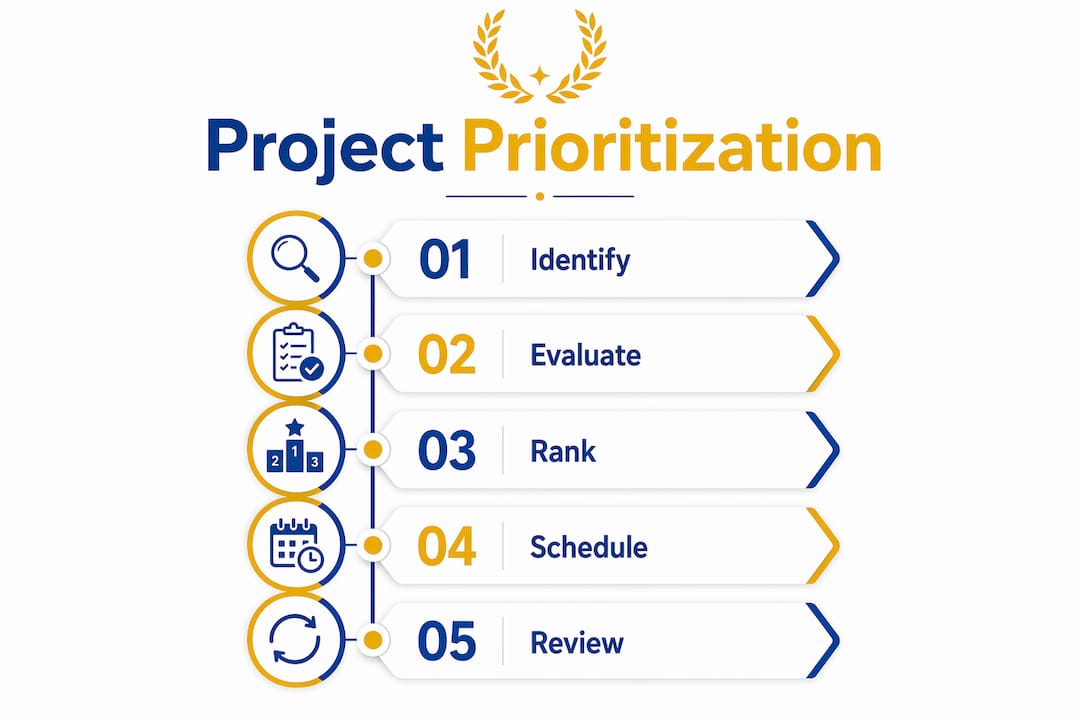
The Eisenhower Matrix gives you a practical starting point. It sorts tasks into four quadrants: urgent and important, important but not urgent, urgent but not important, and neither. Most people pile work into the “urgent and important” box because they never scheduled the “important but not urgent” tasks. Block time for those second-quadrant items before your week fills up with noise.
Shared resources create a hidden bottleneck that urgency-based thinking misses entirely. Identifying and reallocating bottleneck resources clears backlogs faster than responding to whoever is asking loudest. If your graphic designer is overloaded on a low-priority campaign, your high-priority product launch stalls. Fix the allocation, not the noise.
Use this checklist when deciding which project or task gets your attention next:
- Deadline proximity. How close is the hard due date, and what happens if you miss it?
- Downstream dependencies. Does another task or person block on this one finishing first?
- Strategic impact. Does this move a grade, a client relationship, or a career goal forward?
- Resource availability. Do you have what you need right now, or will you be waiting?
- Effort-to-value ratio. Can a short burst of focused work unlock significant progress?
Pro Tip: Review your priority list every Monday morning before checking messages. Setting priorities before you see incoming requests keeps you data-driven instead of reactive.
What are the best productivity techniques for multiple projects?
Batching is the most underused technique for anyone managing multiple projects at once. Batching similar tasks across projects reduces cognitive switching costs and keeps your output consistent. Instead of writing one email for Project A, then switching to a spreadsheet for Project B, then back to email for Project C, you batch all emails across all projects into a single 30-minute block.
Time blocking pairs naturally with batching. Assign specific hours to specific types of work: deep writing from 9:00 AM to 11:00 AM, status updates from 11:00 AM to 11:30 AM, and meetings only in the afternoon. This structure protects your highest-focus hours from low-value interruptions. Students balancing coursework and part-time jobs, for example, can block study hours in the morning before their shift starts.
Task templates accelerate new project setups and cut decision fatigue. When every new project starts with the same checklist, folder structure, and milestone format, you spend your mental energy on the actual work instead of reinventing the wheel. Optiostation’s Optio feature supports exactly this kind of repeatable workflow for students and young professionals who manage multiple workloads.
Work-in-Progress limits are the structural guardrail that keeps batching and blocking from falling apart. Enforcing explicit WIP limits prevents burnout and keeps critical projects moving to completion. A practical rule: cap your active major projects at three at any given time. Anything beyond that gets queued, not started.
Here is how to apply these techniques in practice:
- Batch by task type. Group all research, all writing, or all review tasks across projects into single sessions.
- Block deep work hours. Reserve your peak focus window daily and treat it as a non-negotiable appointment.
- Use project templates. Build a starter checklist for every new project so setup takes minutes, not hours.
- Set a WIP cap. Decide your maximum number of active projects and enforce it before accepting new work.
- Schedule status reviews. Pick one fixed time per week to update all project boards at once.
Pro Tip: Pair task batching with time management strategies by grouping your lowest-energy tasks, like replying to messages or filing documents, into a single end-of-day block. This preserves your best hours for work that actually requires thinking.
How can you track and adapt your projects as priorities shift?
Tracking multiple projects requires a live system, not a static plan. Portfolio dashboards let you spot workload imbalances and timeline conflicts before they cause delays. Update your dashboard at least once a week with current progress, blockers, and any changed deadlines.
Adaptive scheduling is the practice of adjusting your plan when reality changes, which it always does. When a new assignment lands or a client shifts scope, you need a process for deciding what moves, not just what gets added. Flag dependencies explicitly so you know which tasks will cascade when one item slips.
Automation and scheduled check-ins maintain progress visibility without requiring manual effort every day. Set recurring reminders to update task statuses, and use automated notifications to alert collaborators when their input is needed. This keeps everyone aligned without constant meetings.
| Tracking approach | Strength | Limitation |
|---|---|---|
| Weekly dashboard review | Catches conflicts early | Requires consistent discipline |
| Automated status reminders | Reduces manual follow-up | Needs initial setup time |
| Dependency mapping | Surfaces cascade risks | Can feel complex for small projects |
| Daily standup notes | Fast and lightweight | Easy to skip under pressure |
What mistakes should you avoid when organizing multiple projects?
The most damaging mistake is accepting too many concurrent projects without setting a capacity limit. Managing projects at the portfolio level produces better outcomes than treating each project as its own isolated effort. Without a portfolio view, you cannot see that three projects are competing for the same two hours on Thursday.
Over-relying on urgency signals is the second major pitfall. Urgency feels like priority because it creates pressure, but pressure is not the same as importance. A loud email thread about a low-stakes task will always feel more urgent than a quiet deadline for a high-stakes deliverable. Data-driven prioritization by strategic impact corrects this bias.
Common mistakes and their fixes:
- Taking on too much. Fix: Set a hard WIP cap and communicate it clearly before agreeing to new work.
- Reacting to noise. Fix: Prioritize from your project list every morning before checking messages.
- Ignoring bottlenecks. Fix: Audit shared resources weekly and reallocate before backlogs build.
- Skipping templates. Fix: Build a starter checklist for every project type you repeat.
- Siloing projects. Fix: Use a portfolio dashboard so all projects share one source of truth.
Pro Tip: Treat your capacity like a budget. You would not spend money you do not have, so do not commit time you do not have. Say “I can start that in two weeks” instead of “yes” to everything.
Key Takeaways
Organizing multiple work projects requires a centralized portfolio system, data-driven prioritization, task batching, and explicit capacity limits working together.
| Point | Details |
|---|---|
| Centralize all projects | Use one dashboard to connect timelines, responsibilities, and statuses across every project. |
| Prioritize by impact, not urgency | Rank projects by strategic value and resource availability, not by who is asking loudest. |
| Batch similar tasks | Group the same type of work across projects into single sessions to cut switching costs. |
| Enforce WIP limits | Cap active major projects at three to prevent burnout and protect delivery quality. |
| Adapt with live tracking | Update your portfolio dashboard weekly and flag dependencies before they cause delays. |
What Optiostation has learned from managing multiple projects
The hardest truth about organizing multiple projects is that willpower does not scale. You can be disciplined, focused, and talented, and still fail to keep five projects on track if your system is broken. The young professionals and students who handle multiple workloads well are not more capable than their peers. They have better methods.
The second thing worth saying plainly: most people underestimate how much damage urgency bias does. When every request feels urgent, nothing is actually prioritized. Building a weekly priority review, even a ten-minute one, changes this completely. You stop reacting and start deciding.
Flexibility matters too, but it has to sit inside a structure. A rigid plan that cannot absorb a surprise deadline is just a list of things you will feel guilty about. Build slack into your schedule deliberately, not as an afterthought. Leave buffer time between projects, not just within them.
The Centurions who use Optiostation consistently tell us the same thing: the moment they built a portfolio view and set a WIP cap, the noise dropped. Not because they had fewer projects, but because they finally had a clear picture of what was actually happening.
— Optiostation
Optiostation: your second-in-command for multiple projects
Optiostation is built for students and young professionals who need to manage multiple projects without losing their minds or their weekends. The Optio feature acts as your second-in-command, centralizing your tasks, timelines, and priorities in one mobile workspace so you always know what needs your attention next.
Whether you are tracking three client projects, balancing coursework with a part-time role, or coordinating a team, Optiostation gives you the portfolio view, WIP controls, and task templates covered in this article. Start with the best task management guide to find the right setup for your workload. If you want to go deeper on keeping everything on track, the guide on how to keep track of tasks walks you through the daily habits that make the system stick.
FAQ
What does it mean to organize multiple work projects?
Organizing multiple work projects means building one connected system that tracks all timelines, responsibilities, and statuses in a single view. The goal is to replace scattered, siloed efforts with a portfolio-level structure that gives you clarity and control.
How do you prioritize multiple projects with competing deadlines?
Rank projects by strategic impact and resource availability, not by urgency or stakeholder pressure. Use a framework like the Eisenhower Matrix and review your priorities at the start of each week before incoming requests reset your focus.
What is a WIP limit and why does it matter?
A Work-in-Progress limit is a hard cap on how many major projects you actively work on at once. Enforcing a WIP limit prevents burnout and keeps critical work moving to completion instead of stalling across too many simultaneous efforts.
How does task batching help when managing multiple projects?
Batching groups the same type of task across all your projects into a single focused session. This cuts the cognitive cost of switching between different types of work and produces more consistent output across every project you run.
How often should you update your project tracking system?
Update your portfolio dashboard at least once a week. A weekly review catches workload imbalances and timeline conflicts early enough to act on them before they cause delays or missed deadlines.
Recommended
- How Do You Prioritize Multiple Projects Effectively – Optio Station: Best Project Management App for Prioritization
- How to Organize Multiple Projects for Maximum Productivity – Optio Station: Best Project Management App for Prioritization
- How to Organise Tasks at Work for Optimum Productivity – Optio Station: Best Project Management App for Prioritization
- How to Keep Track of Multiple Tasks at Work Easily – Optio Station: Best Project Management App for Prioritization
