

APM software, in this context, means a mobile app that helps you organize tasks, track your time, set and monitor goals, and work with teammates from your phone. For college students and young professionals, it replaces sticky notes and scattered to-do lists with one place to plan a week, log study hours, and keep a group project on track. Apps like Optio build this entire category around that exact audience.
TL;DR:
- Mobile app features supporting task organization, multiple views, and calendar sync help students manage heavy workloads and group projects effectively.
- Offline-first design and in-the-moment logging ensure accurate time tracking and task entries, even without internet access.
- Using structured app routines can increase time-management compliance by up to 64% and lead to measurable grade improvements over a semester.
- Testing apps during high-stress periods like midterms ensures reliability and habit formation before committing long-term.
- Optiostation is built around this user-focused approach, offering core features for free with future premium options.
Table of Contents
- Core Features You’ll Find in a Student-Focused APM App
- How These Apps Actually Help Students and Young Professionals
- How These Apps Work Behind the Scenes
- How to Choose an APM App for This Stage of Life
- Why We Built Optiostation Around This Exact Audience
- Pick One App and Measure It for a Semester
- Getting Started With Optio
- FAQ
- Sources
Core Features You’ll Find in a Student-Focused APM App
A well-built app for this audience covers the basics without the bloat of enterprise software. You get task lists that support nested subtasks, priority flags, and hashtags so you can search across projects instead of scrolling through folders. Most apps pair that with a few different views: a Kanban board for visual progress, a list view for quick scanning, and a calendar or timeline view for deadlines and milestones.
Time tracking usually comes built in, with a start and stop timer, a log of past sessions, and a running total so you can see where your hours actually go. Goal tracking sits alongside this, often with milestones and a simple progress chart rather than a full analytics dashboard. On the collaboration side, you’ll find shared boards, task assignments, comments, and basic permission controls so a teammate can view a plan without accidentally editing it.
- Task organization: nested lists, priorities, and hashtag search keep large course loads or multi-client work sorted.
- Multiple views: Kanban boards, lists, and calendar timelines let you switch perspective depending on the task.
- Time tracking: timers and session logs show actual time spent, not just planned time.
- Goals and milestones: built-in tracking turns a big deadline into smaller, visible checkpoints.
- Collaboration tools: shared boards and assignments reduce the “who’s doing what” confusion in group work.
- Calendar sync: Google Calendar integration keeps class schedules and app deadlines in one feed.
Mobile-first design matters more here than on a desktop tool. You want fast capture (adding a task in a few taps), minimal setup, and an onboarding flow that takes minutes, not an afternoon, since most of this work happens between classes or during a commute.
How These Apps Actually Help Students and Young Professionals
The feature list only matters if it changes behavior, and there’s some evidence that it does. A 2024 study on app-based study methods and resources available through Learnaroma found that students using structured app-supported methods raised time-management compliance within a range starting at 14%, with the study sample’s average grades showing a measurable increase over a semester. The same research found that gamification tied to frameworks like SOAR (Select, Organize, Associate, Regulate) was linked to the higher end of that compliance range. These are results from one study sample, not a universal guarantee, but they point to a real link between structured app use and follow-through.
For group work, a shared board with clear task ownership and visible milestones cuts down the back-and-forth of “did you finish that part yet.” For your own workload, the habit-forming side (daily streaks, logged sessions, visible progress) tends to matter as much as any single feature.
Practical use looks like:
- Blocking out study sessions around exams and logging actual time spent versus planned time.
- Tracking internship or part-time job tasks separately from school work using color-coded categories.
- Coordinating a group project’s deliverables on a shared timeline so deadlines don’t collide.
How These Apps Work Behind the Scenes
You don’t need to understand the engineering to use one of these apps well, but knowing the basics helps you trust it. Most reliable mobile productivity apps are built offline-first: you can add a task or log time with no signal, and the app syncs quietly once you’re back online. A 2026 engineering paper on a student time-use research platform documents exactly this approach, reporting a a very high success rate for data syncing in simulated weak-network conditions, nearly perfect, along with design patterns for handling sync conflicts and keeping each user’s data isolated.
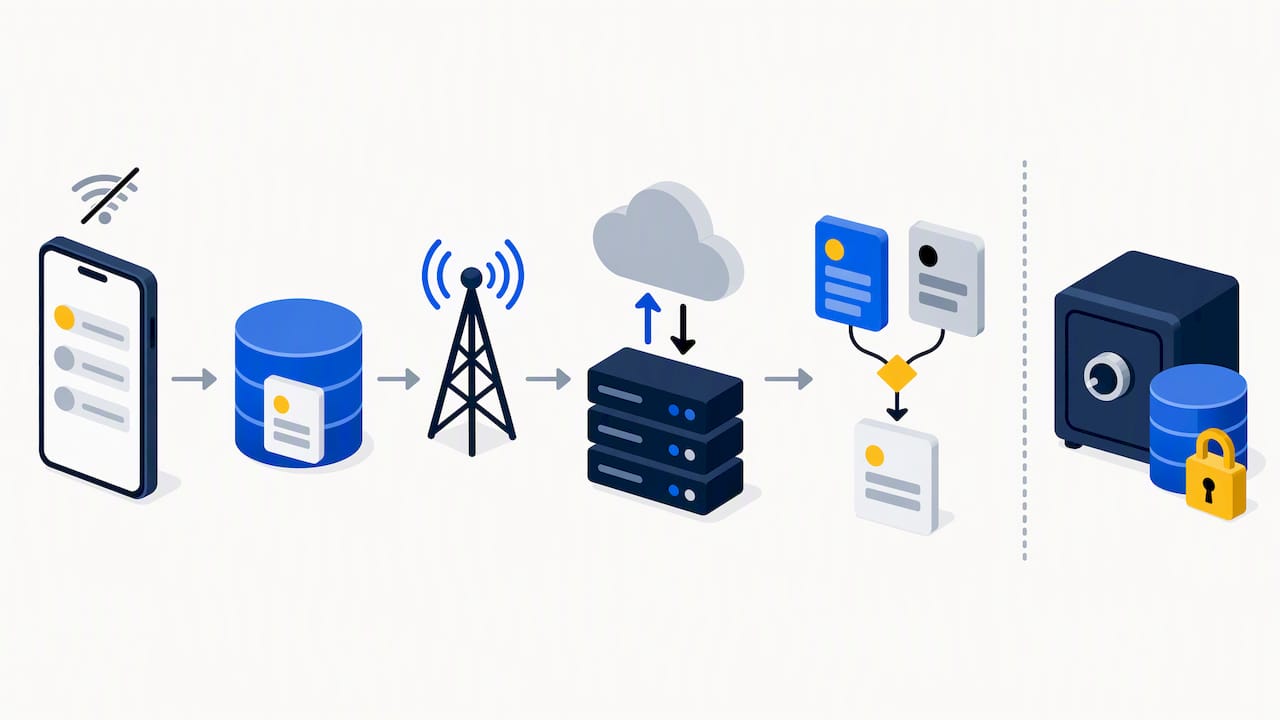
That same research highlights a method called ecological momentary recording, or EMA, which just means logging activity in the moment rather than trying to reconstruct your day later from memory. In-the-moment logging tends to produce more accurate time-use data than end-of-day guesses, which is part of why timers and quick-tap logging beat a nightly journal entry.
What you’ll actually notice as a user:
- Tasks and time entries save instantly, even with no connection, and sync in the background later.
- Streaks and session logs build from your logged activity, not estimates, so the numbers reflect real behavior.
- Analytics stay simple: totals, trends, and streaks rather than dense enterprise reports.
On privacy, personal logs and time entries typically stay private by default, while shared boards and comments are visible only to people added to that project. Exporting your own data is usually available even on a free tier.
Pro Tip: Log a task the moment you start it instead of waiting until you finish. The timestamp alone makes your time-use data far more accurate than a memory-based entry later.
How to Choose an APM App for This Stage of Life
Picking the right app matters more than picking the most feature-packed one. Start with the basics: a mobile-first interface that doesn’t feel like a desktop tool shrunk down, reliable offline capture, simple time tracking, calendar sync, and a free tier that actually lets you use the core features rather than teasing them.
A practical way to test one is to commit to two weeks on the free tier, apply it to one real project (a class, a club, or a part-time job), and check whether you actually logged time consistently. Before committing further, ask a few direct questions:
- Can I export my own data if I switch apps later?
- Is there a student discount, and what happens to my data if I don’t renew?
- How many teammates can I add before hitting a paid wall?
- Is the privacy policy clear about what’s shared versus private?
Watch for warning signs: if core features like calendar sync or basic collaboration sit behind an expensive tier, or the mobile app feels like an afterthought to a desktop product, that’s a sign to keep looking. Our own guide to building a student workflow that works walks through this kind of evaluation in more depth.
Pro Tip: Test any app on your worst week, not your best one. A tool that holds up during midterms or a deadline crunch is the one worth keeping.
Why We Built Optiostation Around This Exact Audience
We built the Optio app specifically for college students and young professionals, which is why the whole experience leans into a Roman theme: you’re the Centurion, and the app positions itself as your second-in-command rather than another corporate dashboard. That framing isn’t decoration, it shapes features like color-coded life aspects, hashtag-based search, and motivational content designed for someone juggling classes, a part-time job, and a group project at the same time.
Our resources go beyond the app itself:
- A practical starting guide, 1 Hour to Mobile First Practice Management for Students & Young Pros, walks through setup basics.
- A primer on what a productivity app actually does covers the category for readers who want more background.
- Students comparing free options can check our breakdown of free project management software for students.
Pick One App and Measure It for a Semester
The real lesson from the research isn’t which app wins on features, it’s that consistent use beats constant switching. Try one app for a full semester, measure your first two weeks as a baseline, and compare your task completion and time-tracking consistency against that starting point.
Build capture into moments you already have: right after a class ends, or during a short end-of-day review. Chasing new features every few weeks undoes the habit before it forms, and habit formation is what actually drives the time-management gains the research points to.
— Optiostation
Getting Started With Optio
We built Optio as a mobile app for students and young professionals, with a Roman-themed experience that treats you as the Centurion and the app as your second-in-command. Core task, time, and goal-tracking features are available free, with more advanced capabilities planned under a future paid tier.

If you want to see the full feature set and try Prioritization Station for yourself, our landing page is the place to start, along with guides for building your own system from day one.
FAQ
What does APM software do for students specifically?
It organizes tasks, tracks time spent studying or working, and lets you set goals you can actually monitor, all from a mobile app rather than a desktop tool. Many versions, including Optio, add calendar sync and team features so group projects stay on one shared timeline.
How is APM software different from general monitoring tools?
In this context, it’s a personal and team productivity app focused on your own tasks, time, and goals, not a system that watches app or network performance. The focus stays on what you need to get done and how you’re spending your time, not infrastructure monitoring.
Does using an app like this actually improve grades or time management?
A 2024 academic study found that students using structured app-based study methods increased time-management compliance by 14% to 64% and saw measurable grade improvements over a semester. Results vary by student and context, but the link between structured app use and follow-through shows up clearly in that research.
Is Optio free to use?
Optio offers its core task, time-tracking, and goal-setting features as part of its Prioritization Station offering, with no published price listed. Pricing details for any future premium tier are available by checking the app directly.
Do these apps work without an internet connection?
Yes, most reliable mobile productivity apps, including designs described in recent engineering research, are built offline-first so you can log a task or time entry with no signal.
Sources
- Study showing app-based methods improve student time-management compliance and grades (2024)
- Design and implementation of a college student time use research platform (2026)
