

A practical way to improve team efficiency is to cut unnecessary meetings, set two or three clear priorities, name one owner per task, and protect blocks of focused time. Shortening review and handoff cycles matters too: DORA research links faster code reviews to better delivery performance. A checklist and a 30/60/90 plan follow, along with how our app can support them.
TL;DR:
- Keep meetings only when they produce decisions or unblock several people; replace information sharing with written updates and pilot changes on one recurring meeting.
- For larger teams, fixed interval or time based coordination often outperforms ad hoc coordination; small teams may need only weekly planning and a short daily check in.
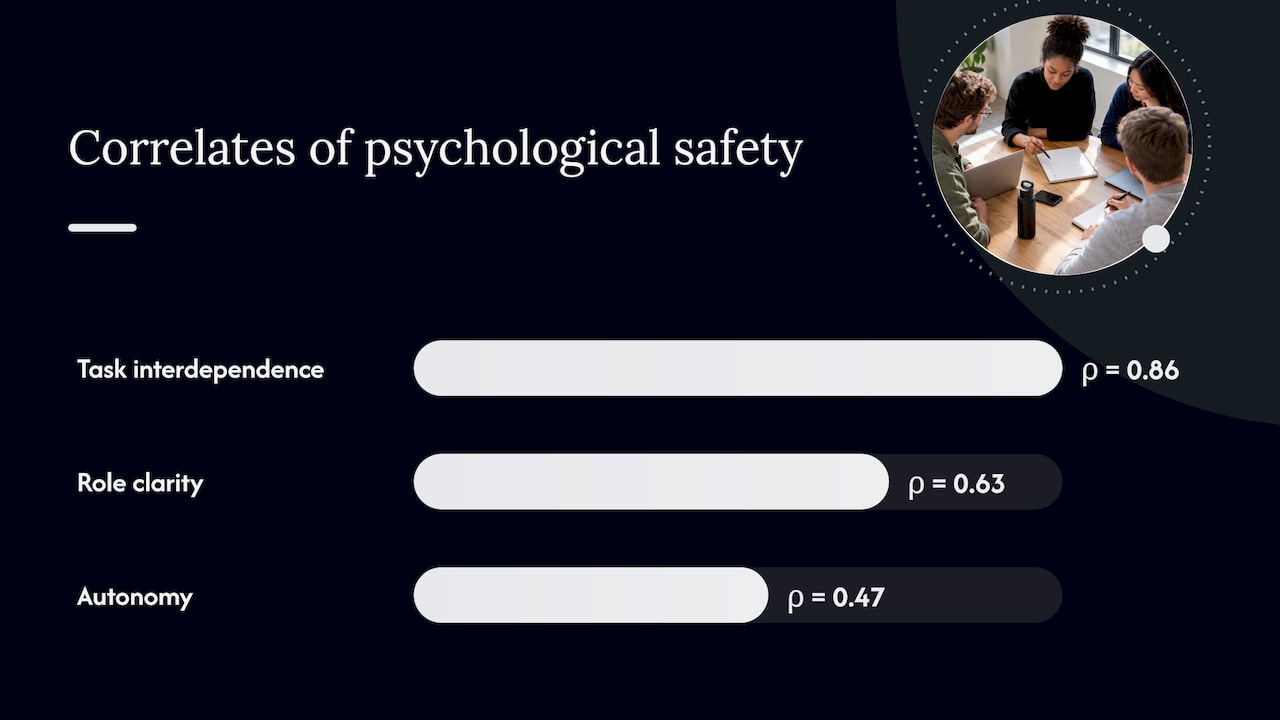
- A review found psychological safety correlated with task interdependence at rho 0.86, role clarity at 0.63, and autonomy at 0.47.
- Track cycle time, completion of planned work, review time, and blocked time as diagnostic signals, not individual performance targets that invite gaming.
Table of Contents
- Which moves raise team efficiency fastest?
- How do you decide which meetings to keep?
- How do you clarify roles and handoffs?
- How do you stop busywork and focus on what matters?
- How do you shorten review cycles and speed up handoffs?
- How do you reduce interruptions and coordinate better?
- How can managers build psychological safety?
- How do you choose tools without creating app sprawl?
- Which simple metrics show whether efficiency is improving?
- What does a staged plan look like?
- How do you fit Prioritization Station into your daily workflow?
- Optiostation’s view: small changes that scale
- Try Prioritization Station with your own 30/60/90 plan
- FAQ
- Sources
Which moves raise team efficiency fastest?
These are ordered roughly by how quickly they pay off. Each one has a rationale and a first step you can take today.
- Stop unnecessary meetings. Recurring meetings often outlive their purpose. Start by canceling a standing meeting for a trial period and see who notices.
- Time-box the meetings you keep. A clear time limit encourages decisions. Start by shortening your next meeting slightly.
- Use pre-reads. Reading together burns shared time. Start by sending the document in advance.
- Set two or three team priorities. Too many priorities means none. Start by asking each person to name their top item this week.
- Write a one-page team charter. It settles who decides what. Start with a shared doc and four headings: purpose, roles, norms, escalation.
- Define a handoff protocol. Work stalls between people, not inside them. Start by agreeing on what “ready to hand off” means for one workflow.
- Shorten review cycles. Waiting is the hidden cost. Start by setting a clear response window.
- Assign work by strengths. People finish faster at what they do well. Start by asking what each person wants more and less of.
- Protect focused work blocks. Interruptions fragment deep work. Start by blocking regular meeting-free periods.
- Pick a single source of truth. Scattered trackers create double entry. Start by choosing one place for all active tasks.
- Track a few simple metrics. What you never measure you cannot improve. Start with one number: how long work takes from start to finish.
None of these ask anyone to work longer. They remove friction, which is the faster route to efficiency.
How do you decide which meetings to keep?
Run every recurring meeting through four questions: Is there an agenda? Is a decision required? Do all attendees need to be there? Could a written update do the same job? If the answer to the second question is no, replace the meeting with an async update. If the answer to the third is no, trim the invite list.
Then apply a simple rule to what remains:
- Keep meetings that produce a decision or unblock several people at once.
- Shorten status meetings and see whether anything breaks.
- Replace pure information sharing with a written note or short recording.
- Cancel anything nobody can explain the purpose of.
Once you have a smaller set, a few rules make those meetings count. Give each meeting one owner who controls the agenda. Send pre-reads ahead so the meeting starts at discussion. Keep a parking lot for off-topic items so they do not derail the agenda. Log decisions in one shared place so nobody has to ask what was decided. Reserve meeting-free windows so people can do the work the meetings discuss.
Do not change everything at once. Pilot the new rules for a short period with a single recurring meeting, and ask the team what improved. People support changes they helped shape, and the pilot gives you evidence instead of opinion.
If your team is large, the way you schedule coordination matters as much as how often. Research in Management Science found that for larger teams, fixed-interval meeting rules or time-based safeguards often outperform letting individuals call coordination whenever they feel like it. Adding minimum and maximum durations to coordination cycles also reduced efficiency loss. For a small team, a weekly planning session and a short daily check-in may be all you need. For a bigger group, a predictable rhythm beats ad hoc pings. Our guide on improving teamwork and communication goes deeper on meeting norms for leaders.
How do you clarify roles and handoffs?
Most stalled work traces back to one of two problems: nobody knows who owns it, or nobody knows what “done” means for the person who receives it. Both are fixable with light documents, not heavy process.
Start with a concise team charter. It should fit on a single screen and cover why the team exists, who owns which area, how decisions get made, and when to escalate. Add a RACI-lite table for recurring work: one person is accountable, a few are consulted, and the rest are simply informed. Skip the “responsible” column if it creates arguments. The point is a single name next to each deliverable.
Role clarity is not just about speed. A meta-analytic review found that role clarity correlates strongly with psychological safety (rho = 0.63), so clear ownership also helps people feel safe speaking up.
Next, write a handoff protocol for the two or three workflows that cause the most delays. A good protocol covers:
- Deliverable: exactly what gets passed along and in what format.
- Acceptance criteria: what the receiver checks before calling it complete.
- Response time: how quickly the receiver will pick it up or push back.
- Questions channel: where unresolved questions go, so they do not stall in private messages.
Finally, map work and dependencies before you begin. At the start of a project, list who needs what from whom and by when. This prevents the rework that happens when two people build the same thing or one person waits on something nobody started. A simple sequence of boxes on a whiteboard is enough. For a deeper look at group dynamics, see our explainer on team collaboration for groups.
How do you stop busywork and focus on what matters?
Prioritization works when it is visible, short, and revisited weekly. A few frameworks do most of the work:
- 80/20 focus: identify the small share of tasks that drive most of the results, and protect time for those first.
- Eisenhower matrix: sort tasks by urgent and important. Do the urgent and important, schedule the important but not urgent, delegate the urgent but not important, and drop the rest.
- Goal linking: write each team goal or key result at the top of your board, and attach every task to one. A task that links to nothing is a candidate for deletion.
- Weekly priority board: list two or three team priorities where everyone can see them, and review them every Monday.
A prioritization session does not need to be long. A short session works: list everything in flight, mark what ties to a goal, pick the top priorities, and park the rest. Keep the board visible, not buried in a folder, and reopen it weekly so the priorities do not drift.
To cut low-value work, run each questionable task through four options: delete it, defer it to a later date, delegate it to someone better placed, or diminish it by doing a lighter version. Most busywork survives because nobody asked whether it should.
Our guide to managing team tasks effectively walks through setting this up for a group.
How do you shorten review cycles and speed up handoffs?
Waiting can be a significant hidden cost in workflows. Work sits in a queue for approval, feedback, or a missing answer, and nobody sees it because nobody is technically busy. Shortening that wait is a way to improve flow.
The principle has research behind it. DORA findings link shorter code review times with better software delivery performance than slower review processes. Code review is a software example, but the lesson carries over: quick feedback and fast knowledge sharing keep work moving, whatever your field. Treat it as a principle to emulate, not a promise of identical results in your context.
Practical ways to get there:
- Micro-reviews: review small pieces often instead of one large batch at the end. Small reviews are faster to give and easier to act on.
- Acceptance checklists: give the reviewer a short list of what “good” looks like so they do not have to guess.
- Automate repetitive approvals: if the same sign-off happens the same way every time, a rule or template can handle it.
- Shared definition of done: agree on what finished means so work does not bounce back for missing basics.
- Response windows: commit to an agreed response window, and flag exceptions early.
Treat each change as a small experiment. Pick one workflow, record how long items wait between steps for a short period, change one thing, and measure again. If the wait drops, keep the change and move to the next bottleneck. If it does not, you have learned something cheaply.
How do you reduce interruptions and coordinate better?
Constant pings break concentration, and interruptions can also require time to regain focus. The fix is not to ban communication but to give it a predictable shape.
Start with the calendar. Block focused work time and treat it like a meeting that cannot be moved without a reason. Set meeting-free windows, such as regular periods, and agree on async norms: updates go in a shared channel or document, and nobody expects an instant reply unless something is urgent.
Coordination timing matters more as teams grow. The scheduling research in Management Science points to trade-offs between how often a team coordinates and how productive it is. For larger teams, fixed-interval rules or time-based safeguards often beat worker-driven coordination, and the best rule depends on team size and how varied the work is. A small team can sync informally. A larger team may benefit from a predictable rhythm.
Coordination timing has a measurable effect: research on team scheduling found that fixed-interval or time-based rules often outperform worker-driven coordination in larger teams, with minimum and maximum cycle durations further reducing efficiency loss. If your team has grown, revisit how and when it syncs.
Set clear escalation rules so urgent interruptions have a path and everything else waits:
- Define “urgent”: a short list, such as outages, deadlines within hours, or safety issues.
- Name the channel: one place for urgent flags, separate from everyday chat.
- Batch the rest: check messages at set times instead of continuously.
- Silence notifications during focus blocks, with the urgent channel as the only exception.
Leaders can also reduce interruptions by answering questions in writing in a shared place, so the same question does not come up five times. Our article on coordinating remote team workflows covers how this applies to hybrid and remote groups. For leadership development resources, RELA’s curriculum offers cohort-based leadership training materials worth a look.
How can managers build psychological safety?
Psychological safety means people feel able to speak up, admit mistakes, and ask questions without fear of embarrassment. Teams with it learn faster and fix problems earlier, which directly supports efficiency.
It is also tied to structure, not just personality. A meta-analysis of team research found strong correlations between psychological safety and role clarity (rho = 0.63), autonomy (rho = 0.47), and task interdependence (rho = 0.86). The practical reading: clear roles and real ownership make it safer to speak up.
Structure and safety move together: a 2017 meta-analytic review reports that psychological safety correlates with task interdependence at rho = 0.86, with role clarity at 0.63 and autonomy at 0.47.
What managers can do:
- Run frequent, focused 1:1s. A randomized trial across more than 1,000 teams found that manager-focused interventions that increased frequent 1:1 meetings raised team psychological safety, especially when conversations were individualized to each person.
- Individuate. Use 1:1s to learn what matters to each person. INSEAD researchers found this works better than generic team-building events.
- Remove blockers. Ask what is slowing them down, then act on it.
- Coach, do not just direct. Ask questions that help people solve problems themselves.
- Hold short debriefs. After a project or incident, spend a short time discussing what worked and what to change.
To check progress without heavy surveys, run quick diagnostics regularly. McKinsey and MIT recommend regular team diagnostics to surface the gap between the behaviors you want, such as trust and open communication, and what actually happens. A short pulse check, repeated on a schedule, can help to show whether things are moving.
How do you choose tools without creating app sprawl?
A tool should remove friction. If people spend more time updating it than doing the work, it is working against you. Pick tools with a few principles in mind:
- One source of truth: all active tasks live in one place, and everything else links to it.
- Few integrations: each connection is another thing that can break or confuse.
- Clear naming and tagging: agree on how to label projects and tasks so search works for everyone.
- Calendar sync: tasks with dates should appear where people already plan their day.
Pilot before you commit. Choose one workflow, such as weekly planning, and run it in the new tool for a few weeks. Track whether people actually use it, how long it takes to update, and whether the team can find things faster. Write a one-page how-to so new members can start without a meeting.
Watch for tool bloat. It shows up as the same task living in a chat thread, a spreadsheet, and a board at once. To consolidate, list every place work is tracked, choose the one that fits best, migrate active items, and archive the others with a note pointing to the new home. Our overview of collaboration tools explains what to look for when choosing.
Which simple metrics show whether efficiency is improving?
Metrics should guide decisions, not create paperwork. Four are enough for most teams:
- Cycle or lead time: how long work takes from start to finish.
- Percent of planned work completed: how much of the week’s plan actually shipped.
- Average review time: how long work waits for feedback.
- Percent of time blocked: how much of the week people spend waiting on something.
Gather them cheaply. A weekly check-in can capture the first two. A short pulse survey, even two questions long, can estimate blocked time. A simple shared sheet or dashboard works fine; you do not need a data team.
Beware of gaming. If a number becomes a target, people will optimize the number instead of the work. Use metrics as signals that suggest where to run an experiment, not as scores to judge individuals. If review time creeps up, ask why and try a fix. If completion rates drop, check whether the team took on too much.
What does a staged plan look like?
A plan keeps good intentions from fading. Start small, measure, and build from what works.
- Days 0–14: diagnose and pilot. Note where work stalls and how long meetings take. Pick one pilot change, such as a meeting rule or a visible priority board. Record baseline numbers for cycle time and review time.
- Next phase: adopt the basics. Roll out protected focus time, updated meeting rules, and a one-page role charter. Compare your numbers to the baseline and share early wins with the team.
- Iteration phase: review and refine. Look at the metrics, keep what helped, and drop what did not. Run one new experiment on handoffs or review speed.
- Scaling phase: scale and document. Spread the most effective rituals to the whole team and write them down as team norms so they survive turnover.
Define success before you start: for example, shorter average review time, fewer recurring meetings, or more planned work completed. When you report results, show the before and after, say what you tried, and name what you will test next. Honest reporting, including what did not work, builds trust.
How do you fit Prioritization Station into your daily workflow?
Prioritization Station is our mobile app for task, team, and time management, and it maps neatly onto the rituals above. Here is a simple way to use it day to day.
Start the week with a priority session. Add your two or three team priorities as top-level items and attach tasks to them. Use color-coding to separate areas of life or project streams, so work and study do not blur together.
Use smart reminders for handoffs and review windows. If you promised a reply within an agreed response window, set a reminder. The same goes for recurring check-ins, so rituals do not depend on someone remembering.
Sync with Google Calendar. Tasks with dates then appear next to your meetings, which makes it easier to see where focus blocks fit and where the week is overbooked.
Track time to spot blockers. Logging how long tasks actually take helps you estimate better and shows where work gets stuck.
Search by hashtag. Tag tasks by project, owner, or theme, then pull up everything related in seconds. It supports the single-source-of-truth principle without extra folders.
Close the day briefly. Check what moved, what is blocked, and what is first tomorrow. Small habits like this make the 30/60/90 plan stick.
Optiostation’s view: small changes that scale
We build for students and young professionals, so we care most about changes that cost almost nothing to try. Our bias is toward simplicity: one list, one owner per task, one short ritual at a time. Big overhauls may be difficult to sustain, while small ones compound.
Picture a small study group working on a capstone project. They reduce their meetings, replace some with a shared checklist, and agree to answer each other’s questions promptly. Nothing fancy, yet they stop losing hours to repeated catch-ups.
Pick one change from this guide, run it for a short period, and write down what happened. Keep it if it helps, drop it if it does not, and choose the next one.
— Optiostation
Try Prioritization Station with your own 30/60/90 plan
If you want a light way to run the plan above, Prioritization Station gives you one place to keep priorities, tasks, and time visible. You can pilot it on the free tier with very little setup.
- Task, time, and team management in one app, so your single source of truth stays in one place.
- Calendar integration and smart reminders that support protected focus blocks and response windows.
- Color-coded areas and hashtag search to keep priorities visible and findable.
Open the app, add your top three priorities for this week, and share the list with your team today.
FAQ
How can team efficiency be improved quickly?
Cut meetings that lack a decision or purpose, set two or three priorities, and give every task one owner. Then protect blocks of focused time. These steps remove waiting and confusion, which is where most lost time hides.
How can a team become more effective?
Combine clear roles with a team culture where people can speak up. A randomized trial found that frequent, individualized 1:1s from managers raised psychological safety, which supports learning and problem-solving. Add short debriefs after projects so lessons are not lost.
How would you increase the efficiency of a development team?
Shorten code review and handoff times first. DORA research links shorter review times to better delivery performance. Also agree on a shared definition of done and automate repetitive approvals.
How do you measure team efficiency without adding bureaucracy?
Track a few signals: how long work takes, how much planned work finishes, how long reviews wait, and how often people are blocked. Gather them with a weekly check-in or a short pulse survey, and treat them as prompts for experiments, not targets.
Sources
- Digitalcommons
- Codeclimate
- 20221107_Fostering Psychological Safety in Teams_manuscript
- Too Many Meetings? Scheduling Rules for Team Coordination | Management Science
- Go, teams: When teams get healthier, the whole organization benefits
