

TL;DR:
- Time blocking involves scheduling specific, measurable tasks to improve focus and reduce task-switching stress. Building in anchors, study blocks, and buffers helps create a flexible, sustainable weekly routine. Rescheduling missed blocks instead of deleting them maintains commitments and enhances long-term productivity.
You know the feeling. It’s 11 PM, your to-do list is longer than it was at 8 AM, and you can’t quite explain where the day went. For college students and young professionals, this is less of an occasional bad day and more of a default setting. Mastering time blocking how to is one of the most direct solutions to this problem. Not a vague resolution to “be more productive,” but a concrete, repeatable system that tells every hour where to go before it disappears. This guide walks you through exactly how to prepare, execute, and fine-tune a schedule that actually holds.
Table of Contents
- Understanding time blocking and why it works
- Preparing your schedule: anchors, study blocks, and buffers
- Executing your time blocks: specificity, incremental start, and re-scheduling
- Verifying and adjusting your time blocking for lasting success
- A fresh perspective: why starting small and flexible beats rigid overplanning
- How Optio Station helps you master time blocking and task management
- Frequently asked questions
Key Takeaways
| Point | Details |
|---|---|
| Specific time blocks | Assign clear, specific tasks to each time block to maximize focus and productivity. |
| Anchor your schedule | Set fixed commitments like classes and meals first, then fit study blocks and buffers around them. |
| Start small | Begin with about three time blocks daily to build habits and avoid overwhelm. |
| Reschedule blocks | Never delete time blocks; always move them to prevent missing important work. |
| Use buffers | Leave 15-20% of your day unblocked to handle surprises and maintain flexibility. |
Understanding time blocking and why it works
Before you block a single minute, you need to know what separates time blocking from a standard to-do list or a rough calendar. Most people schedule events, not work. They write “study” from 2 to 4 PM and then spend that time deciding what to study. Time blocking fixes this at the source.
Time blocking means making appointments with yourself to do specific work, not vague categories. Instead of “study,” you write “rewrite paragraphs 3 through 6 of the market analysis paper.” That distinction is not cosmetic. It changes how your brain engages with the task before you even sit down.
Here is why it works psychologically. The average person switches tasks every 47 seconds, and every context switch costs mental energy, increases error rates, and raises stress hormones. When your calendar tells your brain exactly what to focus on, that cognitive tug-of-war disappears. You are not deciding what to do. You already decided. Now you just execute.
The time blocking basics for students concept is grounded in a few core principles that make it distinctly different from loose scheduling:
- Specificity beats intention. “Email Professor Chen to confirm office hours” is a block. “Admin stuff” is a wish.
- One task per block. Multitasking is not a productivity style; it is a myth. Parallel processing works for machines, not human cognition.
- Duration is a commitment. When you assign 45 minutes to a task, you are also committing to not checking your phone, not pivoting to something easier, and not letting the block bleed into the next one.
- Naming creates accountability. A vague block is easy to abandon. A named block with a clear deliverable is a broken promise if you skip it.
“The goal of time blocking is not to fill every hour. It is to make sure your most important work gets a protected place in your day before everything else crowds it out.”
Good academic time management for students and working professionals alike comes down to this: your calendar should reflect your priorities, not just your appointments. Time blocking is the method that bridges the gap between the two.
Now that you understand what time blocking is and why it works, let’s prepare to create your personalized schedule.
Preparing your schedule: anchors, study blocks, and buffers
The biggest mistake people make when starting the time blocking method is opening a blank calendar and trying to fill it perfectly. That approach guarantees overwhelm. Instead, build your schedule in layers, starting with what is already fixed.
Step 1: Place your anchors first.
Anchors are non-negotiable commitments. They are the immovable objects around which everything else is arranged. Your time blocking schedule preparation should begin here before you touch a single study block.
- Mark all class times, lab hours, and lectures.
- Block out commute time, including the buffer before and after travel.
- Schedule meals. Seriously. Eaten-at-desk lunches are not real breaks and they do not count as free time.
- Protect sleep. The recommended 7 to 9 hours of sleep should be non-negotiable anchors, not aspirational goals.
Step 2: Calculate your study block hours.
Here is a ratio that most students ignore and then regret. One hour of study outside of class for every hour spent in class per week. If you are carrying 15 credit hours, you need 15 hours of scheduled study time blocked into your week. Not crammed the night before exams. Distributed across the week, in specific blocks.
Step 3: Add 1 to 2 study blocks per day, not 6.
This is where the study schedule organization separates beginners from people who actually stick with the system. Start light. Two focused, named study blocks per day is enough to begin.
Step 4: Build in buffer time.
Buffers are 15 to 20 percent of your day left intentionally unblocked. On an eight-hour day, that is roughly 90 to 100 minutes of unassigned time. These are not wasted minutes. They are shock absorbers.
Pro Tip: Schedule one buffer block mid-morning and one in the late afternoon. This way, when a meeting runs long or a task takes twice as expected, you absorb the hit without destroying the rest of your day.
Here is a sample daily structure to visualize this:
| Time slot | Block type | Example task |
|---|---|---|
| 7:00 to 8:00 AM | Anchor | Morning routine and breakfast |
| 8:00 to 9:30 AM | Study block 1 | Read chapters 4 and 5 for economics |
| 9:30 to 10:00 AM | Buffer | Absorb overruns, check messages |
| 10:00 AM to 12:00 PM | Anchor | Class: Introduction to Finance |
| 12:00 to 1:00 PM | Anchor | Lunch (away from the desk) |
| 1:00 to 2:30 PM | Study block 2 | Draft outline for sociology essay |
| 2:30 to 3:00 PM | Admin block | Reply to emails, review tomorrow’s blocks |
| 3:00 to 5:00 PM | Anchor | Part-time work or internship |
| 5:00 to 5:30 PM | Buffer | Transition, unexpected tasks |
| 5:30 to 10:30 PM | Anchor | Dinner, personal time, wind-down |
| 10:30 PM to 7:00 AM | Anchor | Sleep |
With your schedule prepared and anchors set, it’s time to learn how to execute your time blocks effectively.
Executing your time blocks: specificity, incremental start, and re-scheduling
Having a beautiful schedule in a planner means nothing if you cannot execute it when Monday rolls around. Execution comes down to three habits that, once built, become second nature.

Name every block with a deliverable.
“Work on project” is not a block. “Write the data analysis section of the group project (approx. 400 words)” is a block. When the task has a clear, measurable endpoint, you know when you are done. You know when you have succeeded. Vague blocks let you feel busy without actually finishing anything.
Specific time blocking goals also help you estimate better over time. If you know the data analysis section took 75 minutes instead of the 60 you blocked, you update your estimate for the next similar task. Your schedule gets smarter as you use it.
Start with three blocks per day.
This is the rule that separates people who sustain time blocking from those who quit after two weeks. Start with just 3 blocks per day for the first few weeks. Not ten. Not every waking hour. Three.
Why? Because the goal at the beginning is not maximum productivity. It is building the habit of honoring your blocks. Three is manageable. Three creates wins. Wins create momentum.
Never delete a missed block. Move it.
This is the most underrated rule in the time blocking method. Life interrupts. Blocks get broken. The default response is to accept the loss and move on. That is the wrong move. Never delete a time block; always reschedule it to another slot in your week. This keeps the commitment alive. It signals to your brain that these tasks are real obligations, not suggestions.
Here is what good execution looks like in practice:
- Use timeboxing alongside time blocking for tasks that tend to expand. Set a hard stop, and when the timer hits, move on.
- Keep a short admin block (15 to 20 minutes) at the end of each day to review and reschedule anything that slipped.
- Batch similar tasks together. All your email replies in one block. All reading in another. Context switching between task types is just as draining as switching between tasks.
- Do not schedule anything outside your energy patterns. If you crash at 3 PM, that is not the slot for your hardest cognitive work.
Pro Tip: Write tomorrow’s blocks the night before, not the morning of. Morning willpower is real, but it should go toward execution, not planning. Spend five minutes before bed placing your next day’s blocks.
Now that you know how to execute your time blocking plan, let’s explore how to verify and adjust it for sustained success.
Verifying and adjusting your time blocking for lasting success
Most productivity systems die because people treat the initial setup as the final version. Time blocking is not a static document. It is a living schedule that improves every single week if you build in a simple review habit.
How to verify your blocks are working:
- After each completed block, note the actual time spent. Not the planned time. How long tasks actually took versus your estimate is the most useful data point you can collect. Over two weeks, patterns emerge. You consistently underestimate writing tasks. Reading takes twice as long as you think. This calibration makes your future schedule far more realistic.
- At the end of each week, review which blocks were completed, moved, or abandoned. Completed blocks build confidence. Moved blocks are fine. Abandoned blocks are a signal: the task is either wrongly estimated, wrongly placed, or the wrong priority entirely.
- Adjust buffer sizes based on your weekly overruns. If you are consistently burning through your buffers by midday, your morning blocks are too tight. Absorb schedule overruns with buffers rather than sacrificing meals or sleep.
- Reschedule any broken blocks during your end-of-day admin block, not the following morning when fresh decisions compete with fresh tasks.
- Update the names of your blocks as projects evolve. A block labeled “work on thesis” becomes “revise introduction based on advisor feedback.” Your calendar should always reflect where the work actually is.
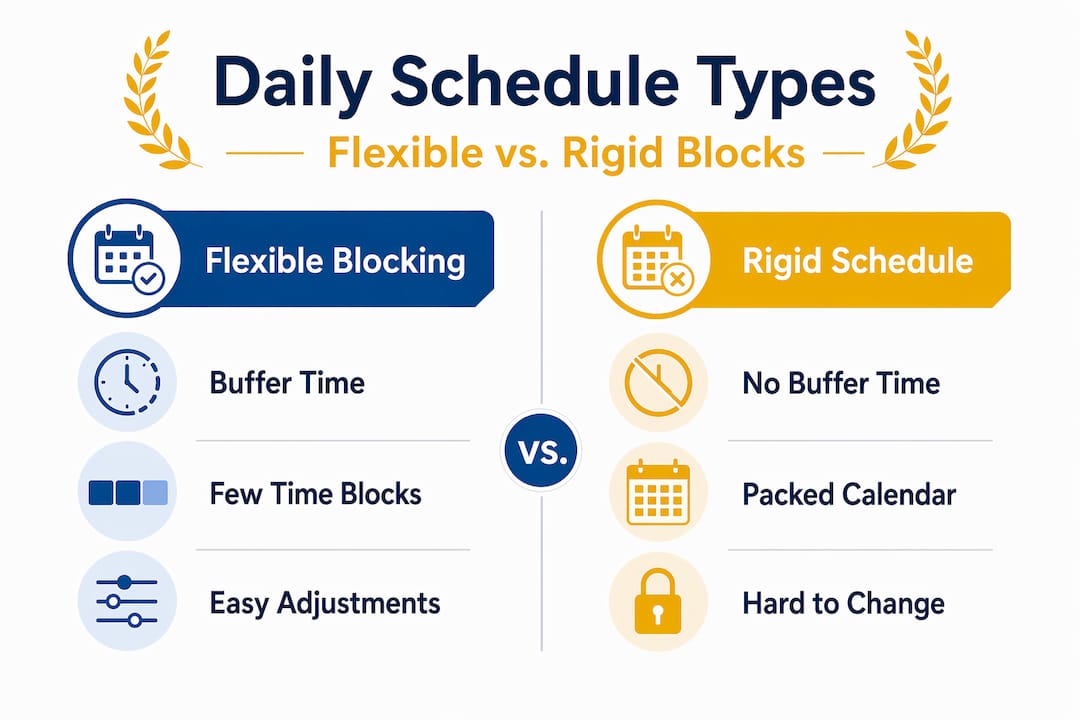
Here is how a flexible schedule compares to a rigid, overpacked one:
| Feature | Flexible time blocking | Rigid overscheduled day |
|---|---|---|
| Buffer time | 15 to 20% of day | None |
| Response to interruptions | Absorb into buffer | Entire day collapses |
| Missed block policy | Reschedule same week | Deleted or ignored |
| Daily block count | 3 to 5 named blocks | 8 to 10 packed blocks |
| Burnout risk | Low | High within weeks |
| Long-term adherence | Sustainable | Rare |
With ongoing time management refining tips and flexible adjustments, your time blocking routine can be a sustainable productivity system.
A fresh perspective: why starting small and flexible beats rigid overplanning
Here is what no one tells you when they hand you a time blocking template: most people fail not because they lack discipline, but because they over-engineer the starting point. They block every hour from 6 AM to 11 PM, feel great on Sunday night, and fall apart by Tuesday afternoon.
The instinct to fill the calendar completely makes sense. If time blocking is good, more blocking must be better, right? Wrong. Overscheduling without buffers kills flexibility and creates a system that punishes you for being human. One unexpected event, and the whole day reads as a failure.
The students and young professionals who actually stick with time blocking long-term are not the ones with the most color-coded calendars. They are the ones who start with three honest blocks, protect their buffers like they protect their sleep, and re-block without guilt when life interferes. That mindset shift, from perfectionism to pragmatism, is what turns a productivity technique into a durable habit.
Think of your schedule the way you would think of a budget. A budget that allows zero discretionary spending is accurate but unlivable. A budget with a “personal” category for unexpected expenses? That one survives contact with real life. Effective time blocking strategies work exactly the same way. Build in the slack, and the system holds.
The biggest outcome of starting small is not just completing more tasks. It is arriving at the end of the week feeling like the schedule worked with you instead of against you. That feeling is what makes you open the calendar again next Sunday.
How Optio Station helps you master time blocking and task management
Time blocking works best when the tool you use makes it frictionless to plan, adjust, and stay consistent. Optio Station is built for exactly this: a task and time management app designed for students and young professionals who need their schedule to be both structured and adaptable.

With Optio Station, you can set up named time blocks alongside your fixed anchors, so your calendar shows you the full picture at a glance. Drag-and-drop rescheduling means a missed block takes seconds to move rather than abandon. Integrated task management features let you attach specific deliverables to each block so you always know what “done” looks like. Built-in buffer alerts warn you when your day is getting too packed before it becomes a problem. Check the best task management software guide to see how Optio Station compares, or jump straight into building your first time-blocked schedule with core time management skills to back you up.
Frequently asked questions
What is time blocking and how does it improve productivity?
Time blocking is the practice of scheduling specific tasks at designated times on your calendar, which reduces multitasking and sharpens focus. By making appointments with yourself for specific work, you remove the constant decision of what to do next and simply execute.
How many time blocks should I start with?
Start with 3 blocks per day for the first few weeks to build the habit without feeling overwhelmed, then gradually increase as the routine becomes natural.
What should I do if I miss or can’t complete a time block?
Reschedule it to another slot in your week rather than deleting it. Never delete a block because rescheduling keeps the commitment alive and prevents important tasks from quietly disappearing.
How much study time should I block if I’m a college student?
Reserve 1 hour of study outside of class for every hour you spend in class each week, distributed across multiple days rather than crammed into one session.
Why is leaving buffer time important in time blocking?
Buffers act as shock absorbers for unexpected tasks or overruns. Leaving 15 to 20 percent of your day unblocked keeps the system flexible enough to survive real life without the whole schedule collapsing.
Recommended
- Time Blocking Time Management for Students and Pros – Optio Station: Best Project Management App for Prioritization
- 7 Time Management Goals for Employees Examples to Boost Productivity – Optio Station: Best Project Management App for Prioritization
- 7 Best Time Management Goals Examples for Centurions – Optio Station: Best Project Management App for Prioritization
- Time Management Time Blocking for Focused Productivity – Optio Station: Best Project Management App for Prioritization
