

A sick time tracker is a simple record of every day you or your team are out sick: the date, the reason category, how long, and how much sick time is left. It can be a spreadsheet, a leave management tool, or a calendar and task app you already use. The best one is the one you will actually update on the day you are sick. This guide shows what to log, how to set up a basic tracker in under an hour, and when it is worth moving beyond a spreadsheet.
TL;DR
- A sick time tracker records absence dates, type, length and remaining balance, so nobody has to rebuild the story from memory later.
- Log every absence the same day. Record the facts only, and keep medical details out of the shared sheet.
- A two-tab spreadsheet (a balance sheet and a log sheet) is enough for a small team or for personal use.
- Switch to a digital tool when reminders, calendar sync or several people editing make the spreadsheet fragile.
- Your employer or school sets the rules. Follow their policy first, then fit your tracker around it.
Table of Contents
- What a sick time tracker is, and who needs one
- What to record every time you take sick time
- How to set up a simple sick time tracker
- Separate short absences from long ones
- Rules vary by employer, school and country
- Spreadsheet or app: when to switch
- Keeping sick records private
- Our perspective: treat sick days as part of the plan
- Plan around your sick days with Optio
- FAQ
- Sources
What a sick time tracker is, and who needs one
At the larger end, a leave management system is an automated tool that HR teams use to track and manage paid-leave requests, including sick days and medical leave, and employees can submit their requests through it. That is the software version of the idea.
At the smaller end, the same idea fits in a personal notebook. Three kinds of people use a sick time tracker:
- Employees and interns who want their own record of days taken, so they can check their balance and back up their dates if a question comes up.
- Managers and team leads who need to see who is out and spot coverage gaps before a deadline.
- Students and part-time workers juggling classes, shifts and projects, who need to know which commitments to reschedule when they get sick.
The common thread is that the tracker answers three questions quickly: how many sick days have I used, how many are left, and what did I miss while I was out?
What to record every time you take sick time
The cleanest trackers capture the same few fields each time. Policies differ, but the published examples overlap a lot.
A UK health service absence policy asks the person reporting an absence to give the reason, the expected length if known, whether they will see a doctor, when they will next update their manager, and any urgent outstanding work. That is a good checklist for the conversation, even if you only log part of it.
A US insurer’s form for intermittent absences asks for the leave number, date of absence, type of absence, hours scheduled and hours of leave taken. Those fields translate well into spreadsheet columns.
Here is a practical set of columns that covers both:
| Column | Example | Why it helps |
|---|---|---|
| Date | Oct 14 | Anchors the entry to a specific day |
| Hours scheduled | 8 | Lets you log partial days correctly |
| Hours of sick time used | 4 | Drives your running balance |
| Category | Illness, medical appointment, caring for family | Separates one-off from repeated absences |
| Documentation | Doctor’s note on file: yes or no | Shows what paperwork exists, without storing details |
| Handover | Covered by Sam, report due Friday | Records what needed attention |
| Running balance | 36 hours left | The number people ask for most |
When a doctor’s note comes into play
Documentation thresholds vary. Georgia Tech’s policy, for example, requires a physician’s statement when sick leave runs past five consecutive work days. The statement covers the onset date, the expected return date, and any restrictions on daily work. If your employer has a threshold like this, add a “note needed after” cell to your tracker so the fifth day does not catch you off guard.
How to set up a simple sick time tracker
You do not need special software to start. A two-tab spreadsheet does the job, and the structure is the same one used in published absence-tracker manuals: one sheet with names and allowed sick days, and a log sheet with dropdowns for names and leave reasons, days taken and dates, which updates used and remaining totals automatically.
Step by step
- Create the balance tab. List each person (or just yourself) in column A, the annual sick allowance in column B, then leave columns for used and remaining.
- Create the log tab. Add the columns from the table above. Use dropdown lists for name and category so spelling never splits your totals.
- Connect the two. On the balance tab, use a SUMIF formula to add up hours from the log for each person. Remaining equals allowance minus used.
- Set the unit. Pick hours or days and stick with it. Hours are more accurate if anyone ever takes half days.
- Add a flag column. A simple formula can highlight any entry past your documentation threshold.
- Freeze the header row and protect formulas. One accidental overwrite of a total can undo weeks of trust.
- Back it up. Keep a dated copy at the end of each month.
For a team, appoint one owner of the sheet. Shared editing without an owner is how totals drift.
Keep the record open until the person is back
If you manage others, one habit from the same UK policy is worth borrowing: leave the sickness absence record open, with no end date, until the employee returns. In a spreadsheet, that means entering the start date right away and leaving the return date blank. A blank cell is an honest answer to “how long?” when nobody knows yet.
Log the same day
Enter each absence the day it happens. It takes thirty seconds, and it stops the guessing game three weeks later about whether it was the 9th or the 10th. If you are the one who is sick, send a two-line message to your manager with the date and expected length, and paste the same facts into your log when you are able.
Separate short absences from long ones
Recording the reason category pays off later. Acas, the UK’s workplace advice body, notes that separating absence reasons helps you spot patterns and decide what to do, for example treating one long absence differently from repeated short ones.
In practice, that means two simple views in your tracker:
- A single long absence: one row, a start date, a return date, and a documentation check.
- Repeated short absences: several rows across months. Filter by person and category to see whether there is a pattern, such as the same weekday or the same stretch of the semester.
A pattern is a reason to have a supportive conversation, not to accuse anyone. Many repeated short absences trace back to workload, a recurring health issue, or a schedule that does not work.
If you need a walkthrough of the whole process from first call to return-to-work, this step-by-step short-term absence management guide lays out the stages managers usually go through and the supporting records to keep.
Rules vary by employer, school and country
A tracker is only useful if it matches the rules you actually work under. Two US university examples show how different the requirements can be:
- At Columbia University, employees in New York City add each unpaid safe and sick leave instance to a cumulative Excel log and send it to a supervisor for approval each time.
- At Georgia Tech, employees report whether sick leave was used on timesheets or departmental forms, and faculty report monthly.
Same concept, two different workflows. Before you build anything, find your handbook, HR portal or syllabus policy and answer four questions:
- How is sick time earned, and is it counted in hours or days?
- Who must be told, how, and by when?
- At what point is documentation required?
- Does the official record live in a system you must use, or can you keep a parallel one?
Your personal tracker should never replace the official record. Think of it as your backup, and keep it consistent with what you report. Since law and policy differ by country, state and employer, ask HR or your supervisor if anything is unclear, and for legal protections or medical leave questions, speak with HR or an employment attorney in your jurisdiction.
Spreadsheet or app: when to switch
A spreadsheet is a fine starting point. It is free, flexible and easy to audit. It starts to strain when:
- Several people need to edit at once. Version conflicts and broken formulas appear fast.
- You forget to update it. A spreadsheet will not nudge you. An app with reminders can.
- Absence collides with deadlines. You want sick days visible next to tasks and calendar events, not in a separate file.
- You track more than sick time. Vacation, appointments, project hours and sick days all start to blur.
For teams, a dedicated leave tool earns its keep when approvals, balances and calendar views all need to stay in sync. For individuals, students and young professionals, a lighter option often works better: a task and time app where a sick day is simply a tagged, color-coded entry on your calendar, with your deadlines rescheduled around it.
If you are comparing options, our guides on time-off tracking software, paid time off trackers and vacation trackers for teams go deeper on features to look for.
Keeping sick records private
Sick records are sensitive. A few habits keep them safe without extra tools:
- Log facts, not diagnoses. “Sick, 8 hours” is enough for a tracker. A diagnosis belongs in medical paperwork, if anywhere.
- Limit who can open the file. On a team sheet, give view access only to people who need it, such as the manager and HR.
- Store notes separately. Keep doctor’s notes in the place your employer designates, and record only “on file” in your tracker.
- Do not paste records into group chats. Share balances, not reasons.
- Review access when roles change. People move teams, and old permissions linger.
For your own personal tracker, a password-protected file or a locked notes app is plenty. If you manage others, follow your organization’s data and privacy policy, and ask HR what must be kept and for how long.
Our perspective: treat sick days as part of the plan
Most sick time trackers are built for HR departments. Most of our users are not HR departments. They are students running on three group projects and a part-time job, or young professionals on their first team. For them, the hard part of a sick day is rarely the log. It is the cascade: the missed deadline, the awkward message to teammates, the reshuffled week.
So we think about sick time as scheduling information. A good record answers “how many days have I used?” A good plan answers “what moves because I am out, and who needs to know?” The two belong together. When you log a sick day, you should be able to see right away which tasks slip, which commitments can be handed off, and what can wait.
That is why we built Optio around simple, flexible structure: tasks and projects, color-coded areas of life, smart reminders and Google Calendar integration, so one view holds the work and the interruptions to it. We are indie-built and we shape the app with feedback from our community, so if you use it for tracking time away, tell us what you would want it to do better.
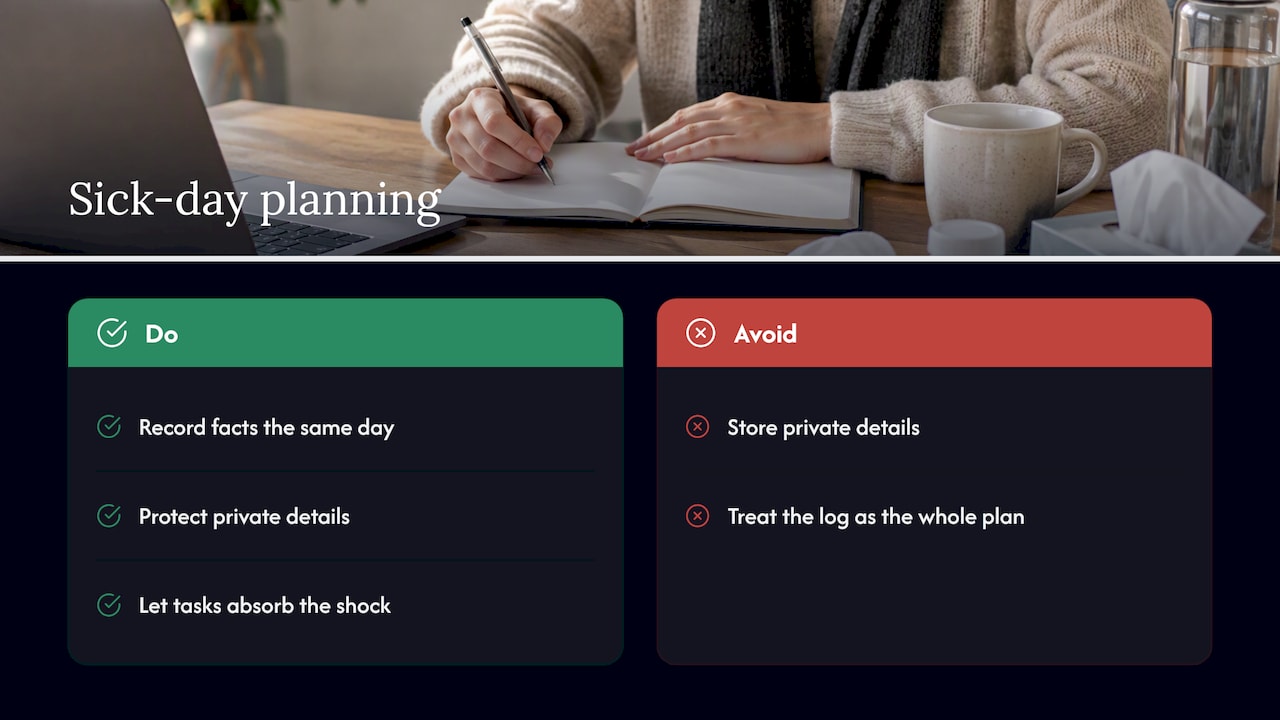
Our advice: keep the tracker boring and the plan flexible. Record the facts the same day, protect the private details, and let your task list absorb the shock.
— Optiostation
Plan around your sick days with Optio
If your sick time tracker lives in one file and your deadlines in another, you are doing double work. Optio is our mobile app for task, team and time management, made for college students and young professionals. You can color-code the areas of your life, set smart reminders, search by hashtag, and sync with Google Calendar, so a sick day and the work it moves sit side by side.
See how it works on the Optio Station home page, or read our guide to keeping track of tasks at work for a routine that holds up when your week does not go to plan.
FAQ
How do I keep track of my own sick days?
Create a simple log with the date, hours missed, category and a running balance, and update it the same day. Check your employer’s or school’s policy for how sick time is earned and counted. Use their official system for what you report, and keep your own log as a backup.
Is a spreadsheet good enough for a sick time tracker?
Yes, for one person or a small team. A balance tab and a log tab with dropdowns and automatic totals will cover most needs. Consider an app when several people edit at once, you need reminders, or you want absences shown next to tasks and calendar events.
What should I not put in a sick time tracker?
Leave out diagnoses, symptoms and medical details. Record the date, duration, a broad category and whether documentation is on file. Keep notes from a doctor wherever your employer’s policy says they belong.
Do I need a doctor’s note for every sick day?
Not usually, but it depends on your employer. Some policies only require documentation after several consecutive days. Georgia Tech, for instance, asks for a physician’s statement after five consecutive work days. Check your handbook or ask HR.
Sources
- Learn the benefits of using a leave management system (TechTarget)
- Sickness and Absence Management Policy and Procedure
- Intermittent absence report form
- Sick Leave, Georgia Tech Policy Library
- Employee Absence Tracker User Manual
- Recording absence, Acas
- Sick Time, Columbia Human Resources
