

Leave tracking is the habit of recording every day off you take or approve, whether it is vacation, sick leave or personal time. For each one you note the date, the leave type, the approval and the balance left afterward. Done well, it takes a few minutes a week. It means you never wonder how many days you have left, and nobody on your team is surprised by a gap in coverage. This guide covers what to record, which types to separate, how to keep balances correct and which rules to check, from a solo professional’s view and a small team lead’s view.
TL;DR
- Track four things for every absence: the date range, the leave type, who approved it and the balance afterward.
- Keep protected leave, such as family or medical leave, in its own category, apart from ordinary vacation or PTO.
- Your own log is a personal safeguard. The employer’s payroll or HR record is the official one, so compare the two regularly.
- Check your employer’s policy and local law for record retention and privacy before you decide what to store.
- A spreadsheet, a calendar and a task app can be enough for one person or a small team. Dedicated systems matter when approvals and accruals get complicated.
Table of Contents
- What leave tracking means
- Your log versus the official leave record
- What to record for every absence
- Which types of leave to track separately
- Keeping up with requests, approvals and balances
- Simple methods that work for one person or a small team
- Rules and policies to check before you start
- Common mistakes and how to avoid them
- Our perspective
- Build your own leave routine in Optio
- FAQ
- Sources
What leave tracking means
At its simplest, leave tracking is a running record of time away from work: who was out, when, for what kind of leave and how much remains. HR teams use the term for the system that records absences and supports policy and legal compliance. Individual employees use it for something lighter, a personal log that answers “how many days do I have left, and did payroll get them right?”
Both uses share the same core data. The difference is who owns the record and what it is for. A manager’s log exists to plan coverage and stay compliant. Your log exists so you can plan trips, avoid losing accrued days and catch mistakes early.
Your log versus the official leave record
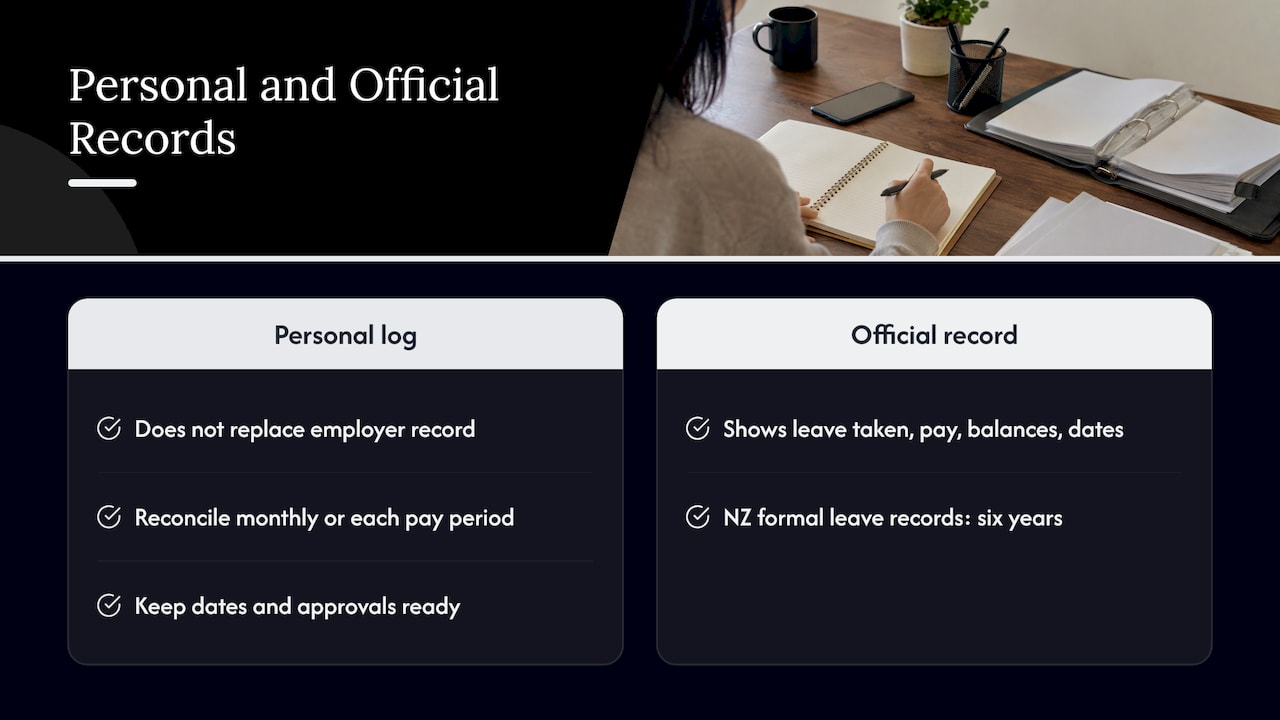
Your personal tracker does not replace the employer’s record, and it should not try to. Official records follow rules about content and retention. Employment New Zealand, for instance, says an employer’s formal leave records must show when leave was taken, what was paid, current balances and entitlement dates, and that they must be kept for six years under New Zealand law.
The same split shows up in the United States. California’s Department of Personnel Administration requires state departments to keep accurate, timely leave-accounting records for leave earned and used, and to compare system entries with attendance records. In Hong Kong, the Labour Department separates attendance and working-hours records from holiday and leave records, and says an employee’s own employment record can help safeguard their rights.
The practical takeaway is simple. Keep your own log, and reconcile it with the official balance every month or every pay period. When the two disagree, you will have dates and approvals ready to show.
What to record for every absence
A useful entry is short. More fields mean more chances to skip the entry altogether. These are the fields worth keeping, drawn from how large employers present balances and how public guidance describes absence records.
| Field | What to write | Why it matters |
|---|---|---|
| Leave type | Vacation, sick, personal, protected leave | Each type usually has its own balance and rules |
| Dates and length | Start, end, full or partial days | Balances depend on exact increments |
| Approval | Who approved and when | Proof if a dispute comes up |
| Balance before | Days or hours available | Starting point for the math |
| Leave taken | Days or hours used | Reduces the balance |
| Leave earned or adjusted | Accruals, carryover, corrections | Explains why balances move |
| Balance after | What remains | The number you plan around |
This mirrors the layout of a university payroll system’s absence balance page, which lists leave type, as-of date, beginning balance, leave taken, leave earned, adjustments, ending balance and accrual maximum. If your own log uses the same columns, comparing it with your pay portal takes seconds.
Extra details for sickness absence
If you manage others, sickness records need a little more care. Acas, the UK’s workplace advice body, says to record the number of absences, the length of each and the reason, and to share medical information only with the people who need it. It also notes that recording unauthorised absence and lateness helps spot patterns, but the records identify individuals, so data protection and confidentiality have to be considered.
That has a practical consequence for tools. A shared team calendar should show “out of office”, not “doctor’s appointment”. Keep reasons in a restricted place.
Which types of leave to track separately
At minimum, track vacation, sick leave and personal days as separate categories. Lumping them together hides how much of each you actually have.
Beyond that, the line to draw is between ordinary paid time off and legally protected leave. Family and medical leave, parental leave and similar categories come with their own documentation, eligibility and start and end dates. Give them their own category so they never get subtracted from a vacation balance by mistake.
Separating reasons also has a fairness side. Acas explains that separating absence reasons helps identify patterns and choose appropriate responses, and that recording disability- or pregnancy-related absence separately can help avoid discriminatory treatment. If you manage a team, build that separation into your log from the first day instead of retrofitting it after a problem.
A workable starting list:
- Vacation or annual leave
- Sick leave
- Personal days
- Public holidays you are off (useful for planning, usually no balance)
- Protected or statutory leave, each kind in its own row
- Unpaid leave
Keeping up with requests, approvals and balances
The dates are the easy part. The part that goes wrong is the chain from request to approval to balance. A simple process keeps it clean.
- Log the request the day you make it. Note the dates, the type and who you asked. A pending status is better than no entry.
- Record the approval. Save the email, chat message or portal confirmation, and add the approver’s name to the entry.
- Subtract on approval, not on the day taken. Your forecast balance then always reflects commitments.
- Mark the entry taken after you return. If the plan changed, correct it immediately.
- Reconcile monthly. Compare your ending balance to the payroll or HR portal figure.
- Note accrual and rollover dates. Many systems calculate accruals, balances, adjustments and rollover rules, and the date a balance expires is the one people forget.
Timing rules vary by employer, and some are strict. As an example from one large U.S. employer, Army Regulation 690-630 says leave should be scheduled and approved as far in advance as possible except in emergencies, that supervisors must decide requests in a timely way, and that most leave is charged in increments of at least 15 minutes. You will not be bound by Army rules, but the lesson travels: find out your own employer’s increment, because a 30-minute appointment charged as a full hour quietly distorts your balance.
Simple methods that work for one person or a small team
You do not need enterprise software to track leave accurately. Match the method to the complexity of your situation.
A personal spreadsheet
One row per absence, using the columns in the table above, plus a summary cell that shows the current balance per type. This is ideal for a single employee or a team of three or four. Its weakness is that nothing reminds you to update it.
A shared calendar
A team calendar with one color per leave type shows coverage at a glance. It tracks dates well but not balances, so pair it with a spreadsheet if balances matter.
A task and reminder app
This is the method many students and young professionals find easiest to keep up, because it lives where they already manage everything else. Create a recurring monthly task to reconcile balances, a reminder before each accrual or expiry date, and a task for every approval you are waiting on. When the request is approved, the task closes and the date goes on the calendar. We cover the underlying habit in our guide to tracking vacation days accurately.
Dedicated leave software
Once a team has many people, several leave types, accrual formulas or approval chains, dedicated systems pay off. Such tools can calculate balances, route approvals and sync approved leave to calendars. If you are comparing options, our overview of time off tracking software and the guide to vacation trackers for teams lay out the features to look for. Connecting leave to payroll is the biggest time saver, since it removes duplicate entry.
The same logic applies outside the office. Volunteer groups and clubs face the same problem of tracking who is available and when, and this look at roster management and records shows how scheduling, attendance and payment records can sit in one place instead of several spreadsheets.
Rules and policies to check before you start
What you may record, and for how long, depends on where you work and who employs you. Check these four things first.
Your employer’s written policy. It sets accrual rates, carryover limits, increments and notice periods. Your log should follow it, not guess.
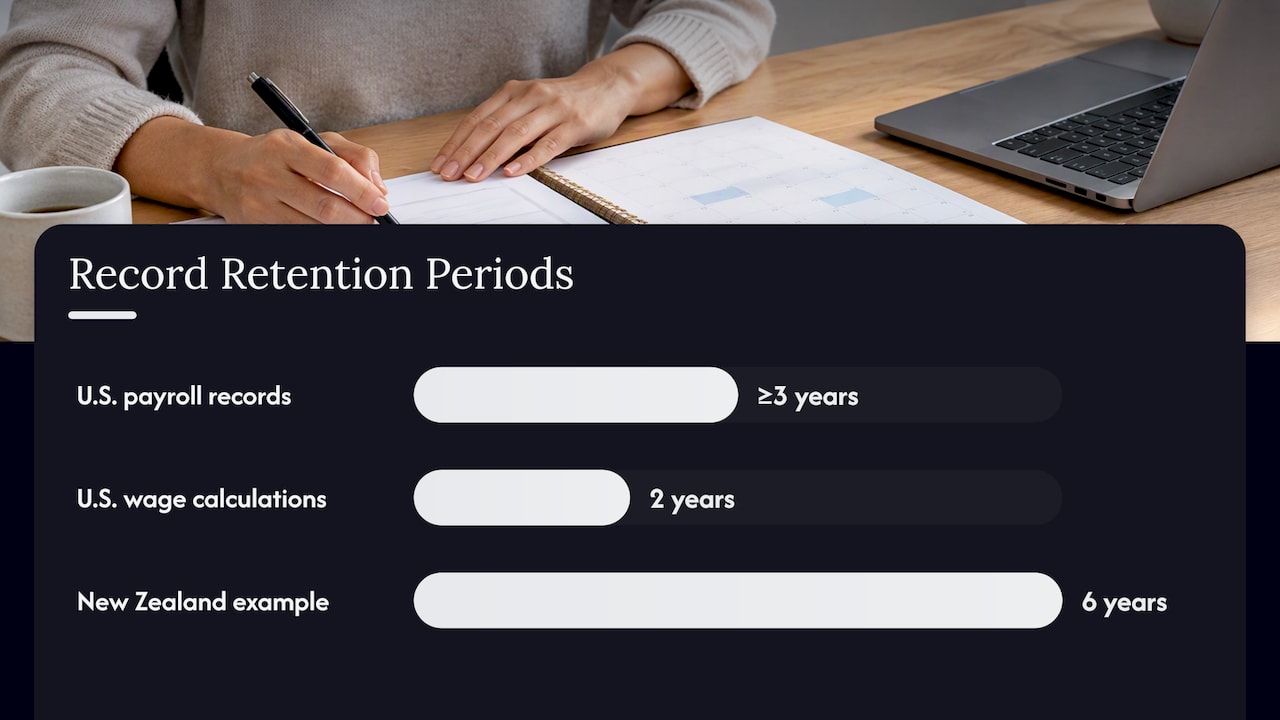
Record retention. In the United States, the Fair Labor Standards Act requires employers to keep payroll records for at least three years and records used to compute wages for two years. The same Department of Labor fact sheet says the records must be complete and accurate, but no particular format is required. Other countries differ, as the six-year New Zealand example above shows. Keep your personal log at least as long as you keep pay stubs.
Protected leave rules. If you or a team member takes leave under a statute, ask HR which documentation applies. Do not store medical details in a general-purpose tracker.
Privacy. If you track other people’s absences, store only what you need, limit who can see it and keep reasons private. This applies to a shared spreadsheet as much as to any HR system.
These rules are general starting points. For a specific situation, such as a disputed balance or a medical leave question, ask your HR department or, where relevant, your state or national labor agency.
Common mistakes and how to avoid them
- Tracking only dates. A calendar full of absences with no balances cannot tell you whether a trip is affordable in days.
- Mixing leave types. One shared balance hides the fact that sick days do not roll into vacation.
- Forgetting partial days. If your employer charges in hours, log in hours.
- Never reconciling. Errors grow quietly. A monthly five-minute check catches them.
- Not taking the leave. Unused leave often expires, and for teams, accrued but untaken leave is carried as a financial liability, which is why managers watch balances. Tracking is meant to help you rest, not to document that you did not.
Our perspective
We built Optio as a second-in-command for people juggling classes, jobs, projects and teammates, and leave tracking shows why that matters. The hard part is rarely the spreadsheet. It is remembering to log a request, chase an approval or check a balance before it expires.
That is a task-management problem, and it is the one we work on. Color-coded life aspects let you keep work, school and personal commitments visible side by side. Smart reminders can prompt you before a deadline or accrual date, and Google Calendar integration keeps approved time off next to everything else you have planned.
Our view is that a good system is the one you will actually open. For most students entering their first job and young professionals on small teams, that means a short list of recurring tasks, a clear calendar and a reminder that arrives at the right moment, not a heavy HR platform.
Optiostation
Build your own leave routine in Optio
If you want your time-off routine to live beside your tasks and calendar, Optio is designed for that kind of organizing. Set up a recurring monthly task to reconcile your balances, add reminders for approvals and expiry dates, and use color-coding to separate vacation, sick time and personal days from deadlines. You can connect Google Calendar so approved leave appears with the rest of your schedule. Try Optio at optiostation.com and start with one recurring task today.
If you are earlier in the process and still building basic habits, our guide on how to keep track of tasks at work is a good place to begin.
FAQ
Is leave tracking the same as time tracking?
No. Time tracking records hours worked on tasks or projects, while leave tracking records time away: vacation, sick days and other absences. They connect in payroll, since both affect pay and hours. If you want to understand the first, see our explainer on what time tracking is.
How long should I keep my own leave records?
At least as long as the employer’s retention period in your location, and ideally as long as your pay records. U.S. federal rules require employers to keep payroll records for three years and wage-computation records for two, while New Zealand requires six years for leave records. Your own log is a backup, so there is no harm in keeping it longer.
What should I do if my balance does not match payroll?
Send HR or payroll your log entries with the dates, leave types and approval messages, and ask them to show how they calculated the balance. Check increments and accrual dates first, because those explain most differences. Raise it soon, while the records are fresh.
Do I need software to track leave for a small team?
Not at first. A shared calendar plus a spreadsheet with balances per leave type covers a small team. Move to dedicated software when approvals, accrual rules or protected leave start to take more time than the tracking is worth.
Sources
- Record-keeping, Employment New Zealand
- Department of Personnel Administration leave accounting, CalHR
- Keeping Proper Employment Records, Hong Kong Labour Department
- Recording absence, Acas
- Unauthorised absence and lateness, Acas
- Review My Absence Balances, UCPath
- Army Regulation 690-630
- Administering Global Leave, Oracle documentation
- Fact Sheet #21: Recordkeeping Requirements under the FLSA, U.S. Department of Labor
