

The system that works is simple: capture every task in one place, prioritize with an A/B/C ranking, assign your A tasks to real time blocks on your calendar, and review the list daily to carry forward what did not get finished. This beats a plain list because it forces you to rank what matters and fit it into time you actually have, instead of hoping willpower closes the gap.
TL;DR:
- Keep the daily A list to three to five tasks, and break large projects into specific next actions, such as drafting an outline or gathering sources.
- Add 20% to 30% extra time to blocks involving multiple tasks, because transitions consume time; experiments found people overestimated availability by as much as 50%.
- Finish tasks requiring two minutes or less immediately, while longer flexible work can remain unbooked until it has a firm duration and deadline.
- Number tasks within each priority tier, carry unfinished items forward, and expect the ranking habit to take two to three weeks to form.
- Choose a format with low effort for reminders, since research found people are less likely to set reminders when doing so requires more physical effort.
Table of Contents
- Why managing your to-do list actually matters
- Core strategies to organize and finish your to-do list
- How to fit your list into real time
- Choosing where to keep your list: paper, digital, or hybrid
- A workflow built for students and young professionals
- Why this approach works and how to make it stick
- Optiostation: built around capture, prioritize, time-budget, review
- FAQ
- Sources
Why managing your to-do list actually matters
A messy list costs you more than clutter. Holding every obligation in your head increases the odds you miss a deadline, and writing things down without ranking them just moves the chaos onto paper. Three mistakes show up constantly:
- Vague entries like “work on project” that never specify the next physical action
- Overloaded daily lists with more items than any person can finish in a working day
- Tasks with no time estimate, so they get skipped when the day fills up
Research backs a fix for two of these at once. Budgeting time before setting goals leads to more realistic targets and greater overall progress than listing goals without first accounting for the hours available. Separately, forming if-then plans makes you far more likely to follow through, because the plan specifies exactly when and where you will act.
Core strategies to organize and finish your to-do list
These steps work in order, and each one solves a specific failure point from a typical list.
- Capture everything in one inbox. Every task, idea, and reminder goes into a single place the moment it crosses your mind, and each item needs a next physical action, not a vague topic.
- Prioritize with A/B/C labels. Mark your most important tasks A, secondary tasks B, and everything else C, then number within each letter (A-1, A-2) so you know the exact order to tackle them. The SMU prioritized to-do list guidance builds this system around doing your A item first and moving anything unfinished to the next day.
- Break big projects into microtasks. A project like “finish research paper” becomes a string of scheduled subtasks: outline, draft intro, pull three sources, write section one.
- Apply the two-minute rule. Anything that takes two minutes or less gets done immediately instead of occupying space on your list; batch the rest into a single block.
- Set a realistic daily limit. Pick three to five A tasks you will actually finish, and protect that number instead of letting the list grow past what a day can hold.
- Carry unfinished items forward methodically. Rewrite incomplete tasks onto the next day’s list rather than letting them resurface indefinitely without a plan.
- Group by context or project. Tags like “errands,” “calls,” or a specific class name let you knock out similar tasks in one sitting instead of switching contexts constantly.
- Write if-then plans for tasks you keep avoiding. “When I finish lunch, I will open my laptop and draft the outline” converts a vague intention into a specific, triggered action, which is exactly the mechanism behind implementation intentions research.
For larger academic projects with many moving pieces, a structured application timeline shows how breaking a long-term goal into dated milestones keeps big, slow-moving tasks from falling off a daily list entirely.
Pro Tip: Write your A-1 task the night before so your first decision of the day is already made.
How to fit your list into real time
Time-first budgeting means you assign hours to your tasks before you decide what counts as a goal for the day, rather than listing tasks and hoping they fit. This matters because people routinely overestimate how much time they actually have available.
- Build time accounts for the day. Block out your fixed commitments first, then see what is actually left before assigning A tasks to it.
- Add a buffer for transitions. Duke’s time-budgeting research recommends adding 20% to 30% extra time when allocating blocks across multiple tasks, since switching between them costs more than people expect.
- Convert only firm tasks into calendar events. A task with a specific duration and deadline becomes a calendar block; a flexible or optional task stays on the to-do list until it earns a slot.
In one set of experiments, participants overestimated their available time by as much as 50% when they set goals without budgeting time first, which is why the time-first order matters more than the goal list itself.
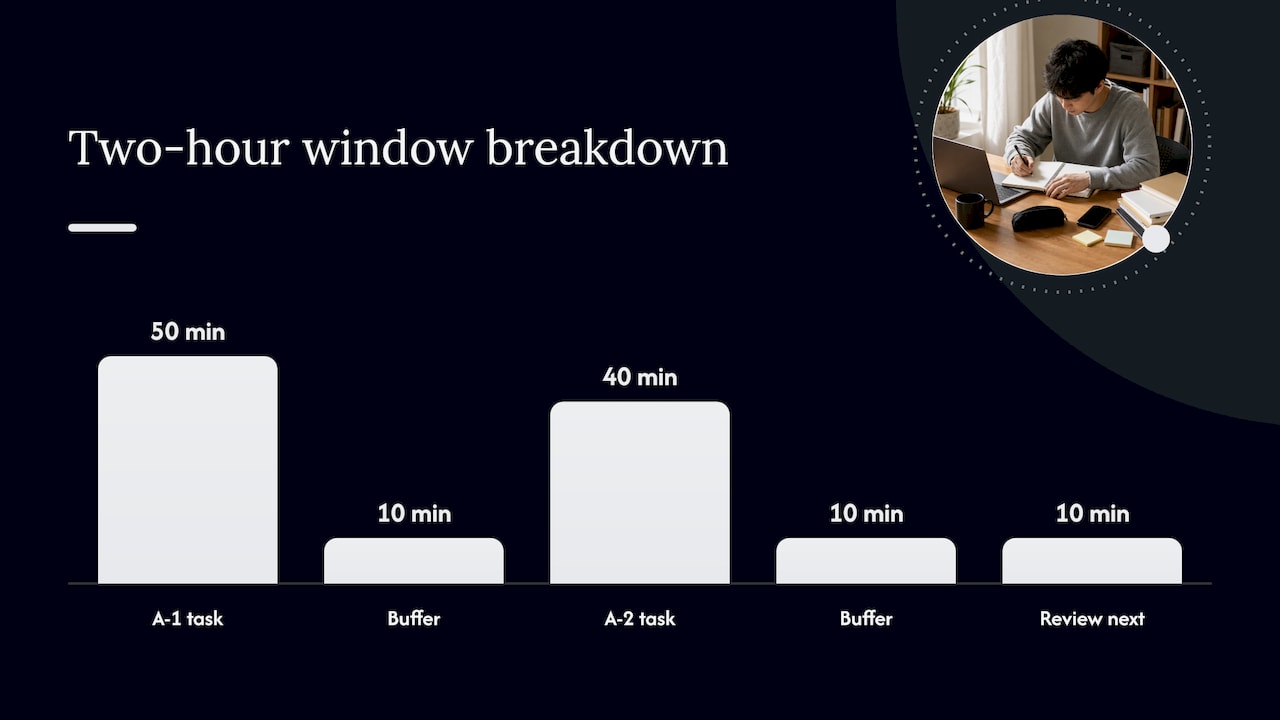
A sample two-hour window: 50 minutes for your A-1 task, a 10-minute buffer, 40 minutes for A-2, another 10-minute buffer, then 10 minutes to review what is next.
Choosing where to keep your list: paper, digital, or hybrid
No single format wins outright. Paper lists are fast to write and force prioritization through limited space, but they do not sync across devices or send reminders. Simple digital notes are flexible and searchable, dedicated task apps add tagging and recurring reminders, and calendar-centric setups tie tasks directly to the time blocks you have already committed to.
- Set up four lists: an inbox for capture, project lists for multi-step work, a someday or backlog list, and a daily A-list for today’s three to five priorities.
- Run a short daily checklist: capture new items, clarify the next action, categorize by project or context, schedule the A tasks, then review before bed.
- Keep reminders low-effort. UCL research on reminder-setting found that the more physical effort it takes to set a reminder, the less likely people are to use one, so a fast reminder flow gets used far more often than a clunky one.
A workflow built for students and young professionals
A repeatable daily routine looks like this: capture tasks throughout the day into one inbox, assign A/B/C labels each evening, time-budget your A tasks into tomorrow’s calendar, and review at night to carry forward anything unfinished.
- For prioritization specifics, our guide on how to prioritize assignments effectively walks through examples built for coursework and deadlines.
- For setting up the four-list structure above, see organizing to-do lists as a student.
- For a fuller template covering capture through review, our guide to to-do list creation lays out the full routine step by step.
Why this approach works and how to make it stick
Focusing on three to five A tasks a day builds confidence faster than an ambitious list ever does, because you actually finish what you commit to. SMU’s guidance on prioritized lists notes the habit itself takes about two to three weeks to form and only about seven days to break, so consistency matters more than intensity in the first month.
This framing emphasizes the idea that small, deliberate daily actions, repeated, are what leadership and productivity actually look like up close.
— Optiostation
Optiostation: built around capture, prioritize, time-budget, review
We designed Optiostation around the exact routine in this article. Task capture, color-coded tags, time-block scheduling, and Google Calendar sync map directly to the capture, prioritize, time-budget, and review cycle, so your A-list and your calendar stay in the same place. Our Prioritization Station feature handles the A/B/C ranking for you instead of leaving it to a separate notebook or app.

If you want a guided setup instead of building the four-list system by hand, visit Prioritization Station and start organizing your next day in minutes.
FAQ
What is the best way to prioritize a to-do list?
Label each task A, B, or C by importance, then number within each letter (A-1, A-2) so your order is explicit. The SMU prioritized to-do list method is built specifically around finishing A tasks first and carrying anything unfinished to the next day.
How many tasks should I put on my daily to-do list?
Keep your daily A-list to three to five focused tasks rather than listing everything you eventually need to do. A shorter, protected list gets finished, while an overloaded one pushes items into an endless backlog.
What is time-first budgeting and why does it matter?
Time-first budgeting means allocating your available hours before you decide what goals or tasks to commit to for the day. Research on this approach found it leads to more realistic targets and greater progress than planning goals without accounting for time first.
How do implementation intentions help me stop procrastinating?
An implementation intention is a specific if-then plan, such as “when I finish breakfast, I will draft my outline,” that ties an action to a clear trigger. Stanford HCI research shows this specificity makes you significantly more likely to actually follow through.
Should I use paper or a digital app for my to-do list?
Either works if it matches how you actually capture and review tasks, since paper is fast but does not sync or remind you, while a digital app adds tagging, time blocks, and low-effort reminders. Optiostation combines tagging, time blocking, and calendar sync in one place for readers who want the digital route.
Sources
- Time before goals: the benefits of budgeting time first for multiple goal setting and pursuit
- TaskGenies / Implementation intentions (Stanford HCI publication)
- Prioritized To-Do List
- Influence of the physical effort of reminder-setting on strategic offloading of delayed intentions
