

An implementation timeline is a table that answers four questions for every piece of work: what gets done, who owns it, when it is due, and what it waits on. Copy the template below, fill it in backward from your final date, and keep it somewhere you will open every day. In Optiostation, you can turn each row into a task with a reminder and keep the whole plan next to your calendar.
TL;DR
- A usable timeline has five columns: milestone, owner, target date, dependency, and a check that proves it is done.
- Start from the finish date and work backward, then break the work into tasks of a day or two.
- Find the critical path, the longest chain of dependent tasks, and protect it with buffer.
- Word suits a written report, Excel suits dates and durations, and a task app suits the daily follow-through.
- A timeline only works if you review it weekly and move dates honestly when they slip.
Table of Contents
- The template: five columns that do the work
- How to write the timeline, step by step
- A worked example: a 10-week student mentoring program
- Which format should you use: Word, Excel, or an app?
- Keep the timeline alive after you write it
- Common mistakes in implementation timelines
- Put your timeline to work in Optiostation
- FAQ
- Sources
The template: five columns that do the work
Most timeline templates look impressive and hide the one thing you need: who is responsible for each date. Here is a plain version you can paste into a spreadsheet, a doc, or a notes app.
| # | Phase | Task or milestone | Owner | Start | Target date | Depends on | Done when |
|---|---|---|---|---|---|---|---|
| 1 | Plan | Agree scope and deliverables | Name | Week 1 | Week 1 | None | Everyone has signed off on a one-page scope |
| 2 | Plan | Break the work into tasks | Name | Week 1 | Week 2 | 1 | Every task is a day or two of visible work |
| 3 | Build | First draft or prototype | Name | Week 2 | Week 4 | 2 | Draft shared with the team |
| 4 | Build | Feedback round | Name | Week 4 | Week 5 | 3 | Comments collected and sorted |
| 5 | Launch | Final delivery or go-live | Name | Week 6 | Week 6 | 4 | Delivered and confirmed |
| 6 | Review | Wrap-up and lessons | Name | Week 6 | Week 7 | 5 | Notes saved for next time |
Two rules keep this table honest. Every row has one named owner, not a group, and every row has a Done when check. If nobody can say what finished looks like, the row is a wish, not a task.
A quick vocabulary note, because these words get mixed up. Penn State’s planning office separates milestones, target dates, and deadlines: a milestone marks a meaningful change, a target date is a hoped-for completion date you can adjust, and a deadline is a hard date after which the project may fail. Label which dates in your table are targets and which are deadlines. A group project’s presentation day is a deadline. Your own draft date is a target.
How to write the timeline, step by step
1. Fix the finish line and work backward
Write down the date the project must be finished and what finished means: a submitted paper, a launched feature, a new process running at your job. Then place the biggest chunks between today and that date. Going backward exposes the problem early: if the last phase needs three weeks and you only have two, you learn it on day one instead of on day forty.
2. Break the goal into tasks
A work breakdown structure, or WBS, is just the goal split into smaller and smaller pieces until each piece can be assigned to one person. The University of Iowa’s student life guide says a WBS makes work easier to assign and helps plan a realistic schedule. Break by deliverable (the draft, the survey, the slide deck) rather than by who is involved, and stop when a task is a day or two of work you can picture.
This is where most plans quietly fail. A row that says Research the topic hides ten decisions. A row that says Pull five sources and write a one-paragraph summary of each does not.
3. Estimate how long each task takes
You are probably optimistic. Virginia Tech’s open textbook on project management lists several estimating methods, including expert judgment, comparing with similar past work, and a three-point approach that weighs best, likely, and worst cases. It also advises using more than one input because the person doing the work may pad or misjudge their own estimate.
For a student or early-career professional, a practical version is this: estimate the likely time, ask a teammate or a mentor how long the same thing took them, and use the larger number for any task you have never done before.
4. Mark the dependencies
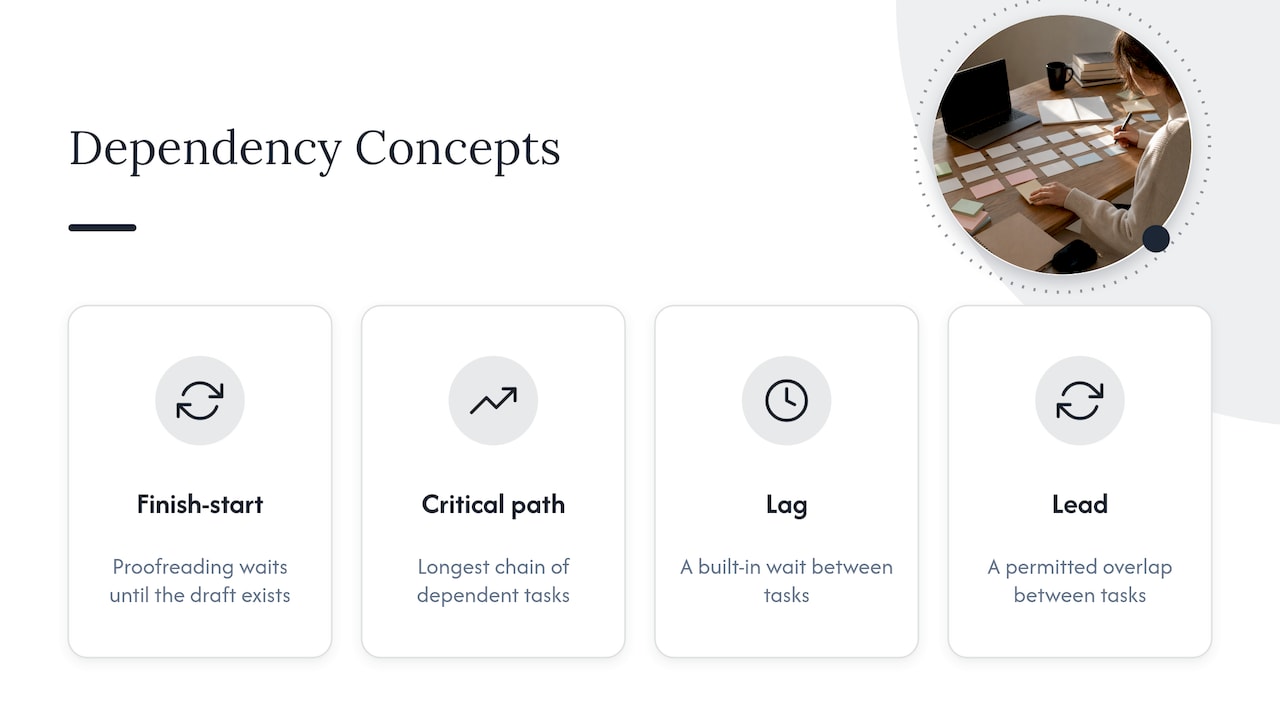
A dependency means one task cannot start or finish until another does. The most common type is finish-to-start: you cannot proofread until the draft exists. The same Virginia Tech chapter describes four relationship types, plus lags (a built-in wait) and leads (a permitted overlap). In your table, the Depends on column covers this. Write the row number, not a vague note.
Then look for the critical path, the longest chain of dependent tasks. Virginia Tech notes that a delay on that chain delays the whole project by the same amount. Highlight those rows. They get your attention first, your earliest start, and your buffer.
5. Add buffer where the risk is
Buffer is not laziness. It is the admission that estimates are guesses. Put extra time at the end of risky stretches and before hard deadlines, not spread evenly across every row. A common habit is to leave a spare day or two after any task that depends on another person, such as waiting for a professor, a client, or a teammate’s section.
6. Assign owners and set a check-in rhythm
The Iowa guide lists team roles and communication routines among its core planning actions. In practice, that means a standing check-in, even 15 minutes, at a fixed time each week. No task should run longer than the gap between check-ins, or you will learn about a stalled task too late to fix it.
A worked example: a 10-week student mentoring program
The University of Iowa guide walks through a mentoring program: weeks 1 to 3 cover design, weeks 4 to 7 recruitment, week 8 matching, and weeks 9 and 10 orientation and training. Here is how that plan looks as rows in the template.
| Phase | Milestone | Owner | Target | Depends on | Done when |
|---|---|---|---|---|---|
| Design | Program structure written | Alex | End of week 3 | None | One-page design approved |
| Recruitment | Mentors and mentees signed up | Sam | End of week 7 | Design | Target number of sign-ups reached |
| Matching | Pairs assigned | Jordan | End of week 8 | Recruitment | Every participant has a match |
| Orientation | Training sessions held | Alex | End of week 10 | Matching | Attendance recorded |
Notice the critical path is a straight line here: design, recruitment, matching, orientation. If recruitment slips by a week, orientation slips by a week unless you shorten something later. That is exactly what the Depends on column makes visible.
If you are planning something personal and long, such as a pregnancy and early parenthood timeline, the same logic applies: stages, milestones, and checklists. A trimester-by-trimester planner shows how a long stretch gets broken into stages you can act on.
Which format should you use: Word, Excel, or an app?
The format matters less than whether you will actually open it. Here is how the main options compare.
| Format | Best for | Weak spot |
|---|---|---|
| Word or Google Docs | A written report or proposal where the timeline is a short table | Tracking durations and changing dates |
| Excel or Google Sheets | Rows of dates, durations, owners, and dependencies | Easy to forget once the file is closed |
| Slide software | Presenting a plan to a class or a manager | Hard to keep current |
| A task app | Daily follow-through, reminders, and team visibility | Needs a template to start from |
Excel and Sheets are the natural home for the table above because dates and durations sit in columns you can sort. We cover this in more depth in our guides to Excel project management timeline templates and Excel schedule templates. If your project is visual and phase-heavy, a Gantt chart template shows the same dates as bars on a calendar.
The real gap is not the template, it is what happens on day nine, when the file is closed and a deadline is quietly approaching. That is where a task app earns its place.
Keep the timeline alive after you write it
A timeline is a forecast, and forecasts need updating. Use this weekly routine, which takes about 15 minutes.
- Mark finished rows and note the actual completion date.
- Check the critical path first: is anything on it behind?
- Move any date that has slipped, and move everything that depends on it. Do not leave a stale date in place.
- Tell the people affected. A date changed silently is a broken promise.
- Decide the next week’s top three tasks.
When the schedule slips, resist the urge to hide it. The goal is a timeline that reflects reality, because that is the only kind that helps you decide what to cut, what to delegate, and when to ask for more time.
For the prioritizing part of that routine, our guide to prioritization techniques explains how to pick the next task when everything feels urgent. For group work, managing team tasks covers how to split ownership so no row is left without a name. And if you are starting a new job and need a plan for your first months, the 30/60/90 plan for young professionals uses the same milestone logic.
Common mistakes in implementation timelines
- Tasks that are too big. If a row would take more than a week, split it.
- No owner. A task owned by everyone is owned by no one.
- Dependencies in your head. If you did not write it down, your teammate does not know it.
- Buffer everywhere or nowhere. Put it ahead of risky handoffs and hard deadlines.
- A plan written once. The date you set in week one is a guess. Update it.
- Confusing targets with deadlines. Know which dates can move and which cannot.
Our view: the plan is only as good as your next action
We built Optio as a second-in-command for students and young professionals, and the people who use it, our Centurions, tend to have the same problem: the plan exists, but the week does not follow it. A timeline tells you where you need to be. It does not tell you what to do at 4 p.m. on a Tuesday.
That is why we think a timeline belongs next to your tasks, your calendar, and your team. Optiostation brings task management, team collaboration, time tracking, goal setting, and project organization into one mobile app, with color-coded life aspects so class, work, and personal goals do not blur together, and smart reminders so a milestone does not sneak up on you. It also connects with Google Calendar, so your dates live where you already look.
We build Optio as an indie app and we shape it with feedback from our community. Simplicity and flexibility come first, because a planning tool you avoid opening is worse than none. Take the five-column table, put its rows in as tasks, and let the app carry the daily follow-through.
Optiostation
Put your timeline to work in Optiostation
Once your table is filled in, the next job is turning it into things you do. Optiostation’s Prioritization Station is built for exactly that: task management, project organization, smart reminders, and Google Calendar integration in one mobile app for college students and young professionals.
Start with our free 5-minute project planning template, then add its milestones as tasks in Optiostation. If you want a broader look at tools before you commit, our overview of project tracker examples shows what a good tracking setup looks like.
FAQ
How do you write a timeline for an implementation plan?
Set the final date, then work backward. Break the goal into tasks of a day or two, assign each an owner, estimate durations, and note what each task depends on. Finally, mark the critical path and add buffer before risky handoffs and hard deadlines.
What should an implementation timeline template include?
At minimum: the milestone or task, an owner, a target date, what it depends on, and a check that proves it is done. Adding a phase column and a status column helps with weekly reviews. Keep it to one page so you actually read it.
Is there a timeline template in Word or Excel?
Both programs offer timeline layouts, and you can also build the table above in either one in a few minutes. Word works for a timeline inside a written report. Excel or Sheets is better when you need dates, durations, and sorting.
How long should planning the timeline take?
For a class project or a small work project, an hour or two is usually enough for a first version, ideally with the people doing the work in the room. Planning is easier and more accurate when the team builds it together rather than one person drafting it alone.
How often should I update the timeline?
Review it weekly, and also any time a task on the critical path moves. Update the dates, tell the people who depend on them, and keep a note of what changed so the next plan starts from better estimates.
Sources
- Implementation Infrastructure, Penn State Office of Planning, Assessment, and Institutional Research
- Planning: The Project’s Roadmap, University of Iowa Division of Student Life
- Chapter 8: Building the Schedule, Principles of Project Management, Virginia Tech
