

Scrum is a lightweight Agile framework that helps teams deliver value iteratively through time-boxed sprints, defined roles, artifacts, and regular inspection and adaptation. Three things matter most: clear accountabilities (Product Owner, Scrum Master, Developers), a steady sprint cadence, and a constant focus on transparency, inspection, and adaptation. The Scrum Guide and the Agile Manifesto define the rules; how you apply them, as we see with students and young professionals, is where the real work begins.
TL;DR:
- Scrum is most effective for projects with a clear scope and frequent checkpoints, like feature development or semester-long group work.
- Smaller teams should run 1 to 2 week sprints and may share Product Owner duties to stay flexible and focused.
- Shorter cycles help catch misunderstandings early, with a maximum sprint length of one month, to enable faster feedback and course correction.
- Successful Scrum adoption requires a cultural shift toward self-management; neglecting this often results in mechanical meetings with little actual improvement.
- Tools like the Prioritization Station can help small teams visualize backlog, track goals, and stay organized during sprints.
Table of Contents
- Agile vs. Scrum: how they relate and why it matters
- Core Scrum components: roles, artifacts, and events
- How a sprint actually runs, step by step
- Benefits and typical use cases for Scrum
- Common pitfalls and how to move past mechanical Scrum
- Applying Scrum for students and small teams
- A short, candid recommendation on getting started
- Keep your sprints organized with Optiostation
- FAQ
- Sources
Agile vs. Scrum: how they relate and why it matters
Agile is not a method you follow step by step. It is a set of values and principles from the Agile Manifesto that favor individuals and interactions, working solutions, customer collaboration, and responding to change over rigid planning. Scrum takes those principles and turns them into a concrete, teachable framework: specific roles, specific meetings, specific artifacts.
Other frameworks implement Agile differently. Kanban, for example, focuses on visualizing work and limiting work in progress without fixed iterations or prescribed roles, which makes it better suited to continuous flow work like support tickets than to project-based deliverables with a defined goal each cycle.
A few quick distinctions help when you are choosing an approach:
- Scrum fits projects with a clear goal that benefits from regular checkpoints, like building a feature set or running a semester-long group project.
- Kanban fits ongoing work with unpredictable arrival times, like a help desk or content queue.
- Lean principles (reducing waste, improving flow) can layer onto either one rather than replacing them.
If your project has a defined scope and you want built-in moments to course-correct, Scrum usually wins. If your work never really “ends,” a flow-based approach may serve you better. For more on how these fit together, see our overview of agile project management foundations.
Core Scrum components: roles, artifacts, and events
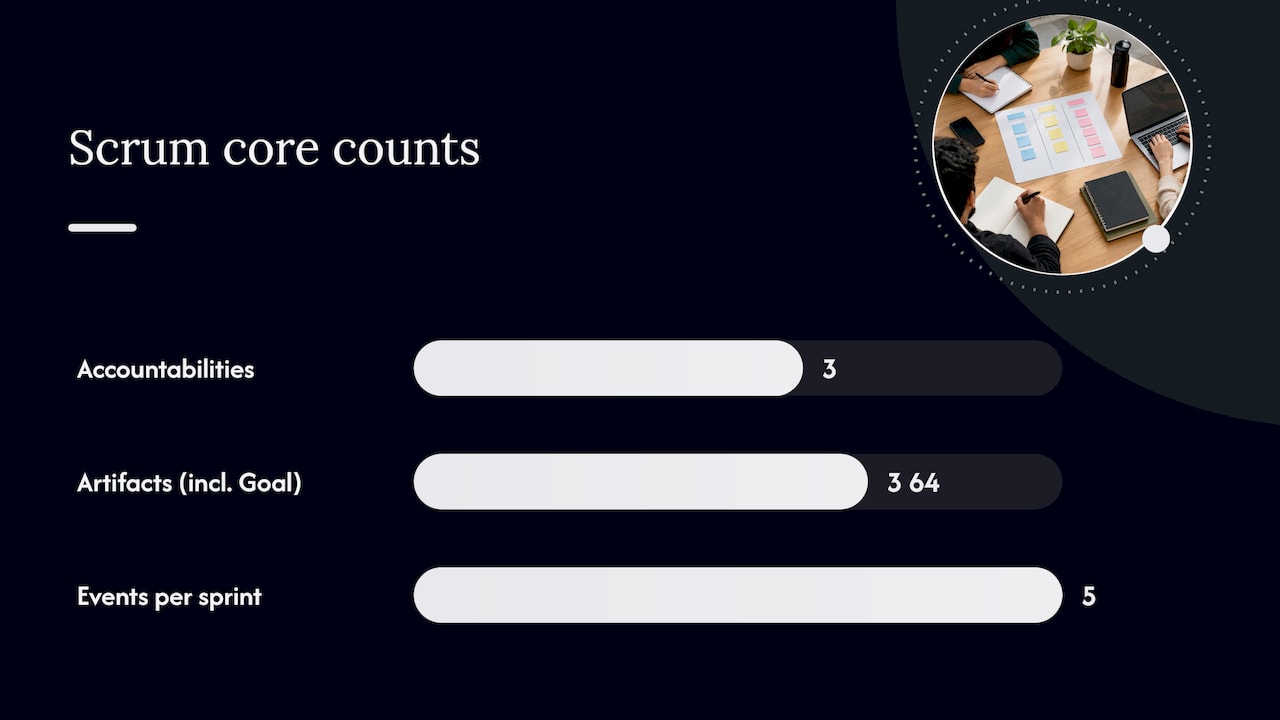
Scrum’s structure comes from three accountabilities, three (or four, counting the Product Goal) artifacts, and five events. Understanding them lets you spot when a team’s process is missing a piece.
- Product Owner: owns the Product Backlog, decides what gets built and in what order, and is accountable for maximizing the value of the team’s work.
- Scrum Master: coaches the team on Scrum theory and practice, removes obstacles, and protects the team’s focus; this role supports the process rather than directing the work. Our guide to the Scrum Master role breaks down the day-to-day responsibilities.
- Developers: the people who do the work of turning backlog items into a usable increment each sprint, however their specific skills are split.
The Scrum Guide specifies that Scrum Teams define three accountabilities and typically stay under 10 people, since larger groups tend to lose the tight communication Scrum depends on.
The artifacts give the team something concrete to inspect:
- Product Backlog: the ordered list of everything that might be needed in the product, owned and prioritized by the Product Owner.
- Sprint Backlog: the subset of backlog items plus a plan the Developers select for the current sprint.
- Increment: the sum of completed work that meets the team’s Definition of Done, which must be usable regardless of whether the Product Owner decides to release it.
Each artifact pairs with a commitment, including the Definition of Done, which the Scrum Guide treats as a pivotal, team-defined quality gate; skip it and increments pile up technical debt instead of staying releasable.
The events repeat every sprint: Sprint Planning kicks things off, the Daily Scrum keeps the team synced, the Sprint Review gathers feedback, and the Sprint Retrospective closes the loop, all wrapped inside a sprint timeboxed to one month or less.
How a sprint actually runs, step by step
A sprint is the container for everything else in Scrum, and its rhythm is what makes the framework usable week after week.
- Sprint Planning: the team sets a Sprint Goal, selects backlog items that serve it, and breaks the work into tasks small enough to track daily.
- Daily Scrum: a 15-minute checkpoint where Developers adjust their plan for the next 24 hours and surface blockers early.
- Sprint Review: the team shows the Increment to stakeholders, collects feedback, and updates the Product Backlog based on what they learn.
- Sprint Retrospective: the team looks at how it worked, not just what it built, and commits to one or two concrete process changes.
The Definition of Done matters at every step, since an increment that does not meet it is not really finished, no matter how much work went into it. This keeps the team honest about progress instead of counting partially done tasks as complete.
Pro Tip: Write your Sprint Goal as a single sentence before picking backlog items, not after. It keeps selection focused instead of becoming a grab bag of unrelated tasks.
Benefits and typical use cases for Scrum
Scrum’s biggest payoff is speed of feedback. Short cycles mean you find out what is working, or what is not, every few weeks instead of at the end of a months-long project.
- Faster feedback loops catch misunderstandings before they compound into wasted work.
- Prioritized backlogs keep the team working on the highest-value items first instead of whatever feels urgent that day.
- Shorter cycles reduce risk, since a bad direction only wastes one sprint, not an entire project.
- A single Sprint Goal keeps the team’s attention on one outcome instead of scattered tasks.
Scrum shows up well beyond software now. Marketing teams run sprints to test campaign ideas, product design teams use it to iterate on prototypes, and student groups use it to manage semester projects with clear weekly checkpoints. The PMI Agile Practice Guide notes that agile approaches now extend into scaling, remote work, and measurable value delivery well outside their original software context.
Scrum fits poorly when work cannot be broken into short, inspectable increments, like highly regulated, sequential processes with fixed external deadlines that leave no room to adapt. In those cases, a more predictive or Kanban-style approach may serve better.
Common pitfalls and how to move past mechanical Scrum
Scrum is easy to start and hard to do well. Industry guidance from AWS warns that teams often reduce it to a checklist of meetings instead of embracing the underlying empirical values of transparency, inspection, and adaptation.
- Treating the Daily Scrum as a status report to a manager instead of a planning huddle among Developers.
- Letting the Product Owner role sit vacant or split without real authority, which leaves the backlog unprioritized.
- Skipping or rushing the Retrospective, so the same process problems repeat sprint after sprint.
- Accepting a vague or missing Definition of Done, which lets unfinished work count as progress.
Academic research on agile adoption beyond software finds that successful implementation usually requires a cultural shift toward self-management and empowerment, and that the real barriers are organizational rather than technical, according to a 2024 academic review. Teams that skip that shift tend to revert to mechanical Scrum: meetings happen, but little actually improves.
Pro Tip: If your retrospectives never produce a change you can name a week later, that is the clearest sign your team is going through the motions rather than practicing Scrum.
Applying Scrum for students and small teams
Small teams do not need the full weight of enterprise Scrum to get its benefits. We find that students and young professionals get the most out of a trimmed version that keeps the inspect-and-adapt cycle intact while cutting ceremony overhead.
- Run 1 to 2 week sprints instead of a full month, since shorter cycles suit coursework deadlines and tighter project timelines.
- Share Product Owner duties across two teammates when no single person can commit full attention to prioritization.
- Keep Daily Scrums to a quick async check-in if your team cannot meet in person every day, using practical tools like Teams Meeting Apps for DevOps to streamline team workflows.
- Sort your backlog into a few simple buckets (this sprint, next sprint, someday) instead of a complex scoring system.
For ready-to-use structures, our agile examples for students and professionals and backlog prioritization techniques walk through templates you can copy directly into a group project or small team workflow.
A short, candid recommendation on getting started
We would rather see you run one honest two-week sprint than spend a month reading about Scrum theory. Pick one measurable thing, like your Sprint Goal success rate, track it, and adjust at your retrospective. Scrum was never meant to be copied exactly: adapt the cadence and roles to fit your team’s actual constraints, then keep the parts that visibly help.
— Optiostation
Keep your sprints organized with Optiostation
Running sprints well means keeping backlog items, deadlines, and teammates visible in one place, which is exactly where our Prioritization Station comes in. We built it around task, team, and time management features that help you sort backlog items into priority buckets, track sprint goals, and see color-coded life aspects alongside your project work, so coursework and team deliverables do not get lost in separate apps.

If you are managing a student project or a small team at work, start by mapping one sprint’s worth of tasks into Prioritization Station and see how it holds up against your next retrospective.
FAQ
What is the difference between Agile and Scrum?
Agile is a set of values and principles from the Agile Manifesto that prioritize responding to change and delivering working results. Scrum is one specific framework, with defined roles, events, and artifacts, that puts those Agile principles into practice.
What are the three roles in Scrum?
The Scrum Guide defines three accountabilities: the Product Owner, who manages the backlog and priorities, the Scrum Master, who coaches the team and removes obstacles, and the Developers, who build the increment each sprint. Scrum Teams are typically kept under 10 people to stay effective.
How long should a Scrum sprint last?
A sprint can run up to one month, though many teams, especially students and small groups, choose shorter durations to match their deadlines. Shorter sprints also mean more frequent feedback and faster course correction.
Can Scrum work outside of software development?
Yes. Industry and academic sources note that Scrum and broader agile practices are increasingly applied in marketing, product design, and education projects, though successful adoption usually depends on a cultural shift toward self-management rather than the practices alone, according to a 2024 academic review.
What is the Definition of Done in Scrum?
The Definition of Done is a team-defined quality standard that an increment must meet before it counts as complete. The Scrum Guide treats it as a pivotal commitment, and teams that skip it tend to accumulate unfinished work disguised as progress.
Sources
- The Scrum Guide
- Manifesto for Agile Software Development
- Agile Practice Guide – Second Edition (PMI)
- What is Agile Project Management? Developing a New Definition (H. Dong et al., 2024)
- What is Scrum? – AWS
