

The highest-leverage moves are simple to name and hard to execute: protect the first 90 minutes of the day for deep work, cut or restructure low-value meetings, automate repetitive tasks, cut or delegate work that doesn’t matter, and measure results with real KPIs instead of gut feel. Teams that apply even three of these tend to report fewer interruptions and clearer priorities within weeks. Task and time management tools can support the shift, and the classic SMART goals framework gives it structure.
TL;DR:
- Protect the first 90 minutes of the workday for deep, uninterrupted focus to maximize productivity and avoid reactive interruptions.
- Restructure meetings with clear agendas and decision boundaries, and replace unnecessary status updates with asynchronous communication.
- Batch reactive tasks like emails and chat into specific windows, reducing cognitive switching costs and freeing up time for meaningful work.
- Pilot small efficiency changes with baseline data and clear success thresholds, avoiding simultaneous large reforms to measure true impact.
- Build ongoing habits through short, targeted pilots, regular reviews, and reinforced skills training to sustain productivity improvements long-term.
Table of Contents
- What Workplace Efficiency Actually Means (And How to Measure It)
- The High-Leverage Strategies Worth Your Time
- How to Prioritize, Pilot, and Measure Every Change
- What This Looks Like for Managers, Individuals, and Hybrid Teams
- Tools and Automation That Actually Reduce Friction
- Ten Quick Wins Your Team Can Start This Week
- Optiostation’s Take on Building These Habits Into a System
- Employee Training and Skill Development That Actually Pays Off
- Employee Feedback and Continuous Improvement, Done Right
- Setting Goals and Performance Expectations People Can Actually Hit
- Encouraging Work-Life Balance and Managing Stress Without Losing Output
- The Real Work Is Making It a Habit, Not a Project
- Sources
What Workplace Efficiency Actually Means (And How to Measure It)
Efficiency and productivity get used interchangeably, and that’s a mistake. Productivity measures output, full stop. Efficiency measures output relative to the resources burned getting there. A team can be productive and wasteful at the same time. The Harvard Business Review argument that strong companies chase productive outcomes rather than efficiency for its own sake is worth sitting with. Squeezing every hour tighter doesn’t help if the work squeezed into it doesn’t matter.
Four numbers tell you where you actually stand:
- Deep work ratio: hours of uninterrupted focused work divided by total hours worked.
- Output per focused hour: units of real progress (tasks closed, features shipped, reports finished) divided by hours of protected focus time.
- Meeting hours per person, per week: total meeting time divided by headcount.
- Task completion rate: tasks finished on time divided by tasks committed to that week.
None of these require exotic software. The Bureau of Labor Statistics treats output per hour worked as the standard unit for labor productivity, and that same logic scales down to a five-person team just as well as it scales up to a national economy.
Pro Tip: Track deep work ratio for two weeks before changing anything. You need a baseline, or you won’t know if your next experiment actually worked.
The High-Leverage Strategies Worth Your Time
Some of these take an afternoon to implement. Others take a quarter. All of them beat generic advice to “work smarter.”
1. Protect the first 90 minutes. The single highest-leverage window in a knowledge worker’s day is the one right after they arrive, before Slack notifications and status meetings start eating attention. Peter Drucker’s distinction between efficiency and effectiveness points to this directly: moving meetings and reactive tasks outside that window produces outsized gains compared to shaving minutes elsewhere. Block it on the calendar as “unavailable,” not “focus time,” because a vague label gets overridden the first time someone needs a quick sync.
2. Restructure meetings before you cut them. Most meeting problems aren’t about frequency, they’re about design. Every recurring meeting needs a written agenda sent in advance, a hard attendee list capped at the people who make the actual decision, and a default assumption that status updates go in a shared doc instead of getting read aloud. If a meeting has no decision to make, it should be an async update. Background research on meeting load consistently points to the same fix: most status meetings can become a two-paragraph written update with zero loss of information.
3. Batch reactive tasks instead of responding in real time. Every time you switch from deep work to answering a Slack message and back, you pay a cognitive tax. Research on task switching shows that cost is real and measurable, not just a feeling. Set two or three fixed windows a day (say, 10 AM, 1 PM, 4 PM) for email and chat, and close the tab the rest of the time. This is the practical core of what Asana’s productivity guidance recommends when it talks about scheduling focus time and eliminating busywork.
4. Apply the 80/20 rule with a deletion mindset. Most teams try to prioritize their way out of overload. Fewer teams try to delete their way out, which is usually more effective. Kill or automate the rest. A weekly report nobody reads is not “low priority.” It’s waste.
5. Standardize workflows and run a five-minute end-of-day audit. Delegation fails most often because instructions are vague, not because the delegate is careless. Written, repeatable checklists for recurring workflows fix that. Pair it with a short shutdown ritual: five to ten minutes reviewing what got done, what didn’t, and what tomorrow’s first task is. Structured shutdown reviews reduce the nagging, unfinished feeling of open loops (the Zeigarnik effect) and leave you starting the next day with a plan instead of a scramble.
Pomodoro (25 minutes on, 5 off) and “eat the frog” (do the hardest task first) both work here as tactical support, not replacements, for the five moves above. Use Pomodoro inside your protected 90 minutes if long, unbroken focus feels hard to sustain. Use “eat the frog” to decide what goes in that block in the first place. For a deeper breakdown of these tactics with templates, Optiostation’s guide on increasing efficiency and productivity walks through each one step by step.
How to Prioritize, Pilot, and Measure Every Change
Not every idea above deserves to launch at once. Sort them on an impact versus effort matrix before committing a team’s attention.
- High impact, low effort: meeting agenda rules, batching email windows, a shutdown audit. Start here.
- High impact, high effort: restructuring your meeting calendar, rebuilding delegation workflows. Schedule these as quarter-long projects.
- Low impact, low effort: minor tool tweaks, notification settings. Fine to do, but don’t mistake them for progress.
- Low impact, high effort: full platform migrations chasing marginal gains. Usually skip these unless a larger need justifies it.
Run changes as pilots, not permanent policy. A simple four-step template keeps this honest:
- Define one goal. “Reduce meeting hours per person” beats “improve efficiency.”
- Baseline the metric for one to two weeks before changing anything.
- Run the change for two weeks. Long enough to see a real pattern, short enough that a bad idea doesn’t do lasting damage.
- Review against a preset threshold. Decide in advance what counts as success, whether that’s a meaningful jump in deep work ratio or a real cut in meeting hours, so the review isn’t just a vibe check.
| Common pitfall | How to course-correct |
|---|---|
| No baseline data before the change | Pause the pilot, collect one week of data, restart |
| Changing three things at once | Isolate one variable per pilot cycle |
| No preset success threshold | Set the number before, not after, seeing results |
| Pilot never gets reviewed | Put the review date on the calendar the day the pilot starts |
Optiostation’s breakdown of time tracking’s role in productivity is a useful companion here if your team needs a lightweight way to capture baseline data without building a spreadsheet from scratch.
What This Looks Like for Managers, Individuals, and Hybrid Teams
The right first move depends on your seat.
If you manage a team:
- Run a 15-minute meeting audit: list every recurring meeting, who attends, and whether it needs to exist.
- Build a one-page delegation template that specifies outcome, deadline, and decision authority, not just “handle this.”
- Tie weekly goals to one visible metric so the team knows what “on track” actually looks like.
If you’re an individual contributor:
- Build a consistent focus ritual, phone away, notifications off, same time daily, so your brain learns the cue.
- Batch reactive communication into two or three windows instead of responding live all day.
- Close each day with a five-minute shutdown review instead of walking away mid-thought.
If your team works hybrid:
- Set core overlap hours everyone commits to being reachable, and treat everything outside those hours as async-first.
- Document decisions and handoffs in writing so nobody has to reconstruct a conversation from memory. Stanford’s reporting on hybrid-work experiments found productivity held steady while retention and satisfaction improved, but only where teams built real norms around it, not just a location policy.
- Review norms quarterly, since hybrid friction tends to resurface as team composition changes.
Tools and Automation That Actually Reduce Friction
Software should remove steps, not add a new interface to babysit. Four categories cover most needs: task managers for tracking work and deadlines, calendar tools for protecting focus blocks, automation platforms for connecting repetitive steps, and AI note-summarizers for turning meeting chatter into a written record automatically.
Before adopting anything, run it through a short checklist:
- Does it integrate with the calendar and communication tools your team already uses?
- How long does onboarding actually take, measured in days, not the vendor’s claim?
- Who owns ongoing maintenance once the person who set it up moves on?
- Where does your data live, and can you export it if you switch tools later?
Two workflows are worth automating almost immediately. First, meeting notes into summary: instead of someone manually typing minutes, an AI summarization tool can turn a recording or transcript into action items automatically, a pattern explored in AmmarAI’s writeup on AI productivity workflows. Second, recurring report generation: if a weekly status report pulls from the same three data sources every time, that assembly step should be automated, not repeated by hand. Automation only pays off when it’s paired with an actual process redesign. Bolting a tool onto a broken workflow just makes the broken workflow faster.
Ten Quick Wins Your Team Can Start This Week
- Run a 15-minute meeting audit. Owner: manager. Watch: total meeting hours per person next week.
- Set two daily focus blocks on every team calendar. Owner: individual. Watch: deep work ratio.
- Introduce one no-meeting afternoon per week. Owner: manager. Watch: task completion rate.
- Move to two fixed Slack check-in windows instead of constant availability. Owner: team lead. Watch: reported interruptions.
- Kill one recurring report nobody reads. Owner: team lead. Watch: hours reclaimed.
- Write a one-page delegation template. Owner: manager. Watch: clarification requests per task.
- Add a five-minute end-of-day shutdown review. Owner: individual. Watch: next-day time-to-first-task.
- Cap meeting attendee lists to decision-makers only. Owner: manager. Watch: average attendee count.
- Automate one repetitive report or note-taking step. Owner: team lead. Watch: hours saved per week.
- Set one visible weekly goal metric for the team. Owner: manager. Watch: goal-alignment score in check-ins.
Optiostation’s Take on Building These Habits Into a System
This approach is built around task, time, and team management for students and young professionals, and the tactics above map directly onto relevant features like time tracking, color-coded life aspects, and smart reminders. A team running the meeting-audit or focus-block pilots above can log the baseline and the pilot period right inside the app instead of juggling a separate spreadsheet.
For deeper walkthroughs, Optiostation’s guide to practical productivity tactics, its process-improvement resources, and its collaboration playbooks each expand on pieces of the framework above. (Customer case studies and testimonials will be added here as they become available.)
Employee Training and Skill Development That Actually Pays Off
Efficiency gains from process changes plateau if the people running the process never build new skills. Training that works tends to share three traits: it’s tied to a specific task the employee does weekly, it’s short enough to fit into a real schedule (an hour beats a full-day workshop most of the time), and it gets reinforced through practice within days, not months later.
Skills worth prioritizing right now include tool proficiency (most teams use maybe a third of what their existing software can do), written communication (since async-first teams live and die by clear documentation), and delegation skills for anyone newly managing others. A quarterly skills audit, where each team member flags one gap and one strength, keeps training targeted instead of generic. Cross-training also pays off directly: when two people can cover the same task, a single absence stops derailing a whole workflow.
Employee Feedback and Continuous Improvement, Done Right
Most feedback systems fail because they’re annual, which means the input arrives too late to change anything. A better cadence is a short pulse survey every month, plus a five-minute retrospective at the end of any pilot you run. Ask three questions: what worked, what didn’t, and what should change next cycle. That’s usually enough.
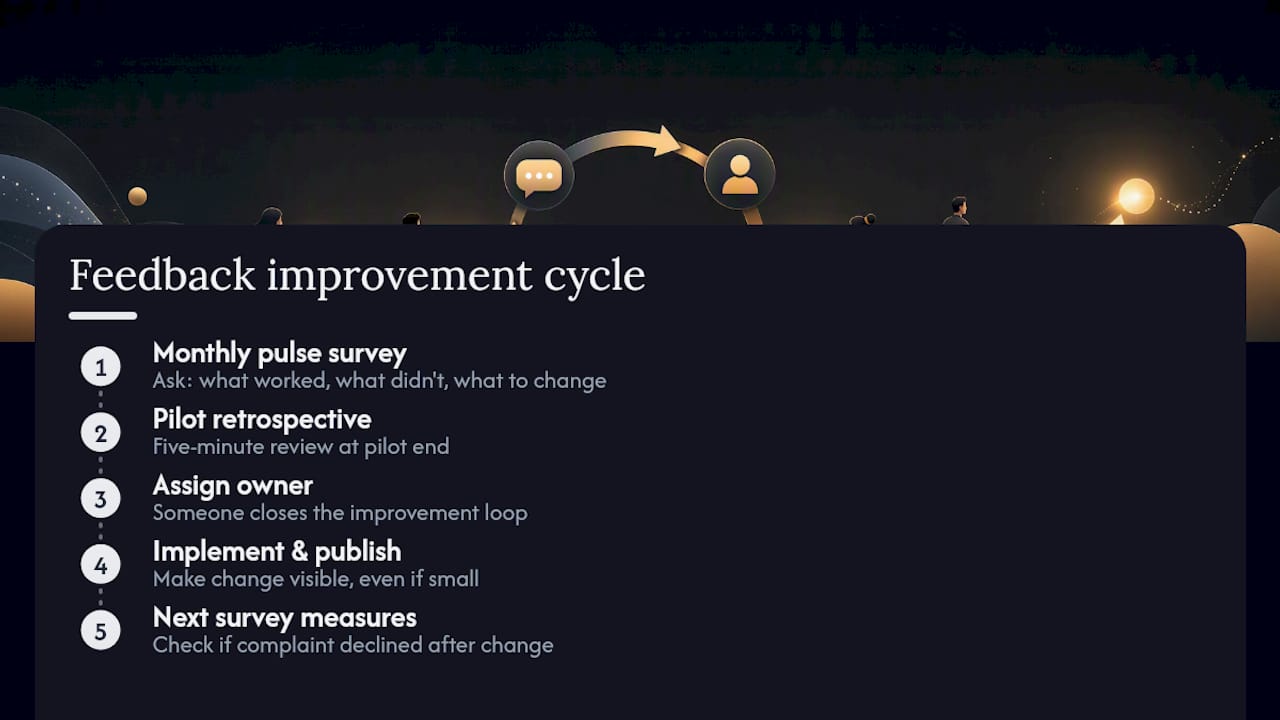
Recognition matters here more than most managers assume. Reporting from Workhuman links frequent, specific recognition to higher engagement and lower absenteeism, which suggests feedback loops work best when they run in both directions, not just manager to employee. Continuous improvement only sticks when someone owns closing the loop. If a pulse survey flags a recurring complaint about tool friction and nothing visibly changes for two cycles in a row, the next survey response rate drops. Publish what changed as a result of feedback, even something small, so the process feels real rather than ceremonial.
Setting Goals and Performance Expectations People Can Actually Hit
Vague goals produce vague effort. “Improve communication” tells nobody what to do differently on Tuesday. The SMART framework (specific, measurable, achievable, relevant, time-bound) fixes that by forcing a goal into a form you can actually check off. “Reduce average email response time to under four hours by the end of the quarter” is something a person can act on immediately.
Goals work best when they cascade: a team-level metric (say, meeting hours per person) breaks down into individual actions (audit your own recurring meetings, decline three this month) that each person can control directly. Review cadence matters as much as the goal itself. A goal set once a quarter and never revisited becomes background noise by week three. A short weekly check against the metric keeps it live.
Encouraging Work-Life Balance and Managing Stress Without Losing Output
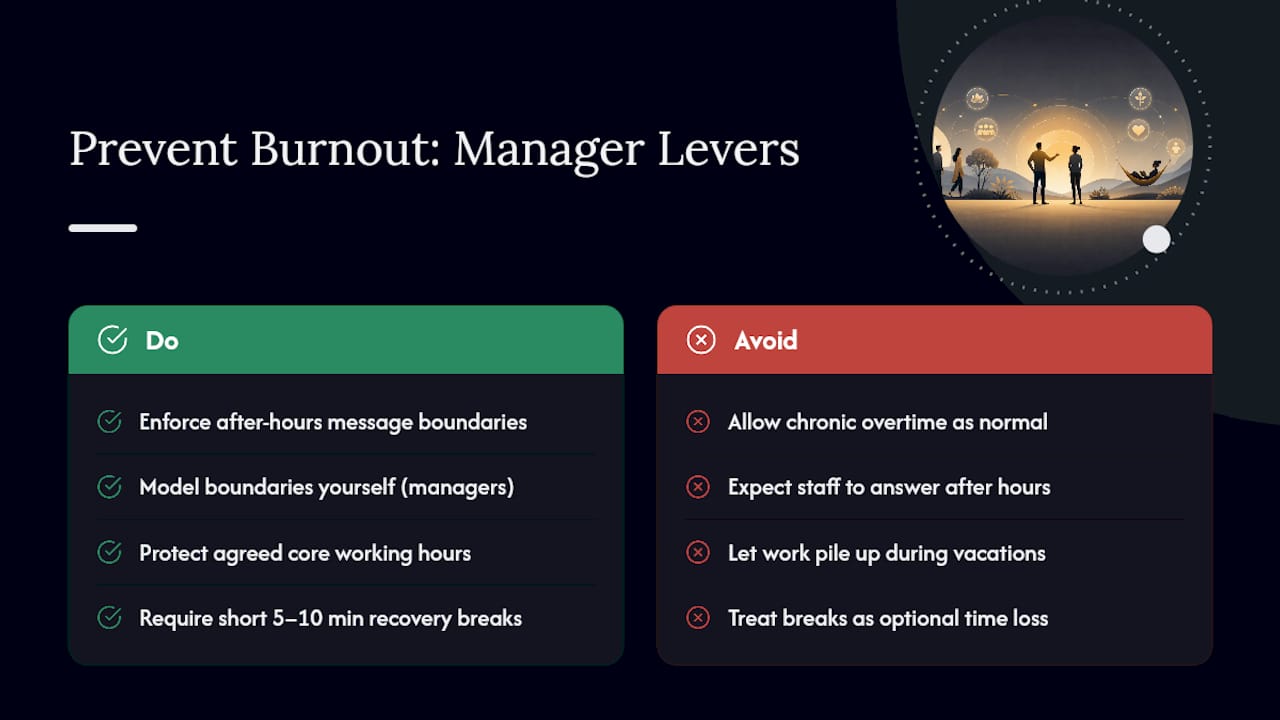
Burnout doesn’t announce itself before it wrecks a quarter’s output. It shows up first as slower turnaround, more errors, and quieter meetings, well before someone actually says they’re overwhelmed. Efficiency gains that come at the cost of chronic overtime don’t hold. They just borrow productivity from next month.
Practical levers here include enforcing real boundaries around after-hours messages (a policy that only works if managers model it themselves), protecting the same core hours discussed earlier so people aren’t guessing when they’re “on,” and treating breaks as part of the work, not a deduction from it. Short recovery periods between focused blocks, five to ten minutes away from a screen, tend to restore attention faster than pushing through fatigue. Encouraging people to actually use vacation time, and covering their workload while they’re out instead of letting it pile up, protects the gains from every other tactic in this article.
The Real Work Is Making It a Habit, Not a Project
Most efficiency advice fails not because the tactics are wrong, but because teams treat them as a one-time initiative instead of an ongoing habit. Run small pilots, two weeks at a time, and let the data decide what sticks rather than defending a plan because it took effort to design. Recognize visible wins early, even small ones, because that’s what gets a skeptical team to try the second experiment after the first one. Pick one tactic from this article, run it for two weeks starting Monday, and measure it honestly. That’s the whole method.
— Optiostation
Sources
- Great companies obsess over productivity, not efficiency (HBR)
- Productivity measures: labor productivity (BLS)
- Hybrid work is often beneficial for companies and workers (Stanford News)
