

The fastest way to increase efficiency and productivity in the workplace is to align work to meaningful outcomes, protect focus time by cutting context switching, and standardize the workflows your team repeats every week. Everything else is secondary. Start with these five quick wins before you read further:
- Cap meetings at 30 minutes and require a written agenda sent at least one hour before.
- Block 2–3 hours of uninterrupted deep work each morning before Slack, email, or standups begin.
- Enforce a single-platform rule for task tracking so nothing lives in someone’s inbox or a side spreadsheet.
- Prioritize the day’s top three tasks the evening before, not the morning of.
- Replace status-update meetings with async written updates posted to a shared channel on a set cadence.
The effort-to-impact ratio here is lopsided in your favor: these five changes cost almost nothing to pilot and tend to produce visible results within two weeks. If you only have time to run one experiment, protect the deep-work block first.
Pro Tip: Before adding any new tool or process, audit your team’s existing efficiency habits to find the quick wins already hiding in your current setup.
Key Takeaways
Protecting focus time, standardizing repeat workflows, and measuring both leading and lagging indicators are the three highest-leverage moves for any manager running an efficiency pilot.
| Point | Details |
|---|---|
| Protect deep-work blocks | Schedule 2–3 hours of uninterrupted focus time each morning before meetings or chat begin. |
| Trim meetings first | Apply the meeting test (async or real-time?) and cut or convert at least one recurring meeting per week. |
| Standardize one workflow | Write one SOP for your team’s most frequent task and store it in a shared knowledge base. |
| Measure leading and lagging | Track focus-block hours and meeting count weekly; track cycle time and error rate monthly. |
| Run a 30-day pilot | Use the week-by-week plan above to test changes at low risk before scaling across the team. |
| Use Optiostation to centralize | Optiostation consolidates task tracking, async updates, and time management in one app for faster pilot setup. |
Table of Contents
- What workplace efficiency and productivity actually mean (and why the difference matters)
- What’s actually blocking your team’s efficiency right now
- Concrete strategies to increase efficiency and productivity in the workplace
- How to choose and configure tools that reduce context switching
- A 30-day pilot plan managers can run starting Monday
- Research-backed signals that sharpen these tactics
- What actually works when you run efficiency experiments
- Optiostation helps you centralize tasks and protect focus time
- Sources
What workplace efficiency and productivity actually mean (and why the difference matters)
Efficiency and productivity are not the same thing, and confusing them is one of the most common reasons improvement efforts stall. Harvard Business Review makes the distinction plainly: efficiency is doing something with less waste, while productivity is doing the right things to generate meaningful output. Effectiveness sits above both: it asks whether the work you’re doing matters at all.
A concrete example: a team that processes 200 expense reports per day with zero errors is highly efficient. But if those reports could be auto-approved by a rule-based system, the team’s efficiency is irrelevant. The productive move is to automate the reports and redirect that time to work only humans can do.
Workhuman frames sustainable productivity as the balance between output, efficiency, and employee wellbeing. That framing matters because organizations that chase efficiency alone tend to squeeze out recovery time, which eventually collapses performance.
Three reasons to care about both:
- Bottom-line impact: Teams that work on the right tasks with fewer handoffs produce more output per hour without adding headcount.
- Employee wellbeing and retention: Sustainable pace reduces burnout, which is one of the leading drivers of voluntary turnover in U.S. workplaces.
- Scalability: Standardized, efficient processes can absorb growth without proportional increases in cost or error rate.
What’s actually blocking your team’s efficiency right now
Most managers assume the problem is motivation or skill. Usually it’s friction. The most common blockers are context switching, unclear goals, poor meeting practices, fragmented tools, and overloaded individuals. Each one is diagnosable.
- Context switching: Every time someone shifts between tasks, apps, or conversations, they pay a cognitive switching cost. That cost compounds across a day.
- Unclear goals: When people don’t know what “done” looks like, they default to staying busy rather than finishing what matters.
- Poor meeting practices: Meetings without agendas, clear owners, or defined outcomes consume calendar space and produce little.
- Fragmented tools: Teams using five different platforms for tasks, chat, documents, and updates spend a surprising portion of their day just navigating between them.
- Overloaded individuals: When one person is the bottleneck for too many decisions, everything queues behind them.
To diagnose which blockers are live on your team, ask these questions in your next one-on-one or team retro:
- What task did you spend the most time on last week that felt low-value?
- How many different apps did you open to complete a single project last week?
- When did you last have two uninterrupted hours to do focused work?
- Which recurring meeting could be replaced by a written update?
- Where do you go when you’re unsure what to prioritize?
The answers will point directly at which tactics from the next section to pilot first.
Concrete strategies to increase efficiency and productivity in the workplace
These tactics are ordered roughly by ease of implementation and speed of visible impact. Start at the top.
1. Protect deep-work blocks with calendar rules.
Schedule a few hours of focus time before 11:00 AM and mark it as busy. No meetings, no Slack, no email. Research on interruptions shows it can take up to 25 minutes to regain full focus after a single disruption. Three interruptions before lunch can cost your team more than an hour of productive capacity, invisibly.
2. Set SMART goals tied to outcomes, not activity.
Vague goals (“improve customer response”) produce vague work. Specific, measurable, time-bound goals (“reduce average first-response time from 6 hours to 2 hours by the end of Q3”) give people a clear finish line. Pair each goal with one leading metric (something you can track weekly) and one lagging metric (the outcome you’re ultimately after). SMART goal examples for time management can help teams write goals that actually drive behavior.
3. Eliminate multitasking by design.
Multitasking doesn’t save time; it distributes attention across tasks and degrades the quality of all of them. The fix is structural: assign one primary task per person per day, and build your team’s workflow so that a new task doesn’t start until the current one reaches a defined checkpoint.
4. Trim and restructure meetings.
Every recurring meeting should pass a simple test: does it require real-time collaboration, or could it be an async update? For meetings that survive that test, cap them at 30 minutes, require a written agenda, assign one decision-maker, and end with written next steps. Meetings without those guardrails tend to expand to fill whatever time is booked.
5. Standardize SOPs for high-frequency work.
Any task your team does more than twice a week deserves a standard operating procedure. SOPs eliminate the invisible decision fatigue that comes from re-solving the same problem repeatedly. Write them once, store them in a shared knowledge base, and review them quarterly. The first SOP you write will feel like overhead. The tenth will feel like infrastructure.
6. Simplify before you automate.
Automating a broken process just produces broken results faster. Before reaching for a workflow automation tool, map the process on paper: identify every handoff, every approval, and every place where work sits idle. Cut what you can, then automate what remains. Workflow automation platforms work best when the underlying process is already clean.
7. Shift to async-first communication.
Default to written, time-stamped updates for anything that doesn’t require an immediate decision. This gives remote and hybrid team members equal access to information and reduces the number of “quick sync” meetings that fragment everyone’s day. Stanford research on hybrid work finds that flexible arrangements deliver mutual benefits when supported by clear norms — async communication is one of those norms.
8. Balance workload and delegate deliberately.
Overloaded team members are a bottleneck, not a resource. Audit task distribution monthly: who is carrying more than their share, and which of those tasks could be delegated or dropped? Delegation isn’t just offloading work; it’s a skill-development tool when matched to the right person.
9. Schedule breaks as part of the workday.
Recovery is not optional. Peer-reviewed research confirms that scheduled breaks and short recovery behaviors improve sustained attention and task performance over time. Build a 10-minute break into every 90-minute work block. The American Psychological Association’s guidance on cognitive recovery reinforces this: stepping away from a task restores the attention needed to return to it effectively.
10. Invest in targeted training.
Skill gaps are a hidden efficiency tax. When someone spends 40 minutes on a task that a trained colleague completes in 10, the gap is a training problem, not a motivation problem. Identify the three skills that would most reduce friction for your team this quarter and build a short, focused development plan around them.
11. Close recognition and feedback loops.
Teams that receive specific, timely feedback on their work adjust faster and stay more engaged. Recognition doesn’t require a formal program: a one-sentence acknowledgment in a team channel after a project closes costs nothing and signals that output is seen. Feedback loops also surface process problems early, before they compound.

Pro Tip: Treat time management techniques as a flexible toolkit, not a single method. High performers often combine time blocking for deep work with Pomodoro intervals for shorter tasks, switching between them based on the work type and their energy level at that hour.
Pro Tip: If you’re using AI or automation tools, set quality guardrails before you scale: a human review checkpoint, a prompt library for consistent outputs, and a defined error rate that triggers a process review. Speed gains without guardrails tend to create quality problems that cost more to fix than the time saved.
How to choose and configure tools that reduce context switching
Pick tools that centralize workflows and reduce handoffs, then standardize their use across the team. The goal is a single pane of glass: one place where tasks live, one place where decisions are recorded, and one place where updates are posted.
Four tool categories and what each should own:
- Task management: owns task creation, assignment, priority, and status. Nothing should live in email or chat that belongs here.
- Async communication: owns written updates, threaded discussions, and file sharing. Slack, Microsoft Teams, or a similar platform works here, but only if notification rules are configured to prevent it from becoming a real-time interruption machine.
- Automation: owns recurring handoffs, approval routing, and data entry that follows a predictable pattern. Keep humans in the loop for anything that requires judgment.
- Knowledge base: owns SOPs, templates, meeting notes, and decisions. If a decision isn’t written down somewhere searchable, it will be re-made.
A short configuration checklist to reduce context switching:
- Turn off all non-urgent notifications during deep-work blocks.
- Set a “notification window” (e.g., 9:00–9:30 AM and 2:00–2:30 PM) for async channel reviews.
- Create one shared task board per team, not per project, so nothing requires switching views to get a full picture.
- Build templates for your three most common project types so setup time drops to minutes.
- Audit integrations quarterly: if two tools don’t talk to each other and your team is manually copying data between them, that’s a process gap.
Collaboration tools configured well reduce the mental overhead of knowing where to look, which is a surprisingly large fraction of the cognitive load in a fragmented-tool environment.
Manager audit questions to run monthly:
- How many platforms did the team use to complete last week’s highest-priority project?
- Where did a task sit idle the longest, and why?
- Which tool is generating the most off-channel workarounds (email threads, side spreadsheets)?
A 30-day pilot plan managers can run starting Monday
Goal: Reduce context switching and meeting load, measure the impact on cycle time and focus time, and decide whether to scale or adjust.
Week 0 (prep, before the pilot starts):
- Survey the team: ask the five diagnostic questions from the blockers section above.
- Baseline your metrics: log average meeting hours per person per week, average task cycle time for one representative workflow, and a one-question wellbeing pulse.
- Pick one workflow to standardize with an SOP.
- Configure your task management tool: one board, templates for your top three project types, notification windows set.
Week 1:
- Launch deep-work blocks on everyone’s calendar (2 hours, mornings, recurring).
- Introduce the meeting test: every meeting owner reviews their recurring meetings and cancels or converts at least one to async.
- Post the new async update template in your team channel and run the first update.
Week 2:
- Run the first SOP on the chosen workflow. Note where it breaks or slows down.
- Hold a 20-minute retro: what’s working, what’s creating friction?
- Adjust notification settings based on what the team reports.
Week 3:
- Add workload balancing: review task distribution and redistribute anything that’s queuing behind one person.
- Introduce the SMART goal check: each team member confirms their top three goals for the week in writing, posted to the task board.
Week 4:
- Measure against baseline: meeting hours, cycle time, wellbeing pulse.
- Run the pilot checklist below.
- Communicate wins and next steps in a brief written summary to the team.
Metrics to track throughout:
- Meeting hours per person per week (target: reduce by at least 20%)
- Percent of workday in deep-work blocks (target: at least 25%)
- Task cycle time for the chosen workflow (target: measurable reduction)
- Error/rework rate on the standardized workflow
- Employee feedback snapshot (one-question pulse: “Did you have enough uninterrupted time to do your best work this week?”)
The Bureau of Labor Statistics productivity resources offer benchmarking data useful for contextualizing your team’s improvements against sector-level trends.
End-of-pilot checklist:
- Did meeting hours drop without a loss of coordination quality?
- Did cycle time on the chosen workflow improve?
- Did the team report more uninterrupted focus time?
- Were there any quality or wellbeing signals that need attention before scaling?
- Which tactic produced the clearest result and should be expanded first?
If three or more of those questions get a “yes,” scale the pilot. If fewer than three, iterate on the weakest point before expanding.
Research-backed signals that sharpen these tactics
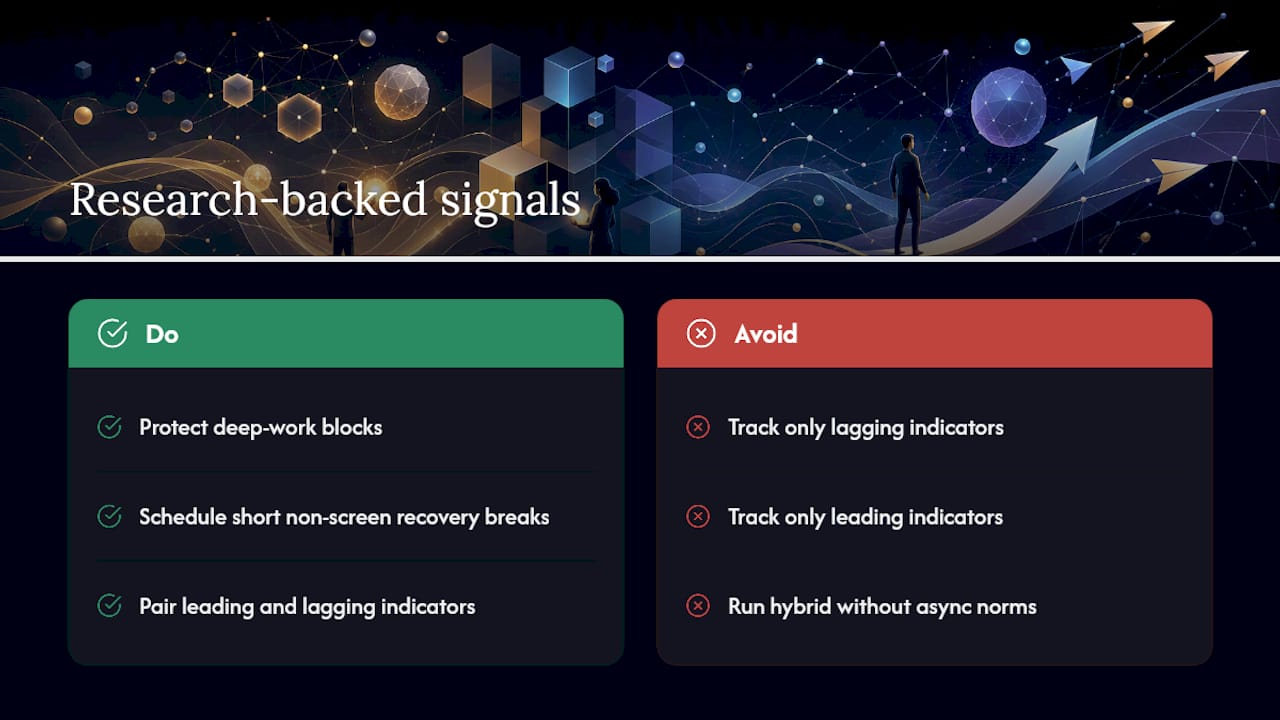
The case for protecting focus time isn’t intuitive until you see the numbers. Studies on workplace interruptions show that regaining full concentration after a single disruption can take up to 25 minutes. In a typical open-office or hybrid environment, where interruptions arrive via chat, email, and colleagues throughout the day, the cumulative cost is substantial. Deep-work blocks aren’t a productivity luxury; they’re a recovery mechanism.
On breaks: the peer-reviewed evidence is consistent. Scheduled recovery behaviors, including short walks, non-screen breaks, and deliberate pauses between tasks, improve sustained attention and reduce the performance decline that sets in during long uninterrupted work sessions.
On hybrid work: Stanford’s research finds that well-designed hybrid arrangements benefit both companies and workers, but the “well-designed” qualifier carries most of the weight. Async norms, clear availability windows, and documented decisions are what separate a productive hybrid setup from a chaotic one.
A note on measurement: pair leading indicators (focus-block hours, meeting count, SOP adoption rate) with lagging indicators (cycle time, error rate, retention). Leading indicators tell you whether the inputs are changing; lagging indicators tell you whether it’s working. Tracking only lagging indicators means you’ll wait months to learn whether a tactic is working. Tracking only leading indicators risks optimizing inputs that don’t move outcomes. Use both, and review them together in your monthly team retro.
What actually works when you run efficiency experiments
The fastest gains in most efficiency pilots come not from new tools but from removing friction that the team has learned to work around.
The caution worth naming: efficiency gains can mask early burnout if you’re not watching the right signals. A team that completes more tasks per week while reporting less satisfaction or more stress isn’t more productive in any sustainable sense. Watch the wellbeing pulse alongside the output metrics, and treat a divergence between the two as a signal to slow down and investigate before scaling.
Optiostation helps you centralize tasks and protect focus time
A single, well-configured work management app can cut context switching and keep decision records in one place, which is the infrastructure that makes every tactic in this guide easier to sustain.

Optiostation is built for exactly this: task management, time tracking, and team coordination in one app, without the overhead of enterprise platforms that take months to configure. As your second-in-command, Optio handles the operational layer so you can stay focused on the work that actually moves outcomes.
What to look for in any work management app you pilot:
- Native integrations with your existing communication and calendar tools
- Templates for recurring project types (cuts setup time to minutes)
- Async update features that replace status meetings
- Lightweight automations for routine handoffs
- Analytics that surface cycle time and workload distribution
Ready to run your 30-day pilot with the right infrastructure? Start with Optiostation’s task management guide or explore how to keep track of tasks at work with practical templates you can use from day one.
Sources
These sources back the research callouts throughout this guide:
Recommended
- Work efficiency tips: proven strategies for students – Optio Station: Best Project Management App for Prioritization
- 7 Essential Productivity Hacks for Students and Professionals – Optio Station: Best Project Management App for Prioritization
- 7 Types of Productivity Techniques Every Centurion Should Know – Optio Station: Best Project Management App for Prioritization
- 10 Ways to Improve Efficiency for Students and Pros – Optio Station: Best Project Management App for Prioritization
