

TL;DR:
- A semester planning workflow consolidates all deadlines, tasks, and goals into a living system that guides consistent progress. Regular weekly reviews, milestone scheduling, and task prioritization help students stay organized and avoid midterm setbacks. Personalizing and maintaining the system ensures long-term effectiveness and reduces stress throughout the semester.
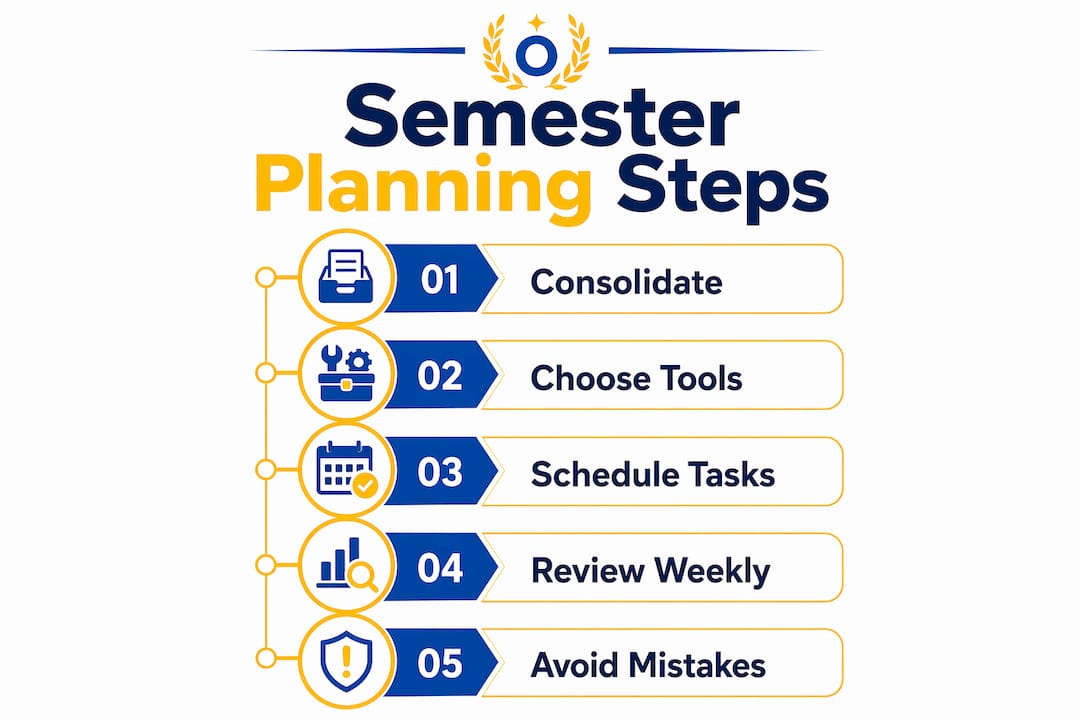
A semester planning workflow is the structured process of organizing all academic deadlines, tasks, and goals into one cohesive system that drives consistent progress from the first week to finals. Most students treat planning as a one-time event. The ones who actually finish strong treat it as a living practice. Tools like Notion, Google Calendar, and AI syllabus parsers have made this process faster and more precise than ever. Getting your semester organization strategies right in week one sets the tone for everything that follows.
What does a solid semester planning workflow actually require?
The foundation of any effective semester planning workflow is consolidation. Every syllabus, every course schedule, and every professor’s stated expectation needs to land in one place before you do anything else. Efficient students spend 30 to 60 minutes per course during the first week transferring all deadlines into a master calendar. That time investment pays back every week for the next four months.
Before you open any app, gather your materials:
- All course syllabi in PDF or printed form
- Lab schedules, practicum dates, and any supplemental course documents
- Your institution’s academic calendar (add-drop deadlines, holidays, reading days)
- Login access to your learning management system (Canvas, Blackboard, or Moodle)
Once you have everything in one place, choose your tools. A linked Notion database covering courses, assignments, and notes gives you a complete system in about 30 minutes of setup. Google Calendar works well for time-blocking and visual scheduling. SyllabusAI and similar AI parsers extract deadlines directly from PDF syllabi, cutting manual entry time significantly. If you prefer analog methods, a physical planner paired with a single digital calendar for shared visibility is a legitimate combination.
The right tool is the one you will actually open every day. A $40 paper planner beats an abandoned Notion workspace every time. Check out this student tool comparison if you want a side-by-side breakdown before committing to a setup.

Pro Tip: Run your syllabi through an AI parser like SyllabusAI before manually entering anything. It catches dates you would likely skim past, including lab deadlines and participation cutoffs that rarely appear in bold.
How to build your semester calendar step by step
Building the calendar is where most students either win or lose the semester. The academic scheduling process works best when you treat it as a construction project with defined phases, not a single afternoon of typing.
- Extract everything from each syllabus. Pull every assignment, quiz, exam, lab report, presentation, and discussion post. Do not filter yet. Get it all out.
- Enter items into your master calendar or database. Color-code by course. In Notion, use a property tag. In Google Calendar, use separate course calendars with distinct colors. Visual separation matters when you are scanning a busy week.
- Add milestone dates, not just due dates. Working backward from major deadlines means scheduling the research phase, the outline stage, and the draft review as separate calendar events. A 10-page paper due November 14 should have a research-complete date of November 1 and a draft-complete date of November 8.
- Apply a prioritization framework. A Priority Matrix separates high-impact tasks from urgent but low-value busywork. A 5% participation grade does not deserve the same planning weight as a midterm worth 30%.
- Block study time using credit-hour math. Plan 2 to 3 hours of study per credit hour each week. A 15-credit semester means roughly 30 to 45 hours of weekly academic work outside class. Seeing that number forces honest scheduling.
Here is how milestone planning compares to simple due-date tracking:
| Approach | What you track | Risk level |
|---|---|---|
| Due-date only | Final submission date | High. No buffer for revisions or setbacks. |
| Milestone planning | Research, draft, review, submit | Low. Problems surface early, not the night before. |
Pro Tip: Segment your weekly task list into three blocks: must-complete, should-complete, and stretch goals. This prevents the paralysis that comes from staring at 20 undifferentiated tasks on a Monday morning.
How do you maintain a weekly review routine that actually sticks?
Setting up the calendar is the easy part. Maintaining it is where most semester organization strategies collapse. A 30-minute weekly review, done consistently every Sunday, is the single highest-return habit in academic planning. It takes less time than one episode of anything you are currently watching.
Here is what that 30 minutes should cover:
- Update the master calendar. Professors change deadlines. New assignments get added mid-semester. Your calendar is only accurate if you refresh it weekly.
- Review last week’s progress. What did you complete? What got pushed? Honest assessment here prevents the slow accumulation of deferred tasks that becomes a crisis in week 10.
- Set specific goals for the coming week. Active goal-setting means writing “finish Chapter 7 reading and draft thesis statement” rather than “work on history paper.” Vague goals produce vague results.
- Identify your three highest-priority tasks. Not ten. Three. Knowing your top three before Monday morning removes the decision fatigue that kills productive mornings.
- Schedule one retrieval practice session per course. Retrieval practice, testing yourself on material rather than re-reading it, is one of the most research-supported study techniques available. Building it into your weekly plan makes it a default, not an afterthought.
Pairing your Sunday review with a consistent morning routine on weekdays reinforces the structure your planning creates. Predictability compounds. The more consistent your review habit, the less mental energy each week requires.
Pro Tip: Treat your Sunday review as a non-negotiable calendar block, not a flexible intention. Schedule it the same way you schedule a class. Missing it once is fine. Missing it three weeks in a row means your plan is already outdated.
What are the most common semester planning mistakes to avoid?
Even students with good intentions make the same mistakes. Recognizing them early is the difference between a plan that holds and one that quietly falls apart by midterms.
- The “set and forget” trap. A semester plan is not a document you file away. Treating it as a living workflow with weekly updates is the only way to prevent missed deadlines when professors adjust the schedule or new assignments appear.
- Confusing task collection with task completion. Having a beautiful Notion database full of assignments does not mean you are making progress. Your system needs clear status labels: Not Started, In Progress, Submitted, Graded. Without status tracking, collecting tasks feels productive while actual work stalls.
- Deleting completed tasks. Archiving finished work with a “Completed” status rather than deleting it preserves your audit trail. You can see what you have done, reference past submissions, and track your own patterns across the semester.
- Letting workspace clutter accumulate. A cluttered digital workspace creates the same cognitive drag as a cluttered physical desk. Weekly archiving of completed items keeps your active view clean and your attention focused on what is actually due.
A plan that lives only in your head is not a plan. It is anxiety with good intentions. The moment you externalize it into a system, you stop managing stress and start managing time.
Pro Tip: Archive completed tasks at the end of each week rather than at the end of the semester. It takes 90 seconds and keeps your workspace from becoming a graveyard of finished work mixed with active priorities.
Key takeaways
A semester planning workflow succeeds when it combines upfront consolidation, milestone-based scheduling, and a non-negotiable weekly review into one consistent system.
| Point | Details |
|---|---|
| Consolidate in week one | Spend 30 to 60 minutes per course entering all deadlines into a master calendar before the semester gains momentum. |
| Plan milestones, not just due dates | Schedule research, draft, and review stages separately so problems surface early rather than the night before submission. |
| Review every week without exception | A 30-minute Sunday review keeps your calendar accurate and your priorities clear for the week ahead. |
| Archive, never delete | Completed tasks should be archived with a status label to preserve your progress record and reduce workspace clutter. |
| Use a prioritization framework | A Priority Matrix separates high-impact work from low-value busywork so your time goes where it actually matters. |
Why most planning advice misses the point
At Optiostation, we have watched a lot of students build beautiful planning systems that collapse by week four. The problem is almost never the tool. It is the assumption that setup equals maintenance.
The psychological payoff of externalized planning is real. When every deadline lives in a system outside your head, your brain stops running background anxiety loops about what you might be forgetting. That cognitive relief is not a side benefit. It is the whole point. But it only works if the system stays current.
We also think the digital versus analog debate is mostly a distraction. The students who succeed are not the ones using the most sophisticated app. They are the ones who open their system every single week and do the 30-minute review without negotiating with themselves about it. A Google Calendar with consistent weekly updates outperforms an abandoned Notion workspace with 47 linked databases.
The advice we give every Centurion is this: personalize your workflow to match how you actually think, not how you wish you thought. If you are a visual person, color-code everything. If you work better with lists, skip the Kanban board. The system that fits your natural behavior is the one you will maintain. And maintenance is the only thing that separates a plan from a result.
— Optiostation
Take command of your semester with Optiostation
Optiostation is built for exactly this kind of work. As your Optio, your second-in-command, it handles the structure so you can focus on execution. The app combines task management, team coordination, and time tracking in one place, purpose-built for students and young professionals who need a system that moves with them.

Whether you are managing five courses, a part-time job, and a group project simultaneously, or just trying to stop missing small deadlines that add up, Optiostation gives you the command structure to stay ahead. Explore the full breakdown of features in our task management software guide and see how Centurions are using it to take control of their semesters from day one. You can also dig into our guide on managing tasks effectively for students and young professionals who need a system that scales.
FAQ
What is a semester planning workflow?
A semester planning workflow is the structured process of consolidating all course deadlines, assignments, and goals into a centralized system and maintaining it through consistent weekly reviews. It combines calendar management, task prioritization, and regular updates to keep academic progress on track.
How long does it take to set up a semester plan?
Efficient students spend 30 to 60 minutes per course during the first week of the semester entering deadlines into a master calendar. A full setup for a five-course semester typically takes two to four hours using tools like Notion or Google Calendar.
What student planning tools work best for semester organization?
Notion, Google Calendar, and AI syllabus parsers like SyllabusAI are among the most effective student planning tools for semester organization. The best tool is the one you will open and update every week, not the one with the most features.
How do I avoid falling behind on my semester plan mid-semester?
Treat your semester plan as a living workflow with a 30-minute weekly review every Sunday to update deadlines, assess progress, and reset priorities. A “set and forget” approach is the primary reason well-built plans fail by midterms.
Should I use a Priority Matrix for academic planning?
A Priority Matrix is one of the most effective frameworks for academic planning because it separates high-impact tasks from urgent but low-value work. It prevents students from spending disproportionate time on minor assignments while major exams or projects go under-prepared.
Recommended
- How to Prioritize Assignments Effectively for Success – Optio Station: Best Project Management App for Prioritization
- Command Log – Optio Station: Best Project Management App for Prioritization
- Why Plan Schedules: Key to Student Success – Optio Station: Best Project Management App for Prioritization
- Schedule Management Plan Template: Boosting Productivity – Optio Station: Best Project Management App for Prioritization
