

TL;DR:
- Workforce management software automates scheduling, time tracking, and compliance tasks, reducing errors and costs. It improves efficiency by enabling real-time data, predictive staffing, and employee self-service features. The software’s primary value lies in preventing errors, disputes, and legal violations through standardized policies and proactive management.
Workforce management software is defined as a digital platform that centralizes workforce planning, scheduling, time tracking, labor compliance, and payroll integration into one system. Known in the industry as WFM software, it functions as a labor-execution system connecting staffing decisions directly to payroll accuracy and regulatory compliance. Tools like ADP Workforce Now and Liveforce represent the category well. For managers and HR professionals, understanding what is workforce management software means recognizing it as the operational backbone of any team running complex schedules, variable shifts, or distributed labor.
What is workforce management software and what does it do?
Workforce management software automates the operational tasks that consume manager time and create costly errors when done manually. At its core, WFM software handles four functions: scheduling, time and attendance tracking, leave management, and labor compliance enforcement. These functions work together rather than in isolation. A schedule change in the system triggers an automatic update to time tracking, which feeds directly into payroll calculations.
ADP defines WFM software as distinct from general HR tools because it enforces complex shift rules and real-time scheduling accuracy at the operational level. That distinction matters. Most HR platforms record what happened to an employee. WFM software controls what happens next, in real time, across an entire workforce.
The software also serves as a compliance engine. It tracks overtime thresholds, enforces break rules, and flags scheduling violations before they become legal liabilities. For industries like healthcare, retail, and hospitality, that compliance layer is not optional.
What features are essential in workforce management software?
The core features of workforce management separate functional tools from genuinely useful ones. Every credible WFM platform includes the following capabilities:
- Intelligent scheduling and rostering: Automated shift creation based on availability, skills, and labor demand forecasts
- Time and attendance tracking: Digital clock-in systems, often biometric or mobile, that feed directly into payroll
- Leave and absence management: Centralized requests, approvals, and balance tracking with time off tracking built in
- Payroll integration: Direct data transfer to payroll systems, reducing manual entry and errors
- Compliance monitoring: Automated enforcement of labor laws, overtime rules, and union agreements
- Real-time analytics and labor forecasting: Dashboards showing live labor costs, coverage gaps, and productivity metrics
Labor forecasting deserves special attention. Platforms like Genesys use predictive algorithms to align staffing with demand, reducing overstaffing during slow periods and understaffing during peak demand. That predictive alignment is one of the most overlooked benefits in the category.
Real-time dashboards give managers strategic visibility into labor costs, enabling faster operational decisions when budgets are under pressure. Visibility at this level turns scheduling data into a management tool, not just a record.

Pro Tip: Standardize your pay rules and scheduling policies before you configure any WFM software. Automating a broken process only makes errors faster and harder to trace.
How does workforce management software improve productivity and reduce costs?
The financial case for WFM software is direct. Organizations implementing WFM solutions reduce labor costs by 5–18%, experience up to 40% faster scheduling times, and see 25% fewer payroll errors. Nucleus Research calculates a $12.24 return for every $1 spent on WFM. Managers using these platforms reclaim up to 7.5 hours per week previously lost to manual scheduling tasks. That time compounds across a management team over a full year.
Turnover is the hidden cost most managers underestimate. Replacing an hourly worker costs between 50% and 200% of that worker’s annual salary. Inconsistent scheduling and poor communication are the primary drivers of hourly worker turnover. WFM software addresses both by giving workers predictable schedules and direct communication channels through mobile apps.
Self-service features reduce scheduling conflicts at the source. When employees can swap shifts, request time off, and check their schedules from a mobile app, the volume of manager interventions drops sharply. Mobile-first self-service apps raise adoption rates and cut scheduling administration time by empowering workers to manage their own coverage directly.
Organizations using WFM software report up to 40% faster scheduling and 25% fewer payroll errors, with Nucleus Research documenting a $12.24 ROI for every $1 invested.
The cascade effect of effective WFM is real. When staffing aligns with customer demand, service quality holds steady, overtime costs drop, and managers spend less time firefighting. That chain reaction from better scheduling to better service outcomes is why workforce optimization software has moved from a nice-to-have to a standard operational tool.
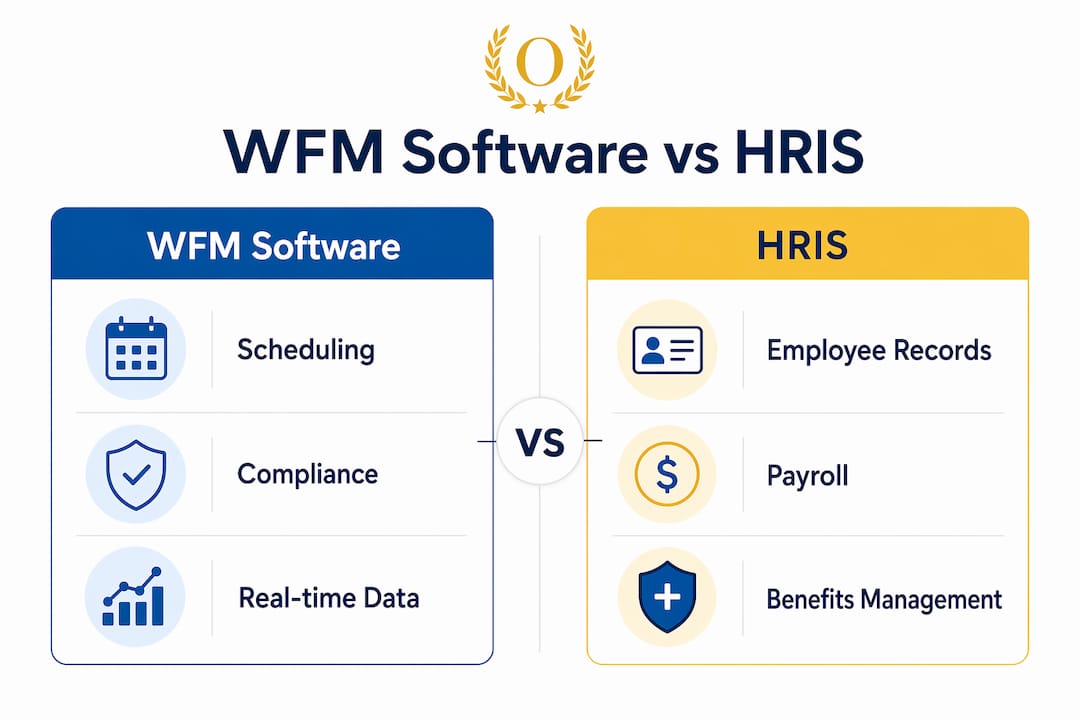
How does workforce management software differ from HR systems?
This is the most common point of confusion for managers evaluating tools. WFM software and HR information systems (HRIS) solve different problems. Mixing them up leads to buying the wrong tool.
| Feature | WFM Software | HRIS/HRMS |
|---|---|---|
| Primary focus | Real-time operational scheduling and compliance | Employee records, benefits, and experience |
| Scheduling complexity | Complex shift rules, demand forecasting, rostering | Basic calendar or absence tracking only |
| Compliance enforcement | Automated rule engine for labor laws and overtime | Policy documentation, not enforcement |
| Payroll connection | Direct, real-time data feed | Periodic batch exports |
| Real-time visibility | Live labor cost dashboards | Historical reporting |
| Best for | Shift-based, variable, or distributed workforces | All employee types, lifecycle management |
WFM software focuses exclusively on operational optimization rather than employee experience. An HRIS like Workday or BambooHR manages the full employee lifecycle, from hiring to offboarding. WFM software manages what happens on the floor, on the shift, and on the clock.
HR systems often lack the complex scheduling and compliance rule engines that WFM platforms provide. A retail chain running 200 part-time employees across three locations needs shift-rule enforcement and demand-based rostering. An HRIS cannot deliver that. The two systems are complementary, not interchangeable. Many organizations run both, with WFM handling operational execution and HRIS handling employee records and benefits.
Best practices for implementing workforce management software
Implementation quality determines whether WFM software delivers its promised returns or becomes an expensive source of friction. The most common failure mode is automating existing broken processes. Standardizing scheduling and pay rules before configuration is the single most important step managers skip.
Start with a policy audit. Document every pay rule, overtime threshold, and scheduling constraint your team currently uses. Identify inconsistencies and resolve them before they get baked into the system. This work is unglamorous but it separates smooth rollouts from costly rework six months later.
Deploy incrementally rather than all at once. Start with one location, one department, or one shift type. Measure results, gather feedback, and adjust before expanding. This approach reduces the risk of organization-wide disruption and gives your team time to build confidence with the new system.
Training must reach frontline employees, not just managers. The self-service impact on adoption depends entirely on whether hourly workers know how to use the mobile app. A well-designed onboarding session for employees pays back in reduced scheduling admin within weeks. You can also build a solid foundation by using a schedule management plan template to align your team before the software goes live.
Pro Tip: Give employees access to shift-swapping and time-off requests through the mobile app from day one. Early adoption of self-service features cuts manager workload faster than any other single configuration choice.
Key Takeaways
Workforce management software delivers measurable labor cost reductions, faster scheduling, and fewer payroll errors when implemented with clean policies and mobile-first employee access.
| Point | Details |
|---|---|
| WFM is a labor-execution system | It connects scheduling decisions directly to payroll accuracy and compliance enforcement. |
| Core features drive ROI | Scheduling, time tracking, payroll integration, and real-time analytics are non-negotiable features. |
| Cost savings are documented | Nucleus Research shows a $12.24 return per $1 spent, with 5–18% labor cost reductions. |
| WFM and HRIS are not the same | WFM handles operational rules and shift complexity; HRIS manages employee records and experience. |
| Clean policies before automation | Standardizing pay rules before configuration prevents costly errors and user friction at launch. |
The real value of WFM software is what it prevents
At Optiostation, we have watched managers treat WFM software as a scheduling tool and miss most of its value. The real payoff is not faster schedules. It is the errors, disputes, and compliance violations that never happen.
Manual scheduling creates a paper trail of guesses. A manager builds a shift based on memory, a spreadsheet, and a few text messages. That process generates overtime violations, missed breaks, and payroll discrepancies that take hours to untangle. WFM software removes the guesswork from the equation entirely.
The evolution from manual to digital workforce management is not just a technology upgrade. It is a shift in how managers spend their time. When the system handles rule enforcement and schedule generation, managers move from reactive firefighting to proactive planning. That shift changes the quality of decisions made at every level of the operation.
One observation worth sharing: organizations that invest in real-time labor dashboards gain a competitive edge that goes beyond cost savings. When a manager can see live labor cost data against budget, they can make staffing adjustments in the same shift rather than discovering the overrun on a Friday payroll report. That speed of response is what separates high-performing operations from average ones.
The uncomfortable truth about WFM implementation is that the software rarely fails. The process around it does. Teams that skip the policy standardization step and rush to go live are the ones writing negative reviews six months later. The technology works. The discipline to prepare for it is what most organizations underestimate.
— Optiostation
Optiostation and workforce coordination go hand in hand
Scheduling software handles the shift. Task management handles everything inside it. Optiostation is built for exactly that gap, giving managers and their teams a mobile-first tool for task prioritization, team coordination, and daily execution.
When your WFM platform sets the schedule, Optiostation keeps the work inside that schedule organized and visible. The best task management software guide on Optiostation walks through the top tools for teams that need more than a calendar to stay productive. For managers building tighter workflows, the how to keep track of tasks guide covers practical methods for maintaining task visibility across a distributed team. Workforce coordination does not stop at the schedule. Optiostation handles what comes next.
FAQ
What is workforce management software used for?
Workforce management software is used to automate scheduling, time tracking, leave management, payroll integration, and labor compliance. It connects staffing decisions to real-time operational data and cost visibility.
How is WFM software different from payroll software?
WFM software manages scheduling and time data before payroll runs. Payroll software processes that data into payments. The two systems are complementary, with WFM feeding accurate hours and rules into the payroll calculation.
What industries benefit most from workforce management tools?
Retail, healthcare, hospitality, and logistics benefit most because they run variable shifts, complex compliance requirements, and large hourly workforces. Any organization with shift-based staffing gains measurable value from WFM tools.
How long does it take to implement workforce management software?
Implementation timelines vary by organization size and complexity, but most mid-size deployments take 8–16 weeks. Teams that standardize pay rules and scheduling policies before configuration complete rollouts faster and with fewer post-launch issues.
Does workforce management software reduce turnover?
Yes. Consistent scheduling and mobile self-service features directly address the primary reasons hourly workers leave. Replacing an hourly worker costs 50–200% of annual salary, making turnover reduction one of the strongest financial arguments for WFM adoption.
Recommended
- Best time off tracking software to boost productivity – Optio Station: Best Project Management App for Prioritization
- Employee Productivity Tracking Software for Managers – Optio Station: Best Project Management App for Prioritization
- What Is Time Management Software? Complete Overview – Optio Station: Best Project Management App for Prioritization
- Understanding Time Management Trends 2025 – Optio Station: Best Project Management App for Prioritization
