

Project scheduling is the process of turning a list of tasks into a time-phased plan with dates, dependencies, and resource assignments so a team knows exactly what happens when. It sequences work, estimates how long each piece will take, and locks in milestones everyone can be held to. The core benefit is simple: it turns “we should finish sometime in April” into a plan you can actually manage, track, and defend when things slip.
TL;DR:
- Critical Path Method is ideal for projects with predictable durations and dependencies, while PERT and Monte Carlo fit uncertain estimates in complex schedules.
- Critical Chain scheduling helps manage shared resources by adding buffers, reducing delays caused by resource conflicts.
- Building an effective schedule requires defining scope, sequencing tasks accurately, assigning resources realistically, and validating with stakeholders before baselining.
- Updating the schedule weekly and tracking variances against the baseline ensures project progress remains accurate and helps catch delays early.
- Using visual tools like Gantt charts and resource histograms improves clarity and helps prevent overbooking or overlooked dependencies.
Table of Contents
- What Is Project Scheduling and What Goes Into a Schedule?
- Common Scheduling Techniques and When to Use Them
- How to Create a Project Schedule Step by Step
- The Views That Make a Schedule Usable
- Keeping the Schedule Accurate While the Project Runs
- When the Schedule Slips: Optimization and Recovery Tactics
- A Six-Week Group Project, Scheduled the Right Way
- Why Scheduling Discipline Pays Off Early in a Career
- Build and Track Your Schedule Without Fighting a Spreadsheet
- Sources
- FAQ
What Is Project Scheduling and What Goes Into a Schedule?
A project schedule is a timetable showing the forecast start and finish dates for every activity in a project, according to the Association for Project Management. That single document, or model, ties together everything a team needs to know about timing: who’s doing what, in what order, and by when. The Project Management Institute goes a step further, describing the schedule model as a living, dynamic representation that integrates activities, resources, and relationships, one that should be baselined and updated regularly rather than built once and forgotten, per the Practice Standard for Scheduling.
Every solid schedule, whether it’s running a product launch or a six-week class project, contains the same building blocks:
- Work breakdown structure (WBS): the hierarchy that splits a project into manageable work packages before anyone talks about dates.
- Durations vs. effort: how long a task takes on the calendar (duration) isn’t the same as how many work hours it consumes (effort). A task can take five calendar days but only six hours of actual work.
- Dependencies: most tasks follow a finish-to-start pattern (Task B can’t start until Task A ends), but start-to-start and finish-to-finish relationships show up too, especially when work runs in parallel.
- Milestones: zero-duration checkpoints, like “draft submitted” or “client sign-off”, that mark progress without consuming time themselves.
- Resource assignments: who’s doing the work, and whether they’re actually available when the schedule says they’re needed.
- Constraints and assumptions: fixed deadlines, blackout dates, or “we assume the client responds within 48 hours” notes that shape the plan around real-world limits.
Once all of that is set, you baseline it. A schedule baseline is the approved version you compare everything against later. Without one, you have no way to say whether you’re actually behind, which is a point the PMI standard makes explicitly: you can’t measure slippage against a plan that keeps quietly changing shape.
Common Scheduling Techniques and When to Use Them
Not every project needs the same scheduling method, and picking the wrong one wastes time you don’t have. The technique should match how predictable your work actually is.
Critical Path Method (CPM) works best for deterministic projects where task durations are known and dependencies are clear. It calculates the longest sequence of dependent tasks, the “critical path”, which sets the minimum possible project duration. Anything on that path that slips pushes the whole finish date back.
PERT (Program Evaluation and Review Technique) and Monte Carlo simulation fit projects with real uncertainty in estimates. Instead of one duration guess per task, PERT uses optimistic, pessimistic, and most-likely estimates to generate a probability-weighted forecast.
Critical Chain Scheduling addresses a problem CPM ignores: shared resources. When the same person or machine is needed on multiple tasks, Critical Chain builds in buffers to protect the delivery date from resource conflicts rather than just task dependencies.
Rolling wave and agile release planning solve a different problem entirely: planning far into the future when you simply don’t have the detail yet. You plan the next two to four weeks in fine detail and keep everything further out at a rougher level, refining it as you go.
- Deterministic, well-understood work → CPM
- High uncertainty in estimates → PERT or Monte Carlo
- Shared or constrained resources → Critical Chain
- Long projects with evolving scope → rolling wave or agile release planning
Pro Tip: Don’t force one technique on an entire project. Plenty of real schedules blend CPM for the critical path with rolling wave for far-out phases nobody has scoped yet.
The choice really does depend on the environment: deterministic projects favor CPM, projects with real uncertainty favor PERT or rolling wave, and resource-constrained work favors Critical Chain, according to Galorath’s breakdown of scheduling methods.
How to Create a Project Schedule Step by Step
Building a schedule isn’t a single task, it’s a sequence, and skipping a step early usually shows up as a mess later. Here’s the order that actually works, drawn from standard practice in both PMI and APM-aligned methodology.
- Define scope and build the WBS. Break the project down into deliverables, then keep splitting until you reach work packages small enough that one person can own each one. Skip this and every later estimate is just a guess dressed up as a number.
- Break deliverables into activities and estimate durations. Each work package becomes one or more tasks. Estimate how long each takes, and be honest about whether you’re estimating calendar time or actual work hours, since the two rarely match.
- Identify dependencies and sequence activities. Map which tasks must finish before others can start. This is where you’ll find your critical path, the chain of tasks with zero slack.
- Assign resources and check availability. A task assigned to someone who’s already booked solid for that week isn’t scheduled, it’s wishful thinking. Level resources across overlapping tasks before you commit to dates.
- Choose a visualization and build the schedule in a tool. A Gantt chart, a network diagram, or a simple calendar view, whatever fits the audience. Then set the baseline.
- Validate with stakeholders and run what-if scenarios. Walk the plan past everyone who has a stake in it, stress-test a few “what if this task runs long” scenarios, then finalize and lock the baseline.
Pro Tip: Run step 6 before you announce a deadline to anyone outside the project team. It’s far cheaper to adjust a plan than to walk back a date you already promised.
This sequencing, from WBS through baseline, follows the same logic laid out in practical breakdowns of the project scheduling process and mirrors the six-step approach many project managers use. If you want a ready-made starting point instead of building the structure from scratch, a schedule management plan template can save you the setup work on steps 1 through 3.
The Views That Make a Schedule Usable
A schedule nobody can read is a schedule nobody follows. The right visualization depends on who’s looking at it and why.
- Gantt charts remain the default for stakeholder communication. They show tasks as horizontal bars across a timeline, so anyone can glance at one and see what’s overdue.
- Network or precedence diagrams matter less for daily communication and more for the math behind the schedule. They’re how you actually calculate the critical path and float.
- Resource histograms and leveling views show whether any single person is overbooked across multiple tasks in the same week, before that becomes a crisis instead of a chart.
- Baseline vs. working schedule comparisons let you see, at a glance, how far current reality has drifted from the original plan.
Good scheduling software should offer dependency tracking, automatic resource leveling suggestions, and built-in variance reporting against the baseline. If you’re evaluating project management software for this purpose, those three features matter more than a slick interface. Teams who’d rather build this in spreadsheets than adopt new software can lean on a set of Excel schedule templates instead.
Keeping the Schedule Accurate While the Project Runs
A schedule that isn’t updated after week one isn’t a schedule anymore, it’s a historical document. The baseline stays fixed as your reference point, but the working schedule needs continuous attention, and the PMI standard treats it as a living model for exactly this reason.
- Update cadence: weekly updates work for most projects; daily updates make sense only for short, high-intensity sprints where a single missed task can throw off the whole week.
- Ownership: task owners report their own progress; the scheduler or project lead rolls it up and checks the math against the critical path.
- Variance analysis: compare actual progress to the baseline regularly, and reforecast the remaining work rather than just noting that you’re “a bit behind.”
- Change control: not every delay needs a rebaseline. Save that for scope changes or delays serious enough that the original baseline no longer serves as a useful comparison point.
- Lessons learned: at project close, the gap between baseline and actual is data. Use it to calibrate estimates on the next project instead of just filing it away.
In many construction and engineering settings, this update discipline is formal enough that a dedicated scheduler role exists just to maintain it, a standardization pushed heavily by groups like AACE and PMI.
When the Schedule Slips: Optimization and Recovery Tactics
Two levers exist for pulling a late schedule back on track, and they carry different costs. Crashing means adding resources to shorten a task, which raises cost but not necessarily risk. Fast-tracking means overlapping tasks that would normally run in sequence, which speeds things up but increases risk since work starts before its prerequisite is fully confirmed. Both moves should follow a look at the critical path first, since compressing a task with slack does nothing for the finish date.
Buffers help more quietly. Feeding buffers protect the critical path from delays in non-critical chains feeding into it, while project buffers sit at the very end to absorb overall uncertainty.
- Crashing raises cost; use it when time matters more than budget.
- Fast-tracking raises risk; use it when tasks can genuinely tolerate overlap.
- Feeding buffers guard the critical path from side-chain delays.
- Smaller work packages and visible accountability reduce Parkinson’s Law and student syndrome, the tendency to stretch work to fill available time and delay starting until a deadline looms, both common drivers of slippage.
Pro Tip: If a task keeps finishing exactly on its deadline no matter how much lead time it gets, that’s Parkinson’s Law in action. Shrink the task or shorten the deadline, not both at once.
A Six-Week Group Project, Scheduled the Right Way
Here’s what a compact, real schedule looks like for a six-week student group project: Week 1, define scope and assign roles. Weeks 2 through 3, research and draft sections (parallel tasks, each owned by one person). Week 4, milestone: first full draft compiled. Week 5, revisions and peer review. Week 6, milestone: final submission.
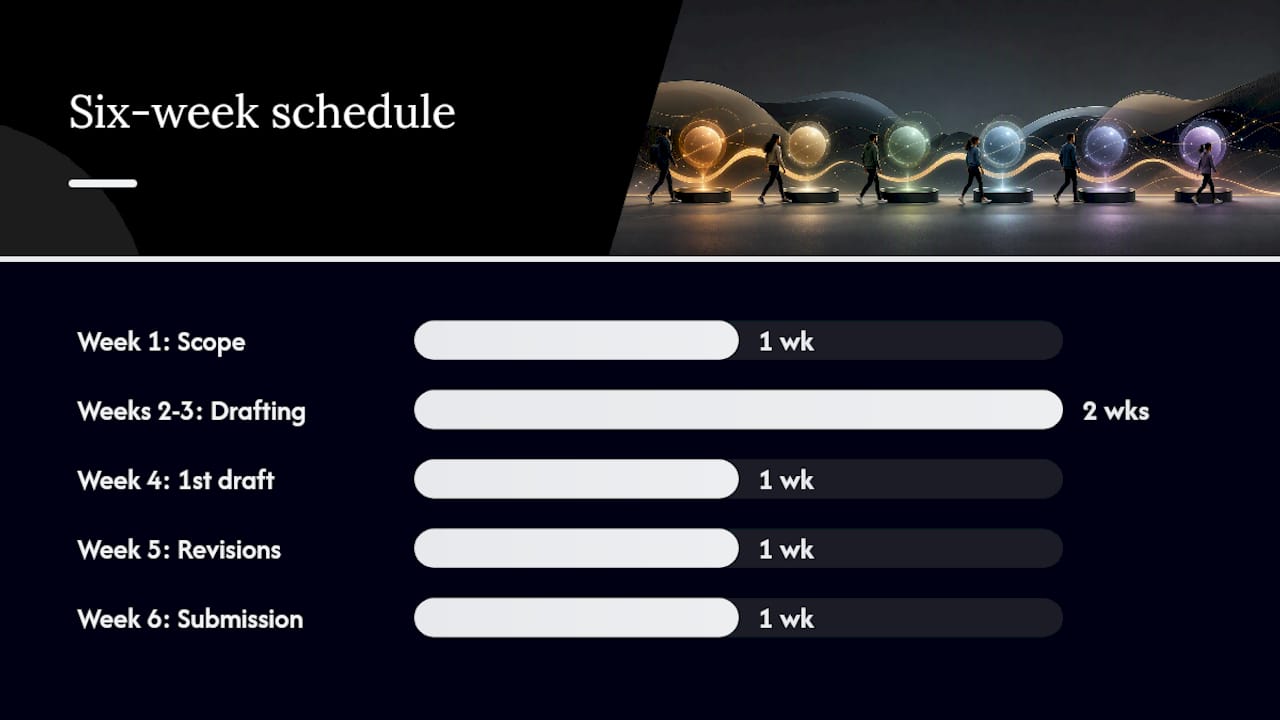
That’s a WBS, a set of sequenced tasks, dependencies between drafting and review, and two milestones, the same structure covered in the how-to steps above. A project schedule example built for students walks through this exact structure in more detail.
Before locking any baseline, confirm six things:
- Scope is written down, not just discussed
- Every task has one named owner
- Durations account for other coursework or job demands
- Dependencies are mapped, not assumed
- Resource availability is checked, not guessed
- A communication plan exists for status updates
Why Scheduling Discipline Pays Off Early in a Career
Most students and early-career professionals learn scheduling by getting burned once, missing a deadline because nobody wrote down that Task B depended on Task A. Optiostation exists because that lesson shouldn’t have to happen the hard way. A short feedback cycle, checking progress weekly against a baseline instead of hoping everything lands on time, is the difference between a stressful last 48 hours and a submission that goes out a day early. Try the checklist above on your next group project before you build the full plan.
— Optiostation
Build and Track Your Schedule Without Fighting a Spreadsheet
Spreadsheets work fine for a one-off project, but they fall apart fast on recurring group work, when three people are editing the same tab and nobody’s sure which version has the real dates. Some apps give students and young professionals a faster path: color-coded task templates, timeline views that show dependencies at a glance, and smart reminders that nudge you before a milestone slips, not after.

For a recurring class project, a part-time job’s rotating shift coverage, or a team split across dorm rooms and apartments, an app that already knows the structure beats rebuilding a Gantt chart from scratch every semester. If you’re weighing task tools generally, the guide to task management software breaks down what to look for beyond scheduling alone. Teams pairing scheduling with AI-assisted writing workflows might also find value in AI tools built for productivity. Download a project management app to set up your first project timeline before your next deadline creeps up on you.
Sources
- What is scheduling in project management? | APM
- Practice Standard for Scheduling — PMI
- Project Scheduling: Definition, Types, Process & Methods | Galorath
FAQ
What is project scheduling in simple terms?
Project scheduling is the process of mapping out tasks, their durations, dependencies, and resource needs into a timetable with real dates, so a team knows exactly what to do and when, according to APM.
What is a project timeline versus a project schedule?
A timeline is usually the visual output, often a Gantt chart, that shows a schedule’s dates and milestones; the schedule itself includes the underlying dependencies, resource assignments, and constraints behind that view.
What are the main steps in project scheduling?
Build a WBS, break deliverables into activities and estimate durations, sequence dependencies, assign and level resources, choose a visualization, then baseline and validate with stakeholders.
Which project scheduling technique should I use?
Use CPM for predictable, sequential work, PERT for high-uncertainty estimates, Critical Chain when shared resources create bottlenecks, and rolling wave when scope details aren’t fully known yet, per Galorath.
What tools help with project scheduling?
Gantt chart software, network diagram tools, and apps like Optiostation that combine timeline views with reminders and templates all help, though the right choice depends on whether you need heavy resource leveling or just clear task visibility.
