

TL;DR:
- A web project manager orchestrates website development from planning through post-launch, ensuring timely and within-budget delivery. They utilize Agile methods, integrate tools like Jira, Confluence, and Slack, and prioritize clear scope boundaries and proactive communication. Effective management hinges on disciplined phases, tool traceability, and continuous stakeholder engagement to prevent delays and scope creep.
A web project manager is the central coordinator who plans, executes, and monitors website development projects to deliver results on time, within budget, and aligned with business goals. This role sits at the intersection of technical execution and stakeholder communication, requiring fluency in tools like Jira, Confluence, and Slack alongside methodologies such as Agile and Waterfall. Whether you are stepping into your first website development manager position or refining your approach as a seasoned digital project coordinator, the difference between a project that ships and one that stalls almost always comes down to process discipline and communication clarity.
What does a web project manager actually do?
A web project manager owns the full lifecycle of a web development project, from the first discovery call to post-launch maintenance. The role is not purely technical and not purely administrative. It requires translating business requirements into sprint-ready tasks, managing dependencies across design, development, and QA teams, and keeping stakeholders informed without drowning them in status updates.
The scope of responsibilities typically includes web project planning, resource allocation, risk identification, timeline management, and change control. On any given day, a web project manager might be reviewing a Jira board for blockers, facilitating a sprint retrospective, or negotiating a deadline extension with a client after a scope change. The role demands context-switching without losing precision.
What separates a strong online project leader from a mediocre one is proactive communication. Waiting for problems to surface in a weekly status meeting is too slow. The best managers build visibility into their workflows so that risks are flagged before they become delays.
What are the key phases of web project management?
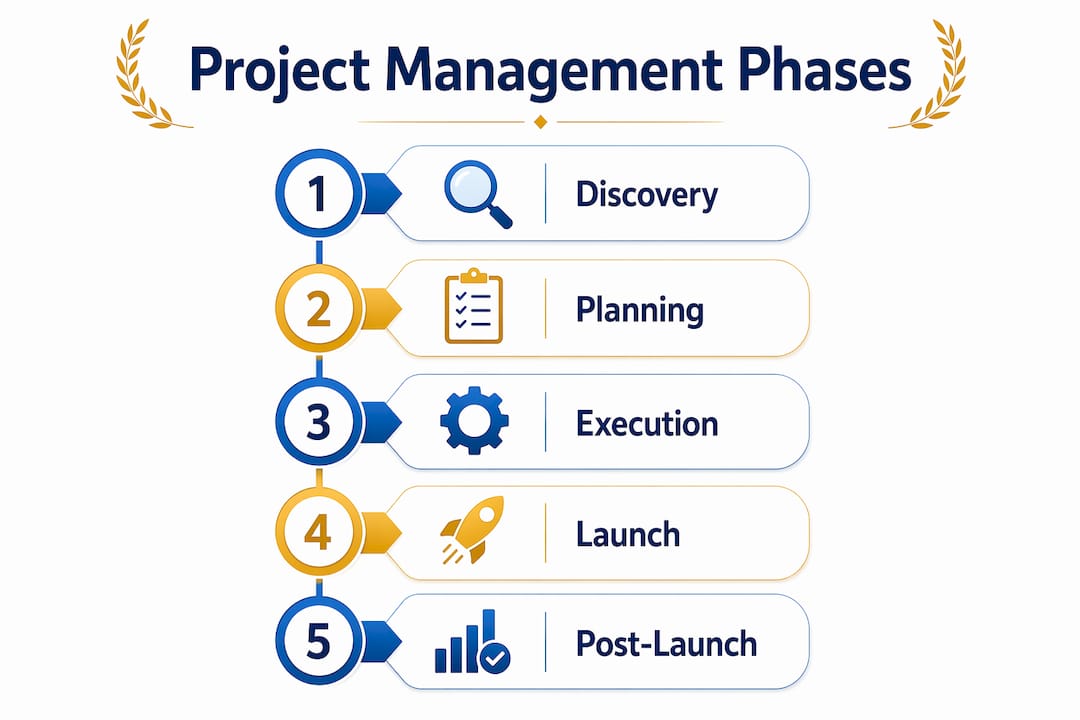
Website project management consists of four main phases: planning and discovery, design and development, testing, and ongoing maintenance. Each phase has distinct deliverables, approval gates, and capacity demands. Treating them as a continuous blur is one of the most common reasons projects miss deadlines.
Here is what each phase requires from you as the project lead:
- Planning and discovery: Define project scope, identify stakeholders, establish a Statement of Work (SOW), and set up your project management tools. This is where you map dependencies and create the initial timeline.
- Design and development: Coordinate between UX designers, front-end developers, back-end engineers, and content teams. Manage sprint cycles, track velocity, and surface blockers daily.
- Testing: Oversee QA cycles, user acceptance testing (UAT), and performance checks. This phase often gets compressed when earlier phases run long, so protect it in your timeline.
- Ongoing maintenance and security: Plan for post-launch support, monitor analytics, and schedule regular security audits. Projects do not end at launch.
Capacity planning is a critical skill across all four phases. You need to know who is available, at what percentage, and for how long. Overloading a developer in sprint three because you did not account for their parallel commitments in sprint one is a preventable failure.
Experienced project managers plan launch readiness tasks like URL redirects, analytics tagging, form testing, and QA sign-offs well before the final sprint. Leaving these for the last week creates a triage situation that damages client trust and team morale.
Pro Tip: Build a launch readiness checklist in Confluence at the start of the project, not the week before go-live. Assign owners to each item and track completion in Jira so nothing falls through the cracks.
How does Agile project management enhance web development projects?
Agile project management uses short cycles called sprints to produce frequent deliverables and adapt to changing requirements. For web projects, this is a significant advantage over traditional Waterfall approaches, where a client sees the product only at the end and changes become expensive.
The practical benefits of Agile for a web project manager include:
- Faster feedback loops: Stakeholders review working increments every two weeks instead of waiting months for a final reveal.
- Reduced rework: Catching a UX misalignment in sprint two costs far less than rebuilding a feature after final delivery.
- Clearer team focus: Sprint goals give developers and designers a defined, achievable target rather than an open-ended backlog.
- Transparent progress: Burndown charts and sprint reviews give clients real visibility into delivery pace.
- Adaptability: When a client’s business priorities shift mid-project, Agile allows you to reprioritize the backlog without derailing the entire timeline.
The role of the project manager in Agile differs from traditional methods. You are less of a command-and-control authority and more of a facilitator and obstacle remover. In a Scrum framework, the project manager often works alongside a Scrum Master, handling stakeholder communication and release planning while the Scrum Master manages the team’s internal ceremonies. In a Kanban workflow, the focus shifts to limiting work in progress and maintaining a steady delivery flow, which works well for ongoing maintenance phases.
“Frequent iterative reviews in Agile reduce risk and enable stakeholder feedback to guide the web product incrementally.” — Coursera on Agile Project Management
For deeper guidance on applying Agile as a project manager, the principles translate directly to web delivery contexts regardless of team size.
What best practices and tools optimize web project manager workflows?
The right tools do not manage your project for you, but the wrong configuration will actively slow your team down. Incorrect Jira setup can turn the platform into a bottleneck rather than a productivity asset. The fix is intentional configuration, not more plugins.

Here is how the three core tools compare for web project management:
| Tool | Primary function | Best used for |
|---|---|---|
| Jira | Issue tracking and sprint management | Development task tracking, bug logging, release planning |
| Confluence | Documentation and knowledge base | Requirements, SOW, meeting notes, runbooks |
| Slack | Real-time team communication | Daily standups, quick decisions, stakeholder pings |
The integration between these three tools is where the real value lives. Linking a Jira issue to its Confluence requirements page means developers never have to hunt for acceptance criteria. Connecting Slack notifications to Jira status changes means the team sees progress without opening a separate tab.
Tracing acceptance criteria and specs directly to Jira issues is the clearest way to answer the question “are we done?” without ambiguity. Without that traceability, a status of “in progress” tells you nothing about release readiness.
Managing dependencies in multi-team delivery requires assigning owners to each dependency, scheduling resolution checkpoints, and negotiating conflicts before they become blockers. A dependency without an owner is a future delay waiting to happen.
Pro Tip: Use prioritization techniques from Agile to rank your backlog by business value and technical risk. This prevents the common trap of building low-impact features while high-priority items wait.
How do effective scope and change management practices prevent project delays?
Clear scope definition at the start prevents confusion and rework, and scope changes must be managed as formal change requests evaluated for timeline and budget impact. This is not bureaucracy. It is the mechanism that keeps a three-month project from becoming a six-month project.
A solid Statement of Work for a web project includes:
- In-scope deliverables: Specific pages, features, integrations, and content types the team will build.
- Out-of-scope exclusions: Explicitly named items that are not part of this engagement, such as SEO copywriting, third-party API development, or post-launch training.
- Change request process: A defined workflow for submitting, evaluating, and approving changes, including who has authority to approve and what triggers a budget conversation.
- Acceptance criteria: Measurable conditions that define when a deliverable is complete and approved.
- Timeline and milestone map: Key dates tied to phase completions, not just a final delivery date.
Making scope boundaries explicit up front and formalizing change requests turns stakeholder ideas into controlled decisions rather than silent additions to the backlog. The client who asks for “just one more feature” in week eight is not being unreasonable. They simply do not know the cost. Your job is to show them.
When a change request comes in, evaluate it against three variables: timeline impact, budget impact, and resource availability. Document the assessment and present it to the client before doing any work. This single habit prevents more scope creep than any contract clause.
Key takeaways
A web project manager succeeds by combining phase discipline, Agile adaptability, tool traceability, and explicit scope control to deliver web projects on time and within budget.
| Point | Details |
|---|---|
| Four-phase structure | Plan each phase with distinct deliverables and approval gates to avoid launch delays. |
| Agile sprint cycles | Use two-week sprints to surface client feedback early and reduce costly rework. |
| Tool integration | Link Jira issues to Confluence specs and Slack alerts to maximize team visibility. |
| Scope documentation | Define in-scope and out-of-scope items in the SOW before any development begins. |
| Launch readiness planning | Assign owners to redirect, analytics, and QA tasks at project start, not the final week. |
Why most web projects fail before the first sprint ends
The uncomfortable truth about web project management is that most failures are not technical. They are organizational. A team can have Jira configured perfectly, a well-groomed backlog, and a skilled developer roster, and still deliver late because nobody owned the scope conversation in week one.
At Optiostation, we have watched teams burn through sprint capacity on features that were never formally approved, simply because a stakeholder mentioned them in a meeting and a developer assumed they were in scope. The fix is not more process overhead. It is one clear document, shared on day one, that says exactly what is being built and what is not.
The other pattern we see repeatedly is tool overwhelm. Teams adopt Jira, Confluence, Slack, Notion, and a time-tracking tool simultaneously, then spend more time updating tools than building the product. Pick two or three tools, integrate them tightly, and enforce consistent usage. Visibility comes from discipline, not from the number of dashboards you have open.
The best web project managers we have encountered share one trait: they treat communication as a deliverable. Status updates, scope change notifications, and risk flags are not interruptions to the work. They are the work. A team that knows where it stands makes better decisions, moves faster, and ships with fewer surprises.
For young professionals stepping into a digital project coordinator role, the workflow strategies for team motivation matter as much as the technical process. Teams that feel informed and respected outperform teams that are simply managed.
— Optiostation
Manage your web projects with the right tools
Keeping a web project on track requires more than a good plan. It requires daily visibility into tasks, time, and team capacity. Optiostation is built for exactly that, giving you a central command for tracking deliverables, managing your team’s workload, and staying on top of deadlines without the noise of enterprise-level tools.

Start with the time management apps that keep your sprints on schedule, then explore how to keep track of tasks at work across multiple workstreams. If your team needs better coordination, see how collaboration tools boost communication and reduce the back-and-forth that slows delivery. Optiostation puts you in command, so your team can focus on building.
FAQ
What is a web project manager?
A web project manager is the professional responsible for planning, executing, and monitoring website development projects from discovery through post-launch maintenance. The role covers scope management, stakeholder communication, resource allocation, and delivery coordination across design, development, and QA teams.
How is Agile different from Waterfall for web projects?
Agile uses short sprint cycles to deliver working increments frequently and incorporate feedback throughout the project, while Waterfall delivers the full product at the end of a linear sequence. Agile’s iterative approach reduces rework and adapts better to changing client requirements in web development.
What tools do web project managers use most?
Jira for issue tracking and sprint management, Confluence for documentation, and Slack for team communication form the core stack for most web project managers. Linking these tools together through integrations is what turns them from separate apps into a unified visibility system.
How do you prevent scope creep in web projects?
Explicit scope boundaries in the SOW and a formal change request process are the strongest defenses against scope creep. Every change request should be evaluated for timeline and budget impact before any work begins.
Can web project managers work remotely?
Remote demand for web project manager roles is substantial, with over 1,400 remote openings listed on Indeed as of mid-2026. The role is well-suited to remote work because most coordination happens through digital tools like Jira, Slack, and video conferencing platforms.
Recommended
- Head of Project Management: Skills to Succeed in 2026 – Optio Station: Best Project Management App for Prioritization
- Design project manager: master the skills and tools – Optio Station: Best Project Management App for Prioritization
- Command Log – Optio Station: Best Project Management App for Prioritization
- Client Project Manager: Skills, Roles, and Best Practices – Optio Station: Best Project Management App for Prioritization
