

You’ve probably been told that working longer hours or juggling multiple tasks at once is the key to getting more done. But here’s the truth: those approaches often backfire, leaving you exhausted and less productive. Timeboxing flips the script by assigning fixed time slots to specific tasks, creating urgency and focus without the burnout. Whether you’re balancing coursework, internships, or your first job, this technique offers a structured way to reclaim your time. This guide will walk you through what timeboxing is, why it works, how to apply it to your schedule, and how to avoid common mistakes that derail your progress.
Table of Contents
- Key takeaways
- Understanding timeboxing: what it is and why it matters
- Timeboxing strategies for students and young professionals
- Common pitfalls and balancing flexibility with structure in timeboxing
- Technology tools to enhance your timeboxing workflow
- Explore tools and strategies for effective task management
- Frequently asked questions
Key Takeaways
| Point | Details |
|---|---|
| Fixed time slots | Timeboxing assigns specific tasks to set time durations to create urgency and force you to start and finish within the limit. |
| Task chunking | It breaks large projects into manageable chunks and provides finite commitments that make starting and progress easier. |
| Deep work blocks | Schedule deep work sessions of about 90 minutes and label them Do Not Disturb to protect focus and minimize interruptions. |
| Energy aligned scheduling | Align timeboxes with peak energy levels and build transition buffers to prevent burnout and help with mental shifts. |
Understanding timeboxing: what it is and why it matters
Timeboxing is a time management technique where you assign specific tasks to fixed time slots, typically ranging from 25 to 90 minutes. Unlike open-ended work sessions where tasks can drag on indefinitely, timeboxing sets a hard stop. This approach directly counters Parkinson’s Law, which states that work expands to fill the time available. When you know you have exactly 60 minutes to draft an essay or 30 minutes to respond to emails, you naturally prioritize what matters most.
The magic of timeboxing lies in creating artificial urgency. Your brain shifts into a higher gear when it knows the clock is ticking. This isn’t about rushing through tasks carelessly. It’s about eliminating the mental permission to procrastinate or perfectionism to slow you down. Students often spend hours on assignments that could be completed in half the time simply because they didn’t set boundaries.
Here’s why fixed durations work so well:
- They force you to break large projects into manageable chunks
- They make it easier to start intimidating tasks because the commitment feels finite
- They provide natural stopping points that prevent mental fatigue
- They create a rhythm that helps you estimate how long tasks actually take
“The discipline of setting time limits transforms vague intentions into concrete action. You move from ‘I should study today’ to ‘I will study biology from 2:00 to 3:30 PM.’”
For students juggling multiple classes and young professionals managing diverse responsibilities, timeboxing brings clarity to chaos. Instead of feeling overwhelmed by everything on your plate, you see a schedule with defined slots. Each completed timebox becomes a small win that builds momentum. Understanding the role of time management starts with recognizing that your attention is finite, but properly allocated, it becomes incredibly powerful.
Timeboxing strategies for students and young professionals
Let’s get practical. Here’s how to build timeboxing into your actual schedule, whether you’re hitting the library or logging into your first remote job.
For college students, your day might look like this:
| Time Block | Task | Duration |
|---|---|---|
| 9:00-9:40 AM | Literature review for research paper | 40 minutes |
| 9:40-9:50 AM | Break (walk, snack) | 10 minutes |
| 10:00-11:00 AM | Data analysis for statistics project | 60 minutes |
| 11:00-11:15 AM | Buffer/transition time | 15 minutes |
| 11:15 AM-12:15 PM | Attend lecture or study session | 60 minutes |
Notice the pattern: focused work blocks of 40 to 60 minutes followed by short breaks. This structure acknowledges that your brain needs recovery time. Research shows that students who use timeboxing for academic writing and literature reviews maintain sharper focus and produce higher quality work than those who grind through marathon sessions.
For young professionals, timeboxing protects your calendar from meeting bloat and endless task creep. Consider this approach:
-
Cap all meetings at specific durations. Schedule 15 minutes for quick check-ins, 30 minutes for project updates, and 45 minutes maximum for strategic planning. This prevents conversations from wandering and forces everyone to prepare.
-
Block deep work sessions. Reserve 90-minute chunks for complex tasks like coding, writing reports, or creative work. Label these as “Do Not Disturb” in your calendar.
-
Build transition buffers. Add 15 minutes between major blocks to handle overruns, grab coffee, or mentally shift gears.
-
Sequence by priority and energy. Tackle your most demanding work during peak focus hours (often morning for most people), then schedule administrative tasks for afternoon energy dips.
Pro Tip: Track your energy patterns for one week before finalizing your timebox schedule. You might discover you’re sharper at 8 PM than 8 AM, and that’s perfectly fine. Align your hardest tasks with your natural peaks.
The key difference between random scheduling and strategic timeboxing is intentionality. You’re not just filling your calendar. You’re designing a system that respects both your commitments and your cognitive limits. Exploring different types of schedules helps you find what fits your unique situation, and setting clear time management goals keeps you accountable to the structure you’ve built.
Common pitfalls and balancing flexibility with structure in timeboxing
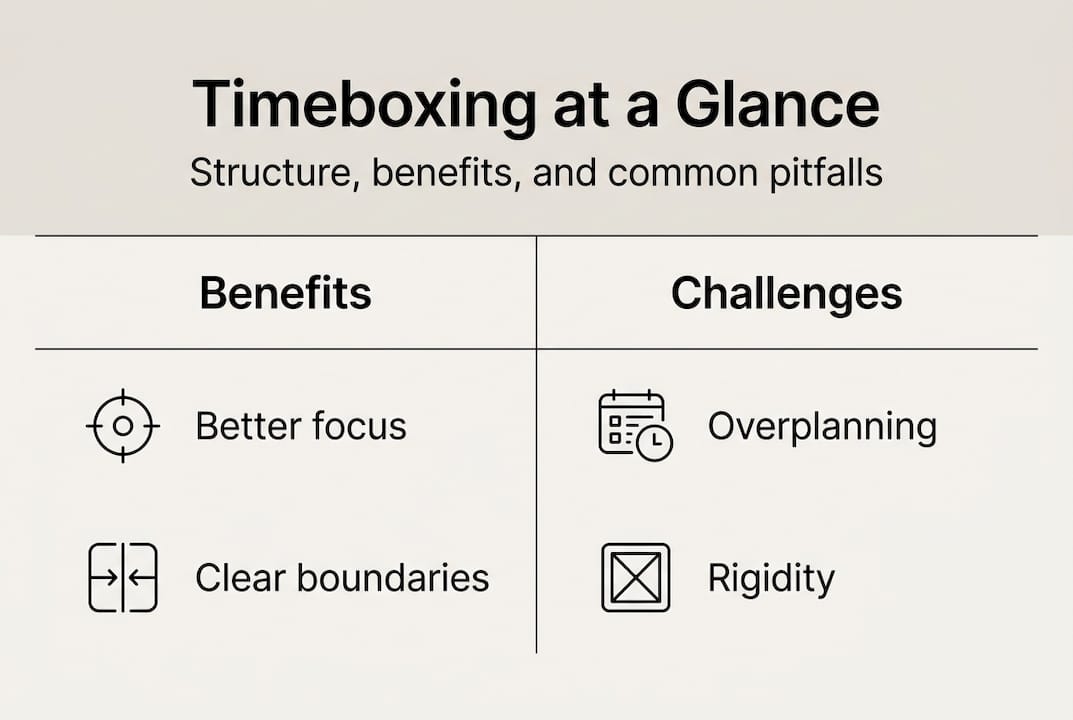
Timeboxing isn’t foolproof. Push it too hard and you’ll create a rigid schedule that feels more like a prison than a productivity tool. Here’s what goes wrong and how to fix it.

The biggest mistake is overscheduling every minute of your day. When you pack your calendar with back-to-back timeboxes and leave no breathing room, you set yourself up for failure. One unexpected phone call, a friend needing help, or a task running five minutes long creates a domino effect that derails your entire day. Research suggests leaving 20 to 30 percent of your day unscheduled as buffer time. This absorbs interruptions without destroying your plan.
Another trap is using the same timebox length for every task. A 25-minute block works great for answering emails but feels rushed for deep analytical work. Similarly, a 90-minute session might be perfect for writing but excessive for reviewing flashcards. Match your block duration to the task’s cognitive demand and your personal focus capacity.
Here are signals you’re being too rigid:
- You feel stressed when tasks take slightly longer than planned
- You interrupt deep focus states just because the timer went off
- You skip breaks to stay on schedule, leading to afternoon burnout
- You avoid spontaneous opportunities because they’re not in your timebox
The solution is flexible timeboxing. Instead of treating your schedule as law, treat it as a strong suggestion. If you’re in flow state during a writing session and the timer goes off, give yourself permission to continue for another 15 minutes. Conversely, if you’re struggling to focus, end the timebox early and take a break rather than forcing it.
Pro Tip: Review your timeboxed schedule every Friday. Note which blocks consistently run over, which tasks you avoid, and where you feel most productive. Adjust next week’s plan based on real data, not wishful thinking about how you think you should work.
Some tasks benefit more from Pomodoro’s strict 25/5 structure, while others need timeboxing’s flexibility. Experiment with both approaches and use them strategically. Learning what time tracking reveals about your actual work patterns helps you make these decisions based on evidence rather than guesswork. The right time management apps can help you test different approaches without manually rebuilding your entire schedule.
Technology tools to enhance your timeboxing workflow
Trying to maintain a timeboxed schedule using only paper planners or memory is possible but unnecessarily hard. Technology handles the logistics so you can focus on the actual work.
Modern productivity apps offer features specifically designed for timeboxing:
| App Type | Key Features | Best For |
|---|---|---|
| Calendar apps | Time blocking, color coding, recurring events, reminders | Visual schedule planning and meeting management |
| Task managers | Duration estimates, deadline tracking, priority sorting | Breaking projects into timeboxed chunks |
| Time trackers | Automatic logging, productivity analytics, distraction alerts | Understanding actual time spent vs. planned |
| Focus timers | Customizable intervals, break reminders, session history | Maintaining discipline during work blocks |
The real power comes from integration. When your task manager syncs with your calendar and your time tracker logs what you actually do, you get a complete picture. Meta-analysis research shows that training in planning techniques like timeboxing significantly boosts academic performance and engagement. Tools amplify this effect by removing friction from the planning process.
Here’s how to build your tech stack:
- Start with a calendar app that supports color-coded time blocks (Google Calendar, Outlook, or Apple Calendar all work)
- Add a task manager that lets you assign duration estimates to tasks
- Use a simple timer app or browser extension to track your actual work sessions
- Consider a distraction blocker for deep work timeboxes when you need maximum focus
Many students and professionals overlook keyboard shortcuts that save 5 to 10 seconds per action. That might sound trivial, but when you’re creating and adjusting multiple timeboxes daily, those seconds add up to minutes saved each week. Learning shortcuts for creating calendar events, moving tasks, and starting timers makes the system feel effortless.
Understanding what time management software can do beyond basic scheduling helps you choose tools that grow with your needs. Some apps automatically suggest optimal timebox lengths based on your history. Others analyze when you’re most productive and recommend scheduling important work during those windows. For students specifically, organization tools that integrate class schedules, assignment deadlines, and study blocks create a unified system. If you’re already using apps like TickTick, exploring features like time tracking unlocks capabilities you might not know existed.
The goal isn’t to become dependent on technology but to let it handle routine scheduling decisions so your brain can focus on higher-value thinking. A well-configured app reminds you when to start, when to stop, and when to take breaks without you having to constantly check the clock.
Explore tools and strategies for effective task management
You’ve learned how timeboxing transforms scattered effort into focused productivity. Now it’s time to put these principles into action with resources designed specifically for students and young professionals like you.

Optio Station offers comprehensive guides on managing tasks effectively, helping you prioritize what matters and eliminate what doesn’t. Discover the best task management software that integrates seamlessly with timeboxing techniques, giving you one system for planning, executing, and tracking your work. Explore our curated list of essential time management apps that support your unique workflow, whether you’re balancing multiple courses or managing your first professional projects. These tools aren’t just about doing more. They’re about doing what matters with less stress and more confidence.
Frequently asked questions
What is the ideal length for a single timebox?
The ideal timebox length ranges from 25 to 90 minutes depending on the task complexity and your personal focus capacity. Simple tasks like email or quick reviews work well in 25 to 30 minute blocks. Complex work like writing, coding, or deep analysis benefits from 60 to 90 minute sessions. Experiment with different durations for a week and track which lengths help you maintain focus without fatigue. Your optimal timebox length might differ from others, and that’s expected.
How does timeboxing compare with the Pomodoro Technique?
Pomodoro uses rigid 25-minute work intervals followed by 5-minute breaks, which works well for tasks where distractions are your biggest challenge. Timeboxing offers flexible block lengths tailored to the specific task and your energy level, making it better for deep or creative work that needs extended focus. Many people use a hybrid approach: timeboxing for overall daily structure with Pomodoro intervals during blocks where they need extra discipline. Neither method is superior. Choose based on what the task demands and how your brain works best.
Can technology tools improve my timeboxing success?
Yes, technology significantly improves timeboxing by handling reminders, tracking actual time spent, and preventing overscheduling through visual calendars. Apps help you plan realistic schedules by showing how much time you’ve already committed versus what remains available. Some tools offer analytics that reveal patterns in your productivity, like which times of day you’re most focused or which tasks consistently take longer than estimated. The key is choosing simple tools that reduce friction rather than complex systems that become another task to manage. Start with a basic calendar app and timer, then add features as you identify specific needs.
Recommended
- Time Management Time Blocking for Focused Productivity – Optio Station: Best Project Management App for Prioritization
- Time Blocking Time Management for Students and Pros – Optio Station: Best Project Management App for Prioritization
- 7 Time Management Goals for Employees Examples to Boost Productivity – Optio Station: Best Project Management App for Prioritization
- 7 Essential Time Management Apps List for Productivity – Optio Station: Best Project Management App for Prioritization
