

Here’s the whole system in one sentence: make the goal concrete, write it down, break it into milestones, schedule the lead measures that drive it, plan for the obstacles that will hit you, review your progress weekly, and celebrate before you set the next one. That’s step by step to achieve a goal, and none of it works if it stays in your head.
Your five-minute move right now:
- Write one SMART sentence describing your goal (what, how much, by when).
- Open your calendar and block one 25-minute session this week to work on it.
That’s it. Do those two things before you read further.
Key Takeaways
A goal only gets finished when it’s made concrete, written down, broken into scheduled lead measures, and reviewed weekly with room to adjust.
| Point | Details |
|---|---|
| Define the finish line | State the metric, time window, and proof of completion before you do anything else. |
| Write it down and pick one | Commit your headline goal to writing and limit yourself to one target for 4 to 12 weeks. |
| Build a goal ladder | Break the lag measure into monthly milestones and 1 to 3 weekly lead measures. |
| Plan for obstacles in advance | Use WOOP and if-then rules so a bad day doesn’t derail the whole plan. |
| Review weekly, adjust once | Spend 20 minutes checking the scoreboard and making one change, not five. |
| Track it inside one system | Optiostation pairs goal templates, calendar sync, and a scoreboard so the whole plan lives in one place. |
Table of Contents
- The Step-by-Step System to Achieve a Goal: Making It Concrete
- Why Writing Down Your Goal Actually Matters
- How Do You Break a Big Goal Into Milestones?
- Planning for Obstacles Before They Hit
- When Should You Schedule Your Goal Work?
- Do You Really Need a Weekly Review?
- Staying Accountable Without Burning Out
- Running This System Inside Optiostation
- Why This Has to Start Small
- Turn This Plan Into a Working App Setup
- Sources
The Step-by-Step System to Achieve a Goal: Making It Concrete
Vague goals die in your notes app, as explained in this guide on how to set Spanish learning goals that stick. “Get better at Spanish” or “improve my resume” gives your brain nothing to act on. The fix is what Harvard Extension School’s action-planning guidance calls the finish-line rule: name the metric, the time window, and the proof you’ll use to confirm you’re done.
- Pick a metric. Not “get fit,” but “run 3 miles without stopping.”
- Set a window. Eight weeks, not “eventually.”
- Define proof. A screenshot, a grade, a completed application, something you can point to.
For a student: “Score an 85 or higher on my statistics final by December 12” beats “do better in stats.” For a young professional: “Apply to 15 jobs in my target field by the end of the month” beats “find a new job.” Adrienne Tierney’s action-plan guidance points to the same trap over and over: people start with an abstraction and wonder why nothing moves. SMART goals fix that by forcing specificity before you schedule anything.
Pro Tip: If you can’t tell someone the exact number or date attached to your goal in one breath, it isn’t concrete yet. Rewrite it until you can.
Why Writing Down Your Goal Actually Matters
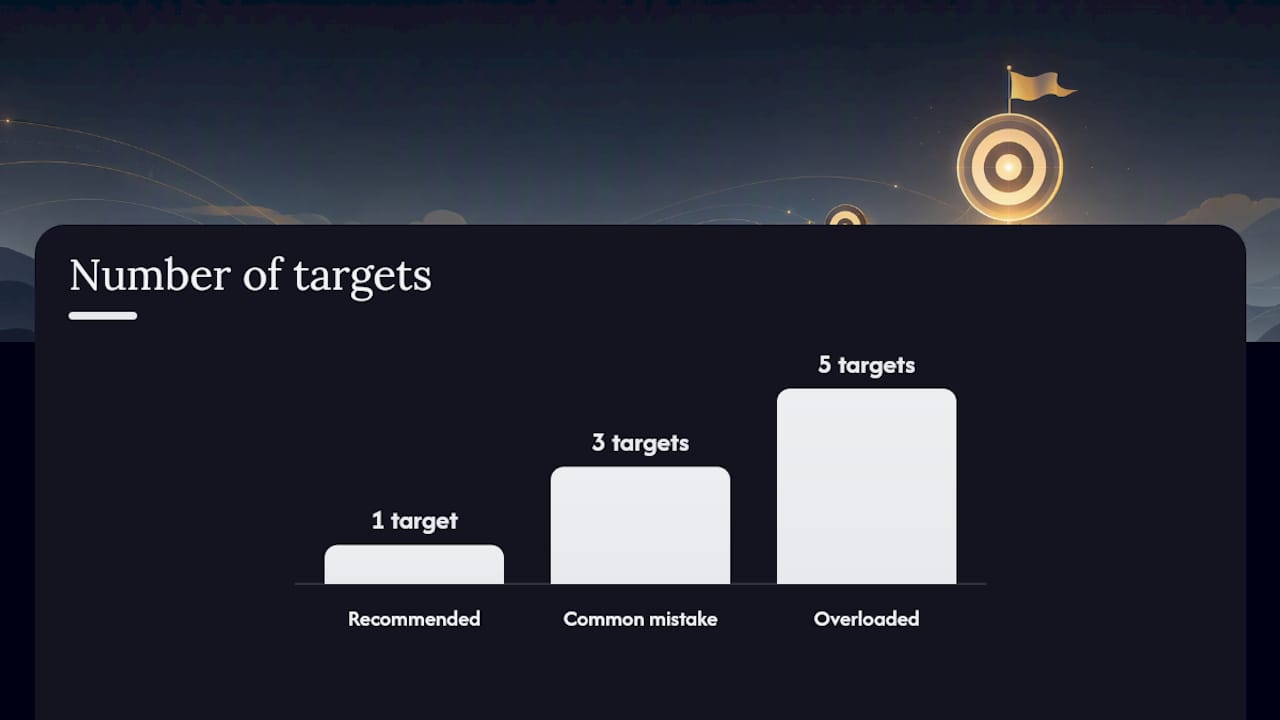
There’s a reason every serious goal-setting guide tells you to write it down instead of just deciding it in your head. Committing a goal to paper, or to an app, makes it harder to quietly abandon. Harvard’s own action-plan framework treats writing as a non-negotiable first move, not an optional nicety, and other goal-setting research backs the same pattern: people who commit to one prioritized target in writing follow through more often than people juggling five loose intentions.
Pick one headline goal for the next four to twelve weeks. Not three. One.
- Name it in a single sentence with your metric and deadline.
- Paste that sentence somewhere you’ll see daily: a notes app, a sticky note, or the goal field in a task manager.
- Date it, so you know exactly when the clock started.
A student chasing a 3.5 GPA and a job hunter chasing 15 applications both benefit from the same academic goal-setting approach: fewer targets, more written specificity.
How Do You Break a Big Goal Into Milestones?
A big goal is a lag measure. It tells you the outcome (the grade, the job offer, the finished project) but nothing about what to do on a random Tuesday. Lead measures are the small, controllable actions that predict the lag measure. Psychology Today’s review of how to conquer big challenges makes the case plainly: breaking a large goal into small, controllable steps reduces anxiety and hands you more wins along the way, which keeps you moving instead of freezing.
Build a goal ladder like this:
- Headline goal (the top rung): Land a summer internship by March 1.
- Monthly milestones (middle rungs): Resume finalized by week 2, ten applications sent by week 4, two interviews scheduled by week 8.
- Lead measures (the bottom rungs, done weekly): Send three applications every week, spend 30 minutes on interview prep every Tuesday.
Choose one to three lead measures max. More than that and you’ll track nothing well. The Sense Central step-by-step framework recommends exactly this kind of ladder, pairing SMART targets with lead measures and a weekly review loop so the goal stays alive between milestones, not just at the finish line.
Planning for Obstacles Before They Hit

Every goal survives contact with a bad week. The tool for this is WOOP: Wish, Outcome, Obstacle, Plan. You name what you want, picture the outcome, identify the realistic obstacle (not the imagined worst case), and pre-decide your response. Sense Central’s step-by-step system recommends pairing WOOP with a planning fallacy buffer: whatever time you think a task will take, multiply it by 1.5. Tasks almost always run long.
Then write if-then rules for your predictable failure points:
- If I feel too tired to do a full session, then I’ll do a 10-minute sprint instead of skipping entirely.
- If I miss a scheduled block, then I move it to the next open slot within 24 hours, no exceptions.
- If I hit three missed sessions in a row, then I reassess the goal itself, not just my schedule.
Pro Tip: Write these if-then rules into your goal statement now, not after you’ve already missed a session and are deciding under stress.
Sometimes the right move is disengaging. Research on unrealistic goals from Curtin University found real mental-health benefits to dropping a goal that’s become genuinely impossible, rather than grinding against it out of stubbornness.
When Should You Schedule Your Goal Work?
Lead measures without a calendar slot are wishes. Pick a daily power window: the hour or two when your focus is naturally sharpest, whether that’s 7 to 9 a.m. before class or 6 to 8 p.m. after your shift ends.
- Block it like a class or meeting. If it’s not on the calendar, it’s not real.
- Work in sprints. Use 25-minute Pomodoro blocks or 50-minute deep sessions with a short break between.
- Schedule a catch-up slot. Put one 30-minute buffer block on the calendar each week for whatever falls behind.
A simple weekly template for a 12-week headline goal: three 25-minute lead-measure sessions on weekdays, one 50-minute review and planning session on Sunday, one catch-up slot floating wherever it fits. Time blocking turns “I should work on this” into an actual appointment with yourself.
Do You Really Need a Weekly Review?
Yes, and it should take about 20 minutes, not two hours. The point isn’t to grade yourself. It’s to catch drift before it becomes a pattern.
- Check the scoreboard. Did you hit your 1 to 3 lead measures this week?
- Look at the outcome trend. Is the lag measure moving in the right direction, even slowly?
- Name one bottleneck. What specifically slowed you down: energy, scheduling, motivation, a skill gap?
- Make one change. Not five. One adjustment to next week’s plan.
- Reschedule. Lock next week’s power windows before you close the review.
Keep the scoreboard visible: the home screen of your task app, a sticky note on your monitor, the first page of a notebook. Sense Central’s goal-completion framework treats this weekly loop as the mechanism that actually separates finished goals from abandoned ones. Tracking only one to three lead measures, instead of everything, keeps the review frictionless enough that you’ll actually run it.
Staying Accountable Without Burning Out
Accountability doesn’t require a formal coach or a public commitment on social media. A weekly two-line text to a friend (“hit 3 of 3 sessions this week”) does most of the work. Harvard’s action-plan guidance points to social accountability and small celebrations as genuine motivation supports, not fluff.
- Find one accountability partner and check in weekly, not daily.
- Tie the goal to something you already value, like “finishing this course matters because it gets me closer to the career I actually want,” so the motivation is internal, not borrowed.
- Celebrate at each milestone, not just the finish line. A milestone hit deserves something small and immediate.
- If three straight weeks show no movement despite real effort, that’s your signal to revisit the goal itself.
Running This System Inside Optiostation
Say a student wants to raise a course grade from a B minus to an A minus over 12 weeks. Inside Optiostation, that becomes a goal card with a deadline, broken into weekly milestones, with two lead measures: three practice sessions a week and one office-hours visit per month.
- Use a goal template to set the SMART statement and deadline in one step.
- Set smart reminders for each scheduled sprint so the calendar block doesn’t get silently skipped.
- Sync with Google Calendar so power windows show up alongside classes and shifts.
- Check the scoreboard view weekly to see lead-measure completion at a glance.
Why This Has to Start Small
Every Centurion we hear from is juggling the same thing: classes or a job, a social life, and a goal that keeps sliding to next week. That’s not a discipline problem. It’s a systems problem, and it’s exactly why Optio exists as the second-in-command that carries the tracking so you don’t have to hold it all in your head. Start with one small milestone this week, not the whole 12-week plan. Small and finished beats big and abandoned every time.
Turn This Plan Into a Working App Setup
You could run this entire system on paper, a spreadsheet, or three different apps stitched together. Optiostation is built so you don’t have to stitch anything: goal templates, calendar sync, reminders, and a scoreboard live in one place, so the plan you just read maps directly onto features you can open today.

Start with the goal-ladder structure from earlier and turn it into a live goal card with weekly milestones and lead measures attached. If tracking has always been the part that slips, a dedicated task-tracking setup keeps your scoreboard visible instead of buried in a notebook you forget to open. Pick one goal, set a 12-week window, and build your first goal card in Optiostation this week.
Sources
Recommended
- How to Increase Motivation: Achieve Your Goals Effectively – Optio Station: Best Project Management App for Prioritization
- 7 Effective Goal-Setting Tips for Students and Professionals – Optio Station: Best Project Management App for Prioritization
- 7 Key Goal Setting Techniques for Centurions – Optio Station: Best Project Management App for Prioritization
- Step by Step Goal Tracking for Students and Professionals – Optio Station: Best Project Management App for Prioritization
