

Write one SMART objective inside your task app, break it into three to five dated milestones, schedule the first three calendar-blocking actions today, and set a recurring five to fifteen-minute weekly review with an on track, at risk, or blocked flag. That sequence, done inside one app instead of scattered across notebooks and sticky notes, is what turns a vague intention into finished work. This approach is built around exactly this loop, from the goal field down to the reminder.
TL;DR:
- Most goals should be specific, measurable, achievable, relevant, and time-bound to be effectively tracked within a task app.
- Breaking a goal into three to five milestones with scheduled actions on a calendar improves follow-through and prevents drift.
- Weekly reviews using a simple progress update and a flag of on track, at risk, or blocked help maintain focus and early intervention.
- Consistent tagging, naming, and using one app simplify tracking and reduce the risk of goals being forgotten orignored.
- Aligning personal objectives with team or shared goals prevents drift and ensures efforts contribute to common priorities.
Table of Contents
- What Setting Objectives at Work Means Inside a Task App
- How to Write a SMART Objective You Can Track in Your App
- Map Milestones and Schedule the First Three Calendar-Blocking Actions
- Track Progress With a Weekly Review and a Directional Flag
- Reduce Friction: One App, Consistent Tags, One Source of Truth
- Six Copy-Ready SMART Objective Examples for Students and Young Professionals
- Why Setting Objectives Matters Beyond Just Getting Things Done
- Aligning Personal and Team Objectives With Shared Goals
- Different Types of Work Objectives You Should Be Setting
- Common Pitfalls in Setting Work Objectives and How to Fix Them
- How to Communicate Your Objectives to Supervisors and Teammates
- Optiostation’s Perspective: Why We Teach This Workflow
- How Optiostation Helps You Set and Track Objectives
- Sources
What Setting Objectives at Work Means Inside a Task App
Setting objectives at work, in the sense that matters for a student or a young professional running their week through a single app, means personal or small-team goals with a horizon of a few weeks to a few months, not annual performance targets set by a manager. Think “finish my capstone research draft by March 10” or “close two new client accounts this quarter” rather than a formal review cycle metric.
The point of managing objectives inside an app instead of on paper is visibility. An objective that lives where you already check tasks gets seen daily; one buried in a separate goals document does not. Goal setting works best when it converts intent into an outcome you can actually measure, paired with milestones, tasks, and a repeatable review cadence rather than a single ambitious sentence.
The most common failure mode is not writing a bad goal. It is writing a decent one, closing the app, and never opening that screen again until the deadline has already passed.
How to Write a SMART Objective You Can Track in Your App
A goal only earns a spot in your task list if it survives contact with a calendar. That is what SMART does: it forces the vague (“get better at coding”) into something a task app can actually hold and remind you about.
Here is what each letter should look like when you are typing it into a goal field instead of a slide deck:
- Specific: name the exact deliverable, not the general direction (“submit three job applications to product roles” beats “look for jobs”).
- Measurable: attach a number or a clear finish line you can check off.
- Achievable: sized to what you can realistically move in the timeframe, given your current course load or workload.
- Relevant: tied to something you actually care about this semester or quarter, not a goal you inherited from someone else’s checklist.
- Time-bound: a real date, not “soon.”
SMART goals need this full set of criteria, plus an ongoing tracking cadence and milestones, or they quietly turn into just another date on a calendar nobody checks.
A template you can paste straight into a goal field: “[Verb] [specific deliverable] by [date], measured by [metric], starting from [baseline].” For example: “Publish four portfolio case studies by a set deadline, measured by live links on my site, starting from zero published pieces today.”
Once that sentence is written, fill in five fields before you move on:
- Baseline (where you’re starting from, in numbers if possible)
- Success metric (how you’ll know it’s done)
- Owner (you, or you plus a named teammate)
- Milestone map (the 3 to 5 checkpoints between now and the deadline)
- First three actions (see the next section)
Skip the milestone map and the first three actions, and you have a wish, not a plan grounded in a written outcome statement.
Map Milestones and Schedule the First Three Calendar-Blocking Actions
A goal without milestones is a single distant deadline, and distant deadlines are exactly what gets pushed aside by whatever feels urgent today. Break the objective into three to five intermediate outputs, each with its own date, before you do anything else.
Say the objective is “finish and submit a 20-page thesis chapter by November 15.” A milestone map might look like this:
- Outline and source list complete (October 20)
- First full draft written (November 1)
- Feedback from advisor incorporated (November 10)
- Final formatting and citations checked (November 13)
Now take the earliest, highest-leverage milestone and pull out the three actions that actually start it moving, then put those three actions directly on your calendar this week. Not “work on outline” as a vague block, but “read Chapter 3 of source A, 9:00 to 10:00 AM Tuesday.” Implementation-intention research backs this up: pairing a specific action with a specific time and place measurably increases the odds you actually follow through compared to leaving the task as an open-ended intention.
Store the milestone map as subtasks nested under the parent goal, and link each of the first three actions to a calendar event through an app’s calendar integration so they show up automatically on the day you scheduled them.
Pro Tip: If a milestone doesn’t have a next action you can start this week, it’s too far out to be useful right now. Break it down further or move on to the milestone that does.
Track Progress With a Weekly Review and a Directional Flag
A goal that never gets reviewed drifts. Weekly written updates paired with a directional flag are close to the minimum viable tracking system for keeping a personal objective alive between the day you write it and the day it’s due.
Every week, spend five to fifteen minutes writing three to five lines and choosing one flag:
- What moved forward since last week (one or two lines)
- What’s blocking progress, if anything
- The single next leveraged task to tackle first
- A flag: on track, at risk, or blocked
The flag matters more than it looks. A binary status forces a decision instead of a paragraph of justification. It surfaces a stalling goal while there’s still time to fix it, not two days before the deadline. Useful goals stay visible and specific enough to fail rather than soft enough to always feel technically on track.
This cadence works especially well for async schedules, where teammates or advisors aren’t checking in live. A five-line update in a shared task view replaces a status meeting nobody had time to schedule anyway.
Reduce Friction: One App, Consistent Tags, One Source of Truth
Every extra tool between “I have a goal” and “I checked on my goal” is a chance for that goal to get forgotten. The single biggest predictor of whether a personal objective survives past week one is whether it lives in the app you already open every day, not in a separate spreadsheet or a notes file you rarely touch.
A few habits make that single-app approach actually work:
- Use one consistent tag or hashtag per goal (like #thesis or #jobsearch) so every related task, note, and calendar block connects back to it instantly.
- Name goals the same way every time (verb plus deliverable plus date) so a quick scan of your task list tells you what’s actually due, not just what exists.
- Build a saved view filtered by that tag so your weekly review takes one click, not a search.
- Let recurring reminders and calendar sync do the nagging, so you don’t have to remember to remember.
Consistent naming and a single home for everything is what separates a goal you check weekly from one you wrote once and never opened again.
Six Copy-Ready SMART Objective Examples for Students and Young Professionals
Adapt any of these directly in your goal field, then fill in your own baseline and dates.
- Job search: “Submit a targeted number of tailored applications by a set deadline, more than currently sent.” Milestones: resume revised (week 1), 5 applications sent (week 2), 15 sent and 3 follow-ups logged (week 4). First three actions: rewrite resume summary, list 20 target companies, draft one cover letter template.
- Coursework: “Score a high percentage on the statistics final, improving from the midterm.” Milestones: practice set 1 complete, tutoring session booked, full mock exam scored. First actions: book tutoring slot, schedule two practice sessions this week, review midterm error log.
- Freelance income: “Land a set number of new paying clients by quarter end, starting from zero.” Milestones: portfolio updated, 10 pitches sent, two contracts signed. First actions: update three portfolio samples, draft outreach message, send five pitches.
- Skill building: “Complete a beginner Python course and build one small project by a set deadline.” Milestones: course 50% done, course finished, project shipped. First actions: enroll today, block three 30 minute sessions this week, pick a project idea.
- Team collaboration: “Ship the group project’s first working draft by a set deadline with all teammates contributing.” Milestones: roles assigned, sections drafted, merged draft reviewed. First actions: assign sections in a shared task, set a mid-week check-in, block two hours for your section.
- Personal habit: “Read 12 books this year, up from 4 last year.” Milestones: 3 books by March, 6 by June, 9 by September. First actions: pick book one, schedule a nightly 20 minute reading block, add it as a recurring task.
Why Setting Objectives Matters Beyond Just Getting Things Done
An objective written down changes what you say yes to. Without one, every incoming request, group chat ping, or “quick favor” looks equally urgent, because you have no fixed point to measure it against. With a clear objective sitting in your task app, a new request gets a fast test: does this move the goal forward, or does it just feel productive?
That filtering effect is the real value of setting objectives at work, even at the personal and small-team scale this workflow covers. It is not about the paperwork of having a goal. It is about having a standing answer to “what actually matters this week” so you stop re-deciding your priorities from scratch every single morning.
Objectives also compound. A goal you tracked and hit last month builds the milestone habit that makes the next goal easier to scope realistically, because you now have real data on how long things actually take you, not just how long you hoped they would take. Students juggling coursework, part-time work, and internship applications often underestimate this: the organizational skill of setting and tracking objectives transfers directly into how early career professionals are expected to manage their own workload once nobody is assigning weekly to-do lists for them anymore. Readers balancing coursework against internship or early job demands can find additional context on navigating that transition from the WorkplaceFairness blog, which covers realistic goal-setting while juggling school and early career responsibilities.

Aligning Personal and Team Objectives With Shared Goals
A personal objective that runs opposite to what your teammates or group project needs creates friction nobody enjoys resolving. Before locking in a goal, check it against whatever the team or class project is actually trying to achieve this month, and adjust the wording so your individual milestone directly feeds the shared one.
Practically, that means tagging your personal objective with the same hashtag or project label your teammates use, so anyone glancing at the shared view can see how your piece connects to the whole. If the group’s stated goal is “submit the case study by March 20,” your personal objective shouldn’t just be “work on my section.” It should read “complete the market analysis section, feeding the group’s March 20 submission,” with your own milestones nested underneath.
Goal drift is a real risk here. Objectives written in isolation, disconnected from any parent goal, tend to lose priority the moment something more urgent shows up, because there’s nothing anchoring them to a bigger commitment. Attaching an explicit parent connection and a review cadence is one of the more effective ways to prevent that drift before it starts.
This also protects you during the weekly review. When your flag turns to “at risk,” you can immediately see whether that risk only affects you or whether it threatens the team’s shared deadline, which changes how urgently you need to communicate it.
Different Types of Work Objectives You Should Be Setting
Not every objective should look the same, and treating all goals as interchangeable is a common way students and young professionals end up burning out on delivery while development quietly stalls.
Performance objectives are the deliverables tied to what you’re already responsible for: finishing an assignment, hitting a sales number, shipping a feature. These are the goals with the clearest deadlines and the most obvious consequences if missed.
Development objectives build a skill or capability you don’t yet have but will need soon: learning a new software tool, improving your public speaking, picking up a second language for an internship abroad. These rarely have external pressure forcing them forward, which is exactly why they need explicit milestones or they get perpetually deprioritized.
Stretch goals push past what feels comfortably achievable, useful for testing your real ceiling rather than your safe estimate. A stretch goal should still be time-bound and specific, but it accepts a higher chance of falling short as a reasonable trade for aiming higher.
A practical rule worth adopting: pair one performance or work goal with one learning or personal goal at any given time, rather than letting delivery pressure crowd out every development objective on your list. Running three or four objectives simultaneously across these types, rather than a single all-consuming one, keeps you from sacrificing growth for whatever is loudest this week.
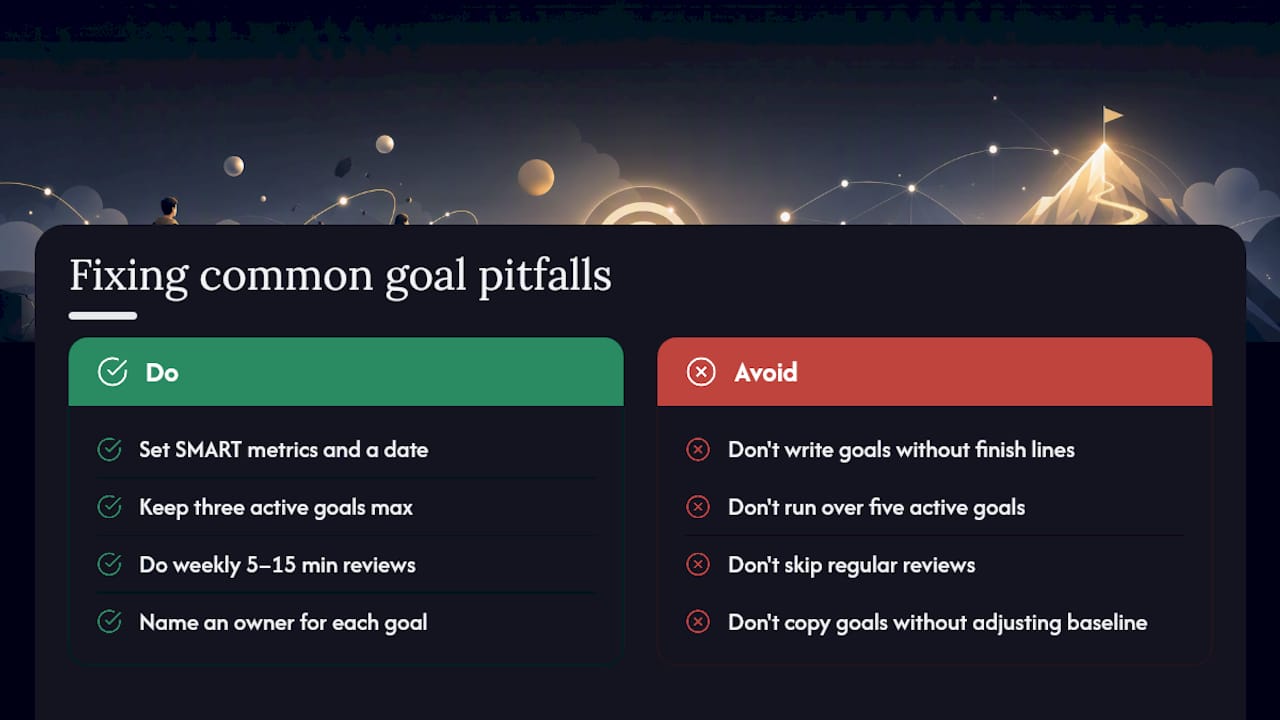
Common Pitfalls in Setting Work Objectives and How to Fix Them
The most common mistake is writing a goal with no clear finish line. “Get better at time management” cannot be tracked, flagged, or checked off, so it sits untouched until it quietly disappears from view. The fix is the SMART template covered earlier: force every goal through a measurable metric and a real date before it goes anywhere near your task list.
The second pitfall is setting too many objectives at once. A useful goal structure tends to cap around three active goals at a time, because anything beyond that dilutes weekly attention across so many fronts that none of them get a real review. If your goal list is pushing past five or six active items, archive or pause the lowest-priority ones rather than trying to progress all of them simultaneously.
The third pitfall is skipping the review. A goal set in January and never revisited until the June deadline has had five months to drift, and drift compounds quietly. The weekly five to fifteen minute check described earlier exists specifically to catch that before it becomes a crisis.
The fourth pitfall is vague ownership on team goals. When a shared objective has no clear owner for each piece, everyone assumes someone else is tracking it, and nobody actually is. Naming an owner field on every objective, even a personal one, forces accountability even when the “team” is just you and one collaborator.
Finally, watch for goals copied from someone else’s template without adjusting for your actual baseline. A goal that made sense for a classmate’s workload might be unrealistic or trivially easy for yours; always rewrite the baseline and metric to match your own starting point before adopting a borrowed structure.
How to Communicate Your Objectives to Supervisors and Teammates
An objective that only exists in your head, or buried in a personal app view nobody else sees, cannot get support from anyone. Once you’ve written a SMART objective, the next step is translating it into something a supervisor or teammate can respond to in under thirty seconds.
Lead with the outcome, not the process. “I’m aiming to close two new accounts by quarter end” lands faster than a paragraph about your outreach strategy. Save the process detail for when someone actually asks.
When sharing progress, use the same directional flag from your weekly review: on track, at risk, or blocked. Supervisors and teammates respond faster to a clear status than to a narrative explanation, and a flag makes it obvious whether they need to act now or just stay informed.
If a goal is genuinely at risk, name the specific blocker and what you need, rather than a general “things are behind.” “I’m blocked on the client’s sign-off, expected by Friday” gives a supervisor something concrete to act on. A vague update gives them nothing to do but worry.
For shared team objectives, keep the goal visible in whatever view or channel the team already checks, using the same tag or naming convention discussed earlier, so status updates don’t require a separate meeting to communicate. The fewer places a goal’s status has to be re-explained, the less likely it is to get lost between people.
Optiostation’s Perspective: Why We Teach This Workflow
We built Optiostation around the idea that a goal only counts once it has a place to live and a reason to get reopened every week.
That gap is not about motivation. It’s about friction. Tags connect a goal to every related task. Calendar integration turns milestones into blocks automatically. Reminders bring the weekly review back to you instead of relying on memory. Try the SMART template in your own task view this week and see what changes.
— Optiostation
How Optiostation Helps You Set and Track Objectives
This workflow doesn’t require five different tools stitched together. This is an app where your goal field, milestone subtasks, calendar blocks, and weekly reminder all sit in one place, so nothing scheduled Tuesday gets lost by Thursday.

Here’s how the mapping works in practice: your SMART objective goes in the goal field, your three to five milestones become nested subtasks with their own dates, your first three actions sync to a calendar, and a recurring reminder brings you back for the weekly flag review. Tag each goal once, and related tasks, notes, and connections follow automatically.
To get started, open a new goal in the app, paste in the SMART template from this guide, add your first three calendar-blocked actions, and set a weekly reminder before you close the app. If you’re still deciding whether a single task app can actually replace your current mix of tools, the complete task management software guide walks through setup and prioritization from the very first screen.
Sources
- SMART goal-setting (WVU Talent & Culture)
- SMART Goals Guide (2026): Set Goals You’ll Actually Hit
- Goal Setting: Frameworks, Methods, and Trackers Guide | Taskade
