

TL;DR:
- Most projects fail due to poor time management and unclear priorities rather than laziness.
- Using structured frameworks like Work Breakdown Structure and Eisenhower Matrix helps break tasks into manageable steps.
- Regular weekly reviews, clear role assignments, and simple scheduling methods are key to consistent project success.
Juggling three deadlines at once feels productive. It rarely is. Only 31-35% of projects actually finish on time, within budget, and to specification, which means the odds are already stacked against you before you open your laptop. The good news? The gap between students and professionals who hit their deadlines and those who don’t almost always comes down to a handful of repeatable habits. This guide walks you through the exact frameworks, scheduling techniques, and collaboration tools that turn chaotic project lists into steady, manageable progress.
Table of Contents
- Why most projects fail: Busting the multitasking myth
- Frameworks for success: Breaking down and prioritizing your project
- Scheduling for success: Time blocking, focus, and the Pomodoro Technique
- Collaborating smart: Role clarity and maintaining balance in group projects
- Making it stick: Weekly reviews and course-correction habits
- Our perspective: Why ‘brilliant basics’ win over complex tools
- Take your next step: Project management tools for students and professionals
- Frequently asked questions
Key Takeaways
| Point | Details |
|---|---|
| Break projects down | Dividing big projects into weekly actionable steps prevents overwhelm and improves success rates. |
| Prioritize and schedule | Use frameworks like the Eisenhower Matrix and schedule blocks of focused time, including breaks, for steady progress. |
| Clarify team roles early | Role assignment tools like RACI charts reduce confusion and failure in group projects. |
| Review and adjust weekly | Short weekly reviews keep projects on track and allow quick course corrections before issues grow. |
| Emphasize basics over hacks | Simple, well-executed routines outperform complicated productivity schemes for students and young professionals. |
Why most projects fail: Busting the multitasking myth
Here’s a hard truth most productivity content glosses over: multitasking isn’t a skill. It’s a trap. The research is clear that only 31% of projects succeed on all key metrics, and a big reason is that teams and individuals spread their focus too thin instead of executing one phase well before moving to the next.
The real culprits behind missed deadlines are rarely laziness. They’re structural. Projects fall apart because of:
- Unclear priorities: No one agrees on what matters most right now.
- Role confusion: In group projects, tasks get duplicated or dropped entirely.
- No scheduling: Work expands to fill whatever time is available (Parkinson’s Law in action).
- Scope creep: The project keeps growing without a plan to absorb the extra work.
The financial and time costs are real. Poor time management leads to an average 27% cost overrun and a 43% schedule overrun on projects. For a student, that means a half-finished paper submitted late. For a young professional, it means a client deliverable that misses the mark and your reputation takes the hit.
If you want to see what these patterns look like in everyday life, the bad time management examples that derail students and professionals are surprisingly common and fixable once you can name them.
“Busyness is not the same as progress. The most effective project managers protect focus, not just time.”
Pro Tip: Treat each project phase as its own mission. Finish phase one before mentally jumping to phase three. Single-tasking consistently outperforms multitasking across every study that has measured the two.
Now that you know the risks of poor time management, let’s explore how structured methods can prevent these common pitfalls.
Frameworks for success: Breaking down and prioritizing your project
Big projects feel impossible until you slice them into pieces small enough to act on. That’s the core idea behind two of the most battle-tested frameworks used by top students and project managers alike.
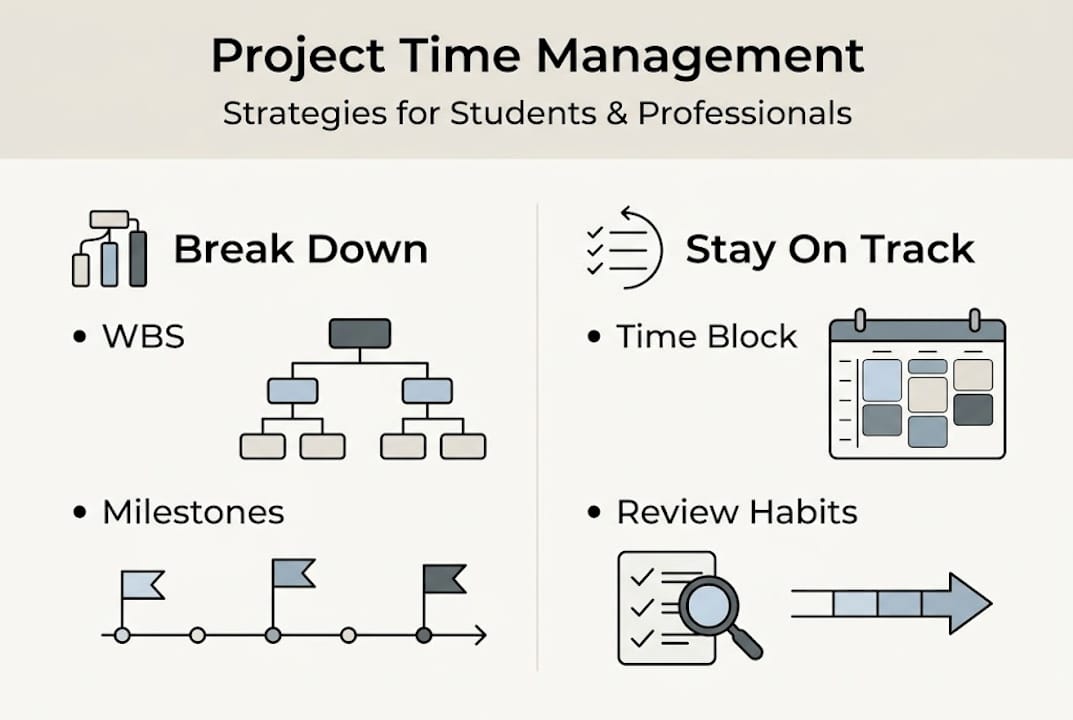
Work Breakdown Structure (WBS) divides your project into weekly, actionable tasks so nothing feels overwhelming. For a final research paper, a WBS breaks it into five clear milestones: topic selection, source gathering, outlining, drafting, and final editing. Each week has one job. You always know what’s next.
The Eisenhower Matrix sorts every task into four buckets. The Matrix organizes tasks into: Do (urgent and important), Schedule (important but not urgent), Delegate (urgent but not important), and Delete (neither). It forces you to stop treating every task like a five-alarm fire.
Here’s how to apply both to a real project in four steps:
- Write out every single task the project requires, no matter how small.
- Group related tasks into logical phases or milestones (that’s your WBS).
- Run each task through the Eisenhower Matrix to assign it a priority level.
- Block calendar time for your “Do” and “Schedule” tasks first, then revisit your list weekly.
| Framework | Best for | Main benefit | Weakness |
|---|---|---|---|
| WBS | Multi-week projects | Breaks work into manageable steps | Needs upfront planning time |
| Eisenhower Matrix | Daily task sorting | Cuts noise and clarifies priorities | Doesn’t show sequencing |
For a deeper look at how these tools work together, the task prioritization guide at Optio covers real scenarios for students and young professionals. You can also explore top productivity hacks that pair well with these frameworks.
Pro Tip: Use your WBS to spot bottlenecks before they hit. If week three has twice the tasks as other weeks, redistribute work now, not when you’re already behind.
With the foundations covered, it’s time to see how scheduling methods can turn those priorities into daily momentum.
Scheduling for success: Time blocking, focus, and the Pomodoro Technique
Knowing what to do and actually getting it done are two different problems. That’s where scheduling comes in.
Time blocking means reserving specific calendar slots for specific tasks, including breaks. The key insight from scheduling research is counterintuitive: schedule your downtime first, then fit work sessions around it. When breaks are protected, you’re less likely to push through exhaustion and make costly errors.
The Pomodoro Technique gives your focus a rhythm. Work for 25 minutes, break for 5, and after four cycles, take a longer 15 to 30 minute break. It sounds almost too simple, but the structured intervals prevent the mental fatigue that creeps in during long, unbroken work sessions.
Here’s what a productive weekday block might look like:
| Time | Activity |
|---|---|
| 8:00 to 9:30 AM | Deep work block (Pomodoro x3) |
| 9:30 to 9:45 AM | Break (walk, stretch, hydrate) |
| 9:45 to 11:15 AM | Second deep work block |
| 11:15 AM to 12:00 PM | Admin tasks, emails, logistics |
| 12:00 to 1:00 PM | Lunch (non-negotiable) |
| 1:00 to 3:00 PM | Collaborative work or meetings |
| 3:00 to 3:30 PM | Buffer time for overruns |
Scheduling do’s and don’ts:
- Do block time for your hardest task first thing in the morning when focus is sharpest.
- Do add a 15-minute buffer after each major block for overruns.
- Don’t schedule back-to-back deep work sessions without breaks.
- Don’t treat your calendar as a wish list; if it’s on the calendar, it’s a commitment.
For a full walkthrough of how to set this up, the time blocking for students resource at Optio walks through real weekly templates. When you’re ready to go deeper, the focused time blocking guide adds advanced strategies for professionals managing multiple projects.
Pro Tip: Always plan your breaks before your work sessions. Protected recovery time is what separates sustainable performance from one-week sprints that end in burnout.
After identifying and prioritizing tasks, you need to put them on the calendar for realistic progress. Now let’s talk about what happens when more people are involved.
Collaborating smart: Role clarity and maintaining balance in group projects
Group projects fail for a specific, predictable reason: nobody knows who owns what. Without clear ownership, tasks get duplicated, important work gets dropped, and resentment builds fast.

The fix is a RACI chart, which stands for Responsible, Accountable, Consulted, and Informed. A RACI chart at kickoff maps out exactly who does each task, who answers for its outcome, who gets a say, and who just needs to be kept in the loop. It takes 20 minutes to build and saves hours of confused messages later.
Need proof it works? A college graduation ceremony project, organized with clearly assigned roles and a structured plan, achieved a 95% participant satisfaction rate and came in on budget. That’s not luck. That’s what role clarity does.
Steps to start any group project the right way:
- Assign a project lead who owns the overall timeline.
- Build a RACI chart in your first meeting before any work starts.
- Set communication norms: when you meet, where decisions get recorded, how updates are shared.
- Schedule a mid-project check-in to catch drift before it becomes a crisis.
- Define what “done” looks like for every deliverable from day one.
“The team that plans together, delivers together. Skipping role clarity at the start is the fastest path to a group falling apart at the finish line.”
The group collaboration explained resource at Optio covers how digital tools can reinforce these role assignments without adding bureaucracy.
Pro Tip: Schedule team downtime into your group calendar just like you would a work session. Morale and energy are project resources too.
Not all projects are solo efforts, and managing your time becomes even more complex when you add teammates. Here’s what keeps the whole group on track over time.
Making it stick: Weekly reviews and course-correction habits
The best project plan in the world won’t save you if you never check whether it’s still working. That’s what weekly reviews are for.
A 10-minute weekly review helps you catch problems early: a deadline that crept up, a task that ballooned in scope, or a team member who’s underwater. It turns reactive scrambling into proactive adjustments.
Try this Sunday ritual to start each week sharp:
- Review every open project and note where each one stands against its timeline.
- Identify the single most important task for each project in the coming week.
- Check if any deadlines are closer than you expected and adjust your calendar accordingly.
- Flag any blockers, waiting-on-someone tasks, or decisions that need to be made.
- Close by writing your three non-negotiable priorities for Monday morning.
“High performers are 2.5x more likely to run successful projects” precisely because they build this kind of consistent reflection into their routines, not just their intent.
For a concrete look at how this plays out across a real project timeline, the project time management in action case study at Optio walks through the full cycle from kickoff to close.
Even the best-laid plans need adjusting, and the weekly review is what keeps you honest without turning self-reflection into another source of stress.
Our perspective: Why ‘brilliant basics’ win over complex tools
Every few months, a new productivity app promises to transform how you work. Most Centurions we hear from try it for a week, then quietly go back to their old habits. The tool wasn’t the problem. The missing foundation was.
Here’s what we’ve observed: the students and young professionals who consistently hit their deadlines don’t have fancier systems. They have simpler ones they actually use. Single-tasking. A weekly review ritual. A WBS on paper or in an app. Scheduled breaks that don’t get sacrificed when work gets heavy.
Overcomplicating your process is itself a form of procrastination. Building the perfect color-coded productivity system feels like work, but it isn’t the work.
The our detailed case study at Optio reinforces this point: real results come from small, repeatable actions done consistently, not from dramatic system overhauls. The Centurions who win are the ones who protect their fundamentals, review their progress weekly, and resist the urge to reinvent the wheel every time a new method goes viral.
Take your next step: Project management tools for students and professionals
Knowing the strategy is one thing. Having the right tools to execute it daily is another. Optio is built as your second-in-command: a mobile app designed for Centurions, meaning students and young professionals who need practical task, team, and time management without the corporate bloat.

Whether you’re juggling coursework, client deadlines, or a mix of both, the right setup makes every framework in this article easier to stick with. Explore the task management software options that fit your workflow, get a handle on keeping track of tasks across multiple projects, or start with the task management guide for students to build your system from the ground up. Your next deadline doesn’t have to be a scramble.
Frequently asked questions
What is an example of project time management for students?
Breaking a big assignment like a research paper into five weekly milestones using a Work Breakdown Structure is one of the most practical ways students can manage project time without feeling overwhelmed.
How does the Pomodoro Technique help manage project time?
The Pomodoro Technique uses 25-minute focused intervals followed by short breaks to keep concentration high and prevent the mental fatigue that derails long study or work sessions.
Why do most group projects go off track?
Role confusion is the leading cause. Starting with a RACI chart that assigns clear ownership at kickoff significantly reduces miscommunication and keeps everyone accountable from day one.
What is a weekly review for project management?
A weekly review is a focused 10-minute habit where you check your progress on every open project, spot upcoming deadline risks, and reset your priorities for the week ahead.
Are digital task management tools necessary for effective time management?
Digital tools aren’t strictly required, but they make it far easier to track tasks, collaborate with teammates, and stay on top of shifting priorities, especially when managing more than one project at a time.
Recommended
- Understanding the Role of Time Management in Success – Optio Station: Best Project Management App for Prioritization
- Unlock better productivity with the role of timeboxing – Optio Station: Best Project Management App for Prioritization
- Command Log – Optio Station: Best Project Management App for Prioritization
- 7 Best Time Management Goals Examples for Centurions – Optio Station: Best Project Management App for Prioritization
