

Adopt one dashboard, block your calendar into focused sessions, and run a five-minute weekly review. That’s the whole formula for process efficiency improvement at the personal and small-team level. Pomodoro sessions and time blocking handle daily execution; a weekly review catches what’s drifting before it becomes a crisis. Set it up inside a mobile app like Optiostation and you may start noticing improvements in completion rate within a few weeks.
TL;DR:
- Focusing on just one dashboard, calendar sync, and weekly review can significantly improve personal productivity within a week.
- Specific techniques like time blocking with detailed intentions, and spaced practice, are proven to enhance retention and task completion.
- Tracking focused hours and session completion rates reliably measures progress, with expectations of 60-70% early on and climbing to 80% over four weeks.
- Using a minimal, well-structured dashboard on a phone with four fields and avoiding over-complication increases task visibility and reduces maintenance costs.
- Automated calendar and task reminders, along with clear task ownership, are key to sustaining team workflows without losing focus or increasing meeting time.
Table of Contents
- Building Your Process Efficiency Improvement System in Under an Hour
- Which Techniques Actually Move the Needle?
- How to Set Up a Minimal Single Dashboard on Your Phone
- What Should You Measure to Know It’s Working?
- Coordinating a Small Team Without Killing Focus Time
- How Do You Use GenAI Without Losing Accuracy?
- Will This System Actually Last Past Week Two?
- Applying Kaizen and Continuous Improvement to Your Own Routine
- Automating the Parts of Your Workflow That Don’t Need You
- Getting a Team to Actually Adopt a New System
- What Should You Track Beyond Hours and Completion Rate?
- How Other Fields Apply the Same Efficiency Principles
- What Optiostation’s Users Teach About Keeping Systems Simple
- Try the Minimal Setup Inside Optiostation
- Sources
Building Your Process Efficiency Improvement System in Under an Hour
You don’t need a semester-long overhaul to fix a broken workflow. You need one focused session, right now, to build the skeleton of a system you’ll refine later.
- Capture everything first. Dump every task, assignment, and half-formed obligation into a single inbox. Don’t sort yet. Just get it out of your head.
- Build one weekly dashboard. Pick 1 to 3 priorities for the week. Resist the urge to list twenty things; a crowded dashboard is where systems go to die.
- Block calendar time. Assign each priority a specific window, then drop Pomodoro timers inside those blocks for focus.
- Schedule the weekly review. Pick a fixed day and time. Track two numbers only: focused hours logged and percentage of planned sessions completed.
- Protect your leisure window. Block it on the calendar with the same seriousness as a class or a deadline.
Pro Tip: Set the weekly review for Sunday evening, not Monday morning. Reviewing before the week starts means you walk into Monday with a plan instead of scrambling to make one.
Which Techniques Actually Move the Needle?
Not all productivity advice earns its keep. These five do, and each one solves a specific failure mode in how students and small teams lose time.
- Time blocking with implementation intentions. Instead of “study chemistry,” write “at 4:00 PM, in the library, I will review chapter 6 problem sets.” The specificity closes the gap between planning and doing, an effect researchers have documented for decades under the name implementation intentions.
- Pomodoro variants. Standard 25 minute work and 5 minute break cycles suit reading and admin tasks; 50/10 or 90 minute deep blocks suit writing and problem sets. Match the interval to the task, not the other way around.
- GTD-lite. Capture everything into one inbox, clarify what each item actually requires, define the next physical action, then review weekly. Skip the elaborate context tagging that makes full GTD collapse under its own weight.
- Eisenhower matrix plus the Ivy Lee method. Sort tasks by urgent/important, then each night pick the six most important tasks for tomorrow and rank them. Work the list in order. Don’t jump ahead.
- Spacing over cramming. Distributing study sessions across a week rather than massing them the night before produces better retention, a finding distributed practice research backs consistently.
One weak but real signal from a multi-institution study: students who edited AI-generated answers rather than accepting them outright saw a modest but significant grade correlation (ρ = 0.290). The lesson generalizes past AI use. Editing your own plan, not just executing it blindly, is what makes any technique here stick.
How to Set Up a Minimal Single Dashboard on Your Phone
Context switching between five apps costs more time than any single feature saves you. A single dashboard fixes that by giving every task, deadline, and note one home.
- Create four fields, no more. Title, due date, course or team tag, and priority level. A quick-launch Pomodoro button attached to the task card rounds it out.
- Sync your calendar once. Connect Google Calendar so time blocks show up automatically without manual double-entry.
- Run a Sunday ritual. Clear the inbox, set next week’s 1 to 3 priorities, and glance at last week’s completion rate.
- Resist adding fields. Every extra property is a small maintenance tax. Start with one page and only add complexity once the basic version proves itself for two or three weeks.
Pro Tip: If you catch yourself building a tagging system with more than six categories, stop. That’s a sign you’re organizing instead of working.
What Should You Measure to Know It’s Working?
Two numbers tell you almost everything: focused session hours per subject or project, and session completion rate (sessions finished versus sessions planned). Tracking focused hours rather than total time logged is the more reliable predictor of actual progress, since total time includes plenty of distracted scrolling disguised as “studying.”
Log sessions the moment they end, using the in-app timer’s stop button rather than trying to reconstruct your day later from memory.
- Week 2 checkpoint: expect a completion rate around 60 to 70%. That’s normal, not failure.
- Week 4 checkpoint: completion rate should climb toward 80% or higher, and focused hours should feel more predictable week to week.
- Prune signal: if you’re spending more time managing the system than doing the work inside it, cut a field or a step. Complexity should earn its place.
Coordinating a Small Team Without Killing Focus Time
Group projects fail less from bad ideas and more from unclear ownership. Fix that with a shared board where every task has one owner and one visible next action, not a vague “we’ll figure it out.”
- Rule one: every task has exactly one owner’s name on it.
- Rule two: the next action is written in plain language, not implied.
- Rule three: one 15-minute weekly sync, no more, covers status and blockers.
Use comments and hashtags on shared tasks instead of scheduling a meeting to answer a question that takes thirty seconds to type. That keeps deliverables visible without dragging four people into a call.
Pro Tip: Block your own deep work sessions before you agree to the team’s meeting time. Protecting your calendar first, then coordinating around it, keeps you from losing your best hours to other people’s scheduling habits.
How Do You Use GenAI Without Losing Accuracy?
Treat the first AI response as a draft, not an answer. The research on iterative editing backs this up directly: students who revised AI outputs multiple times before submitting work correlated with modestly better grades than students who accepted the first response.
- Use AI to outline, summarize, or clarify a confusing concept, never as the final word on a graded answer.
- Fact-check anything with a number, date, or citation before it goes anywhere near your work.
- Add your own voice and reasoning back in. An unedited AI paragraph reads like an unedited AI paragraph.
- Check your school’s or employer’s AI policy before you start. Rules vary widely and ignorance isn’t a defense.
For a domain-specific example of this in practice, flight students refining checkride prep with AI study tools follow the same iterate-and-verify pattern, adapted to material where a wrong answer has real consequences.
Will This System Actually Last Past Week Two?
Expect friction for the first two weeks. That’s not a sign you picked the wrong technique; it’s what adopting any new routine feels like before it becomes automatic, usually around week four.
- Protect 2 to 3 hours daily for leisure or recovery. Systems that leave no room for a social life or downtime get abandoned, regardless of how well-designed they are on paper.
- Maintain three micro-habits: one daily priority, a nightly two-minute capture of loose tasks, and the weekly review.
- Watch for over-design. If you’re adding a fifth tag or a new automation instead of doing the actual work, simplify.
Applying Kaizen and Continuous Improvement to Your Own Routine
Kaizen, the Japanese practice of small, continuous adjustments rather than one dramatic overhaul, translates well to personal workflow design. Instead of redesigning your entire system after a bad week, change one thing: shift your Pomodoro length from 25 to 40 minutes, or move your weekly review from Sunday night to Saturday morning. Test it for a week, keep it if it helps, revert if it doesn’t.
Six Sigma’s core habit, borrowed loosely, is even simpler: stop guessing why a process breaks and look at where it actually breaks. If half your Pomodoro sessions get interrupted at the same point, that’s not bad luck. That’s a specific bottleneck, usually a notification, a poorly timed meeting, or a task that was too vague to start cleanly.
A basic flow chart does this diagnostic work without any software. Sketch your typical study or work block as boxes: capture, plan, execute, review. Mark where you consistently stall. Most students find the stall point is “plan,” not “execute.” They sit down without a clear next action, burn ten minutes deciding what to do, and lose momentum before the timer even starts.
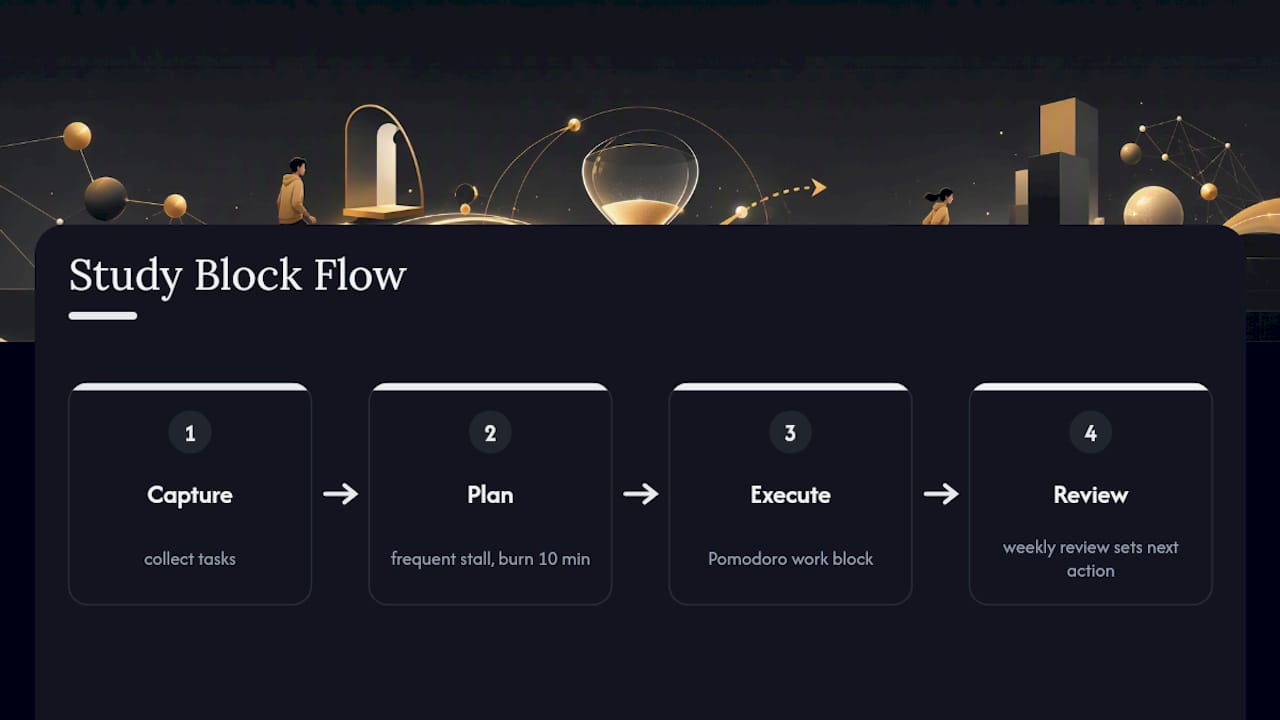
This is where a minimal dashboard earns its keep. If the next action is already written on the task card from your Sunday review, the planning stall disappears because the decision was already made in advance, at a calmer moment. Continuous improvement, at this scale, isn’t a formal program. It’s noticing one recurring friction point per week and removing it.
Automating the Parts of Your Workflow That Don’t Need You
GenAI saves time on thinking tasks. Workflow automation saves time on repetitive administrative tasks that don’t need a brain at all. The two solve different problems, and conflating them is why some people feel like they’ve “tried automation” and gotten nothing out of it.
Calendar sync is the simplest example already covered here: a task’s due date automatically creates a calendar block without you re-typing it. Extend that logic further. Recurring tasks, like a weekly lab report or a standing team check-in, should auto-generate on their own schedule rather than requiring you to recreate them from scratch every week.
Integration between your task app and your calendar is the highest-leverage automation for an individual or small team, because it removes the single most common failure point: a task that exists on a list but never gets a real time slot, so it just sits there indefinitely.
For small teams, automated notifications when a task’s owner changes, or when a due date is 24 hours out, replace the manual “hey, did you see this” message that clutters group chats. The goal isn’t to automate everything. It’s to automate the parts of the process that are purely mechanical, so your attention stays on the parts that require judgment.
Getting a Team to Actually Adopt a New System
The best workflow system fails if only one person on the team uses it. Change management, at this scale, isn’t corporate jargon. It’s a handful of concrete moves that determine whether a new process sticks or gets quietly abandoned by week three.
Start small and visible. Don’t introduce a new dashboard, a new meeting cadence, and a new tagging system in the same week. Pick one change, run it for two weeks, and let the team feel the difference before adding the next piece.
Make the benefit obvious to the person adopting it, not just to the group. A teammate will keep updating a shared board if doing so means fewer status-check messages land in their inbox. They won’t keep doing it if it just feels like extra data entry for someone else’s benefit.
Assign one person to model the new behavior first. Teams follow examples faster than they follow instructions. If the project lead updates their task status consistently, others tend to mirror it within a week or two without being asked.
Revisit the system at the 15-minute weekly sync and ask one question: what’s the fastest thing to change? Not what’s broken, not what’s ideal. Just the smallest adjustment that removes friction for the most people. Change management for a four-person student team doesn’t need a formal framework. It needs someone willing to ask that question out loud, consistently, until the habit takes hold.
What Should You Track Beyond Hours and Completion Rate?
Focused hours and completion rate are the starting metrics, useful because they’re fast to log and hard to fake. But once your system is running for four to six weeks, a couple of additional signals tell you more about whether the process itself is actually working, not just whether you’re busy.
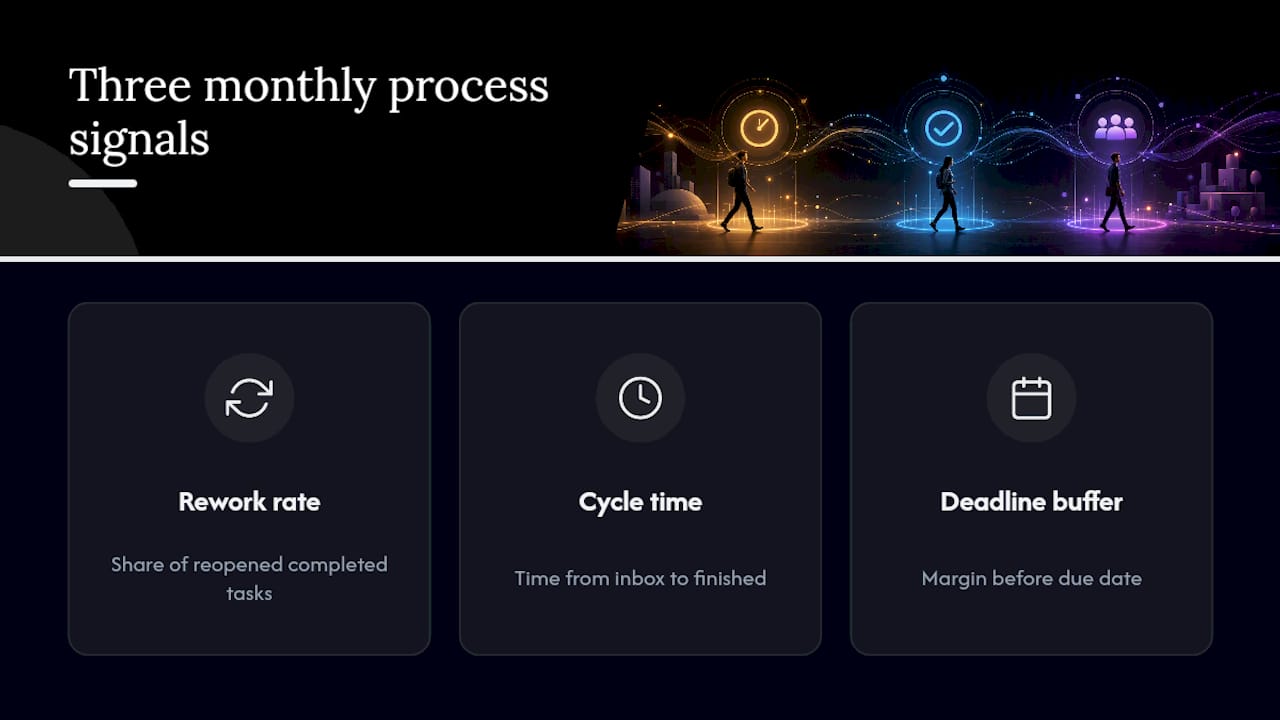
Rework rate matters more than people think. If you’re redoing the same assignment section or the same project deliverable multiple times, that’s not a time-management problem. It’s a clarity problem upstream, usually in how the task was defined in the first place. Track how often a “completed” task gets reopened.
Cycle time is the gap between when a task enters your inbox and when it’s actually finished. A short cycle time on small tasks and a longer one on complex ones is healthy. A long cycle time on small tasks means things are sitting untouched, which is a planning failure, not an execution one.
Deadline buffer is worth watching for teams specifically. Are deliverables finishing with a day of margin, or are they landing exactly at the deadline every time? Zero buffer, consistently, means the schedule is too tight and something will eventually slip. These three metrics won’t fit on a simple weekly dashboard glance the way hours and completion rate do, so check them monthly instead of weekly. That cadence catches the pattern without turning tracking itself into a new time sink.
How Other Fields Apply the Same Efficiency Principles
The dashboard-plus-review pattern isn’t unique to students. Nursing students preparing for licensure exams use nearly identical scheduling logic: block focused study time, track it, and review weekly against a deadline. One study-time management guide for CCRN exam prep recommends breaking preparation into scheduled blocks with protected recovery time, the same structure covered earlier in this guide, just applied to a licensing exam instead of a semester.
Language educators use a related version of the “clarify, then act” step from GTD. In task-based language teaching, instructors design a specific, well-defined task before asking students to execute it, because a vague task produces vague output. That’s the exact same lesson as writing a specific next action on a project card instead of leaving it as “work on presentation.”
Retail and hospitality teams run weekly reviews that look a lot like the Sunday ritual described earlier. Sales numbers replace study hours, shift coverage replaces task ownership, but the mechanism is identical: measure a small number of signals consistently, review them on a fixed schedule, and adjust one thing at a time rather than overhauling the whole operation. The specific numbers change by industry. The underlying loop of capture, execute, measure, review does not.
What Optiostation’s Users Teach About Keeping Systems Simple
The pattern we see most often isn’t a fancy feature request. It’s a Centurion who built too much dashboard on day one, then scaled it back to three fields and a weekly reminder, and stuck with it for a full semester. Start small. Protect leisure. Iterate every Sunday. Try the minimal setup this week, then adjust based on what your own completion rate tells you.
— Optiostation
Try the Minimal Setup Inside Optiostation
Optiostation is built specifically for the system this guide just walked through: one dashboard, calendar sync, built-in timers, and simple tags for course or team labels, instead of five separate apps fighting for your attention.

Every Centurion (that’s what Optiostation calls its users) gets access to student-built templates that skip the blank-page setup problem entirely. You import a weekly dashboard template, connect your calendar, and set a recurring weekly review reminder in your first session rather than building it from scratch. The freemium model means you can run the full three-part system, dashboard, time blocks, and weekly review, before ever touching a paid tier. Team boards work the same way for small project groups, with owner tags and due dates visible to everyone without an extra meeting.
If you want to see the full feature breakdown before setting up your own dashboard, the complete task management software guide walks through prioritization tools and setup options in more detail. Start your first weekly dashboard this Sunday.
Sources
- Expanding the lens: multi-institutional evidence on student use of ChatGPT in higher education (Springer)
- Time management tips for working students (Verywell Mind)
- Time Management for Students: 7 Steps + 9 Methods 2026 | Notemeeting
- Student time management and focused session tracking (Make10000Hours blog)
