

TL;DR:
- Organizing to-do lists is the most effective habit for managing time and reducing mental clutter. A well-built list clarifies tasks, prioritizes actions, and ensures regular review to keep progress steady.
Organizing to do lists is the single most effective habit a college student or young professional can build for managing time and reducing mental clutter. Task management, the recognized industry term for this practice, covers everything from capturing raw ideas to scheduling specific next actions. Research by E.J. Masicampo and Roy Baumeister found that defining specific next steps lowers intrusive thoughts and mental load. That means a well-built list does not just remind you what to do. It frees your brain to actually do it.
What are the essential elements of an organized to-do list?
A productive to-do list does five things: it captures tasks without judgment, clarifies outcomes, assigns priority by context, commits to a next action, and gets reviewed before it goes stale. Most lists fail because they skip steps two through five. They become long, vague archives that create anxiety instead of progress.
The five core functions work like this:
- Capture without judgment. Write every task down the moment it appears. Do not filter or rank yet. The goal is to get it out of your head.
- Clarify outcomes. Turn vague entries like “work on project” into specific results: “write the introduction section of the marketing report.” Specific, measurable tasks increase execution likelihood and reduce procrastination.
- Choose priority by context. Not every task deserves equal attention. The Eisenhower Matrix sorts tasks into four quadrants: urgent and important, important but not urgent, urgent but not important, and neither. Separating tasks by urgency and importance encourages better focus on meaningful work.
- Commit with a next action. Every task needs a physical, visible first step. “Call professor” beats “handle grade issue” every time.
- Review before the list decays. A list you never revisit becomes noise. Daily and weekly reviews keep priorities current and remove tasks that no longer matter.
Simple priority codes work alongside the Eisenhower Matrix. Label tasks A (must do today), B (should do this week), C (nice to do when time allows), or D (delegate or drop). This gives you a fast visual scan without rebuilding your whole system each morning.
Pro Tip: Before you close your laptop each night, spend two minutes scanning your list and marking tomorrow’s A tasks. You will start the next day with a clear target instead of a blank stare.

Which tools and formats work best for students and young professionals?
The right format depends on your workflow, not on what looks good in a productivity video. Both analog and digital options work. The key is picking one you will actually use consistently.
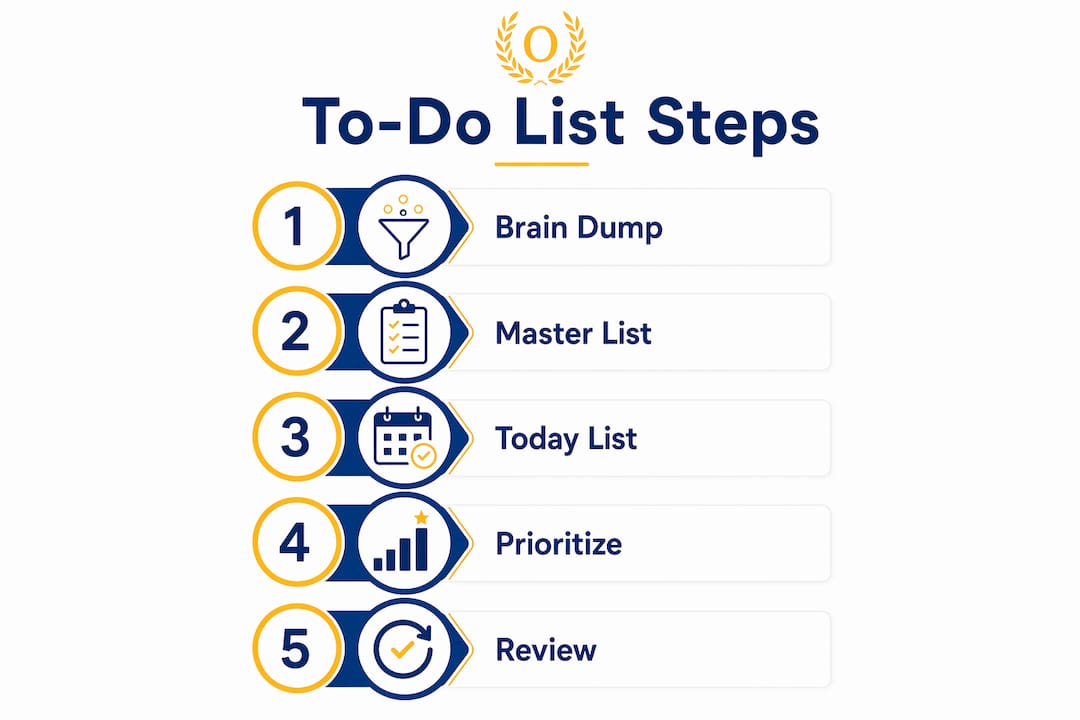
A three-list system reduces overwhelm and increases focus for both general users and those with ADHD. The three lists are a brain dump, a master list, and a today list. The brain dump holds every raw idea and task. The master list organizes those items by project or category. The today list contains only the tasks you plan to finish that day.
| Format type | Best for | Key strength |
|---|---|---|
| Brain dump list | Clearing mental clutter fast | Captures everything without filtering |
| Master list | Long-term project tracking | Organizes tasks by project or area |
| Today list | Daily focus and execution | Limits scope to 3–5 tasks |
| Bullet journal | Visual, analog thinkers | Flexible, customizable layout |
| Digital task app | Reminders and calendar sync | Recurring alerts, location triggers |
Digital task management apps add features that paper cannot match. Modern apps support recurring reminders, location-based alerts, and calendar integration, which helps busy students and professionals stay on track across shifting schedules. Analog methods like bullet journals work well for people who think visually and prefer writing by hand. Neither is superior. The best tool is the one you open every day.
Optiostation is built specifically for students and young professionals who need task, team, and time management in one place. Its Roman-themed design treats you as the Centurion in command, with Optiostation acting as your second-in-command to keep tasks organized and moving.
Pro Tip: If you are new to task management, start with a paper today list for one week before switching to a digital app. You will understand your own task patterns before adding technology to the mix.
How to prioritize tasks effectively within your to-do list
Prioritization is not about doing the most tasks. It is about doing the right tasks at the right time. Three frameworks help students and young professionals make that call consistently.
-
The Eisenhower Matrix. Place each task in one of four boxes based on urgency and importance. Quadrant one tasks (urgent and important) get done immediately. Quadrant two tasks (important, not urgent) get scheduled. Quadrant three tasks (urgent, not important) get delegated. Quadrant four tasks get dropped. This task prioritization approach prevents you from spending all day on low-value fire drills.
-
The SUG method. Rate each task on three dimensions: Seriousness (what happens if you skip it), Urgency (how soon it must be done), and Growth (how much it advances your goals). The task with the highest combined score goes first. This method works especially well when the Eisenhower Matrix feels too abstract.
-
Energy-based scheduling. Match task difficulty to your energy level. Schedule A-priority, high-focus tasks during your peak hours, typically mid-morning for most people. Save low-energy slots for email, admin, and C-priority items. This approach is one of the most overlooked task management tips for students juggling classes, part-time work, and personal life.
-
Balance task sizes. A list of only large tasks stalls momentum. Mix one big task, two medium tasks, and two small tasks each day. Completing the small ones early builds confidence and keeps you moving.
-
Use deadlines as anchors, not ceilings. A deadline tells you the latest a task can finish. It does not tell you when to start. Work backward from the deadline to set your own internal due dates, giving yourself buffer for interruptions.
What are practical steps for maintaining your to-do list daily?
A daily workflow turns good intentions into consistent results. Follow these five steps to build a system that holds up under real-life pressure.
-
Consolidate into one trusted inbox. Every task, idea, and commitment goes into a single capture point, whether that is a notebook, an app, or a voice memo. Multiple scattered lists create gaps and missed items.
-
Clarify task outcomes each morning. Scan your master list and rewrite any vague entries. “Study” becomes “complete practice problems 1–20 in chapter 4.” Clear tasks start faster and finish more reliably.
-
Assign priority codes. Label each task A, B, C, or D before you begin working. This takes under five minutes and prevents the habit of defaulting to easy tasks over important ones.
-
Commit to specific next actions with scheduled times. Block time on your calendar for A-priority tasks. A task without a time slot is a wish. A task with a time slot is a plan.
-
Conduct daily and weekly reviews. A five-minute daily review at the end of each day and a 20-minute weekly review on Sunday keeps your list accurate and your priorities current. Drop tasks that no longer matter. Move items that shifted in importance.
The most common pitfall is adding tasks faster than you complete them. This turns your list into an archive and kills motivation. A second pitfall is writing tasks too vaguely, which causes you to avoid starting them. A third is skipping the review step, which lets outdated tasks clog the system.
Pro Tip: Set a two-minute timer at the end of each workday and do nothing but review your list. Two minutes is short enough that you will never skip it, and it is long enough to catch anything that slipped through.
Online learners face a specific version of this challenge. Adapting your task system to a self-directed schedule requires extra structure, and tips for online learning often point to consistent daily reviews as the single biggest factor in staying on track.
How can you overcome procrastination and task overwhelm?
The to-do list is not a judgment of your character. It is a restart tool. When you miss a task, you do not fail. You simply move it and keep going. That mindset shift changes everything.
Experts highlight designing lists that survive real-life interruptions and reduce self-criticism. A list that makes you feel guilty every time you open it will eventually become a list you stop opening. Build flexibility into the system from the start.
Practical techniques for handling overwhelm:
- Limit your today list to 3–5 tasks. Keeping a today list to 3–5 tasks prevents burnout and maintains motivation. If you finish early, pull from the master list.
- Break large projects into steps of 15 minutes or less. A task that takes 15 minutes or less rarely gets procrastinated. “Write thesis introduction” becomes “write one opening sentence.”
- Use body doubling. Work alongside a friend, in a library, or on a video call. The presence of another person, even silently, increases follow-through on difficult tasks.
- Reward completion, not effort. Set a small reward for finishing your top A task before noon. This trains your brain to associate task completion with a positive outcome.
- Review for flexibility after interruptions. When an unexpected meeting or crisis derails your day, open your list and reprioritize immediately. Do not wait until tomorrow.
“Framing your to-do list as a restart system rather than a judgmental checklist leads to healthier productivity habits for students and professionals.”
The goal is a list you trust, not a list you fear.
Key Takeaways
Effective task management combines clear capture, specific next actions, and regular reviews to reduce mental load and drive consistent progress.
| Point | Details |
|---|---|
| Clarify every task | Rewrite vague entries into specific, measurable actions before you start working. |
| Use a three-list system | Separate your brain dump, master list, and today list to reduce overwhelm and sharpen daily focus. |
| Prioritize by context | Apply the Eisenhower Matrix or SUG method to rank tasks by importance, not just urgency. |
| Review daily and weekly | A five-minute daily check and a 20-minute weekly review keep your list accurate and your priorities current. |
| Treat the list as a restart tool | Missing a task is not failure. Move it, adjust, and keep moving forward without guilt. |
What I have learned from watching students manage their lists
The biggest mistake I see is treating the to-do list as a performance record. Students add every task they can think of, then feel defeated when the list grows faster than it shrinks. That is a design flaw, not a personal flaw.
The lists that actually work are short, specific, and reviewed often. They are not impressive to look at. They contain three to five tasks for today and a master list that gets pruned every week. Clarity beats length every time.
Technology helps, but it is not the answer on its own. A well-designed app with reminders and calendar sync is genuinely useful. But the same person who ignores a paper list will ignore an app notification. The system has to match how you actually think and work, not how you wish you worked.
The students and young professionals who make the most progress are the ones who customize their system over time. They try the Eisenhower Matrix, keep what works, and drop what does not. They treat their list as a living document, not a finished product. That flexibility is what makes the difference between a system you use and one you abandon.
— Optiostation
Optiostation: your second-in-command for task management
Optiostation is built for Centurions who need a reliable system for managing tasks, time, and teams without the complexity of enterprise software.
The app brings together prioritization, reminders, and collaboration in one place, designed specifically for the pace of student and early-career life. If you are ready to move from scattered notes to a system that actually holds, the top time management apps curated by Optiostation give you a vetted starting point. You can also explore the full task management software guide to find the right fit for your workflow. Flexible options are available whether you are managing a solo course load or coordinating with a small team.
FAQ
What is the best method for organizing to-do lists?
The three-list system (brain dump, master list, today list) combined with the Eisenhower Matrix is the most effective approach for students and young professionals. It separates collection from planning and limits daily focus to 3–5 tasks.
How many tasks should be on a daily to-do list?
Keeping your today list to 3–5 tasks prevents burnout and maintains motivation, especially under a heavy or unpredictable schedule.
How do I stop procrastinating on my to-do list?
Break every large task into steps of 15 minutes or less and treat your list as a restart tool rather than a record of failure. Missing a task means you move it, not that you failed.
What makes a digital to-do list app worth using?
The best digital task management apps combine recurring reminders, calendar sync, and context-aware prioritization so your list stays current across a shifting schedule.
How often should I review my to-do list?
A five-minute daily review at the end of each workday and a 20-minute weekly review on Sunday keep your list accurate, your priorities current, and obsolete tasks out of the way.
Recommended
- 7 Types of To-Do Lists Every Student Should Use – Optio Station: Best Project Management App for Prioritization
- Master to-do list creation: 40% focus boost for students – Optio Station: Best Project Management App for Prioritization
- Command Log – Optio Station: Best Project Management App for Prioritization
- Understanding Why Use Task Lists for Better Productivity – Optio Station: Best Project Management App for Prioritization
