

TL;DR:
- Time blocking schedules your day into fixed, focused segments that reduce decision fatigue and interruptions.
- Practicing nightly reviews and estimating tasks at 1.5 times their duration helps create realistic, flexible plans.
Time blocking organizes your day into labeled calendar appointments so you do the right work at the right time. Here is the minimal plan you can apply tonight: brain dump every task, estimate each one and multiply by 1.5, group related tasks, label blocks as deep/shallow/buffer, drop them into your calendar by energy level, then review the next night.
Starter template for tomorrow:
- 8:30–10:00 AM: Deep work block (your single most important task)
- 10:00–10:15 AM: Buffer (transition, water, stretch)
- 10:15–10:45 AM: Email and messages
- 11:00–12:00 PM: Second focus block (project work or studying)
- 12:00–1:00 PM: Lunch and real rest
- 1:00–2:30 PM: Third core block (meetings, calls, or collaborative work)
- 2:30–3:00 PM: Buffer and admin wrap-up
Quick-start checklist (10 minutes tonight):
- Write down every task you need to do tomorrow.
- Pick your three most important ones and assign each a specific time slot.
- Add two buffer blocks of 15–30 minutes around your heaviest work.
The single next action: open your calendar tonight and place tomorrow’s three core blocks before you go to sleep. That one habit, repeated for seven days, is where the method proves itself.
Table of Contents
- What is time blocking, exactly?
- Why does time blocking actually work?
- Who benefits most from time blocking?
- Which time-blocking methods should you try?
- How to time block your day: the full step-by-step workflow
- How does time blocking compare to related techniques?
- What does the research say about time blocking?
- What are the most common time-blocking mistakes?
- Key Takeaways
- Why consistency beats the perfect schedule
- Optiostation helps you put this into practice
- Useful sources and further reading
What is time blocking, exactly?
Time blocking is the practice of dividing your day into named, fixed segments on a calendar, each reserved for a specific task or category of work. Unlike a to-do list, which tells you what to do but not when, a time block commits you to a start time, an end time, and a single focus. The difference sounds small. In practice, it removes the constant low-grade decision of “what should I work on now?” that drains attention across an unstructured day.

A concrete morning looks like this: 8:30–10:00 AM, draft the project report (deep work, no notifications); 10:15–10:45 AM, clear email inbox; 11:00–12:00 PM, team meeting. Each slot has a label and a boundary. When 10:00 AM arrives, you stop the report and move to email, not because you feel like it, but because the calendar says so.
The method has several close relatives worth knowing by name: timeboxing (adding a strict time cap to a task), task batching (grouping similar tasks into one block), and day theming (dedicating whole days to one category of work). Details on each come later, but recognizing the names helps when you read about time blocking time management strategies elsewhere.
Why does time blocking actually work?
The core mechanism is simple: pre-deciding when to work removes the moment-by-moment choice of what to do next, which reduces decision fatigue and preserves limited willpower for executing complex work. Every time you glance at a to-do list and ask “what now?”, you spend a small amount of cognitive energy. Multiply that by dozens of micro-decisions across a day and you arrive at the afternoon feeling spent before the hard work is done.
Context switching compounds the damage. Research from UC Irvine found it takes a substantial amount of time to fully return to a task after an interruption. Time blocking attacks this directly by creating protected windows where a single task gets your full attention.
Cal Newport’s argument, documented extensively in his writing on deep work, is that the quality of focused hours matters far more than the raw count of hours logged. Blocking time is the structural mechanism that makes deep work possible rather than accidental.
The practical benefits stack up quickly:
- Fewer interruptions. A visible calendar block signals to colleagues (and to yourself) that the time is taken.
- Clearer capacity. When you try to fit everything into blocks, you immediately see what does not fit, which forces realistic prioritization.
- Better estimation. Scheduling tasks repeatedly trains you to judge how long things actually take.
- Reduced mental overhead. The plan is made the night before, so mornings start with execution, not deliberation.
Professionals who time block accomplish 53% more tasks than those who work from unstructured lists, according to one widely cited analysis. That figure reflects the compounding effect of protected attention over a full workday.
Who benefits most from time blocking?
The method fits best when your work requires sustained concentration and you control at least part of your schedule. Knowledge workers, students with project-heavy coursework, writers, developers, and researchers all tend to see immediate gains. So do people who feel perpetually reactive, spending their days responding to messages and requests while their own priorities slip.
If you recognize yourself in any of these, time blocking is worth a serious try:
- You frequently reach the end of the day having done a lot but finished nothing meaningful.
- You have deep-project work that requires more than 30 minutes of uninterrupted focus.
- You lose track of time on low-value tasks (email, social media, admin) and run short on time for high-value ones.
- You are a student managing multiple courses, deadlines, and part-time work simultaneously.
Time blocking is less effective in roles where interruptions are the job itself: emergency responders, customer-facing support staff, or managers whose primary function is availability. For those situations, a lighter version works better, blocking only 2–3 hours of the day for focused work while leaving the rest open.
Pro Tip: Start with just three blocks. Beginners who try to schedule every minute almost always abandon the system within a week. Three core blocks protect your most important work without making the schedule feel like a cage.
Which time-blocking methods should you try?
Not every approach suits every person or every type of work. Here are the six most practical methods, with guidance on when each one earns its place.
-
Traditional time blocking. You divide the day into named segments and assign one task or task category to each. Best for knowledge workers and students with predictable schedules. Block lengths: 60–90 minutes for deep work, 30 minutes for admin. Pros: maximum focus, clear structure. Cons: requires schedule control and upfront planning.
-
Task batching. Similar tasks (email, phone calls, errands) get grouped into one block instead of scattered across the day. Best for anyone drowning in small, repetitive tasks. Pros: reduces the mental cost of switching between task types. Cons: works best as a complement to traditional blocking, not a standalone system.
-
Timeboxing. A strict time cap is placed on a task, and you stop when the box closes whether the task is done or not. Best for perfectionists and anyone prone to Parkinson’s Law (work expanding to fill available time). Pros: creates urgency and prevents over-investment in low-priority tasks. Cons: can feel abrupt on creative work. Pair it with traditional blocking by using a timebox inside a longer focus block.
-
Energy-based blocking. Tasks are scheduled according to your natural energy curve rather than clock time. Cognitively demanding work goes in your peak window (often mid-morning), meetings and calls in the post-lunch dip, and admin at the end of the day. Best for anyone who has noticed their focus varies significantly across the day.
-
Pomodoro technique. Work in 25-minute sprints with 5-minute breaks; after four sprints, take a longer break. Best for students and early-career professionals who struggle to start or who find long blocks intimidating. Pros: low barrier to entry, built-in rest. Cons: the 25-minute unit is too short for complex deep work; use it inside a 90-minute block rather than as the block itself.
-
Day theming. Each day of the week is dedicated to one category of work (Monday: strategy, Tuesday: client work, Wednesday: content, and so on). Best for entrepreneurs, freelancers, and managers who need to protect creative or strategic work from operational noise. Pros: reduces context switching at the weekly level. Cons: requires enough schedule autonomy to actually enforce the theme.
For beginners, the fastest path to results is traditional blocking combined with task batching. Add Pomodoro sprints inside your deep-work blocks if starting feels hard.
How to time block your day: the full step-by-step workflow
This is the repeatable process. Run it the night before, not the morning of.
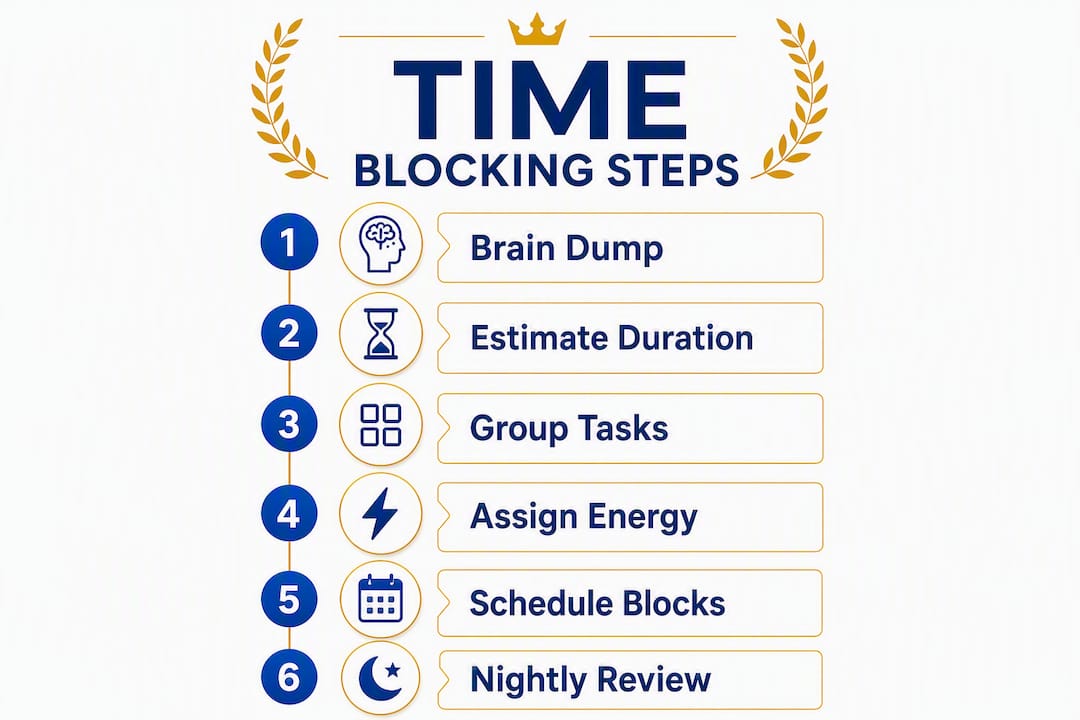
Step 1: Brain dump. Write every task, obligation, and commitment you can think of onto a single list. No filtering, no prioritizing yet. The goal is to get everything out of your head and onto paper (or a digital list). A thorough brain dump is the foundation of an honest schedule.

Step 2: Estimate and apply the 1.5x rule. For each task, estimate how long it will take, then multiply that number by 1.5. If a task feels like 60 minutes, block 90. This single habit counters optimism bias and prevents the schedule collapse that happens when one task runs long and dominates the rest of the day.
Step 3: Group and categorize. Sort tasks into three buckets: deep work (cognitively demanding, requires focus), shallow work (email, admin, logistics), and buffer (transition time, unexpected requests). This step makes the next one fast.
Step 4: Assign blocks by energy. Place deep-work blocks during your peak energy window. Shallow work and meetings go in lower-energy periods. Buffer blocks sit between major segments, not just at the end of the day.
Step 5: Place blocks in your calendar. Treat every block like a formal meeting by putting it on a shared or professional calendar. This creates external accountability and prevents others from scheduling over your protected time. Use color-coding: one color for deep work, another for admin, a third for meetings.
Step 6: Review nightly. Spend five minutes at the end of each day checking which blocks were completed, which were interrupted, and what needs to move. This review is where the system improves over time.
Sample daily schedule for a knowledge worker:
| Time | Block | Type |
|---|---|---|
| 8:30–10:00 AM | Deep work: primary project | Deep |
| 10:00–10:15 AM | Buffer | Buffer |
| 10:15–10:45 AM | Email and Slack | Shallow |
| 11:00–12:00 PM | Second focus block | Deep |
| 12:00–1:00 PM | Lunch (protected) | Buffer |
| 1:00–2:30 PM | Meetings or collaborative work | Shallow |
| 2:30–3:00 PM | Admin wrap-up | Shallow |
| 3:00–3:15 PM | Nightly review and plan tomorrow | Buffer |
Pro Tip: When a block gets interrupted, do not delete it. Move it to the next available slot. This “move, don’t delete” rule keeps important work on the calendar rather than quietly disappearing from your week.
For students, a structured study schedule follows the same logic: protect your hardest subject in your sharpest morning window, batch lighter review tasks in the afternoon, and leave evenings for rest or flexible catch-up.
How does time blocking compare to related techniques?
| Method | Best for | Typical block length | Key advantage | Discipline required | Tools to try |
|---|---|---|---|---|---|
| Traditional time blocking | Knowledge workers, students | 60–90 min (deep), 30 min (shallow) | Maximum focus, clear structure | High | Google Calendar, Notion, Optiostation |
| Timeboxing | Perfectionists, deadline-driven work | 25–60 min | Prevents scope creep, creates urgency | Medium | Any timer, calendar with hard stops |
| Task batching | Anyone with many small tasks | 30–60 min per batch | Reduces task-switching overhead | Low–Medium | To-do list + calendar block |
| Day theming | Entrepreneurs, managers, freelancers | Full day per theme | Weekly-level context reduction | High | Weekly calendar template |
Decision rules for picking your method this week:
- If you need strict time limits on tasks that tend to expand, use timeboxing inside your blocks.
- If you want a weekly rhythm that protects creative work, try day theming for one week.
- If you have many small tasks fragmenting your day, start with batching before adding full blocking.
- If you are new to all of this, traditional blocking with three core blocks is the lowest-risk starting point.
Run a one-week experiment: pick one method, schedule it for five days, and track two things each evening: how many blocks you completed as planned, and how many times you were pulled off a block by something unplanned. That data tells you whether the method fits your actual work environment. For a deeper look at timeboxing specifically, Optiostation’s guide covers how to combine it with calendar blocking.
What does the research say about time blocking?
The evidence base for time blocking draws from several well-established findings in cognitive science and productivity research.
Context switching carries a steep cost. Research from the American Psychological Association confirms that switching between tasks produces “switch costs” that reduce efficiency and increase errors, even when the switch feels minor. Time blocking addresses this by eliminating the switch itself.
Decision fatigue is equally well-documented. Pre-scheduling tasks the night before means your morning self does not spend energy deciding what to work on. That preserved willpower goes directly into execution. The 1.5x estimation rule addresses a related bias: the planning fallacy, the well-documented human tendency to underestimate how long tasks take.
Practitioner heuristics that hold up across experience levels:
- Block only 60–70% of your available time. The remaining 30–40% absorbs the unexpected without collapsing the plan.
- Name each block with a specific deliverable, not a vague category. “Write intro section of report” beats “writing.”
- Start with three scheduled blocks and add more only after two weeks of consistent practice.
- Never delete a block. Move it.
Running a 7-day experiment: Each evening, record three numbers: blocks completed as planned, interruptions that pulled you off a block, and a subjective focus score from 1–10. After seven days, the pattern is usually obvious. Most people discover one or two recurring interruption sources that account for most of their schedule drift.
What are the most common time-blocking mistakes?
Most people who try time blocking and quit do so because of predictable, fixable errors.
Over-blocking. Scheduling every minute of the day feels productive in planning and catastrophic in practice. One overrun task cascades into the next, and by noon the schedule is fiction.
Fix: block only 60–70% of your available hours. Leave the rest as buffer and flex time.
Vague block labels. “Work on project” is not a block. It is a wish. When the block arrives and you are not sure what “work on project” means right now, you will default to the easiest thing nearby.
Fix: name every block with the specific output you are producing. “Draft slides 4–8 for Thursday presentation” is a block.
Skipping the nightly review. Without a review, the system does not learn. Blocks that were interrupted stay interrupted. Patterns that cause drift never get fixed.
Fix: set a five-minute calendar reminder at the end of each workday. Review, move any incomplete blocks, and set tomorrow’s three core blocks.
Treating blocks as optional. A block you skip without consequence is not a block. It is a suggestion.
Fix: treat blocks exactly as you would treat a meeting with your manager. Reschedule rather than cancel.
Quick-response guide for interruptions:
- Note the interruption source (person, platform, or internal distraction) in a running log.
- If the interruption is genuinely urgent, handle it and immediately move the displaced block to the next open slot.
- If it can wait, write it on a capture list and return to the block.
- At the nightly review, check whether the same source interrupted you more than once. Recurring sources need a structural fix, not just willpower.
Key Takeaways
Time blocking works because it converts a vague to-do list into a committed schedule, protecting deep work, reducing decision fatigue, and making capacity visible before the day begins.
| Point | Details |
|---|---|
| Start with three core blocks | Block your three most important tasks first; fill only 60–70% of available time to absorb the unexpected. |
| Apply the 1.5x rule | Multiply every task estimate by 1.5 to counter optimism bias and prevent schedule collapse. |
| Treat blocks like meetings | Place blocks on a shared calendar and reschedule rather than delete when interrupted. |
| Review every night | A five-minute nightly review is where the system improves; without it, patterns of drift never get fixed. |
| Optiostation supports the practice | Optiostation’s task and time management tools give students and professionals templates and tracking to run the 7-day experiment and measure block adherence. |
Why consistency beats the perfect schedule
The most common mistake people make with time blocking is treating it as a design problem. They spend an hour building the ideal schedule, color-coded and perfectly balanced, and then abandon it by Wednesday because real life did not cooperate.
The method is not about perfection. It is about the nightly five-minute habit of deciding, in advance, what tomorrow’s three most important hours will protect. That decision, made consistently, compounds. A schedule that is 70% followed beats a perfect schedule that lasts two days.
The research on context switching and decision fatigue points to the same conclusion: structure does not constrain you, it frees you. When the plan is already made, the morning becomes about execution rather than negotiation with yourself. That shift in how a day starts changes how it ends.
One more thing worth saying plainly: the tools matter less than the habit. A paper planner, Google Calendar, or a dedicated app all work if you use them consistently. What does not work is any system you only run when you feel motivated. Motivation follows structure, not the other way around.
Optiostation helps you put this into practice
Optiostation is built specifically for students and young professionals who need more than a to-do list but less than a full enterprise project suite. The app’s task and time management features let you capture your brain dump, assign blocks directly to your schedule, and track which blocks you actually completed, so the 7-day experiment described in this article becomes a measurable process rather than a guess.

Where most calendar apps treat scheduling as a passive activity, Optiostation’s Optio framework positions the app as your second-in-command: it holds the plan, flags what is overdue, and keeps your three core priorities visible throughout the day. Students managing coursework across multiple subjects and professionals juggling project deadlines alongside meetings will find the structure fits without requiring a setup overhaul.
The best task management software for time blocking is the one you will actually open every morning. Optiostation is designed to be that app. Download it, run the 7-day experiment from this guide, and track your block completion rate. The data will tell you everything you need to know.
Useful sources and further reading
The sources below back the claims in this article and are worth reading directly if you want to go deeper on any specific point.
- Context switching and interruption costs (UC Irvine): The foundational study showing it takes over 23 minutes to fully recover focus after an interruption. Essential reading for understanding why blocking time matters.
- Multitasking research (APA): The American Psychological Association’s summary of task-switching costs. Clear, accessible, and directly relevant to the case for single-task blocks.
- Time blocking step-by-step (HabitBox): Practical walkthrough covering the brain dump, 1.5x rule, and beginner pitfalls. Good companion to the workflow in this article.
- Time blocking guide (10000Hours): Covers decision fatigue, typical block lengths, and how to structure a day around energy levels.
- Time blocking at work (Atlassian): Practitioner-focused guide with strong advice on calendar accountability and the “move, don’t delete” rule.
- Cal Newport on deep work (Wikipedia): Background on Newport’s research and the deep work framework that underpins the productivity case for time blocking.
- Parkinson’s Law (Wikipedia): The principle that work expands to fill available time, which explains why timeboxing and hard block endings matter.
- Time blocking overview (Wikipedia): Concise reference entry covering definitions, variants, and the 53% productivity statistic.
- Optiostation time blocking guide: Optiostation’s own practical guide with templates and calendar examples for students and professionals.
- Time blocking vs. to-do list (Optiostation): A direct comparison for readers deciding whether to replace or complement their existing list system.
- Effective language study routines (Tutoroo): Useful for students applying time blocking to language learning, with concrete routine structures.
Recommended
- Time Blocking Time Management for Students and Pros – Optio Station: Best Project Management App for Prioritization
- Time blocking how to: reclaim your day and focus – Optio Station: Best Project Management App for Prioritization
- Daily Planning Routine How To Boost Productivity Easily – Optio Station: Best Project Management App for Prioritization
- Time Management Time Blocking for Focused Productivity – Optio Station: Best Project Management App for Prioritization
