

TL;DR:
- Effective team meetings last between 15 and 45 minutes and require a clear purpose and focused agenda. Proper preparation, role assignment, and disciplined scheduling ensure each meeting produces meaningful decisions and actions. Sending a concise summary within 24 hours reinforces accountability and maintains momentum afterward.
Efficient team meetings are defined by three non-negotiable elements: a clear purpose, a focused agenda, and participants who are ready to decide or act. Knowing how to run efficient team meetings separates leaders who build momentum from those who drain it. Effective meetings last 15–45 minutes, and anything longer signals a preparation problem, not a complexity problem. The techniques in this article are grounded in research and built for professionals who want every meeting to produce a real outcome.
How to run efficient team meetings: prerequisites that set you up to win
The most productive meetings are won before anyone enters the room. Preparation is not optional. It is the single biggest factor separating a meeting that moves work forward from one that wastes an hour.
Start with a clear purpose. Every meeting needs a purpose that fits into one of four categories: decide, align, inform, or create. If you cannot state the purpose in under 15 words, cancel the meeting and send an async update instead. This one filter eliminates a significant share of unnecessary recurring meetings.
Build a focused agenda. Humans process information best when agenda items are limited to 3–4 key questions rather than vague topics. Frame each item as a specific question, such as “Which vendor do we select for Q3?” rather than “Vendor discussion.” Question-based framing tells every participant exactly what outcome is expected before they walk in.
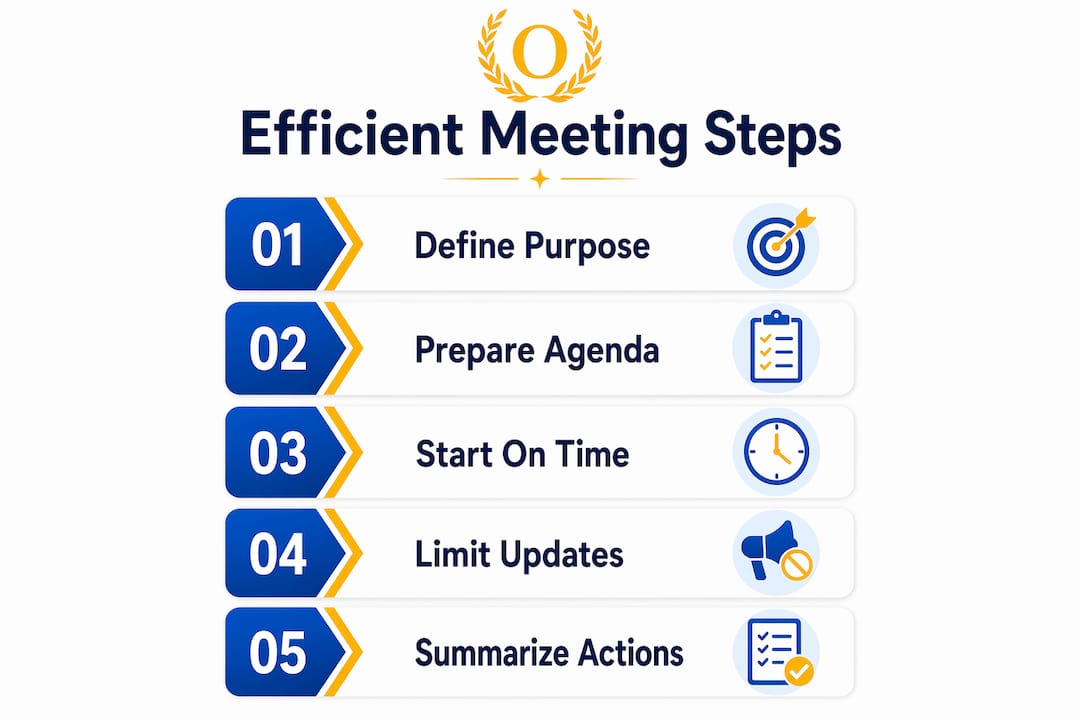
Distribute the agenda at least 24 hours in advance. Sharing the agenda early gives participants time to prepare, flag missing context, or opt out if their presence is not needed. That last point matters. Smaller groups move faster and contribute more.
Assign roles before the meeting starts. Assigning a facilitator and a timekeeper creates built-in accountability. The facilitator manages the flow of discussion. The timekeeper protects the schedule. Without these roles, both responsibilities fall silently on the meeting organizer, and one of them always gets dropped.
- Limit attendees to people who must decide or contribute directly
- Assign a note-taker to capture decisions and action items in real time
- Set a hard end time in the calendar invite, not just a start time
- Use your agenda creation workflow to build and share agendas consistently
Pro Tip: Send the agenda with a one-sentence meeting goal at the top. That single sentence forces you to confirm the meeting is worth holding and tells every attendee exactly what success looks like.
How should you structure and execute the meeting to maintain engagement?
Structure during the meeting is what turns a good agenda into a real outcome. Without it, even well-prepared teams drift into status updates and circular debate.

Start on time, every time. Starting late rewards the people who showed up late and penalizes the ones who were on time. Meeting lateness negatively impacts team satisfaction and signals that the leader does not respect the group’s time. Set the norm in the first meeting and hold it.
Apply the 80/20 time rule. No more than 20% of meeting time should go to context-setting or status updates. The remaining 80% belongs to problem-solving, decisions, and alignment. This ratio forces leaders to move status updates out of the meeting and into a shared document or async channel.
Use timeboxing for each agenda item. Assign a specific number of minutes to each question before the meeting starts. When the time is up, the group either makes a decision or schedules a follow-up. Timeboxing prevents one topic from consuming the entire session.
Here is a practical execution sequence for a 30-minute meeting:
- Open (2 minutes). State the meeting goal and confirm the agenda. No small talk beyond 60 seconds.
- Context (4 minutes). Share only the background information participants need to decide. Nothing more.
- Discussion (18 minutes). Work through 3–4 agenda questions. The facilitator keeps each item moving.
- Decisions and action items (4 minutes). Confirm every decision made. Assign each action item with a name and a deadline.
- Close (2 minutes). Restate what was decided, who owns what, and when the next check-in is.
Capture action items with three fields. Action items must specify what, who, and by when to prevent post-meeting confusion. “Someone will look into it” is not an action item. “Priya will finalize the vendor shortlist by friday” is.
- Use silent writing before open discussion to surface ideas from quieter team members
- Rotate the facilitator role across meetings to build shared ownership
- Park off-topic items in a visible “parking lot” list rather than letting them derail the agenda
Pro Tip: If a discussion stalls, ask the group: “What information would we need to decide this right now?” That question either surfaces the missing data or reveals that the decision is already clear.
What common pitfalls hinder efficient meetings and how can you avoid them?
Even experienced leaders fall into patterns that quietly destroy meeting quality. Recognizing these pitfalls is the first step to fixing them.
Holding meetings without a clear purpose is the most common and most costly mistake. If the meeting exists because it is on the calendar, not because there is something to decide, it should not happen. Audit every recurring meeting quarterly and cancel any that cannot pass the 15-word purpose test.
Inviting too many people slows every decision. Limiting attendees to essential participants produces faster, more engaging discussions. Everyone else gets an async summary. This is not exclusion. It is respect for their time.
Letting meetings run over trains your team to ignore end times. Once a meeting runs long once, it runs long every time. Use a visible timer and give the timekeeper explicit authority to call time.
- Treating meetings as the primary channel for information sharing rather than decision-making
- Skipping the follow-up summary, which leaves action items untracked and decisions forgotten
- Scheduling 60-minute meetings by default when 30 minutes would work
Progressive timeboxing is one of the most effective techniques for fixing chronic overruns. Start recurring meetings at 30 minutes and reduce by 5 minutes each session until the group reaches 15 minutes or less. The constraint forces the team to prioritize and cut filler. Most teams are surprised by how much they can accomplish in less time once the pressure is real.
The underlying principle is simple. Meetings expand to fill the time allotted. Shrink the container and the content sharpens.
What tools and follow-up practices enhance meeting efficiency?
The meeting ends when the room clears. The results are determined by what happens in the next 24 hours.
Send a meeting summary within 24 hours. Meeting summaries sent within 24 hours reinforce accountability and keep momentum alive. The summary should include every decision made, every action item with its owner and deadline, and the date of the next relevant meeting. Keep it to one page or less.
Update non-essential stakeholders asynchronously. Keeping non-attendees informed via notes or summaries saves collective time and builds trust. A short written recap or a two-minute video clip covers what they need without pulling them into a meeting they did not need to attend.
Use digital tools to manage the full meeting workflow. The table below maps each phase of the meeting to the type of tool that supports it best.
| Meeting phase | Tool category | Primary benefit |
|---|---|---|
| Agenda preparation | Shared document or task app | Distributes agenda 24 hours early |
| Scheduling and invites | Calendar integration | Reduces back-and-forth scheduling |
| Note-taking and decisions | Real-time collaboration doc | Captures decisions as they happen |
| Action item tracking | Task management app | Assigns ownership and deadlines |
| Async stakeholder updates | Video recap or summary tool | Informs without requiring attendance |
Optiostation’s task and time management features cover the action item tracking and async update phases directly. Team leaders can assign tasks from meeting notes, set deadlines, and track progress without switching between apps. The meeting productivity checklist inside Optiostation gives Centurions a repeatable structure for every session.
Pro Tip: Treat the meeting summary as a contract. If a decision or action item is not in the summary, it does not officially exist. This one habit eliminates the “I thought someone else was handling it” problem.
Key Takeaways
Running efficient team meetings requires a clear purpose, a question-based agenda distributed 24 hours in advance, disciplined timeboxing, and a summary sent within 24 hours that assigns every action item with a name and a deadline.
| Point | Details |
|---|---|
| Define the meeting purpose | Every meeting must fit into decide, align, inform, or create. Cancel it if you cannot. |
| Limit agenda to 3–4 questions | Frame items as specific questions to speed decisions and focus discussion. |
| Apply the 80/20 rule | Spend 80% of meeting time on decisions and problem-solving, not status updates. |
| Assign roles before the meeting | A facilitator and timekeeper prevent drift and protect the schedule. |
| Send a summary within 24 hours | Confirm every decision and action item with a named owner and a clear deadline. |
What I have learned from running hundreds of team meetings
The conventional advice says to run shorter meetings. That is true, but it misses the real problem. Most meetings are not too long. They are too vague. A 60-minute meeting with a sharp purpose and three clear questions outperforms a 15-minute meeting where nobody knows what they are deciding.
The practice that changed how I think about meeting facilitation is setting explicit success criteria before every session. Not a goal. A criterion. “We will leave this meeting having selected one vendor” is a criterion. “We will discuss the vendor options” is a goal that lets everyone off the hook. That distinction matters more than any timer or agenda template.
Rotating the facilitator role is the second thing that consistently surprises teams. When the same person always runs the meeting, everyone else becomes a passenger. Rotating the role forces every team member to think about structure, not just content. It also surfaces quieter voices naturally, without the awkward “Does anyone else have thoughts?” prompt that rarely works.
The hardest habit to build is the async update. Leaders resist it because it feels like extra work. It is not. It replaces the 30-minute “alignment meeting” that existed only to share information. A well-written async communication approach gives people the context they need without requiring their presence. Once a team experiences the time savings, they protect it.
Audit your recurring meetings every quarter. Cancel the ones that cannot pass the 15-word purpose test. You will not miss them.
— Optiostation
Optiostation’s tools for meeting-ready teams
Running tighter meetings is only half the equation. The other half is what happens after the meeting ends, when action items need owners, deadlines need tracking, and progress needs to be visible without another meeting to check in.
Optiostation is built for exactly that gap. The app gives team leaders and Centurions a single place to assign tasks from meeting notes, set deadlines, and track completion without switching tools. The time management app list on Optiostation helps you pick the right tools for scheduling, note-taking, and follow-up. For teams that want a complete system, the task tracking guide walks through how to manage every action item from assignment to completion. Optiostation works as your second-in-command so your meetings actually produce results.
FAQ
What is the ideal length for a team meeting?
Effective team meetings last 15–45 minutes. Any meeting with more than three participants requires a written agenda to stay productive within that window.
How many agenda items should a meeting have?
Limit the agenda to 3–4 question-based items. Framing each item as a specific question improves decision-making speed and gives participants a clear target.
When should you cancel a meeting?
Cancel a meeting when you cannot state its purpose in under 15 words. If the outcome can be achieved asynchronously, a written update or shared document is a better use of everyone’s time.
How do you manage remote meetings effectively?
Distribute the agenda 24 hours early, assign a facilitator and timekeeper, and use a shared document for real-time note-taking. Send a written summary with all decisions and action items within 24 hours of the session.
What should a meeting summary include?
A meeting summary should list every decision made, every action item with its assigned owner and deadline, and the date of the next relevant check-in. Sending it within 24 hours keeps accountability high and prevents tasks from falling through the cracks.
Recommended
- How to Improve Teamwork for Success in College and Work – Optio Station: Best Project Management App for Prioritization
- How to Manage Team Tasks Effectively for Success – Optio Station: Best Project Management App for Prioritization
- Efficient meeting workflow: Step-by-step guide to results – Optio Station: Best Project Management App for Prioritization
- Meeting Productivity Checklist: Maximize Results With Smart Digital Tools – Optio Station: Best Project Management App for Prioritization
