

Over 60 percent of American professionals report feeling overwhelmed by their daily workload. Staying organized can be the difference between falling behind and achieving your goals. By mastering task management strategies, you can gain more control over your schedule, reduce stress, and unlock greater productivity throughout your workday.
Table of Contents
- Step 1: List All Current And Upcoming Tasks
- Step 2: Prioritize Tasks Based On Importance And Deadlines
- Step 3: Group Similar Tasks For Efficient Workflow
- Step 4: Schedule Tasks Using A Digital Organizer
- Step 5: Review And Adjust Your Task System Regularly
Quick Summary
| Key Point | Explanation |
|---|---|
| 1. List all tasks systematically | Gather current and upcoming tasks in one place to clarify workload and boost productivity. |
| 2. Prioritize effectively using techniques | Employ methods like the Eisenhower Matrix to categorize tasks by urgency and importance for better focus. |
| 3. Group similar tasks for efficiency | Cluster related tasks to minimize mental fatigue and improve focus, enhancing overall productivity. |
| 4. Use digital organizers for scheduling | Implement a digital tool to track tasks, using features like color coding and reminders for better time management. |
| 5. Regularly review your task system | Conduct periodic reviews to adjust your task management approach, ensuring flexibility and alignment with current priorities. |
Step 1: List all current and upcoming tasks
Listing all your current and upcoming tasks is the critical first step in organizing your work for maximum productivity. By creating a comprehensive task inventory, you create a strategic roadmap for your professional activities and set the stage for effective time management. Tracking all your responsibilities systematically allows you to gain clarity and control over your workload.
Start by gathering all potential tasks from multiple sources: work assignments, personal projects, emails, team communications, and scheduled meetings. Use a single centralized system like a digital notebook, spreadsheet, or dedicated task management app to compile everything in one place. Break down larger projects into smaller actionable steps, ensuring each task is specific and measurable. Categorize tasks by project, priority level, and estimated time required. This approach transforms an overwhelming list of responsibilities into a clear, manageable action plan.
A pro tip for maintaining an effective task list is to update it daily. Set aside 10-15 minutes at the beginning or end of each workday to review, add, and adjust your tasks. This regular maintenance prevents important responsibilities from slipping through the cracks and helps you stay proactive in managing your workload. By consistently tracking and organizing your tasks, you create a powerful system for professional productivity and personal peace of mind.
Step 2: Prioritize tasks based on importance and deadlines
Prioritizing your tasks is a strategic approach that transforms your work management from chaotic to controlled. By understanding which tasks demand immediate attention and which can wait, you create a powerful system for professional productivity. Utilizing systematic prioritization techniques helps you focus your energy on activities that truly move the needle.
One of the most effective methods for prioritization is the Eisenhower Matrix. This approach involves categorizing tasks into four distinct quadrants: urgent and important (do immediately), important but not urgent (schedule), urgent but not important (delegate), and neither urgent nor important (eliminate). Begin by listing all your tasks and then evaluating each one based on its potential impact and time sensitivity. High priority tasks are those that directly contribute to your core goals or have critical deadlines. Consider factors like project impact, potential consequences of delay, and alignment with your broader professional objectives.
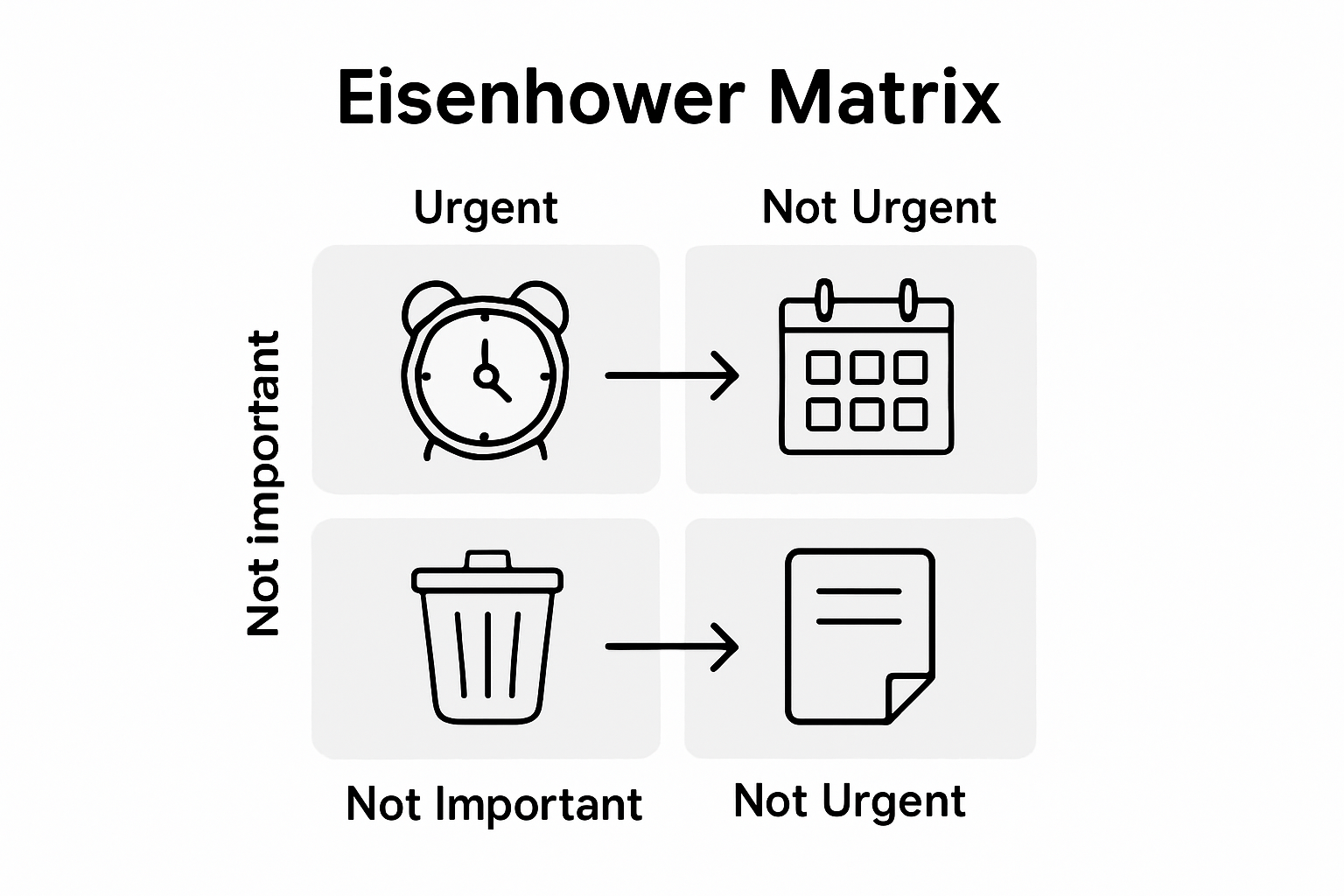
A practical tip for maintaining effective task prioritization is to review and adjust your priorities daily. Not all tasks remain static some become more or less critical as circumstances change. Set aside 10 minutes each morning to reassess your task list, moving items between quadrants as needed. This dynamic approach ensures you remain flexible and responsive to shifting work demands. By consistently applying these prioritization strategies, you will not only manage your workload more effectively but also reduce stress and increase your overall professional performance.
Step 3: Group similar tasks for efficient workflow
Grouping similar tasks is a powerful strategy that can dramatically improve your productivity and mental efficiency. By clustering tasks with similar characteristics or requirements, you create a streamlined workflow that minimizes mental fatigue and maximizes focus. Organizing tasks through strategic categorization allows you to work more intelligently and reduce the cognitive load of constant task switching.
Start by analyzing your task list and identifying natural groupings. These might include administrative tasks, creative work, communication activities, research projects, or tasks requiring specific tools or mental states. For instance, group all email correspondence, phone calls, and meeting preparations together. Similarly, cluster research tasks that require deep concentration, or administrative tasks like expense reporting and document filing. This approach leverages the psychological concept of batching similar activities, which helps your brain maintain consistent focus and reduces the mental energy expended in transitioning between radically different types of work.
A critical tip for effective task grouping is to be flexible and periodically reassess your categories. Work demands change, and what works perfectly one month might need adjustment the next. Consider your personal energy levels and most productive times of day when creating these task clusters. Some people find they are most creative in the morning, while others hit their stride in the afternoon. By aligning your grouped tasks with your natural productivity rhythms, you can optimize your workflow and accomplish more with less mental strain.
Step 4: Schedule tasks using a digital organizer
Scheduling tasks with a digital organizer transforms your productivity by creating a structured system for managing your workload. Digital tools offer unprecedented flexibility in tracking and organizing your professional responsibilities. Breaking down complex projects into manageable steps helps you maintain clear visibility and control over your workflow.

Choose a digital organizer that supports multiple views like calendar, list, and kanban board formats. Start by transferring all your tasks from your initial list into the digital platform. Assign specific dates and time blocks for each task based on their priority and complexity. Use color coding to distinguish between different types of tasks or projects. Color categorization helps your brain quickly recognize task categories and mentally prepare for different types of work. Consider utilizing features like recurring task settings for regular responsibilities and reminder notifications to keep yourself accountable.
A critical tip for digital task scheduling is maintaining consistent updates. Your digital organizer is only as effective as the information you input. Set aside 10 minutes at the end of each day to review your schedule update completed tasks remove outdated items and plan for the next day. This daily maintenance ensures your digital system remains an accurate reflection of your current workload and prevents task overflow or missed deadlines. By treating your digital organizer as a dynamic tool rather than a static document you create a responsive system that adapts to your changing professional demands.
Step 5: Review and adjust your task system regularly
Regularly reviewing and adjusting your task management system is crucial for maintaining peak productivity and ensuring your workflow remains aligned with your evolving professional goals. A static task system quickly becomes obsolete as work demands shift and priorities change. Systematic task prioritization review helps you stay responsive and focused on what truly matters.
Set a consistent schedule for comprehensive task system reviews. This could be weekly or biweekly depending on the complexity of your work. During these review sessions critically assess each task category. Ask yourself key questions: Are these tasks still relevant? Have their priorities changed? Are some tasks consistently being postponed? Identify patterns in your task completion and productivity. Look for bottlenecks or recurring obstacles that might indicate a need for system adjustment. Consider reallocating time resources reorganizing task clusters or eliminating tasks that no longer serve your professional objectives.
A critical insight for effective task system maintenance is embracing flexibility. Your task management approach should be a living system not a rigid framework. Be willing to experiment with different organizational techniques tracking methods and prioritization strategies. Some professionals find success with weekly replanning others prefer monthly comprehensive reviews. The key is finding a rhythm that works for your specific work style and professional demands. By treating your task system as a dynamic tool that can be continuously refined you create a responsive productivity strategy that adapts to your changing professional landscape.
Take Command of Your Work Tasks with Optio Station
Struggling to organize your work tasks for maximum productivity is a challenge many face. The article highlights how listing, prioritizing, grouping, and scheduling your tasks can feel overwhelming without the right system to serve as your second-in-command. If you want to conquer your workload like a true Centurion and reduce stress while boosting focus, embracing a tool designed for task, team, and time management is essential.

Discover how Optio Station empowers students and young professionals to become leaders of their productivity battles. With Roman-themed guidance, you get organized task lists, prioritization strategies, and digital scheduling all in one place. Visit Optio Station now to experience smooth task management. Explore practical advice in ProductivityThoughts and stay sharp with insights from CenturionTips. Take immediate control of your workday by enlisting your Optio today.
Frequently Asked Questions
How can I create a comprehensive list of my current and upcoming tasks?
To create a comprehensive task list, gather all tasks from various sources such as work assignments, emails, and meetings. Use a centralized system like a digital notebook or task management app to compile everything in one place, ensuring each task is specific and measurable.
What is the best way to prioritize my tasks effectively?
The best way to prioritize tasks is by using the Eisenhower Matrix, which categorizes tasks into four quadrants: urgent and important, important but not urgent, urgent but not important, and neither. Evaluate your tasks based on their impact and deadlines, and adjust priorities each morning to stay aligned with your goals.
How should I group similar tasks to improve my workflow?
Group similar tasks by identifying natural categories such as administrative tasks, creative work, or communication activities. This minimizes mental fatigue and allows you to maintain focus, making it easier to complete tasks efficiently.
What steps should I follow to schedule my tasks using a digital organizer?
To schedule tasks in a digital organizer, first transfer your compiled task list into the tool and assign specific dates and time blocks based on priority. Use color coding for different task types, and update your schedule regularly to keep it accurate and actionable.
Why is it important to review and adjust my task management system regularly?
Regularly reviewing your task management system is crucial for adapting to changing work demands and priorities. Set a consistent schedule for review sessions, asking yourself if tasks are still relevant and identifying any bottlenecks, allowing you to refine your approach for better productivity.
How often should I update my task list to maintain effectiveness?
You should update your task list daily to prevent important responsibilities from slipping through the cracks. Set aside 10-15 minutes at the start or end of your workday to review, add, and adjust tasks for maximum effectiveness.
Recommended
- How to Organize Daily Tasks at Work for Maximum Productivity – Optio Station: Best Project Management App for Prioritization
- How to Manage Multiple Tasks Easily for Better Results – Optio Station: Best Project Management App for Prioritization
- 7 Essential Organization Tips for Busy Professionals – Optio Station: Best Project Management App for Prioritization
- How to Manage Daily Tasks Effectively for Success – Optio Station: Best Project Management App for Prioritization
- Top Workshop Organization Ideas for Diesel Injection Pros 2025 – My WordPress
- 7 Creative Workspace Ideas to Boost Productivity and Focus – Projector Display
