
You handle multiple tasks by prioritizing first, then blocking protected time for the top items, batching similar work, and delegating whatever doesn’t need your specific attention. That’s the order that works, not multitasking. Below you’ll find the exact frameworks (Eisenhower matrix, ABCD, 1-3-5), copyable templates, and word-for-word interview phrasing to make this concrete today.
TL;DR:
- Prioritize tasks using frameworks like Eisenhower or ABCD, then time-block or batch similar work to maximize focus and efficiency.
- Use a master backlog separate from your daily list and review it weekly to prevent task overload and maintain clarity.
- Schedule deep work early in the day with protected blocks and limit interruptions by turning off notifications and setting response times.
- Delegate tasks to others only when they have the skill, and the task does not require your specific attention or judgment.
- Focus on decision-making habits like quick triage and calendar control rather than multitasking to handle heavy workloads effectively.
Table of Contents
- How Do You Manage Multiple Tasks? Start With These Methods
- What’s the Fastest Way to Prioritize Tasks?
- How Do You Turn a Priority List Into a Real Schedule?
- Why Does Switching Between Tasks Slow You Down?
- What’s the Best Way to Manage Tasks so Nothing Gets Lost?
- How Do You Protect Focus When Everyone Wants a Piece of Your Day?
- When Should You Delegate Instead of Doing It Yourself?
- How Do You Answer “How Do You Handle Multiple Tasks?” in an Interview
- Copyable Templates You Can Use Today
- Why the “Just Multitask Harder” Advice Is Backwards
- Put These Methods Into an App That Actually Tracks Them
- Sources
- FAQ
How Do You Manage Multiple Tasks? Start With These Methods
Trying every technique at once is how people burn out in week one. Pick a single method from this list, run it for three or four days, and notice whether your task list actually shrinks.
- Prioritize before you touch anything. Sort tasks by urgency and importance before opening your inbox. Use this when your list has more than five open items.
- Time-block your calendar. Assign each priority task a specific slot instead of leaving it as a vague intention. Use this daily, ideally the night before or first thing in the morning.
- Batch similar tasks. Group emails, calls, or edits into single blocks rather than handling them as they trickle in. Use this when interruptions are eating your deep work time.
- Time-box anything that could expand forever. Cap research, formatting, or “polishing” tasks at a fixed number of minutes. Use this on tasks with no natural stopping point.
- Run focus sprints. Work in 25 to 50 minute stretches with a hard break after. Use this for your hardest, most cognitively demanding task of the day.
- Delegate what someone else can own. Hand off tasks that don’t require your specific skill or judgment. Use this the moment your list outpaces your available hours.
- Use one tool to track everything. A single system beats five sticky notes and three apps. Use this from day one, not after things fall apart.
What’s the Fastest Way to Prioritize Tasks?
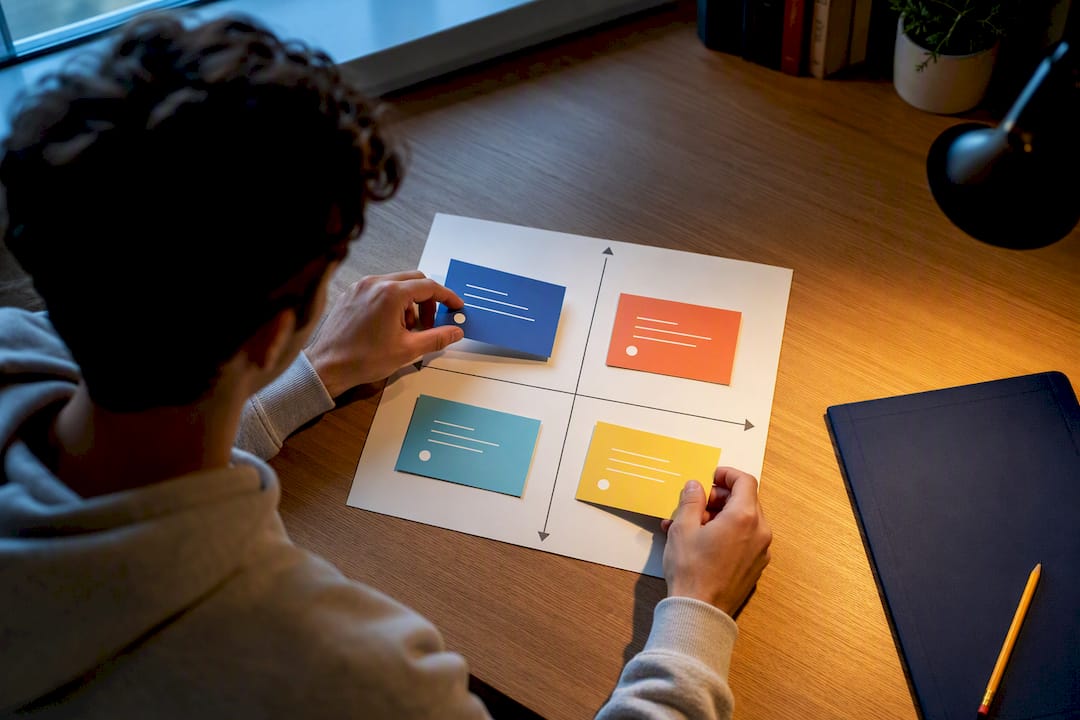
Two frameworks cover almost every situation: the Eisenhower matrix and ABCD ranking. The Eisenhower matrix sorts tasks into four boxes: urgent and important (do now), important but not urgent (schedule), urgent but not important (delegate), and neither (delete). A student with a paper due tomorrow and a club meeting request sitting in their inbox does the paper first and answers the club email later, or not at all.
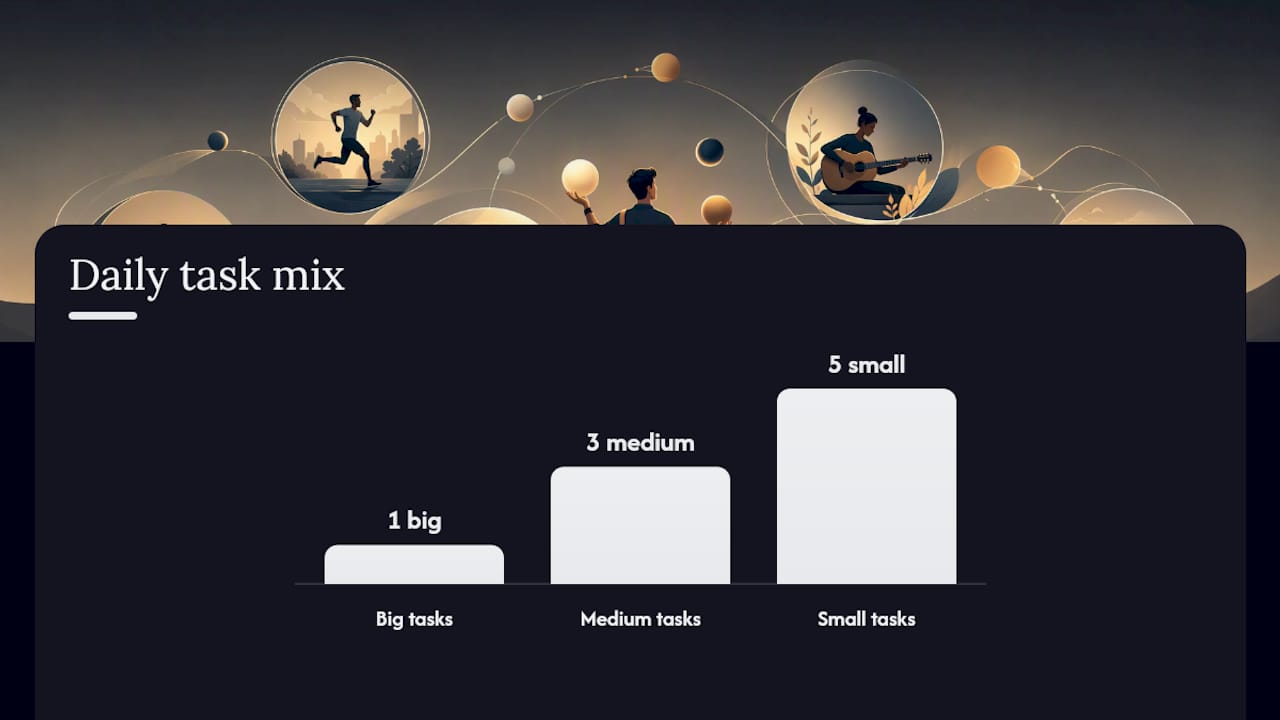
ABCD ranking works faster when you’re staring at a long flat list. Label each task A (must happen today), B (should happen soon), C (nice to do), or D (delegate or drop). Pair that with the 1-3-5 rule: pick one big task, three medium tasks, and five small ones for the day. Anything beyond that goes back into your backlog, not onto today’s plate.
A five-minute morning triage keeps both frameworks practical:
- Dump every open task into one list, no editing yet.
- Mark anything that’s actually due today.
- Cross out or defer anything that hasn’t moved in over a week.
- Ask of each remaining item: do I need to do this, or can someone else?
- Slot your top six items into A/B/C or 1-3-5 before you open email.
Pro Tip: If a task has sat on your list for three straight days without progress, it’s either not actually important or you’re avoiding it. Delegate it, delete it, or schedule it for a specific hour today. Don’t let it float.
Choosing between defer, delete, or delegate comes down to one question: does this task require you specifically, and does it matter this week? If no to either, it doesn’t belong on today’s list.
How Do You Turn a Priority List Into a Real Schedule?
Time-blocking assigns fixed calendar slots to specific tasks. Time-boxing caps how long you’ll spend on a task regardless of whether it’s finished. Use blocking for planned, known work; use boxing for open-ended tasks that tend to swallow more time than they deserve.
- Take your top A-priority task and give it the first protected block of your day, ideally 60 to 90 minutes before meetings start.
- Add 15-minute buffers between blocks. Skipping this is the single most common reason time-blocking falls apart by 11 a.m.
- Group meetings into two windows per day instead of scattering them, based on Atlassian’s guidance on managing multiple projects, which frames predictable time allocation as the fix for constant firefighting.
- Assign routine admin (emails, status updates) to one late-afternoon block rather than letting it interrupt deep work.
- Leave one unscheduled 30-minute slot for overflow. Something always runs long.
A sample weekday might look like: 8:00 to 9:30 deep work on your A-task, 9:30 to 9:45 buffer, 10:00 to 11:30 meetings, 11:30 to 12:00 email batch, 1:00 to 2:30 second priority task, 3:00 to 3:30 overflow slot, 4:00 to 4:30 admin batch. Adjust the hours, not the structure.
Why Does Switching Between Tasks Slow You Down?
Constant switching has a measurable cost. CHI’s 2005 research on interrupted work found that people who get interrupted compensate by working faster, but that speed comes with more stress and more errors, not free extra time. Every ping you answer mid-task charges you a hidden fee in the form of quality and calm.
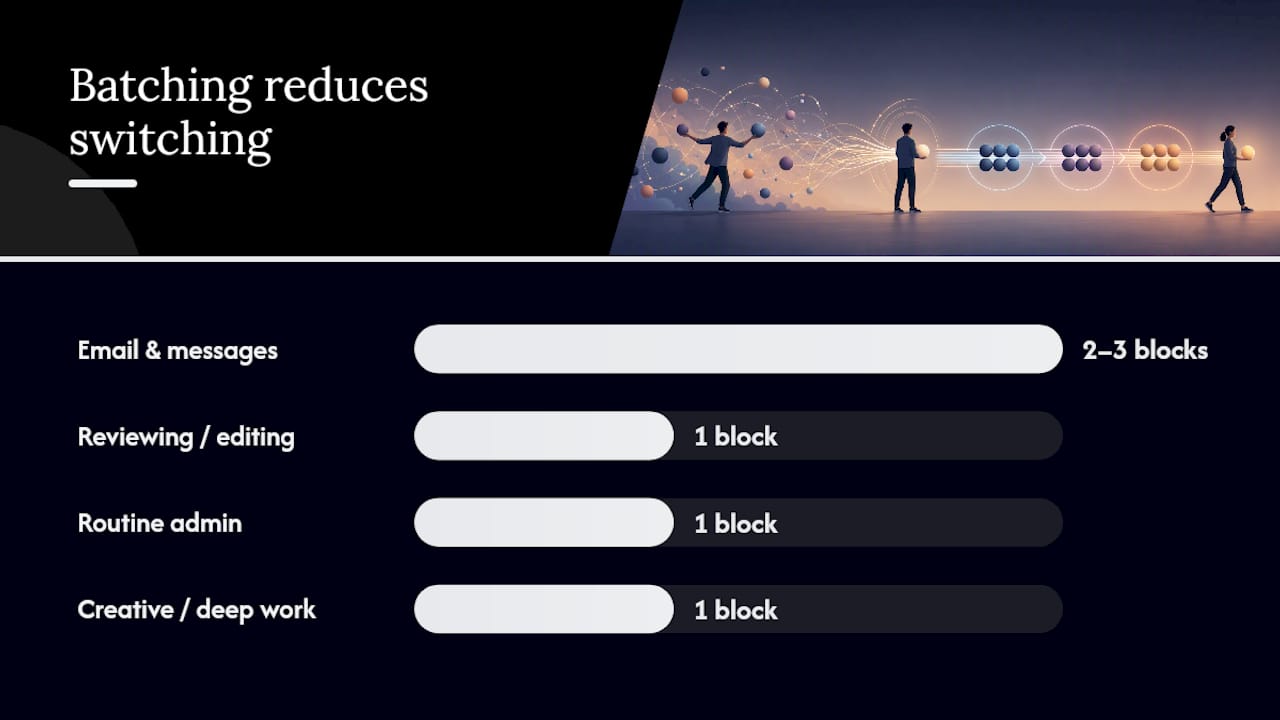
Batching is the direct countermeasure. Group similar work into single sessions instead of reacting to it piece by piece:
- Email and messages: two or three fixed blocks a day, not a constant open tab.
- Reviewing or editing: one block, done back to back, not scattered between other tasks.
- Routine admin: end of day, when creative energy is already spent anyway.
- Creative or deep work: your first block of the day, before notifications start piling up.
Batches of 45 to 90 minutes tend to hold attention without dragging. Test it yourself: track how long three recurring tasks take with your current scattered approach for a week, then batch the same tasks the following week and compare.
What’s the Best Way to Manage Tasks so Nothing Gets Lost?
A master backlog holds everything you might ever do. A daily list holds only what you’re actually doing today. Mixing the two is the single biggest reason task lists spiral out of control, according to Asana’s guidance on structuring to-do lists.
- Keep one master backlog per major area of life or work, not one giant catch-all.
- Pull a short daily “next actions” list from that backlog each morning.
- Use due dates and status tags only where they change what you actually do. Overtagging just adds clutter.
- Follow a simple loop: capture everything as it comes in, clarify what it actually requires, schedule it, then review weekly.
A assignment tracker built around this structure beats a plain notes app once your task count climbs past a dozen or so open items. Paper still works fine for a short, stable list. Once tasks span multiple projects with different deadlines, a digital system that separates backlog from daily action earns its place.
Pro Tip: Review your master backlog once a week, not once a day. Daily reviews of a 60-item list waste more time than they save.
How Do You Protect Focus When Everyone Wants a Piece of Your Day?
Interruptions don’t just cost the time they take. Research on attention and task performance shows that frequent interruptions degrade the quality and speed of complex work well after the interruption ends, since attention takes time to fully reset.
- Set explicit response windows with teammates (“I answer messages at 11 and 3”) instead of leaving expectations unspoken.
- Turn off notifications during focus sprints. Silence beats willpower every time.
- Work in 25 to 50 minute sprints with a genuine break after each one, not a scroll break that turns into twenty minutes.
- Default to single-tasking whenever a task requires actual thinking. Save multitasking for pairing a routine physical task with something low-demand, like folding laundry during a podcast.
When Should You Delegate Instead of Doing It Yourself?
Delegate when someone else has the skill, when it would take them less time than it costs you, or when doing it builds their ability for next time. Keep ownership when a task requires context only you have, or when the stakes are too high to hand off without close supervision.
A short delegation script prevents most of the back-and-forth that makes people avoid delegating in the first place:
- State the task in one sentence.
- Name the expected outcome, not just the activity.
- Give a firm deadline.
- Set one check-in point before the deadline, not five.
- Attach a short checklist or handoff note so nothing gets re-explained twice.
Escalate instead of delegating when the task involves a decision above your authority or a risk you can’t absorb alone. Otherwise, keep it and schedule it properly.
How Do You Answer “How Do You Handle Multiple Tasks?” in an Interview
Structure your answer as claim, method, brief example, measurable outcome. That order keeps you concise and gives the interviewer something specific to remember instead of a vague “I’m good at multitasking.”
- Individual contributor example: “I prioritize using a quick urgent/important sort each morning, then block calendar time for the top two items before checking email. Last semester I managed four classes and a part-time job by batching all my emails into two windows a day, which cut my daily distraction time roughly in half and let me finish assignments a day ahead of deadline.”
- Team lead example: “I run a five-minute daily triage with my team to separate what’s urgent from what’s just loud, then delegate based on who has bandwidth and skill fit. When we had three client deadlines overlap last quarter, I moved two lower-priority tasks to teammates with a clear handoff note, and we hit every deadline without anyone working a weekend.”
Keep your answer under 90 seconds and lean on one real number or outcome. Vague claims about being a “great multitasker” don’t land; specifics do.
Copyable Templates You Can Use Today
Paste these into your organized project setup or planner and adjust the labels to fit your week.
- Daily triage: List everything, then mark 1 big task, 3 medium tasks, 5 small tasks (or A/B/C if you prefer letters).
- Weekly review: Check current capacity, list every deadline in the next seven days, note what needs delegating, and clear anything untouched for over a week.
- Batching schedule: Fixed email blocks at 9 a.m. and 3 p.m., one review block after lunch, deep work first thing in the morning.
- Adapting for students or freelancers: Swap “meetings” for “class blocks” or “client calls,” and treat study sessions or billable work as your protected deep work slots.
Why the “Just Multitask Harder” Advice Is Backwards
Most advice about handling multiple tasks quietly assumes you need to get better at doing several things simultaneously. That’s the wrong target. The actual skill is deciding, fast and repeatedly, what deserves your attention right now and what can wait, then defending that decision against the next ping that arrives. CHI’s interrupted-work research makes this concrete: people who juggle tasks under interruption don’t do more work, they just do it under more stress and with more mistakes.
The gap between advice and reality shows up most in interviews, where candidates describe multitasking as a strength when what actually got them through a heavy semester or overloaded sprint was a triage habit and a calendar that said no to distractions. Optiostation’s guides and templates were built around this exact distinction: task, team, and time management as one connected system rather than three separate habits you have to remember to run. Try one template from this article for a full week before judging whether it works. A single week is enough to see whether your list is finally shrinking instead of just moving around.
— Optiostation
Put These Methods Into an App That Actually Tracks Them
Reading about prioritization and batching is one thing, but using AI productivity workflows and study-focused automations can help you implement these strategies more effectively. Keeping four classes, a job, and a group project straight without a system is another. There are apps that turn your prioritized list, batching schedule, and calendar blocks into one connected view instead of three disconnected habits you have to remember on your own.

Some apps support color-coded task categories so A-priority items stand out from routine admin, sync with Google Calendar so your time-blocks don’t live in a separate world from your actual schedule, and include ready-made templates so you’re not building your triage system from scratch every Monday. If you’re a student or young professional juggling coursework, a job, and a life outside both, start with the task management guide built for students and young professionals and set up your first weekly review template this week.
Sources
- CHi 2005 — The cost of interrupted work: more speed and stress
- NCBI PMC7075496 — Impact of interruptions on performance and strategies to mitigate
FAQ
What Is the Best Way to Manage Tasks Under a Heavy Workload?
Prioritize using the Eisenhower matrix or ABCD ranking, block calendar time for your top items, and batch everything else instead of reacting to it as it arrives.
How Do You Keep Track of Multiple Tasks at Work?
Separate a master backlog of everything you might do from a short daily list of what you’re actually doing today, and review the backlog weekly rather than daily.
Is Multitasking Actually Effective?
Rarely, for anything requiring focus. Research on interruptions shows switching between complex tasks slows you down and raises error rates. Multitasking works only when pairing a routine physical task with something low-demand.
What Should I Say When an Interviewer Asks How I Handle Multiple Tasks?
State your prioritization method, describe a real example where you used it, and end with a measurable outcome, like meeting a deadline early or reducing distraction time.
Which Tool Helps Track Tasks, Time, and Team Priorities Together?
Some apps combine task lists, time-blocking, and calendar sync in one app, which suits students and young professionals juggling school, work, and group projects.
