

TL;DR:
- Most teams underestimate the importance of combining communication with task management in collaboration tools to boost productivity. These integrated platforms improve clarity, accountability, and speed, especially for remote or academic teams managing complex projects. Adopting effective habits and selecting the right tools transforms collaboration into a practical, growth-oriented process.
Most teams believe their biggest productivity problem is communication, so they grab a chat app and call it done. That’s only half the equation. The real power of collaboration tools comes from pairing communication with structured task management, and the teams that figure this out early move faster, miss fewer deadlines, and actually enjoy working together. Whether you’re coordinating a group project for class or managing a marketing campaign at your first job, this guide breaks down exactly how collaboration tools explained translate into real, measurable results for students and young professionals.
Table of Contents
- What are collaboration tools and why do they matter?
- The two essential tasks: Communication and task management
- How collaboration tools look in action: Real-world team examples
- Best practices and pitfalls: Getting the most out of collaboration tools
- Why most teams underuse collaboration tools—and how to fix it
- Take your teamwork further with dedicated collaboration and task tools
- Frequently asked questions
Key Takeaways
| Point | Details |
|---|---|
| Two main functions | Collaboration tools support both clear communication and organized task management for teams. |
| Practical benefits | These tools help reduce confusion, speed up feedback, and prevent missed deadlines. |
| Getting started | Choose a tool that fits your team’s needs and start by focusing on both communication and tasks. |
| Best practices | Use one tool at a time, set team rules, and tie every discussion to an action item. |
| Expert insight | Combining messaging with task tracking delivers the biggest productivity gains for students and young professionals. |
What are collaboration tools and why do they matter?
Collaboration tools are digital platforms built to help teams work together more efficiently, regardless of whether they’re in the same room or spread across different time zones. They’re not just glorified inboxes. At their core, collaboration tools primarily allow teammates to communicate and manage tasks, meaning they handle both the conversations and the work that comes out of those conversations.
For students and young professionals, these tools matter because the environments you operate in are uniquely demanding. In academic settings, group projects involve multiple schedules, shifting deadlines, and the constant risk of someone dropping the ball. In early-career environments, you’re often expected to contribute meaningfully to a team while still learning the workflow. Traditional methods like email threads and shared Google Docs get messy fast. They don’t give you a clear picture of who’s doing what, what’s due next, or whether anything is actually moving forward.
Here’s why that matters in practical terms:
- Reduced friction: When communication and task tracking live in the same place, there’s less jumping between apps and less chance of something slipping through the cracks.
- Accountability by design: Assigning a task inside a tool creates a visible record. Everyone knows what they own.
- Speed: Real-time messaging and file sharing cut down the lag that kills momentum, especially for remote teams.
- Visibility: A shared dashboard means no one has to send a “hey, where are we on this?” message every other day.
“The tools your team uses shape how your team thinks. Give people visibility into tasks and conversations together, and you change the way they collaborate.”
With a better understanding of why collaboration tools matter, let’s look at the two core functions they actually enable.
The two essential tasks: Communication and task management
Every collaboration tool worth using does two things well: it helps your team communicate, and it helps your team manage work. These aren’t separate features bolted together. They’re two sides of the same coin, and the best tools make them inseparable.
Communication features in collaboration tools include real-time chat, video calls, file sharing, threaded discussions, and notifications. Task management features include creating and assigning tasks, setting due dates, tracking progress, adding comments to specific work items, and organizing work into boards or lists.
Here’s a quick comparison of what both functions bring to your team:
| Feature area | Communication | Task management |
|---|---|---|
| Core function | Share information in real time | Organize and track work |
| Key features | Chat, video, file sharing | Task lists, deadlines, assignments |
| Main benefit | Faster decision-making | Clearer accountability |
| Risk without it | Miscommunication and confusion | Missed deadlines and wasted effort |
| Best used for | Updates, brainstorming, feedback | Project milestones, deliverables |
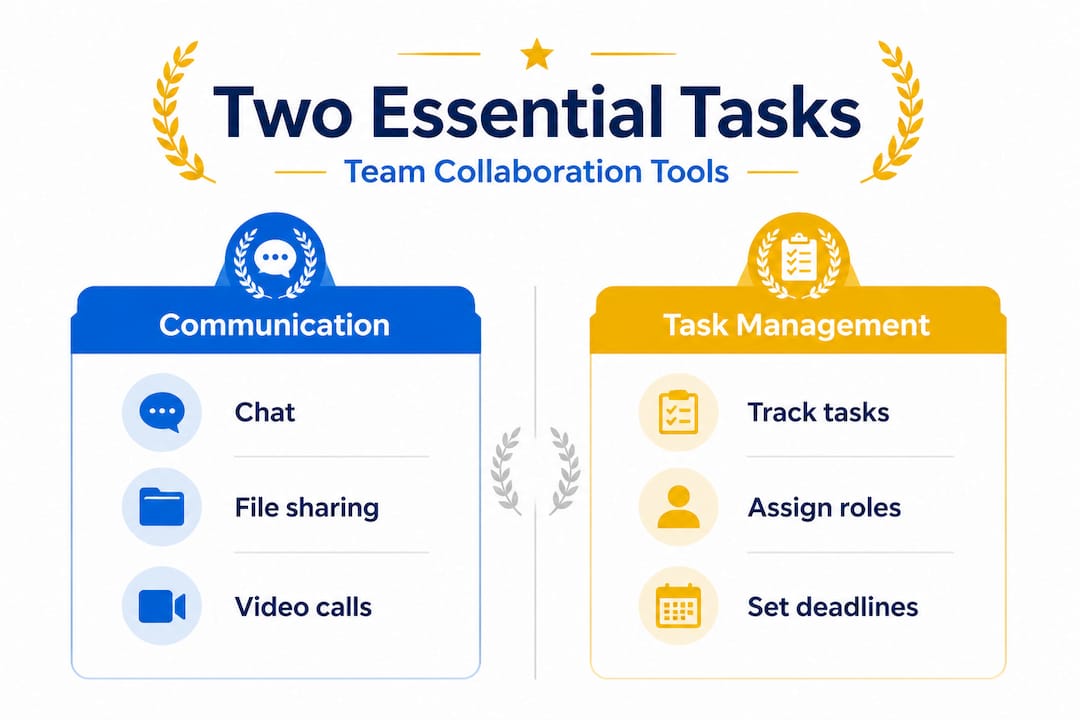
The combination of both is what creates genuine productivity. Teams that only use chat are still at risk of forgetting to follow through on decisions. Teams that only track tasks without fluid communication tend to become robotic and miss the nuance of good collaboration. Team collaboration for groups works best when both channels reinforce each other.
Pro Tip: Stop using email as a task tracker. It buries action items inside conversation threads, creates version-control chaos, and makes it nearly impossible to see the full picture of your team’s workload. Dedicated task management tools for productivity eliminate that problem entirely by giving every task its own space, owner, and deadline.
Smart teams also tap into innovation strategies for teams to build collaborative habits that go beyond just picking the right software. The mindset behind how you use the tool matters just as much as the tool itself.
Now that we can see the core focus, let’s look at how these play out in real-world situations.
How collaboration tools look in action: Real-world team examples
Theory is useful, but examples make it stick. Let’s walk through two realistic scenarios that show exactly how communication and task management work together inside a collaboration tool.
Scenario 1: The remote student group project
Four students are working together on a semester-long research project. They’re all in different parts of the city with conflicting class schedules. Without a collaboration tool, they rely on a group chat and a shared doc, but nobody knows who’s doing what, and every check-in feels like starting from scratch.

With a collaboration tool, they set up a shared workspace. Each research section becomes a task with a clear owner and a due date. The group chat is still there for quick updates, but now it connects directly to those tasks. When someone finishes their section, they update the task status and drop a comment. Everyone sees the progress without having to ask. Missed deadlines drop significantly because project tracking for student teams creates that layer of visibility and accountability that a chat thread simply can’t.
Scenario 2: Young professionals managing a product launch
A small three-person marketing team at a startup is preparing a campaign launch. They’re using a single platform that handles both Slack-style messaging and a Kanban board (a visual task board organized into columns like “To Do,” “In Progress,” and “Done”). Every brainstorm session ends with tasks created directly from the conversation. Each person owns specific deliverables, and the timeline is visible to everyone, including the team lead.
The result? Fewer “where are we on the ad copy?” messages. Faster reviews. Clearer priorities. The tool doesn’t just save time. It changes how the team thinks about work.
Here’s a data snapshot of how common features map to those two core tasks:
| Tool feature | Supports communication | Supports task management |
|---|---|---|
| Group chat channels | ✓ | |
| Video calls | ✓ | |
| Task boards (Kanban) | ✓ | |
| Due date reminders | ✓ | |
| File attachments | ✓ | ✓ |
| @mentions | ✓ | ✓ |
| Progress tracking | ✓ |
Notice how file attachments and @mentions serve both functions. That’s exactly the kind of overlap that makes collaboration tools more powerful than using separate apps.
Key benefits teams consistently report include:
- Fewer missed deadlines because tasks are visible and tracked automatically
- Clearer instructions since tasks carry context alongside their assignments
- Faster feedback loops when comments live right next to the work itself
- Less repetitive check-ins because progress is visible at a glance
Group project skills and outcomes improve dramatically when teams have the right structure supporting them. And if your team is incorporating AI into your workflow, exploring AI tools for student collaboration can layer on additional automation and intelligence to your collaboration setup.
With those concrete examples in mind, let’s break down how to actually adopt these tools the right way.
Best practices and pitfalls: Getting the most out of collaboration tools
Picking a collaboration tool is the easy part. Actually rolling it out successfully and keeping your team engaged with it is where most groups fall short. Here’s a practical, step-by-step process for getting real value out of whichever tool you choose.
Step 1: Audit your team’s actual needs. Before comparing features, list the specific problems you’re trying to solve. Is it missed deadlines? Too many email threads? No clarity on task ownership? Your needs define the tool, not the other way around.
Step 2: Evaluate tools on three criteria. Look for integration (does it connect with tools you already use?), user experience (can your least tech-savvy teammate figure it out in 10 minutes?), and accountability features (can you assign tasks, set due dates, and track status?). The collaboration best practices that work long-term are built on tools your whole team will actually use.
Step 3: Start with one core use case. Don’t roll out every feature at once. Pick one workflow, such as a recurring weekly task, and run it through the tool first. Once that feels natural, expand.
Step 4: Set ground rules together. Decide how your team will use the tool. What belongs in chat? What should be a task? How quickly should people respond to comments? These norms prevent the tool from becoming another chaotic inbox.
Step 5: Review and adjust. After two or three weeks, check in as a team. What’s working? What’s getting ignored? Adjust your setup based on real usage patterns, not assumptions.
“The biggest mistake teams make isn’t choosing the wrong tool. It’s choosing the right tool and using it wrong.”
The biggest pitfalls to watch for:
- Tool overload: Using five different platforms for five different purposes fragments your team’s attention and creates exactly the kind of confusion you were trying to avoid.
- No shared norms: Without rules, every person uses the tool differently, and the result is chaos with better formatting.
- Skipping follow-up: A task created without a review process is just a wishlist.
Pro Tip: Start small and add complexity only as your team grows into the tool. Overloading a new team with features, integrations, and automations from day one is a fast way to kill adoption before it starts. Check out top apps for student teams for a feature-by-feature breakdown of the most popular options.
Also worth exploring: how you personalize your collaboration tools to match your team’s specific learning and working styles, especially in academic settings where every group has a different dynamic.
Why most teams underuse collaboration tools—and how to fix it
Here’s the uncomfortable truth: most teams use collaboration tools at about 30% of their actual capacity. They set up a workspace, create a few channels, start chatting, and then wonder why things still feel disorganized. The answer is almost always the same. They’re using the communication layer without the task management layer.
This isn’t a laziness problem. It’s a habits problem. When a team first adopts a new tool, the messaging features get picked up immediately because they’re familiar. Everyone knows how to chat. Task boards, due dates, and assignment features feel more like “extra work” until you’ve experienced the payoff of using them consistently.
The fix is simpler than most teams think. Adopt one rule across every meeting, every discussion, and every decision: every conversation leads to an action item. That’s it. Whenever your group discusses something and lands on a decision, someone creates a task from it. The task has an owner. It has a due date. It lives in the tool.
This single habit closes the gap between talking about work and actually doing it. It transforms your collaboration tool from a messaging app into a genuine productivity system.
The deeper issue is that teams often treat these tools as optional rather than structural. The deep dive on role of collaboration tools makes it clear that the value isn’t in the software itself. It’s in the habits and workflows you build around it. The tool is the skeleton. Your team’s discipline is what puts muscle on it.
The teams that get the most out of collaboration tools aren’t necessarily using the fanciest platforms. They’re the ones who’ve agreed on how to use whatever they have, and they stick to it.
Pro Tip: Make it a weekly habit to review open tasks as a team, even for just five minutes. This single practice closes more loops than any feature upgrade ever will.
Take your teamwork further with dedicated collaboration and task tools
Knowing the theory is one thing. Putting it into practice with tools built specifically for how students and young professionals actually work is where the real shift happens.
Optio is built exactly for this. It’s a mobile-first platform designed for Centurions, students and young professionals who need a second-in-command that keeps their teams organized, their tasks visible, and their communication connected. You don’t need a corporate toolkit or a 30-tab setup. You need something lean, intuitive, and actually built for the way your team operates. Start with the team collaboration guide to understand how to structure your team from the ground up, and explore the best task management software breakdown to find the right tools to put your workflow in motion.
Frequently asked questions
What are the two main tasks collaboration tools support?
Collaboration tools primarily allow teammates to communicate and manage tasks, covering everything from real-time chat to assigning deadlines and tracking project progress.
How do collaboration tools help student teams?
They enable instant group messaging and make assigning or tracking project tasks far easier, with features that support communication and task assignment and tracking in one shared workspace.
Can collaboration tools replace emails and spreadsheets?
Yes. Most tools offer chat and built-in task tracking that reduce the need for scattered emails and manual spreadsheets, and collaboration tools primarily combine both functions into a single organized platform.
Are there free collaboration tools available?
Many collaboration tools offer robust free plans that are perfect for student projects and small teams, making them accessible without any budget.
How do these tools improve productivity?
They streamline communication and task visibility so teams spend less time chasing updates, and the tools that support task assignment and tracking cut down the friction that slows most student and professional teams down.
Recommended
- 7 Best Collaboration Tools for Remote Teams Explained – Optio Station: Best Project Management App for Prioritization
- Collaboration Best Practices 2026: Boost Productivity 30% – Optio Station: Best Project Management App for Prioritization
- Understanding Collaboration Workflow for Teams – Optio Station: Best Project Management App for Prioritization
- Collaboration Tools Explained: Powering Modern Teamwork – Optio Station: Best Project Management App for Prioritization
- Audome | The all-in-one tool for audio collaboration & management
