

Pick your group roles for projects in the first ten minutes of your first meeting, not the night before it’s due. Name one person per role, give each role exactly one deliverable, and set your first check-in date before anyone leaves the room. That single move prevents the most common group project failure: everyone assuming someone else has it handled.
Do this now:
- List the deliverables your project actually needs (research, draft, slides, final review).
- Match each deliverable to one owner, plus a backup if your group is larger than four.
- Write the deadline and check-in date next to each name, in a doc everyone can see.
Before you leave your first meeting, confirm:
- Every role has a name attached to it
- Every role has one deliverable, not three vague duties
- The next deadline and the next check-in are both on the calendar
- Everyone knows who makes the final call if two people disagree
Key Takeaways
Clear group roles for projects work because they turn vague group effort into individual accountability with a name, a deliverable, and a deadline attached to each one.
| Point | Details |
|---|---|
| Assign roles in meeting one | Name an owner for each role before anyone leaves the first meeting. |
| Give every role one deliverable | Vague duties create overlap; a single named output creates accountability. |
| Fix or rotate deliberately | Choose fixed roles for tight deadlines, rotating roles for skill building over time. |
| Document decisions immediately | Share meeting notes and role definitions the same day, not days later. |
| Centralize tracking with Optiostation | Use a shared tool like Optiostation to keep role owners, deadlines, and check-ins visible to the whole team. |
Table of Contents
- Why Assigning Roles Matters for Project Outcomes
- Common Group Project Roles and What Each One Owns
- How to Choose and Assign Roles Fairly
- Running Meetings So the Roles Actually Work
- Adjusting Roles for Team Size and Project Type
- A Fillable Role-Assignment Template You Can Copy
- Why the Smallest Change Often Fixes the Biggest Problem
- Keep Every Role and Deadline in One Place
- Frequently Asked Questions
- Sources
Why Assigning Roles Matters for Project Outcomes
Groups that assign roles finish with more even workloads and fewer people quietly doing nothing. That’s not a guess. The University of Waterloo’s Centre for Teaching Excellence found that structured roles like facilitator, notetaker, and arbitrator increase participation and stop any single member from absorbing the majority of the work.
Role clarity heads off three specific failures: two people redoing the same section because nobody claimed it, a deliverable nobody claimed at all, and a bottleneck where every decision waits on one overloaded person. Skip the role talk and you get all three eventually.
Pro Tip: Rotate roles across projects instead of keeping the same person as “the writer” every time. It forces cross-functional skill building and builds real empathy for how hard the other roles actually are.
Assigned roles also give people a structured way to practice skills they’d normally dodge. A shy teammate who never volunteers to present will present if presenting is their assigned job, and that’s where actual growth happens, not from being handed the job they were already good at, according to Washington University’s Center for Teaching and Learning.
Common Group Project Roles and What Each One Owns
Every functional team splits into two categories: roles that produce the work, and roles that keep the group running. Skip either category and something breaks.
Task-oriented roles (the ones that produce deliverables)
Researcher — Gathers sources, data, and background material. Deliverable: an annotated source list or research brief. Critical for research-heavy projects.
Writer — Drafts the actual content, whether that’s a report section or a script. Deliverable: a complete first draft by the agreed date.
Editor/QA — Reviews drafts for clarity, consistency, and errors before anything goes out. Deliverable: a marked-up revision or a sign-off note. Non-negotiable on any project with a written or coded final product.
Presenter — Delivers the final output to whoever’s grading or evaluating it. Deliverable: a rehearsed presentation or demo. Becomes the most important role on presentation-heavy projects.
Brainstormer — Generates ideas and alternative approaches early, before the group locks into one direction. Deliverable: a short list of options with pros and cons, according to the University of Minnesota’s group roles guide.
Coordination and social roles (the ones that keep the group running)
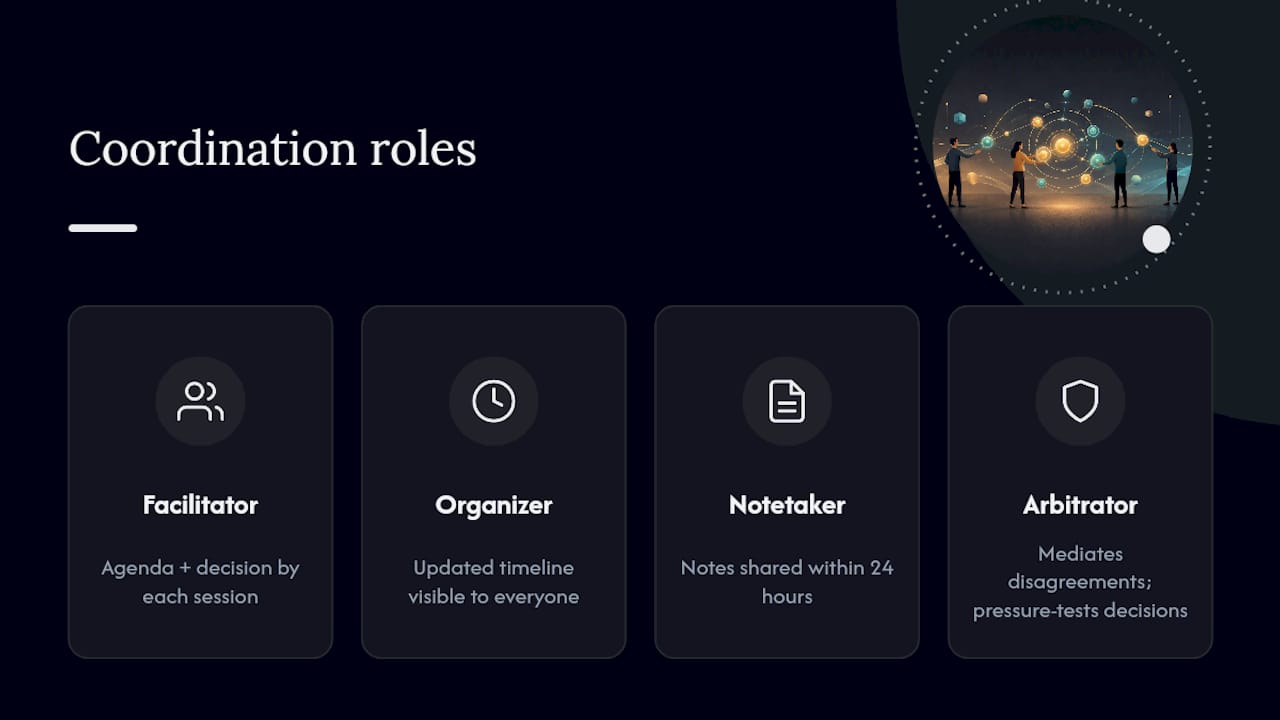
Facilitator — Runs meetings, keeps discussion on track, and makes sure quieter members get heard. Deliverable: a meeting agenda and a decision made by the end of each session.
Organizer/Timekeeper — Tracks deadlines, schedules meetings, and keeps the group on pace. Deliverable: an updated timeline visible to everyone.
Notetaker — Documents decisions, action items, and who owns what. Deliverable: meeting notes shared within 24 hours.
Arbitrator/Devil’s Advocate — Mediates disagreements and pressure-tests decisions before the group commits to them. This role matters most in larger groups where disagreements are more likely, per Waterloo’s role framework.
For small groups of two or three, combine roles rather than leaving any of them unstaffed. A group of four can run one person per core role. Larger teams, seven or more, should split heavy roles like editor and researcher across two people so no one becomes the single point of failure.
Translating student roles into professional language
If you’re building this list for a work project instead of a class assignment, the same functions carry different titles. Atlassian’s breakdown of project roles maps them cleanly: Facilitator becomes project lead or scrum master, Organizer becomes project coordinator, and Arbitrator becomes the role a product owner or sponsor plays when priorities conflict. The 21 Group Roles for Students list from Helpful Professor is worth bookmarking if your project needs more specialized roles than the core set here, things like a “checker” for technical accuracy or a “connector” who liaises with outside stakeholders.
How to Choose and Assign Roles Fairly
Match roles to skills first, but confirm willingness before locking anyone in. A skilled writer who hates writing under deadline pressure will underperform in that role no matter how good they are on paper.
Run assignment in five steps:
- Take a quick skills inventory. Ask who’s strong at writing, speaking, organizing, or research. Two minutes, no debate yet.
- Let people state preferences. Someone might want to grow a skill they’re weak in. Let that happen when the project allows for it.
- Confirm responsibilities and deadlines out loud. Don’t assume everyone read the doc the same way.
- Write the decisions down in a shared file everyone can access, not a group chat that scrolls away.
- Set a review point, usually the halfway mark, to check whether the role split is actually working.
Decide upfront whether roles stay fixed for the whole project or rotate at milestones. University of Michigan’s guidance on assigning student roles points out that the right choice depends on the assignment goal: fixed roles work better for tight deadlines, rotating roles work better when the point is skill development across a semester or quarter. If one role clearly requires more hours than the others, split it across two people rather than pretending the workload is even.
Keep the whole thing in one shared tool instead of scattered texts. A central task management system turns “who’s doing what” from a memory exercise into something everyone can check in five seconds.
Running Meetings So the Roles Actually Work
Open every meeting with three things stated out loud: the purpose of this meeting, what success looks like by the end of it, and who’s speaking on which topic. Skip this and meetings drift.

Track action items in a simple four-column format: owner, action, deadline, status. Nothing fancy, just visible.
| Owner | Action | Deadline | Status |
|---|---|---|---|
| Maya | Finalize source list | Friday | In progress |
| Jordan | Draft intro section | Monday | Not started |
Weekly syncs should run short, five to ten minutes, just enough for each role owner to say what’s done, what’s blocked, and what’s next. Save the longer conversations for milestone reviews, where the group actually looks at the deliverable, not just the status update.
Watch for red flags: someone consistently missing check-ins, a deliverable that keeps sliding without explanation, or one person quietly redoing another’s work instead of raising the issue. The fix is almost never “work harder.” Reassign the task, write clearer acceptance criteria so expectations are unambiguous, or bring in the arbitrator role to mediate before resentment builds.
Pro Tip: Share meeting notes within the same day they’re taken. A decision that only lives in one person’s memory disappears by the next meeting, and then you’re relitigating it.
Documenting decisions and distributing them promptly is standard advice across university teaching guides, and it holds up because the alternative, relying on memory, fails predictably.
Adjusting Roles for Team Size and Project Type
Role count should track group size, not the other way around: small teams combine roles, large teams split them, as explained in this Campaign Team Roles List: A Manager’s Complete Guide. A team of two can’t staff six distinct roles, so combine researcher with writer and organizer with notetaker.
| Team size | Recommended role setup |
|---|---|
| 2 to 3 people | Combine roles: one person handles research and writing, another handles organizing and editing |
| 4 people | Distinct facilitator, editor, researcher, and presenter, each staffed separately |
| 7 | Split heavy roles like editor and researcher across two people, add a dedicated arbitrator |
Remote teams need one extra layer: explicit written norms. Decisions made verbally on a call and never written down vanish. Set a shared file-naming convention, require asynchronous status updates from each role owner, and schedule check-ins with time zones actually in mind rather than defaulting to whoever’s online first.
Research-heavy projects lean hardest on the researcher and editor roles, since the whole output depends on source quality. Presentation-heavy projects lean on the presenter and facilitator, since delivery is the product.
A Fillable Role-Assignment Template You Can Copy
Drop this directly into your shared doc before your first meeting ends, and you’ve solved most of the confusion before it starts.
Fields to fill for each role:
- Role name
- Primary responsibilities (one to two lines, not a paragraph)
- Deliverable (the specific output, not a vague duty)
- Owner and backup
- Deadline
- Decision authority (can this person decide alone, or does it need group sign-off?)
- Escalation path (who resolves it if the owner and another member disagree)
- Check-in cadence (weekly, at milestones, or both)
Filled example, small student presentation project:
Role: Presenter. Responsibility: deliver final talk and handle Q&A. Deliverable: rehearsed 8-minute presentation. Owner: Priya. Backup: Sam. Deadline: April 3. Decision authority: Priya decides slide order alone; group signs off on final content. Escalation: facilitator mediates disputes. Check-in: twice weekly leading up to delivery.
Once roles are set, run this checklist: documented in a shared file, shared with the full group, deadlines confirmed out loud, first check-in already on the calendar.
Pro Tip: At the halfway review, ask each role owner one question: “What’s blocking you right now?” That single question surfaces uneven contribution faster than any status meeting.
Why the Smallest Change Often Fixes the Biggest Problem
Most group project failures that look like personality conflicts are actually role ambiguity wearing a disguise. Settling who owns what before work starts fixes more problems than any amount of team-building ever will. Centralizing that decision in one shared, trackable system is the difference between a group that finishes on time and one that’s still arguing about ownership the night before it’s due.
Keep Every Role and Deadline in One Place
Writing role assignments on a whiteboard or in a group chat works for exactly one meeting, then it scrolls away or gets erased. Centralizing roles, deliverables, and deadlines in one app is what actually keeps a group project from unraveling by week three.

Optiostation gives every role owner a visible task with a deadline attached, so nobody has to ask “wait, was that mine or yours?” two days before the deadline. Two things it does well for group work specifically:
- Assigns clear task ownership per role, with reminders that fire before deadlines slip, not after
- Keeps shared timelines and check-ins visible to the whole team instead of buried in a chat thread
If your group is tired of losing track of who owns what, start by centralizing your role assignments in the best task management setup built for exactly this kind of coordination.
Frequently Asked Questions
What are the most important group roles for projects?
Facilitator, organizer/timekeeper, notetaker, and arbitrator form the core set for most teams, with researcher, writer, editor, and presenter added for task-heavy work.
Should group roles stay fixed or rotate?
It depends on the goal. Fixed roles suit projects with tight deadlines; rotating roles suit longer projects where skill development matters more than speed.
How do you assign roles fairly in a group?
Take a quick skills inventory, let people state preferences, confirm deadlines out loud, and write the decisions in a shared document everyone can check.
What happens when group roles aren’t clearly defined?
Work gets duplicated, deliverables fall through gaps, and one person often ends up doing far more than their share while others assume someone else has it covered.
Sources
- Group Work: Assignment of Roles | Centre for Teaching Excellence | University of Waterloo
- Group Roles | Effective U – University of Minnesota
- Assigning roles in student groups (Teaching tip) | University of Michigan
- Using Roles in Group Work – Center for Teaching and Learning (WashU)
- Common project roles & responsibilities explained | Atlassian
- 21 Group Roles for Students (List of Examples) (2026) | Helpful Professor
Recommended
- How to Organize Multiple Projects for Maximum Productivity – Optio Station: Best Project Management App for Prioritization
- Project Organization – Strategies for Student Success – Optio Station: Best Project Management App for Prioritization
- How Do You Prioritize Multiple Projects Effectively – Optio Station: Best Project Management App for Prioritization
- Planning Group Assignments for Students and Professionals – Optio Station: Best Project Management App for Prioritization
