

TL;DR:
- Most leaders lack formal metrics to measure team productivity, creating blind spots in management. Implementing transparent, balanced tracking tools focuses on workflow, quality, and engagement, enhancing performance without damaging morale. Effective data use involves ongoing, collaborative analysis to improve team performance and adapt strategies, especially in remote work environments.
Most organizations are flying blind when it comes to measuring what their teams actually produce. 1 in 4 executive leaders have no formal metrics for workplace productivity, which means decisions about performance, resourcing, and growth are based on gut feeling rather than data. Employee productivity tracking software changes that equation. This guide breaks down the metrics that matter, the features worth paying for, how to deploy these tools without destroying morale, and how to actually use the data you collect to improve how your team works.
Table of Contents
- Key takeaways
- What employee productivity tracking software actually measures
- Features worth paying for in 2026
- How to deploy without breaking what works
- Turning tracked data into team improvement
- My take on where this is all heading
- Put your tracking insights to work with Optiostation
- FAQ
Key takeaways
| Point | Details |
|---|---|
| Most leaders lack formal metrics | Roughly 25% of executives have no system to measure productivity, creating blind spots in team management. |
| Balance quantity with quality | Tracking output volume alone risks pushing speed over value. Combine metric types for fair assessment. |
| Transparency drives adoption | Explaining how data will be used before rollout prevents disengagement and builds employee trust. |
| Avoid single productivity scores | Balanced scorecards using both quantitative and qualitative data give a far more accurate performance picture. |
| Data informs coaching, not just control | The best use of tracking data is identifying workflow bottlenecks and coaching opportunities, not surveillance. |
What employee productivity tracking software actually measures
Before you evaluate any software, you need to be clear on what you are trying to measure. Not all productivity metrics are created equal, and choosing the wrong ones to track can cause more problems than having no metrics at all.
Performance experts at ADP identify three core categories that together form a complete picture of employee performance:
- Quantity metrics count how much work gets done. Sales calls made, tickets resolved, pages written, tasks completed. These are easy to pull from most systems and give you a baseline read on output.
- Quality metrics measure how well the work is done. Error rates, customer satisfaction scores, revision frequency, peer review outcomes. Without these, quantity data is nearly meaningless.
- Efficiency metrics look at how resources (time, money, tools) are used relative to output. A team member who closes 30 tickets a day but spends four hours on each might still be underperforming compared to someone who resolves 20 with higher accuracy in less time.
- Engagement metrics are the softest category but arguably the most predictive. Collaboration patterns, communication frequency, meeting participation, and even patterns of working hours can signal burnout or disengagement before they become retention problems.
The practical trap most managers fall into is over-indexing on quantity because it is the easiest data to collect. Counting tasks completed feels concrete and reportable. But sole reliance on quantity metrics risks quality loss, because team members quickly learn to optimize for whatever gets measured. If speed is the only thing being tracked, you should expect faster and sloppier work.
As AI automates more routine tasks, the metrics that matter are shifting too. Collaboration and decision-making quality are becoming the real performance indicators, because the cognitive and interpersonal work that software cannot replace is exactly where human employees add the most value. Build your measurement framework around that reality now, before the gap between what you track and what actually matters gets wider.
Features worth paying for in 2026
The performance management solutions market is projected to reach $6.33 billion by 2030, growing at 12.4% annually. That growth means a lot of tools are competing for your budget, and feature bloat is a real problem. Here is a breakdown of what actually earns its place in a serious platform.
| Feature | What it does | Why it matters |
|---|---|---|
| Time tracking and timesheets | Logs hours worked across tasks, projects, and clients | Provides the raw data layer for all other productivity analysis |
| App and URL monitoring | Records which applications and websites employees use during work hours | Identifies distraction patterns and informs workload conversations |
| Workflow analytics | Maps how tasks move through a process and where delays occur | Exposes bottlenecks at the team level rather than blaming individuals |
| Reporting dashboards | Visualizes trends in output, time allocation, and performance over time | Makes data usable for managers who are not data analysts |
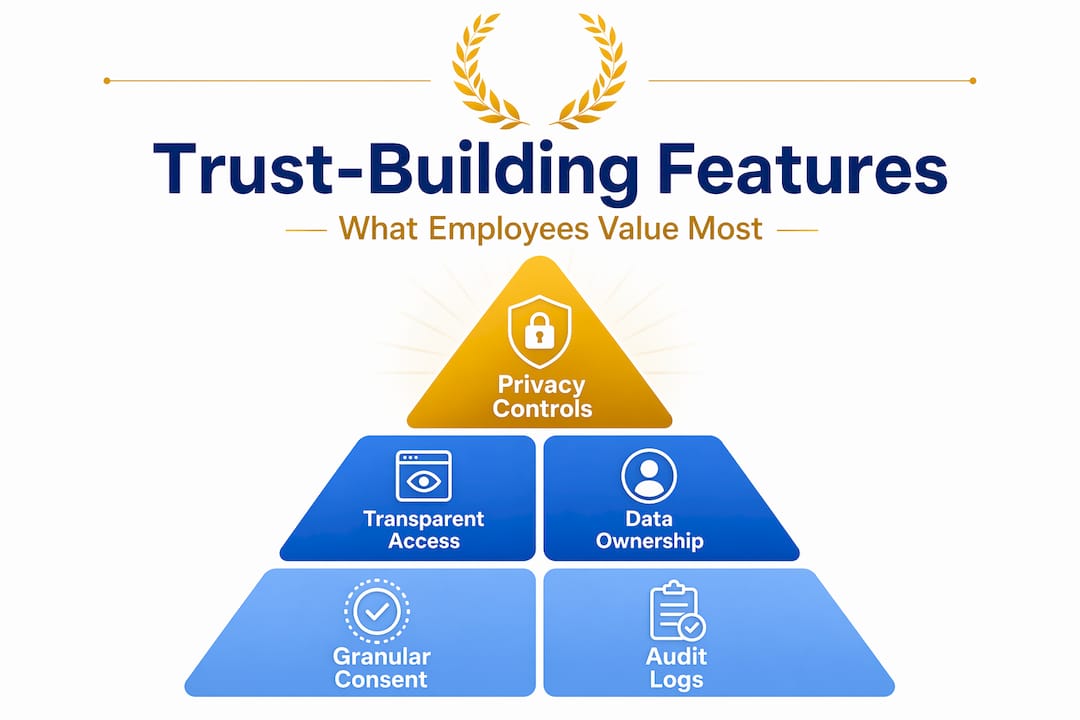
| Privacy and transparency controls | Lets employees see their own data; allows opt-out windows or blackout periods | Builds trust and reduces the surveillance perception that kills adoption |
| AI-based anomaly detection | Flags unusual activity patterns automatically | Saves managers time and surfaces problems earlier than manual review |
| Integrations with existing tools | Connects with task managers, payroll systems, and communication platforms | Prevents data silos and creates a single source of workflow truth |
AI features deserve particular attention right now. Tools that use intelligent automation to surface trends rather than requiring managers to dig through raw data save real time. Daily briefing automation can reduce time spent on low-value work by up to 33%, and the best employee time tracking tools are building similar functionality into their reporting layers.
Pro Tip: Before committing to any platform, ask vendors specifically how employees interact with their own data. If the answer is “they can’t,” that is a red flag for morale and retention down the line. Employee-facing dashboards are not optional in 2026.
Privacy controls are not just a legal consideration. They are a product decision that affects whether your team trusts the tool or resents it. Understanding the role of time tracking and how transparency is built into the system is worth researching before you sign any contract.
How to deploy without breaking what works
Buying the right software is the easier half of this project. The deployment is where most implementations go wrong, and the mistakes are almost always human rather than technical.
The single biggest failure mode is silence. Clear communication about data use directly influences whether employees accept or resist the rollout. When tracking software appears on company devices without explanation, people assume the worst, because surveillance anxiety is real and historically well-founded. Tell your team what data is being collected, why, how long it is retained, and who can see it before the tool goes live.
Here are the common deployment mistakes that undermine even well-chosen software:
- Installing without context. Tracking tools that appear without explanation feel like a trust violation. Hold a team meeting before launch.
- Making it punitive from day one. If the first conversation that involves tracking data is a disciplinary meeting, you have cemented how the tool will be perceived forever.
- Tracking the wrong things for the role. URL monitoring matters less for a strategy team than for a customer support team. Match what you track to what the role actually requires.
- Ignoring early feedback. Employees notice gaps and friction in the system quickly. Creating a formal feedback channel in the first 30 days improves the data quality and the team’s willingness to use the tool honestly.
Framing software as a tool for employee success rather than management oversight is not spin. It is the practical difference between a team that games the system and a team that benefits from it. The shift from monitoring for control to monitoring for performance is a mindset change that has to happen at the leadership level first.
Pro Tip: Run a soft launch with one team before organization-wide rollout. Use the feedback you collect to fix configuration problems and refine your communication approach. A rough first impression is very hard to undo.
Reviewing your workplace productivity strategies before deployment also helps you define what success looks like before you start collecting data, rather than after. That matters more than most managers realize.
Turning tracked data into team improvement
Collecting data is not the same as using it well. Most managers who invest in productivity analysis software see diminishing returns within six months because they never build a systematic process for reviewing and acting on what the platform tells them.
Here is a practical framework for turning raw tracking data into real performance improvement:
- Start with team-level trends, not individual scores. The most productive managers analyze bottlenecks and trends rather than evaluating people in isolation. If your team’s output drops every Thursday afternoon, that is a workflow signal. It is not an individual failing.
- Identify where time goes, not just how much. Time allocation data reveals whether high performers are spending time on high-value work. Often they are not. Redirecting that time is a faster productivity gain than any motivation program.
- Use data to start coaching conversations, not end them. A dip in efficiency metrics should open a question, not trigger a correction. “I noticed your task completion rate dropped over the last two weeks. What is getting in the way?” gets better results than “your numbers are down.”
- Combine quantitative data with qualitative feedback. Multiple data sources with qualitative feedback reduce the risk of unfair assessment significantly. Software tells you what happened. Conversation tells you why.
- Avoid the single-score trap. Labeling employees with one productivity score collapses complex performance into a number that misses context, role differences, and the quality dimensions that matter most. Balanced scorecards give you a far more defensible and accurate picture.
Pairing this approach with the right automated task management software closes the loop between tracking what happened and managing what happens next.
My take on where this is all heading
I’ve spent enough time watching teams adopt monitoring tools to have a strong opinion here. Most implementations fail not because the software is wrong, but because the leadership thinking behind the rollout is wrong. Managers treat tracking as a solution to a motivation problem, when almost always the real problem is a workflow or communication problem that better data can expose but not fix on its own.
What I’ve seen work consistently is the combination of transparent data access and genuine employee involvement in interpreting what the numbers mean. When team members can see their own performance data and are invited into the conversation about what it suggests, they become allies in the improvement process rather than subjects of it.
The AI angle is real and accelerating. The performance management market is growing fast because AI adoption in productivity tools is genuinely changing what managers can surface without manual analysis. But I’d caution against treating AI-generated insights as ground truth. They surface patterns. You still have to understand the context those patterns exist in.
My honest take: the best tracking software is the kind your team does not mind using. That is a higher bar than most vendors set, and it should be the first thing you test before you buy.
— Optiostation
Put your tracking insights to work with Optiostation
Understanding what to track is only part of the equation. Acting on that data requires a task and workflow system that keeps your team aligned and accountable from one place.

Optiostation is built for exactly that moment. After your productivity data tells you where the gaps are, Optiostation helps you close them with structured task management tools designed for teams that move fast. Whether you need to redistribute workloads after a bottleneck analysis or give team members a clearer picture of their own priorities, the platform supports both. You can also explore the Optiostation guide to tracking tasks at work to get practical, step-by-step advice on turning your tracking insights into better daily habits for your whole team. For remote work context, productivity tips for remote teams are also worth reviewing alongside your software rollout plan.
FAQ
What is employee productivity tracking software?
Employee productivity tracking software records how employees spend their work time, measures output across key performance metrics, and generates reports that help managers identify trends, bottlenecks, and coaching opportunities.
How do I track employee productivity without hurting morale?
Clear communication about data use is the most critical factor. Tell employees what is tracked, why, and how the data will be used before the tool goes live. Frame it around performance support, not surveillance.
What metrics should productivity software track?
Effective work performance measurement combines quantity, quality, and efficiency metrics with engagement signals. Relying on quantity alone risks driving speed at the expense of output quality.
Can tracking software work for remote teams?
Yes. Remote work productivity tracking is one of the strongest use cases for these tools, since managers lack the visibility they would have in an office. Focus on output trends and workflow data rather than activity monitoring for remote contexts.
How often should managers review productivity data?
Weekly trend reviews at the team level and monthly individual check-ins using combined quantitative and qualitative data give the best balance. Daily monitoring of individual activity data creates micromanagement dynamics that reduce engagement over time.
Recommended
- Best time off tracking software to boost productivity – Optio Station: Best Project Management App for Prioritization
- What Is Time Tracking and Why It Matters Now – Optio Station: Best Project Management App for Prioritization
- Understanding the Role of Time Tracking in Productivity – Optio Station: Best Project Management App for Prioritization
- Why Track Time? Understanding Its Importance and Benefits – Optio Station: Best Project Management App for Prioritization
