

Choosing the right project management software can feel overwhelming when you’re a student or young professional juggling coursework, internships, and side projects. Many assume free tools lack the features needed to stay organized and productive. That misconception keeps talented individuals stuck with messy spreadsheets and chaotic to-do lists. The truth is that several free project management platforms offer robust capabilities tailored to academic and early career needs. This guide explores the top free options available in 2026, helping you select software that transforms how you organize tasks, collaborate with teams, and achieve your goals without spending a dollar.
Table of Contents
- What Is Project Management Software And Why Is Free An Option?
- Top Free Project Management Software Options For Students And Young Professionals In 2026
- How To Choose The Best Free Project Management Software For Your Academic And Professional Needs
- Maximizing Productivity Using Free Project Management Tools: Tips And Best Practices
- Explore Optio Station’s Expert Guides And Tools
Key takeaways
| Point | Details |
|---|---|
| Free tools offer robust features | Top platforms provide task tracking, collaboration, and integrations suitable for students and young professionals. |
| Compare interface and integrations | Evaluating user experience, team features, and app compatibility ensures the right fit for your workflow. |
| Align tools with your workflow | Selecting software that matches your organizational style increases adoption and productivity. |
| Free versions often suffice | Many academic and professional projects succeed without upgrading to paid plans. |
What is project management software and why is free an option?
Project management software centralizes task tracking, deadlines, and collaboration in one platform. These tools help individuals and teams organize projects, assign responsibilities, set due dates, and monitor progress in real time. Core features typically include task boards, calendar views, file sharing, notifications, and commenting systems that keep everyone aligned.
You might wonder why companies offer free versions of sophisticated software. The business model is straightforward. Providers attract users with generous free tiers, knowing that as projects grow in complexity or team size expands, some users will convert to paid plans for advanced features. This freemium approach benefits both parties. Students and young professionals access professional grade tools at no cost, while companies build user loyalty and showcase their platform’s value.
Free doesn’t mean inferior. Many project management platforms deliver competitive free versions packed with essential capabilities. These tools handle the organizational needs of individuals, study groups, student organizations, and small professional teams effectively. You get task assignment, deadline tracking, basic collaboration features, and mobile access without paying.
The key differences between free and paid tiers usually involve limits on users, storage capacity, advanced automation, premium integrations, or priority support. For academic projects, freelance work, and early career tasks, these restrictions rarely pose problems. Understanding what is project management software helps you recognize which features matter most for your specific situation and avoid paying for capabilities you won’t use.
Top free project management software options for students and young professionals in 2026
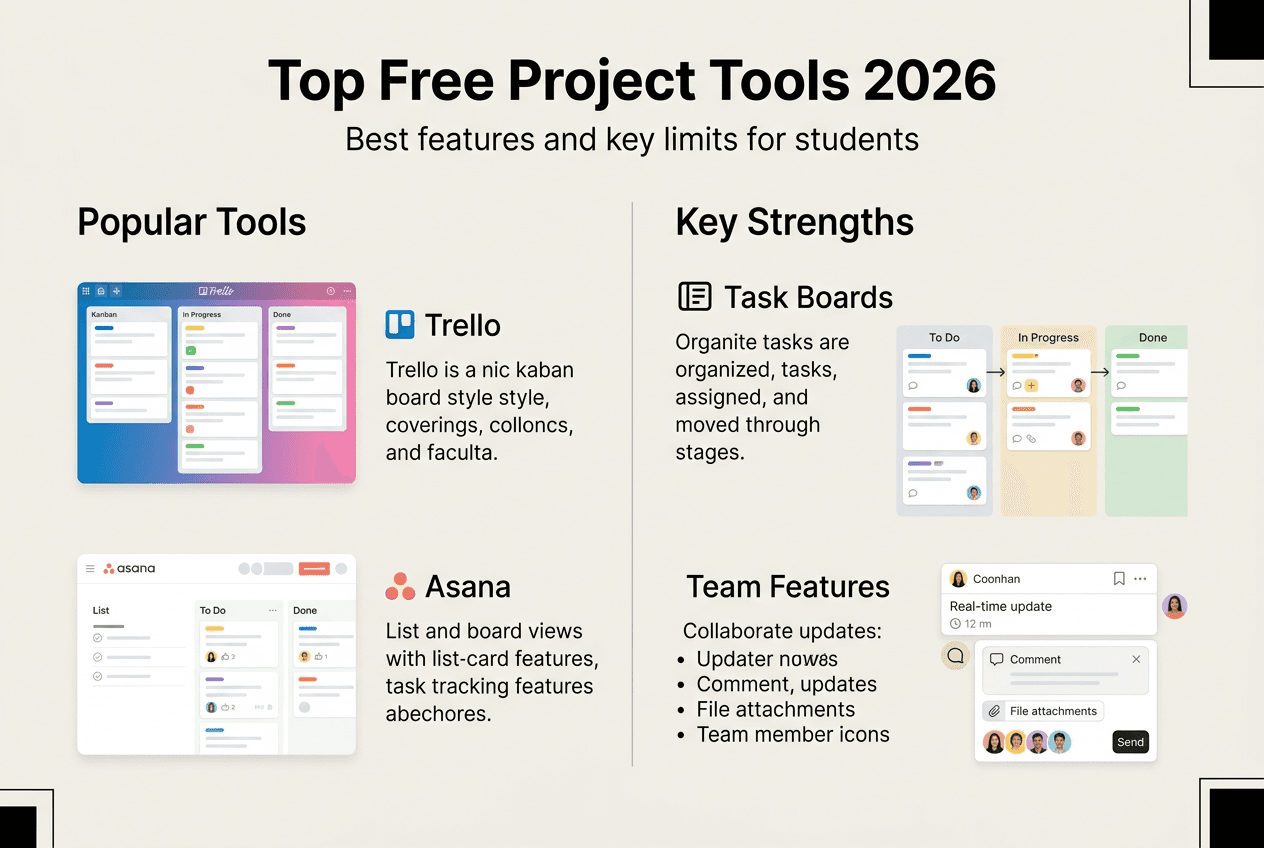
Free project management tools such as Trello, Asana, and ClickUp offer robust features suitable for educational and early career contexts. Each platform brings unique strengths to different organizational styles and project types.
Trello excels with its visual kanban board approach. You create cards representing tasks and move them across columns like To Do, In Progress, and Done. The free version supports unlimited personal boards, 10 boards per workspace, unlimited cards, and basic automation. Students appreciate Trello’s intuitive drag and drop interface that requires zero learning curve. It works beautifully for visual thinkers managing coursework, group projects, or job applications.
Asana provides both list and board views with powerful task management features. The free tier accommodates up to 15 team members, unlimited tasks and projects, calendar view, and basic integrations with Google Drive and Slack. Young professionals favor Asana for its professional feel and ability to break complex projects into subtasks with clear ownership and deadlines.
ClickUp stands out for customization and feature density. Even the free version includes unlimited tasks, 100MB storage, collaborative docs, kanban boards, calendar views, and native time tracking. The platform suits users who want granular control over their workflow and don’t mind a steeper learning curve. ClickUp appeals to ambitious students managing multiple commitments simultaneously.
Notion blends project management with note taking and documentation. You can build custom databases, wikis, and task boards within the same workspace. The free personal plan offers unlimited pages and blocks, making it ideal for students who want an all in one system for class notes, research, and project tracking.
Here’s how these top free project management software options compare:
| Platform | Best For | Key Strength | Main Limitation |
|---|---|---|---|
| Trello | Visual organizers | Intuitive kanban boards | Limited automation |
| Asana | Structured teams | Professional task management | 15 user cap |
| ClickUp | Power users | Extensive customization | Steeper learning curve |
| Notion | All in one needs | Combines notes and tasks | Complex for simple projects |
Pro Tip: Choose software that matches your usual workflow style, whether that’s visual boards, detailed lists, or integrated documentation, to ensure consistent usage.
Most platforms offer mobile apps with offline access, ensuring you can update tasks between classes or during commutes. Storage limits vary, with Trello offering 10MB per file attachment and ClickUp providing 100MB total in free plans. Integration capabilities matter if you rely on Google Workspace, Microsoft 365, or communication tools like Slack and Discord.
How to choose the best free project management software for your academic and professional needs
Assessing your needs before selecting software increases adoption and productivity. Follow this systematic approach to identify the right tool.
Define your primary use case. Are you managing solo coursework, coordinating group projects, tracking job applications, or organizing freelance work? Different scenarios demand different features.
Evaluate collaboration requirements. Solo users can prioritize personal organization features, while team projects need robust sharing, commenting, and permission controls.
Consider your organizational style. Visual thinkers thrive with kanban boards, while detail oriented individuals prefer list views with subtasks and dependencies.
Check device compatibility. Verify the platform offers mobile apps for iOS and Android if you work across devices. Test the mobile experience since some tools sacrifice functionality on smaller screens.
Assess integration needs. List the tools you already use daily like Google Calendar, email clients, cloud storage, or communication apps. Choose software that connects seamlessly with your existing ecosystem.
Estimate team size and growth. If you anticipate expanding from solo work to team collaboration, select platforms with generous user limits in free tiers.
Test the learning curve. Sign up for free trials and spend 30 minutes exploring each platform. The right tool should feel intuitive within your first session.
Review storage and file limits. Calculate typical project file sizes to ensure the free tier accommodates your needs without constant deletions.
Pro Tip: Start simple and upgrade tools as needs grow to avoid overwhelm and maintain consistent usage habits.
Your technical comfort level matters too. Beginners benefit from streamlined interfaces like Trello, while tech savvy users might appreciate ClickUp’s advanced customization. Consider how to manage tasks effectively within your chosen platform by matching features to your natural work patterns rather than forcing yourself to adapt to rigid systems.
Don’t overlook customer support availability. Free tiers typically offer community forums and knowledge bases rather than direct support. Check if the platform provides sufficient documentation and active user communities to troubleshoot issues independently.
Maximizing productivity using free project management tools: tips and best practices
Effective use of project management software can increase productivity by 20 to 30 percent when implemented strategically. Apply these proven practices to extract maximum value from free tools.
Set up your workspace thoughtfully from day one. Create separate boards or projects for distinct areas like coursework, extracurriculars, job search, and personal goals. This separation prevents mental clutter and helps you focus on one domain at a time. Use consistent naming conventions and color coding across projects for instant visual recognition.

Prioritize ruthlessly by tagging tasks with urgency and importance labels. Most platforms support custom tags or priority flags. Review your task list each morning and identify the three most critical items requiring completion that day. This focused approach prevents the paralysis that comes from staring at dozens of undifferentiated to dos.
Establish regular update routines. Spend five minutes at the start and end of each day reviewing tasks, updating progress, and planning next steps. Consistency matters more than perfection. Brief daily check ins keep your system current and trustworthy, while sporadic marathon updates create friction and abandoned tools.
Leverage calendar integrations to sync deadlines with your existing schedule. Most project management platforms connect with Google Calendar or Outlook, creating a unified view of commitments. This integration prevents double booking and ensures project deadlines appear alongside classes and meetings.
Common pitfalls to avoid include overcomplicating your setup with excessive categories, neglecting mobile updates when away from your computer, and failing to archive completed projects that clutter your workspace. Keep your system lean and maintain it actively.
“The difference between successful and struggling students often comes down to organization and collaboration skills rather than raw intelligence. Project management tools level the playing field by providing structure that keeps everyone on track.”
For team projects, establish clear communication norms within the platform. Decide whether updates happen through task comments, separate chat integrations, or scheduled meetings. Clarify who assigns tasks, how priorities get set, and when deliverables are due. Document these agreements in a pinned project description.
Use templates for recurring project types. If you manage similar assignments each semester or run regular events, create reusable templates that save setup time. Most platforms let you duplicate boards or projects with predefined task structures.
Explore collaboration best practices that enhance team coordination, such as assigning single owners to each task, setting realistic deadlines with buffer time, and celebrating completed milestones to maintain momentum.
Explore Optio Station’s expert guides and tools
Optio Station offers comprehensive resources designed specifically for students and young professionals navigating productivity challenges. Our platform provides detailed guides on selecting and implementing project management software that fits your unique academic and career context.
Discover our best task management software guide for in depth comparisons of platforms beyond basic project management, including specialized tools for time blocking, habit tracking, and goal setting. Learn proven strategies through our how to manage tasks effectively resource that teaches prioritization frameworks used by top performers.
Team projects require different skills than solo work. Our understanding team collaboration guide breaks down communication strategies, conflict resolution techniques, and coordination methods that transform group assignments from frustrating obligations into productive partnerships. Optio Station serves as your second in command, supporting Centurions like you with actionable insights that boost organization and achievement across all your endeavors.
FAQ
What is the best free project management software for beginners?
Trello and Asana are highly recommended for beginners due to user friendly interfaces and robust free features. Trello’s visual kanban boards require no training and work intuitively for managing coursework, applications, and personal projects. Asana provides more structure with list views and subtasks while maintaining accessibility for new users. Both platforms fit academic and small professional projects well without overwhelming beginners with excessive options. Start with one platform and explore best project management software for beginners to find your ideal match.
Can free project management tools handle team collaboration?
Most free tools support collaboration with basic features like shared boards, comments, and task assignments that work well for student groups and small professional teams. You can invite teammates, distribute responsibilities, track progress collectively, and communicate within tasks. Advanced functionality like custom permissions, advanced reporting, and workflow automation usually requires upgrades. For typical academic group projects or early career team coordination, free tiers provide sufficient team collaboration capabilities without limitations.
How do I overcome the limitations of free project management software?
Start with free plans and assess if paid features are needed as your projects grow in complexity or team size. Use complementary tools to cover functionality gaps, such as pairing a basic project manager with separate time tracking or file storage solutions. Leverage integrations for extended capabilities, connecting your project management platform with calendar apps, communication tools, and cloud storage you already use. Most students and young professionals find creative workarounds that deliver professional results without subscriptions. Review overcoming free software limitations for specific strategies.
Do free project management tools work on mobile devices?
Yes, all major free project management platforms offer mobile apps for iOS and Android with core functionality available offline. You can create tasks, update progress, check deadlines, and communicate with teammates from your phone between classes or during commutes. Mobile experiences vary by platform, with some offering full feature parity while others reserve advanced capabilities for desktop browsers. Test mobile apps during your evaluation process to ensure they support your on the go workflow needs.
How secure is my data in free project management software?
Reputable platforms implement enterprise grade security measures including encryption, secure data centers, and regular backups regardless of plan tier. Free users receive the same data protection as paid subscribers. Review each platform’s privacy policy and security documentation to understand data handling practices. For sensitive academic or professional information, verify the tool complies with relevant standards and offers two factor authentication. Avoid sharing confidential information in free tools without confirming adequate security measures.
Recommended
- Best project management software for students in 2026 – Optio Station: Best Project Management App for Prioritization
- Command Log – Optio Station: Best Project Management App for Prioritization
- Best Task Management Software: Complete Guide – Optio Station: Best Project Management App for Prioritization
- What Is Project Management Software? Complete Breakdown – Optio Station: Best Project Management App for Prioritization
- Top 4 Operational Management Platforms 2026
- 7 Key Benefits of Compliance Tracker Software for Teams
