

TL;DR:
- Construction management software integrates project planning, budgeting, and documentation into one platform, reducing weekly information search time. The best tools are lifecycle platforms with strong mobile offline, BIM, and ERP integration, tailored to project type, size, and workflows. Successful adoption relies on user-friendly design, thorough training, and aligning features with real field needs to prevent data silos and inefficiencies.
Construction management software is an integrated digital platform that connects project planning, budgeting, field coordination, and documentation into one unified system. Construction professionals waste about 14 hours weekly searching for information or fixing errors, and the right platform cuts that waste directly. Top tools like Procore, Autodesk Construction Cloud, and Buildertrend have proven they can boost productivity by 14–15% and reduce project costs by 4–6%. Answering what is the best construction management software depends on your project type, team size, and the workflows you need to support.
What is the best construction management software?
The best construction management software is not just a reporting dashboard. Top platforms function as predictive coordination engines that link tasks to readiness conditions, so your team spots delays before they become budget problems. That distinction separates professional-grade tools from basic project trackers.
Procore and Autodesk Construction Cloud lead the market for complex commercial projects. Buildertrend holds the top position for residential builders. Fieldwire and Bluebeam serve specialty trades and field-focused crews. Each platform targets a specific buyer tier, which means the “best” answer is always relative to your work.
Understanding what project management software does at a foundational level helps you evaluate construction-specific tools more clearly. Construction platforms add layers of document control, BIM visualization, and field reporting that general project tools do not include.

What core features define top construction management tools?
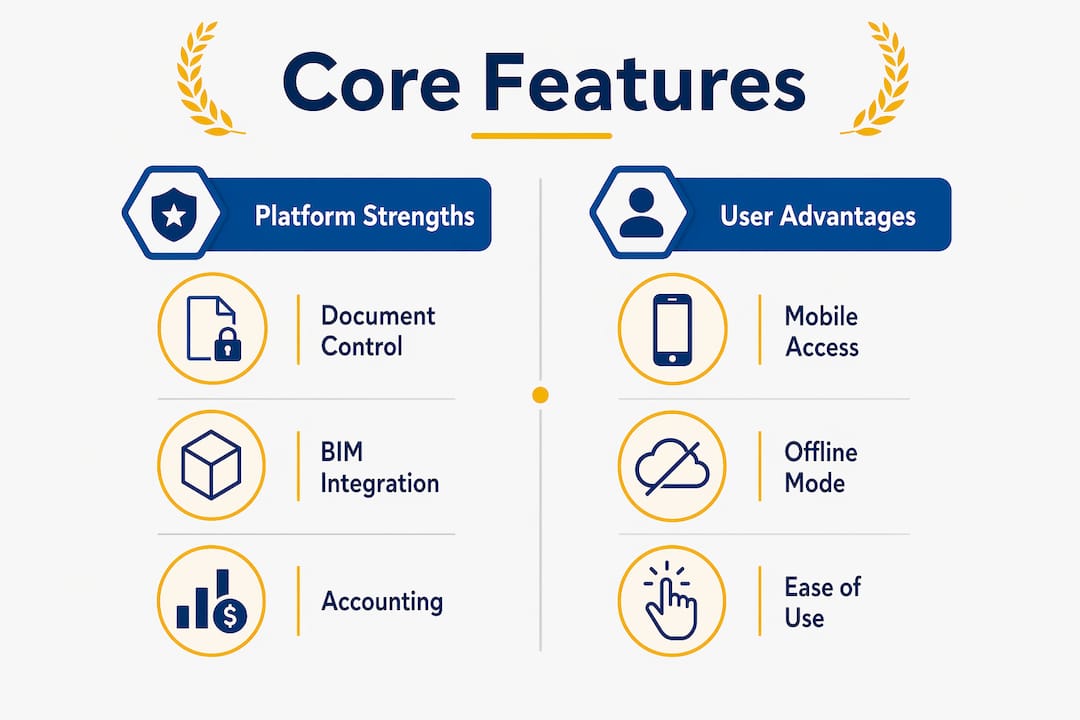
Professional-grade platforms in 2026 require centralized document control, RFI tracking, BIM visualization, and mobile offline reporting as baseline capabilities. These are not premium add-ons. They are the minimum standard for any serious construction project management solution.
The features that separate good platforms from great ones include:
- Centralized document control: All drawings, specs, and contracts live in one place. Every team member accesses the current version, which eliminates the costly rework caused by outdated files.
- RFI and submittal workflows: Requests for information and submittal reviews move through structured approval chains. This keeps architects, engineers, and contractors aligned without email chains.
- Real-time collaboration with mobile offline access: Offline mobile capability is critical because job sites frequently have no reliable internet. Field crews must update tasks and reports without waiting for a signal.
- Accounting and ERP integration: Data silos and lack of ERP integration create costly overhead and reduce ROI. Connecting your construction platform to QuickBooks, Sage, or Oracle eliminates duplicate data entry.
- Scheduling and resource planning: Gantt charts, critical path analysis, and resource leveling keep timelines realistic and crews productive.
- BIM model visualization: Teams review 3D models directly inside the platform for clash detection and field coordination.
Pro Tip: Before evaluating any platform, list the three workflows that cost your team the most time each week. Match those workflows to specific features, not to marketing descriptions.
How does project type affect your software choice?
Project type and team size are the two most reliable filters for narrowing down construction project management solutions. A platform built for a 500-unit residential development will frustrate a commercial general contractor managing a $200 million hospital build.
Use this framework to match your work to the right platform:
- Enterprise commercial GCs: Procore and Autodesk Build lead for complex projects requiring deep document management, multi-prime coordination, and owner reporting. Both platforms scale across large portfolios and integrate with major ERP systems.
- Residential builders: Buildertrend is built for homebuilders and remodelers. Its client portal lets homeowners track progress, approve selections, and communicate directly with the builder. That feature alone reduces phone calls and change-order disputes.
- Specialty and field trades: Fieldwire excels at task management and plan markup for electricians, plumbers, and mechanical contractors. Bluebeam Revu is the standard for PDF markup and document review across all trade types.
- Mid-market general contractors: Platforms like Procore offer tiered pricing that serves mid-size firms, but the learning curve is real. Evaluate whether your team has the bandwidth to implement a full enterprise platform.
- Design-build firms: Autodesk Construction Cloud integrates directly with Autodesk Revit and AutoCAD, making it the natural choice when your team produces and manages BIM models in-house.
BIM integration has shifted from a design-phase luxury to an operational necessity, embedded in daily workflows to reduce rework. If your projects involve BIM, your software must support it natively, not through a third-party workaround.
How do leading platforms compare in features and usability?
The table below compares the five most widely evaluated platforms in 2026 across the criteria that matter most to project managers.
| Platform | Best For | Document Control | BIM Integration | Mobile Offline | Accounting Integration |
|---|---|---|---|---|---|
| Procore | Commercial GCs | Excellent | Strong | Yes | QuickBooks, Sage, Oracle |
| Autodesk Construction Cloud | Design-build, BIM-heavy | Excellent | Native | Yes | Limited native, API available |
| Buildertrend | Residential builders | Good | Limited | Yes | QuickBooks, Xero |
| Oracle Primavera | Large infrastructure | Strong | Moderate | Limited | Oracle ERP native |
| Fieldwire | Field trades, specialty | Moderate | Plan-based | Yes | Limited |
Procore and Autodesk Construction Cloud lead for complex projects, while Buildertrend serves residential users with a more approachable interface. Each platform offers unique strengths in workflows, integrations, and pricing. Oracle Primavera dominates large infrastructure and government work where schedule complexity is extreme, but its implementation cost and learning curve make it impractical for most commercial GCs.
User adoption by field crews influences success more than feature depth. Mobile-first, user-friendly design drives daily use. A platform your foremen refuse to open is worth nothing, regardless of its feature list.
Pro Tip: Run a 30-day pilot with your field crew before committing to any platform. Track how many daily active users you get by week three. If adoption is below 60%, the interface is the problem, not the crew.
Pricing varies significantly. Procore charges based on annual construction volume, which means costs scale with your revenue. Autodesk Construction Cloud uses seat-based pricing. Buildertrend offers flat monthly tiers starting under $500. Oracle Primavera requires enterprise contracts. Fieldwire has a free tier for small teams and paid plans for larger organizations.
What are the biggest pitfalls in adopting construction software?
Most failed software implementations share the same root causes. Recognizing them before you buy saves significant time and money.
- Choosing single-purpose tools over lifecycle platforms: Buyers must distinguish between single-purpose tools and full lifecycle platforms to avoid data silos. A scheduling tool that does not connect to your document management system creates exactly the fragmentation you were trying to fix.
- Underestimating training requirements: Field crews and office staff need structured onboarding, not a YouTube tutorial. Budget for formal training sessions and designate internal champions who support their peers.
- Ignoring integration with existing systems: If your accounting team runs Sage 300 and your new platform does not connect to it, someone will maintain two systems manually. That doubles labor and introduces errors.
- Prioritizing features over usability: A platform with 200 features that your team uses at 20% capacity delivers less value than a simpler tool used at 90% capacity.
- Skipping a pilot phase: Deploying across your entire organization without a controlled pilot removes your ability to catch configuration problems before they affect live projects.
Pro Tip: Assign one person per department as a platform advocate during rollout. Peer-to-peer support drives adoption faster than any vendor training program.
The future of construction software also rewards teams that prepare now. AI features for automated document analysis and schedule risk prediction are moving from experimental to standard. Platforms that support these capabilities without requiring a full system replacement will deliver the best long-term value.
What trends are shaping construction software in 2026?
The construction software market is evolving faster than most buyers realize. The table below summarizes the key trends shaping purchasing decisions this year.
| Trend | Current Status | Impact on Buyers |
|---|---|---|
| AI document analysis | Active in Procore, Autodesk | Reduces manual review time on RFIs and submittals |
| BIM as daily workflow tool | Standard in enterprise platforms | Requires platforms with native BIM support |
| Mobile offline functionality | Expected baseline feature | Non-negotiable for field-heavy teams |
| Cloud collaboration upgrades | Continuous improvement across all platforms | Enables real-time owner and subcontractor access |
| Lifecycle platform consolidation | Growing buyer preference | Reduces tool sprawl and data fragmentation |
AI is the most significant shift. Automated schedule risk prediction identifies delays weeks before they appear in a Gantt chart. Document analysis tools flag missing information in submittals before they reach the architect. These capabilities are already live in Procore and Autodesk Construction Cloud, not on a future roadmap.
The move toward lifecycle platforms reflects a broader recognition that distinguishing between tools and full lifecycle platforms prevents fragmented data and maximizes efficiency. Buyers who consolidate onto one platform reduce IT overhead, improve data quality, and give leadership a single source of truth for portfolio performance.
Key takeaways
The best construction management software is a lifecycle platform that connects field, office, and ownership functions into one system, with mobile access and ERP integration as non-negotiable requirements.
| Point | Details |
|---|---|
| Match platform to project type | Commercial GCs need Procore or Autodesk; residential builders get more value from Buildertrend. |
| Prioritize mobile offline access | Field crews on sites with poor connectivity need offline capability to maintain daily productivity. |
| Integrate with accounting systems | Connecting to QuickBooks, Sage, or Oracle eliminates manual data entry and protects ROI. |
| Adopt lifecycle platforms | Single-purpose tools create data silos; unified platforms give leadership a reliable portfolio view. |
| Measure adoption, not features | A platform used daily at 80% capacity outperforms a feature-rich tool used inconsistently. |
What i have learned after years of watching teams choose wrong
Most construction teams spend 80% of their evaluation time comparing feature lists and 20% thinking about adoption. That ratio should be reversed.
The platforms that fail are almost never bad software. They fail because the team that selected them never asked the field crews what they actually needed. A project manager who spends most of their day in an office will prioritize reporting dashboards. A foreman who spends their day on a slab with no WiFi needs offline task updates and plan access. Both users are right. The platform has to serve both.
The other mistake I see repeatedly is buying for today’s project size and ignoring growth. A firm running $10 million in annual volume that selects a platform with no API connectivity will hit a ceiling within two years. Migrating data mid-growth is painful and expensive. Buy one tier above where you are now.
The team collaboration workflows that work in construction are not fundamentally different from those in any other project-driven industry. The tools are more specialized, but the principles are the same. Clear ownership, visible progress, and fast communication between the office and the field determine whether a project finishes on time.
One more observation: the firms that get the most from their construction software are the ones that treat it as a process change, not a technology purchase. The software does not fix a broken workflow. It amplifies whatever workflow you already have, good or bad.
— Optiostation
Take your project coordination further
Managing a construction project means tracking hundreds of tasks across teams, trades, and timelines simultaneously. Optiostation is built for exactly that kind of structured, high-volume task management. As your second-in-command, Optiostation keeps your priorities visible and your team aligned, whether you are coordinating a job site or managing a full project portfolio.
Explore Optiostation’s task management guide to see how structured task tracking reduces the coordination overhead that slows construction teams down. You can also review the collaboration workflow guide for practical frameworks that translate directly to field and office coordination. Construction professionals who build strong task habits at the individual level run better projects at every scale.
FAQ
What is construction management software?
Construction management software is a digital platform that centralizes project planning, documentation, scheduling, budgeting, and field coordination in one system. It replaces disconnected spreadsheets and email chains with structured workflows accessible to all project stakeholders.
Which construction management platform is best for large commercial projects?
Procore and Autodesk Construction Cloud are the leading platforms for large commercial general contractors, offering deep document management, BIM integration, and multi-prime coordination at enterprise scale.
How much does construction management software cost?
Pricing varies by platform and model. Procore charges based on annual construction volume, Autodesk Construction Cloud uses seat-based pricing, and Buildertrend offers flat monthly tiers starting under $500. Fieldwire provides a free tier for small teams.
Why does mobile offline access matter for construction software?
Job sites frequently have limited or no internet connectivity, so field crews need offline access to continue updating tasks, marking up plans, and submitting reports without interruption.
What is the biggest mistake teams make when adopting construction software?
The most common mistake is selecting a platform based on features without running a field-level pilot. User adoption by field crews determines success more than any feature comparison, and a 30-day pilot reveals adoption problems before they affect live projects.
Recommended
- Best free project management software for students 2026 – Optio Station: Best Project Management App for Prioritization
- Project Management Software: Complete Guide for 2025 – Optio Station: Best Project Management App for Prioritization
- Best project management software for students in 2026 – Optio Station: Best Project Management App for Prioritization
- What Is Project Management Software? Complete Breakdown – Optio Station: Best Project Management App for Prioritization
