

A workflow tool is software that defines the steps a piece of work goes through, moves the work from one step to the next, and shows who has it right now. Workflow software is the same idea at product scale: the app, or the feature inside an app, that does this job. For a college student or a young professional, the practical question is not “which enterprise platform?” but “how do I stop work from stalling between steps?” That is where a simple, well-organized task and time app such as Optio earns its place: it gives your tasks, teammates and deadlines one home, so your workflow lives in a system instead of in your head.
TL;DR
- A workflow is a set of steps that leads to an outcome, such as a paper submitted or a client deck approved. A workflow tool records those steps and moves work along them.
- Tools range from a simple task board to automation builders and enterprise platforms. Students and early-career professionals usually need the human-coordination end of that range.
- A tool does not fix a messy process. You still need agreed steps, a clear owner and a regular review.
- Optio brings tasks, team collaboration, time tracking, goals, smart reminders and Google Calendar integration into one mobile app.
Table of Contents
- What a workflow tool actually is
- Workflow software, tasks and processes: how the terms fit
- What a workflow tool does for you
- Types of workflow tools
- Workflow software versus task, project and time tools
- Examples you will recognize
- What a tool cannot do for you
- How to pick a workflow tool when you are a student or early-career
- Where Optio fits
- Try it on your next deadline
- FAQ
- Sources
What a workflow tool actually is
Start with the word workflow. IBM describes a workflow as a system for managing repetitive processes and tasks that happen in a particular order. The IBM overview of workflows also draws a useful line: a workflow is a simple series of individual tasks, while a business process is bigger, made of several workflows, information systems, data and people.
A workflow tool is the software that carries that sequence. The IEEE Technology Navigator describes workflow management software as an application category built to define, execute, monitor and optimize the sequences of tasks that make up a process. It routes work items between people, systems and automated agents according to predefined rules.
Translate that into student life. Say you are writing a group research paper:
- Someone drafts the outline.
- Teammates claim sections.
- Drafts come back for review.
- One person merges and formats.
- The group submits before the deadline.
That is a workflow. Whether it runs through a group chat, a shared document or a purpose-built app, the questions are the same. Who has the work? What happens next? Where is it stuck? A workflow tool exists to answer those without anyone having to ask.
Workflow software, tasks and processes: how the terms fit
The search results for this topic use several words that sound alike. Here is how they stack up.
ServiceNow explains the hierarchy this way: a task is a single assignment, several tasks working together create a process, and processes grouped around a business outcome across multiple people are called workflows. Its examples include new-employee onboarding, document approvals, help-desk tickets and purchase orders.
| Term | What it means | Student or early-career example |
|---|---|---|
| Task | One assignment | Read chapter 4 |
| Workflow | Ordered steps toward an outcome | Draft, review, revise, submit a paper |
| Process | Several workflows and people working together | A whole capstone project or a product launch |
| Workflow tool | Software that records and moves work along the steps | An app that tracks each step and its owner |
In everyday language, “workflow tool” and “workflow software” are used interchangeably. The word “management” is often added (workflow management software), and it means the same family of products. If you want a second plain-English take on the vocabulary, we also cover it in our guide to workflow software.
What a workflow tool does for you
The tool’s value is visibility and momentum. According to AWS’s explanation of workflows, a workflow consists of steps and states: steps move the process from one state to another along a path until it is complete. A tool makes those states visible. A task is “not started,” “in progress,” “waiting for review” or “done,” and everyone can see it.
In practice, most workflow tools bundle a handful of functions:
- Capture work. Requests, assignments and ideas land in one place instead of five apps.
- Define the path. The steps and who handles each are written down.
- Assign and route. Each item has an owner and moves to the next person when finished.
- Automate routine steps. Reminders, status changes and recurring tasks happen on their own.
- Show status. You can see what is moving and what is waiting.
- Record the history. You can look back at how long things took.
IBM frames the value as coordination rather than mere tracking: the software routes tasks to the right person at the right time with the information they need. That matters for a team of students with different class schedules, or for a young professional juggling a manager, two peers and a client.
Types of workflow tools
The category is wide, so it helps to sort it. Two sorting methods come up most.
By how work flows
NetSuite names four workflow types:
- Sequential: each step follows the one before it, like drafting, then editing, then publishing.
- State-machine: work can move back and forth between people, like a draft returned for revisions.
- Rules-driven: sequential steps with conditional branches, like “if the budget is over a set amount, route to a manager.”
- Parallel: several workflows run at once toward one goal.
Most group assignments are a mix of sequential and state-machine: work goes forward, gets sent back, and goes forward again.
By how much is automated
SAP’s beginner guide sorts workflows by automation level: manual, where people perform and monitor every task; semiautomated, where software handles routine steps and people keep control of complex ones; automated, where software executes tasks with minimal human involvement; and hyperautomation, where advanced AI runs whole processes.
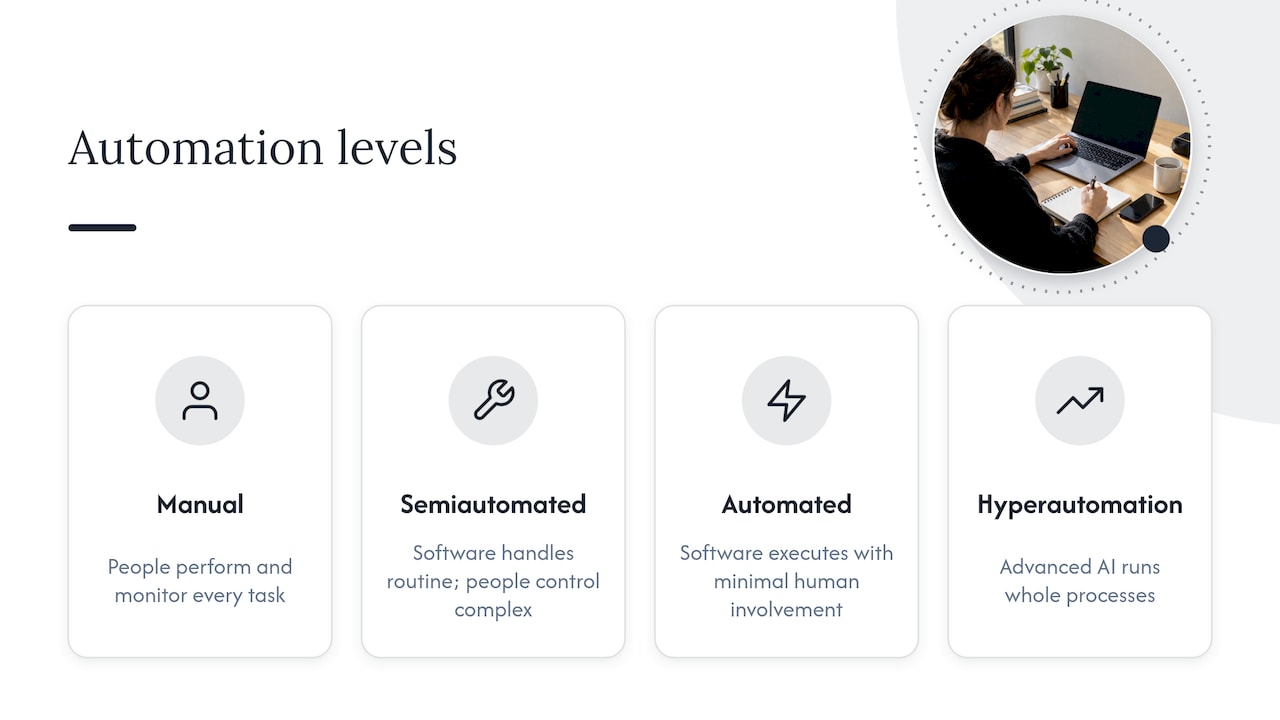
Students and early-career professionals mostly live in the manual and semiautomated zones. You decide, the software reminds, sorts and tracks.
By product category
Tines describes three product categories: task and project management tools for human coordination, automation platforms built on triggers and connectors that move data between systems, and intelligent workflow platforms that combine automation, AI and human approval across multiple teams. Its decision rule is simple. If people are coordinating work, a task tool fits. If data moves between systems on simple triggers, an automation platform fits. If people, systems, AI and audit trails all span several teams, a larger platform fits.
For your situation, the first category is the one that matters. A group project, an internship, a first job on a small team: these are people coordinating work. You do not need an enterprise platform with audit trails.
Workflow software versus task, project and time tools
This is where the confusion lives. The labels overlap, because the boundaries are fuzzy by design. Alloy Software notes that workflow management is often only one part of a larger app’s feature set, rather than the app’s main focus.
A workable way to tell them apart:
- Task management software tracks individual to-dos, due dates and priorities. Our overview of task management software goes deeper.
- Project management software groups tasks into projects with milestones, owners and timelines.
- Time tracking software records where your hours go.
- Workflow software focuses on the path: the order of steps, the handoffs and the status of each item.
- Workforce management software schedules and tracks employees’ hours and attendance. It is a different job again, and this workforce management software guide shows how that category differs from the others above.
For a student or young professional, the line between the first four blurs in a good way. One app that holds tasks, projects, teammates and hours gives you most of what a workflow tool does, without the setup an enterprise product demands.
Examples you will recognize
A semester. Each course is a workflow: syllabus deadlines go in, readings and assignments get scheduled, drafts get written, submissions get checked off. A tool shows the whole term at once and warns you when two big deadlines collide.
A group project. Roles are assigned, each person’s section has a status, and review comes before merge. The workflow tool tells the group who is blocking whom.
A first job. A request arrives, you do the work, a colleague checks it, and a manager approves it. The same pattern, shorter loops.
Personal routines. Job applications work well too: find a posting, tailor a resume, apply, follow up, interview. Each application moves through the same stages, so a tool can show you which ones are stuck.
If you want to build the academic version step by step, see our guide to building an academic productivity workflow.
What a tool cannot do for you
Software records and moves work. It does not design your process. Three things need to exist before any tool can help: steps agreed in advance, a named person responsible for the workflow itself, and a habit of reviewing and changing it when it is not working.
In a student group, that means:
- Write the steps down. Even five lines: who drafts, who reviews, who submits.
- Name an owner. One person is accountable for keeping the path moving. Rotate the role if you like, but name it.
- Review once a week. Ten minutes to ask what stalled and why, then change the path.
A planning platform for your degree follows the same logic. If you are mapping courses and requirements, course scheduling strategies for students show how a draft plan, reviewed regularly with an advisor, beats an improvised one.
How to pick a workflow tool when you are a student or early-career
Use the criteria that fit your situation, not an enterprise buyer’s checklist.
- Does it run well on your phone? Most student and early-career work happens between classes, on transit and at a desk. A mobile-first app gets used. A desktop-only system often doesn’t.
- Can you see status at a glance? You should know in seconds what is due, what is waiting on someone else and what is done.
- Does it handle people? Look for ways to share tasks and projects with teammates.
- Does it connect to your calendar? Deadlines that live only in an app get missed.
- Does it remind you smartly? Reminders should surface what matters now, not everything.
- Is it simple to start? If setup takes an afternoon, you won’t do it before the deadline crunch.
- Does it grow with you? You want a free tier to begin and room to add features later.
Where Optio fits
Optio is a mobile app for task, team and time management built for college students and young professionals. It covers task management, team collaboration, time tracking, goal setting, project organization, color-coded life aspects, smart reminders, motivational content, hashtag-based search and Google Calendar integration. Users access the core features for free, with advanced capabilities planned behind a paid subscription.
That feature set maps directly to the workflow questions above. Projects give your steps a home. Color-coded life aspects keep school, work and personal commitments distinct. Teammate collaboration shows who has what. Time tracking shows where the hours went, and the Google Calendar connection puts deadlines next to your classes and meetings. When you want to compare approaches, our guides to the best task management software and how to manage team tasks walk through the options and routines.
Our view: a workflow is a habit before it is software
We built Optio around a simple belief: most people who struggle with workload do not need more features, they need fewer places to look. A workflow that lives in your head, a group chat and three notebooks will break the first time your week gets busy.
That is why Optio is organized the way it is. Tasks, teammates, time and goals sit in one app, with colors for the parts of your life so you can see at a glance what a day actually holds. Smart reminders and Google Calendar integration keep deadlines in front of you, and hashtag-based search helps you find any task fast.
We are an indie-built app, and we incorporate feedback from our community. That keeps us focused on simplicity and flexibility rather than on enterprise complexity you will never use. Our Roman theme is part of the idea: Optio is your second-in-command, and you are the Centurion. You set the objective. Optio keeps the ranks in order.
If you are choosing your first workflow tool, choose the one you will open every day. For students and young professionals, that is usually the one that fits in your pocket and takes minutes to set up.
Optiostation
Try it on your next deadline
The fastest way to understand a workflow tool is to run one real project through it: a paper, a group assignment, a job search. Put the steps in, assign them, set reminders and watch the status change as you work. Optio’s core features are free to use, so you can set up your next project in a few minutes at Optiostation, and our guide to keeping track of tasks at work shows how to carry the routine into your first job.
FAQ
What is a workflow tool in simple terms?
It is software that lays out the steps of a piece of work, tracks where each item is and shows who is responsible next. Think of a group project board where every task has an owner and a status. It replaces “did you send that yet?” with a view anyone can check.
What is workflow software, and is it the same thing?
Yes, in everyday use the terms mean the same thing. Workflow software is the category, and a workflow tool is one product or feature within it. Formal definitions, like the one from the IEEE Technology Navigator, describe software that defines, runs and monitors task sequences and routes work between people and systems.
Do students need workflow software?
If you coordinate with others or juggle several courses and commitments, a simple version helps a lot. You do not need enterprise automation. A task and project app that shows status, deadlines and teammates covers the workflow needs of most students and early-career professionals.
What is the difference between a workflow and a process?
A workflow is a series of tasks in a set order. A process is larger: according to IBM, it consists of multiple workflows, information systems, data and people. Writing a paper is a workflow. Running a whole capstone project with several teams is closer to a process.
Can a workflow tool fix a disorganized team?
It makes disorganization visible, which is the first step. The team still has to agree on steps, name an owner and review what stalls. Once those are in place, the tool keeps everyone aligned.
Sources
- IBM: What Is a Workflow?
- IEEE Technology Navigator: Workflow management software
- ServiceNow: What is workflow automation?
- AWS: What is a Workflow?
- NetSuite: Workflow Management: Definition, Components, and Benefits
- SAP: What Is Workflow Management: A Beginner’s Guide
- Tines: How to choose workflow software for your team
- Alloy Software: What is Workflow Management
- Kloqk: Workforce Management Software: An SMB Buyer’s Guide
- Univyze: Course Scheduling Strategies for Students
