

Yes. A spreadsheet app is a type of productivity software, so the statement “a spreadsheet app is a type of productivity software” is true. Productivity software is a category of application programs that help people produce documents, databases, graphs, spreadsheets and presentations, and spreadsheet applications are a standard example of it. If you came here for a quiz or exam answer, you have it. If you want to understand why, and how it helps you manage your own work as a student or young professional, read on.
TL;DR
- True: a spreadsheet app belongs to the productivity software category, alongside word processors and presentation apps.
- Productivity software is application software: programs that help you do useful work such as writing, analyzing data and organizing tasks.
- Spreadsheets organize data in rows and columns, calculate with formulas and turn numbers into charts.
- Spreadsheets are one type of productivity tool. Task, time and team apps are others, built for a different job.
- Knowing which tool fits which job saves you hours in school and at work.
Table of Contents
- The quick answer for your quiz or exam
- What productivity software actually means
- Where the spreadsheet fits: the office suite
- What a spreadsheet app does
- Examples of productivity software by type
- A short history: the spreadsheet that sold computers
- Why this matters for you as a student or young professional
- Spreadsheets and task apps: same category, different jobs
- Our perspective
- Put your tasks and time in one place
- FAQ
- Sources
The quick answer for your quiz or exam
The typical question reads: “A spreadsheet app is a type of productivity software. True or False?” The answer is True. The same quizzes usually pair it with a second statement, that most application software opens in a window on the screen, which is also true.
If your course asks you to justify the answer, use this one-line reasoning: productivity software is application software used to produce information, and a spreadsheet app is application software used to produce and analyze numerical information. One textbook source notes that one way to categorize application software is to group word processing, spreadsheets, data management and presentation software into a category called productivity software. By that definition, a spreadsheet app is in the category by default.
What productivity software actually means
Software comes in two broad kinds. System software runs the device itself, like the operating system on your laptop or phone. Application software is everything you open to get a task done. IEEE describes application software as programs designed to perform tasks directly useful to end users, and it names spreadsheets, text editors and presentation tools as general-purpose applications that support tasks common across many professions.
Productivity software is a subset of application software. A college course text states that productivity software is a type of application software that has become a standard workplace tool, often packaged in integrated suites. HP’s glossary puts it in practical terms: it is software that helps people create documents, analyze data, communicate and organize work, and it calls the category the most widely used type of application software for work, school and home.
The name has a history. The category was named for the productivity gains these tools gave individual office workers, from typists to knowledge workers, when 1980s office suites changed offices that had relied on typewriters, paper filing and handwritten ledgers. The definition has stretched since. TechTarget notes the label is sometimes broadened to include any application that helps people do their jobs, including collaboration and communication programs. That is why task managers, calendars and team chat tools are now commonly called productivity apps too.
Where the spreadsheet fits: the office suite
An office suite is a bundle of productivity apps from one developer. HP explains that a suite usually contains a word processor, a spreadsheet and a presentation app, plus email and cloud storage, and that shared design and file formats make moving content between the apps easier. Wikipedia describes the spreadsheet program as one of the main components of an office productivity suite, which usually also holds a word processor, a presentation program and a database management system.
That is the structural reason the answer is true. Wherever you find an office suite, you find a spreadsheet inside it. Take the spreadsheet out and the suite is no longer complete.
What a spreadsheet app does
A spreadsheet is a grid. According to Wikipedia, spreadsheets organize data in tables of cells arranged in rows and columns. A cell can hold a number, text, or the result of a formula that is calculated automatically from other cells. Several sheets can be combined into a workbook, and the data can be shown as text, numbers or graphics.
Three jobs explain why people reach for one.
1. Organizing data
In a typical spreadsheet, a USF textbook explains, each column represents a category of data and each row a record, and cells are identified by column letter then row number, such as B6. A class budget could have columns for date, item and amount, with one row per purchase. Large spreadsheets can also be summarized with pivot tables, which LibreOffice’s documentation describes as a tool to organize, manipulate and summarize large amounts of data.
2. Calculating
The real power is the formula. The same USF chapter gives a worked example: a built-in payment function, entered as PMT(0.05/12, 60, 3000), computes the monthly payment on a $3,000 car loan over 60 months at 5% annual interest. Change the loan amount or the rate and the result updates on its own. OpenStax makes the same point for business: once formulas are keyed in, changed data is recalculated instantaneously.
A student version of this: list your monthly income in one cell and your rent, food and transport in others, then add one formula for what is left. When your part-time hours change, you change one number and the leftover amount follows.
3. Presenting results
Spreadsheets also turn numbers into visuals. The USF text notes that they offer charts and graphs for visualization and, like word processors, support sharing so several users can work on the same file at once. LibreOffice’s Calc guide lists functions, statistics tools, dynamic 2D and 3D charts and macros among its features, and states that a single sheet can hold up to 1,048,576 rows and 16,384 columns.
Examples of productivity software by type
A spreadsheet is one entry in a longer list. HP’s glossary gives examples by type:
| Type | What it is for | Examples |
|---|---|---|
| Word processor | Essays, reports, letters | Microsoft Word, Google Docs, LibreOffice Writer |
| Spreadsheet | Data, budgets, calculations, charts | Microsoft Excel, Google Sheets, LibreOffice Calc |
| Presentation | Slides and pitches | Microsoft PowerPoint, Google Slides, LibreOffice Impress |
| Email and calendar | Messages and scheduling | Outlook, Gmail, Google Calendar |
| Notes | Quick capture of ideas | OneNote, Google Keep |
| Collaboration and storage | Calls, shared files | Teams, Meet, OneDrive, Drive |
The table follows HP’s productivity software glossary. Notice that email, calendars and collaboration tools sit in the same list. The category is about the job a tool does for you, not about whether it handles numbers or words.
To see how a spreadsheet differs from its neighbors, ask what the output is. A word processor produces a document. A presentation app produces slides. A spreadsheet produces a calculated, organized table of data. All three produce something, which is the common thread.
A short history: the spreadsheet that sold computers
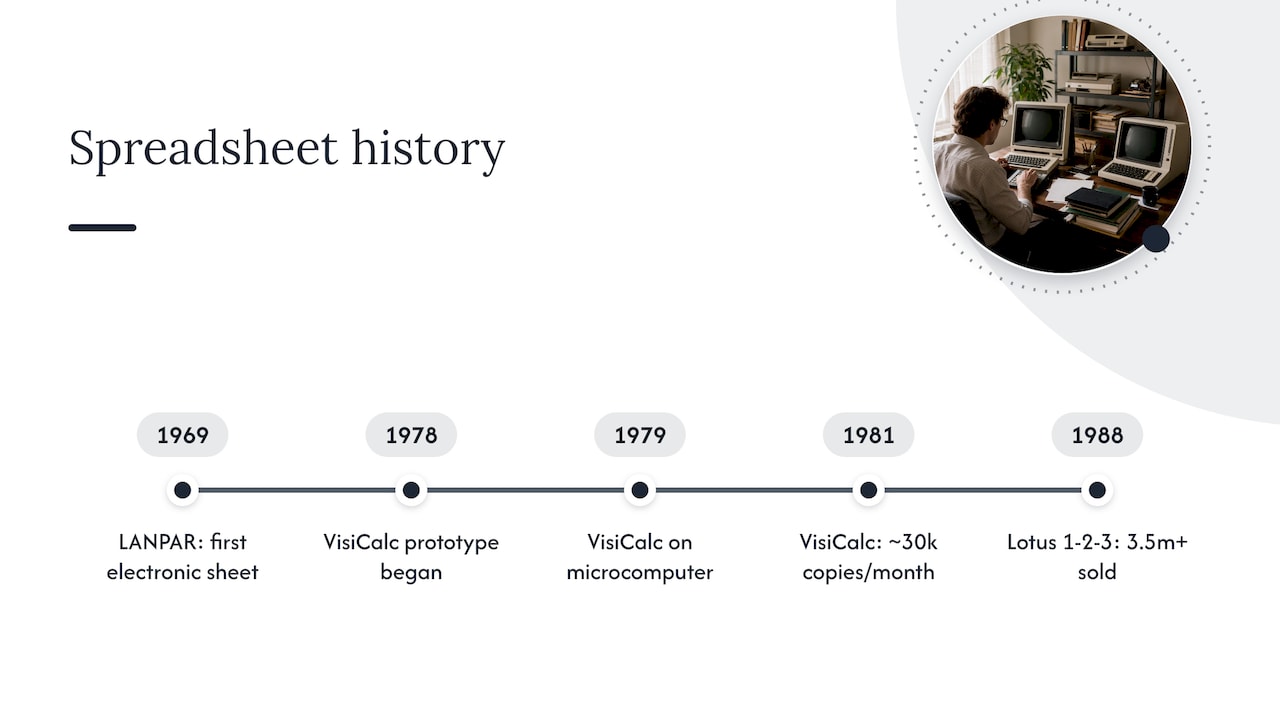
Spreadsheets are among the oldest productivity apps and one of the reasons personal computers took off in offices. Wikipedia traces them from LANPAR in 1969, the first electronic spreadsheet on mainframe and time-sharing computers, to VisiCalc in 1979 on a microcomputer, to Lotus 1-2-3 and then Excel.
The Computer History Museum records that VisiCalc was the “killer app” that spurred Apple II sales, with many customers buying an Apple specifically to run it. It began in spring 1978 as a prototype by Harvard MBA student Dan Bricklin, who that fall teamed with Bob Frankston to develop it for the Apple II. An academic history reports that by 1981 VisiCalc sales were approximately 30,000 copies per month, with about 500,000 copies sold over its lifetime. A few years later, a 1988 New York Times piece reported that Lotus had dominated the spreadsheet market for five years, selling more than 3.5 million copies of Lotus 1-2-3.
The lesson: when people say a spreadsheet is productivity software, they mean the original kind. The category grew up around it.
Why this matters for you as a student or young professional
This is not only a vocabulary question. Productivity software is a job requirement. Wikipedia reports that in the United States, as of 2015, about 78% of middle-skill occupations required the use of productivity software. Middle-skill here means jobs needing more than a high school diploma but less than a bachelor’s degree.
The USF textbook authors go further and argue that spreadsheet skill is perhaps the most marketable skill of all the office applications: no one is hired strictly for writing emails or documents, but spreadsheet expertise can make a person extremely valuable to an organization.
In practice, you will meet spreadsheets in at least three places:
- In class: business, science and statistics courses use them for data, forecasts and lab results. OpenStax lists financial statements, sales forecasts and budgets as typical spreadsheet work.
- In your first job: budgeting, tracking sales or inventory and reporting are everyday uses.
- In your own life: a monthly budget, a loan comparison or a savings plan.
If you want the broader picture of what counts as a productivity app and what it does for you, our guide on what a productivity app is and its benefits covers it from the student side.
Spreadsheets and task apps: same category, different jobs
Here is where many students get stuck. A spreadsheet can hold almost anything in a grid, so it is tempting to use it for everything. But the category is wide, and different productivity tools answer different questions:
| Your question | The kind of tool built for it |
|---|---|
| How much is left in my budget? | Spreadsheet |
| How do I write and format this paper? | Word processor |
| How do I present this to the class? | Presentation app |
| What must I do first today, and what is due this week? | Task and priority manager |
| Where did my time go? | Time tracker |
| Who on the team owns which piece? | Collaboration app |
A spreadsheet answers questions about numbers. Most of a student’s week is not numbers. It is deadlines, group projects, shifts, classes and the dozen small things that slip. That is a task management problem, and it is the reason task apps are now counted in the productivity category too. Our overviews of task management software and time management software show what each type covers, and the guide to prioritization techniques explains how to decide what goes first.
The practical rule is simple. Use a spreadsheet when the work is data you need to calculate. Use a task app when the work is a list of things to finish by a date. Many people use both, and that is exactly how a well-stocked productivity toolkit is meant to work.
Our perspective
We built Optio around a simple observation: when you are a college student or a young professional, your biggest productivity problem is rarely a lack of software. It is deciding what matters first.
Spreadsheets, word processors and slides are excellent at producing things. What they do not do on their own is tell you which of your ten open tasks deserves your next hour. That is the gap a task, team and time app is meant to fill, and it is why we think of it as the second-in-command to your toolkit, with you as the Centurion.
So we focused on what we describe as simplicity and flexibility: tasks, projects, time tracking, goal setting, color-coded areas of your life, smart reminders and Google Calendar integration in one mobile app. We are indie-built and we incorporate feedback from our community, so the app grows with the people who use it.
If you are learning what counts as productivity software, learn spreadsheets well. Then give your daily workload a home that was designed for it.
Optiostation
Put your tasks and time in one place
Once you know a spreadsheet handles your numbers, the next question is where your to-dos, deadlines and team projects live. Optio is a mobile app for task, team and time management made for college students and young professionals. It covers task management, team collaboration, time tracking, goal setting, project organization, color-coded life aspects, smart reminders, hashtag-based search and Google Calendar integration, with core features free and advanced capabilities planned as a paid subscription.
Meet the Prioritization Station and see how it works on Optiostation. If you would like to compare approaches first, our list of time management apps and our guide to the best apps students need are good next reads.
FAQ
Is a spreadsheet app a type of productivity software?
Yes. Productivity software covers application programs that help you produce documents, databases, graphs, spreadsheets and presentations. Spreadsheet apps such as Excel, Google Sheets and LibreOffice Calc are listed as one of its main types by HP. On a true or false question, the answer is true.
What are examples of productivity software?
The main types are word processors, spreadsheets, presentation apps, email and calendar apps, note-taking apps and collaboration or cloud storage tools. Specific examples include Word, Excel, PowerPoint, Gmail, Google Calendar and OneNote. Task and time management apps are also commonly counted in the category today.
Is productivity software a type of application software?
Yes. Application software is any program designed to perform tasks directly useful to end users, and productivity software is the subset used to produce information and organize work. LibreTexts’ course material states that productivity software is a type of application software and a standard workplace tool.
What is the difference between a spreadsheet and a database?
Both store data, but a spreadsheet is a grid you can calculate in directly, while a database is built to store and query large sets of related records. Office suites often include both: Wikipedia notes the suite usually contains a database management system next to the spreadsheet, word processor and presentation program.
Do I need to learn spreadsheets if I mostly manage tasks?
Yes, it is still worth learning the basics. Spreadsheet skills show up in coursework and entry-level jobs, and a task app handles a different part of your week: priorities, deadlines and time. Learning both gives you the full toolkit.
Sources
- productivity software | TechTarget
- Productivity Software | Encyclopedia.com
- Application software | IEEE Technology Navigator
- 2.2.2: Application Software | LibreTexts
- What Is Productivity Software? | HP
- Productivity software | Wikipedia
- Spreadsheet | Wikipedia
- Chapter 09 Introduction to Spreadsheets | USF Digital Commons
- Chapter 5 Getting started with Calc | LibreOffice
- Calc Guide 25.2, Chapter 1 | LibreOffice
- 13.1 Transforming Businesses through Information | OpenStax
- Software: Putting PCs to Work | Computer History Museum
- A History of Microcomputer Spreadsheets | AIS
- The Executive Computer: Lotus 1-2-3 Faces Up to the Upstarts | The New York Times
