

The fastest way to get focused work done today is to take one item off your to-do list and give it a start time and an end time on your calendar. Do that right now for your top priority, in a block of 25 to 90 minutes. Research on self-imposed deadlines shows that breaking big goals into scheduled checkpoints improves how people pace their effort instead of cramming everything at the end.
TL;DR:
- Scheduling deep work within the first 90 minutes of the day maximizes focus before emails and messages fragment attention.
- Adding 25% to task duration estimates and leaving buffers between blocks improves schedule accuracy and reduces interruptions.
- Prioritizing one or two high-impact tasks early on ensures important work gets completed before smaller tasks fill the day.
- Most failures in time blocking result from over-committing or neglecting transition buffers, leading to unmanageable schedules.
- Using tools like Optiostation can streamline converting to-do lists into calendar-based schedules, especially for students and professionals.
Table of Contents
- What time blocking is and how it maps to a to-do list
- Step-by-step: convert today’s to-do list into scheduled time blocks
- Time-blocking methods and when to use each
- Why time blocking works: concise evidence and practical implications
- Tools, templates, and a simple planner workflow for turning a to-do list into blocks
- Common mistakes and quick fixes when time blocking a to-do list
- Optiostation’s recommended workflow and resources
- Sticking with time blocking without burning out
- How Optiostation helps you turn a to-do list into scheduled blocks
- Sources
- FAQ
What time blocking is and how it maps to a to-do list
Time blocking means taking each item on your to-do list and assigning it a specific start time and end time on your calendar instead of leaving it as an open-ended task. A flat to-do list tells you what needs doing. A time-blocked calendar tells you when you will do it and for how long. According to the Wikipedia entry on timeblocking, the method integrates calendar and to-do list functions so that specific slots get assigned to specific tasks, which reduces multitasking and helps more tasks actually get finished.
Before you place a single block, two things need to happen. First, estimate how long each task will actually take, not how long you wish it would take. Second, rank your tasks so the two or three that matter most get placed before your calendar fills up with smaller items.
Time blocking sits alongside a few related techniques rather than replacing them:
- Timeboxing caps a task at a fixed duration regardless of whether it feels finished, which forces decisions instead of endless polishing.
- Pomodoro breaks work into short, fixed sprints (often 25 minutes) with brief rests, useful inside a larger time block.
- Task batching groups similar small tasks, like emails or errands, into one block instead of scattering them all day.
Before you schedule any to-do items, block your non-negotiables first: sleep, meals, and commute time. These form the walls of your day, and everything else has to fit around them.
Step-by-step: convert today’s to-do list into scheduled time blocks
Turning a to-do list into a working schedule takes about ten minutes once you have the habit. The process has six stages, and skipping any one of them is usually why a time-blocked day falls apart by 2 PM.
- Collect everything first. Write down today’s to-dos alongside any fixed appointments (classes, meetings, appointments) so you can see your real available hours before you start placing blocks.
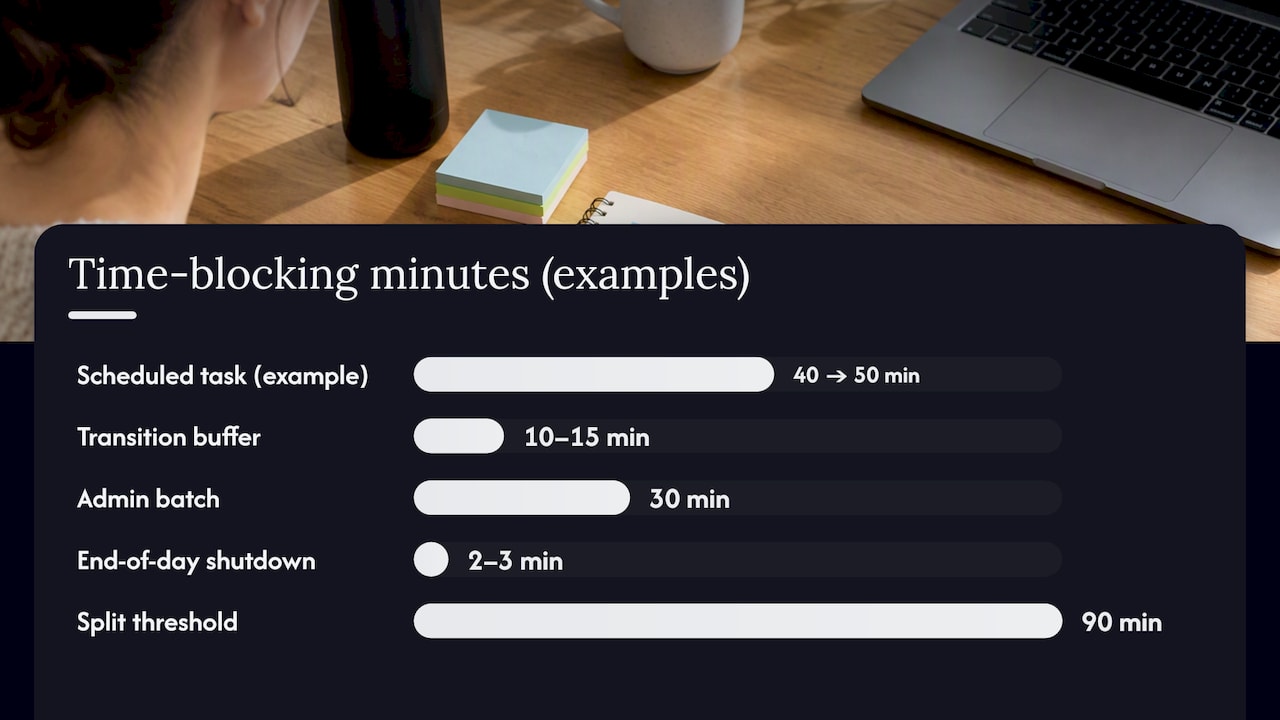
- Estimate each task’s duration, then add a buffer. Guess how long a task will take, then add about 25% on top. A task you think will take 40 minutes gets scheduled as 50.
- Prioritize before you place anything. Pick one or two tasks that need deep, uninterrupted focus and mark them as must-do blocks. Rank everything else below them.
- Place your deep-work blocks in your best hours. Put your hardest or most important task where your energy is highest, whether that is early morning or after lunch, then fill in smaller tasks around it.
- Add transition buffers between blocks. Leave 10 to 15 minutes between scheduled items so a meeting running long does not wreck the rest of your day.
- Split anything over 90 minutes and route overflow. Break long tasks into two blocks with a short recovery gap, and if the day fills up before every to-do has a slot, move the rest to an explicit “unscheduled, won’t fit today” list rather than pretending you’ll get to it.
At the end of the day, spend two or three minutes on a quick shutdown: check what actually got done, note which estimates were off, and carry over anything unfinished. This single habit is what makes tomorrow’s blocks more accurate than today’s.
Pro Tip: Schedule your hardest task within the first 90 minutes of your day, before email and messages have a chance to fragment your attention.
A student working through exam prep might collect five study tasks and two fixed classes, estimate each reading session at 45 minutes plus a buffer, place the densest subject in a morning block, and push a lower-priority reading to the overflow list rather than squeezing it in between classes. An early-career professional might do the same with a report draft, a client call, and three smaller admin tasks, batching the admin items into one 30-minute block instead of answering them as they arrive.
The Optiostation guide to time blocking walks through this same conversion process with calendar-based examples, and a step-by-step walkthrough breaks it down further for readers who want a slower pace on their first attempt.
Time-blocking methods and when to use each
Not every day fits the same shape, and picking the wrong variant is a common reason people abandon time blocking after a week. Match the method to your task mix and your energy pattern rather than forcing one system onto every day.
- Task batching works best when you have many short, similar tasks, like email, grading, or data entry, that are cheaper to do together than scattered across the day.
- Day theming suits roles with distinct types of work: a research day, a meeting day, a writing day, so your brain stays in one mode instead of switching contexts constantly.
- Timeboxing helps when perfectionism is the problem. A hard stop at 45 minutes forces you to ship a draft instead of endlessly revising it.
- Pomodoro hybrids (25-minute sprints inside a larger block) suit beginners and anyone who finds a 90-minute block intimidating; short blocks are also a better fit for shallow work, while longer blocks tend to align with your natural focus rhythms for deep work.
Choose based on three questions: how long is the task, how likely is it to get interrupted, and when during the day is your attention sharpest. A task prone to interruptions, like customer support or team messages, often belongs in a batched block with clear boundaries rather than scattered throughout an otherwise focused day.
Why time blocking works: concise evidence and practical implications
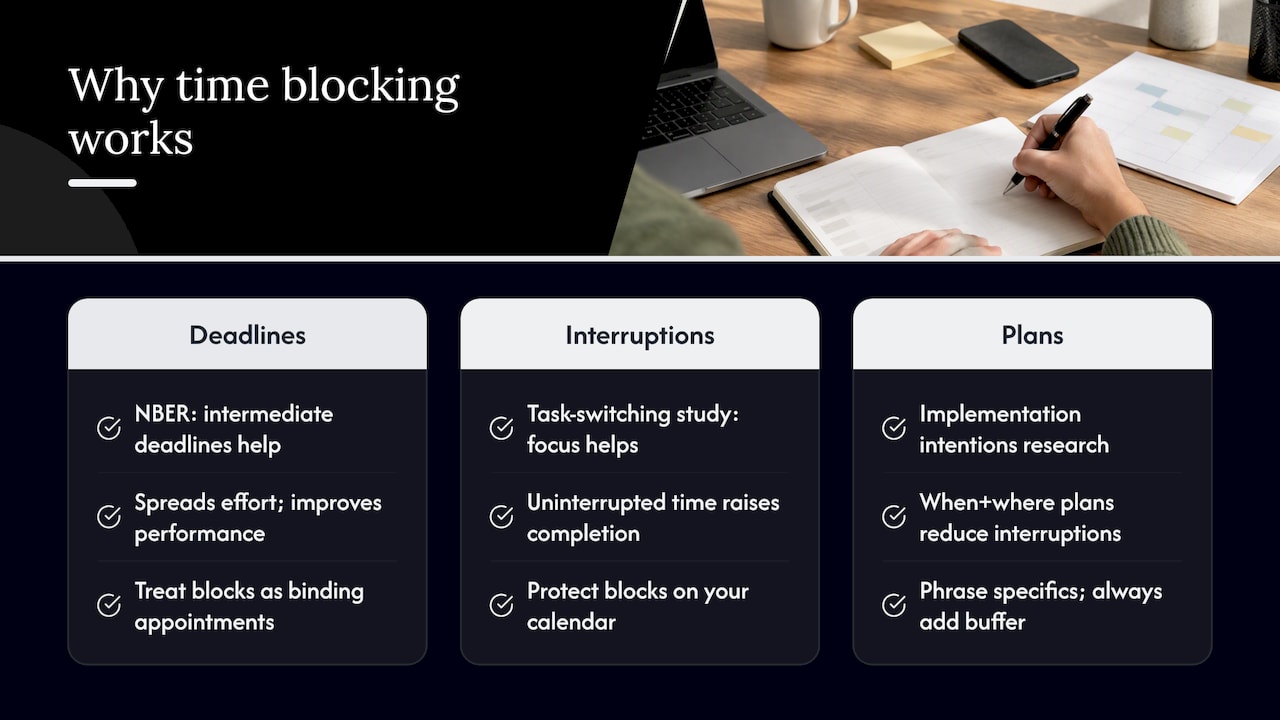
Time blocking is not just a scheduling preference, it has a research basis in how people handle deadlines, interruptions, and multitasking. A National Bureau of Economic Research working paper found that self-imposed intermediate deadlines help people spread effort more evenly over time and improve task performance compared to working toward a single terminal deadline. Breaking a to-do list into scheduled blocks essentially creates a string of these intermediate deadlines throughout your day.
Interruptions carry a measurable cost. A study of task-switching in computing environments found that focused, uninterrupted time reduces the costs of switching between tasks and leads to more work actually getting completed compared to unguided, interruption-heavy work. Protecting a block on your calendar is a direct defense against this.
Forming a specific plan for when and where you will do a task also changes behavior. Research on implementation intentions shows that people who set concrete “when and where” plans experience fewer interruptions and show less optimistic bias about how long tasks will take, both of which are common failure points for a plain to-do list.
Put together, the practical implications are straightforward: treat your calendar blocks as binding appointments rather than suggestions, phrase your plan in specific terms (“I will draft the proposal at 9 AM at my desk” rather than “work on proposal today”), and always build in a buffer since your own time estimates are probably optimistic.
Tools, templates, and a simple planner workflow for turning a to-do list into blocks
You don’t need specialized software to start time blocking, but the right setup makes the habit easier to keep. Tools generally fall into three categories: calendar-first apps where you drag tasks directly onto a calendar grid, task-first apps that sync with a calendar so items appear as blocks automatically, and paper or digital planner templates for people who prefer a manual process.
Whichever you choose, a useful daily planner includes a few consistent fields:
- Day window, the hours you’re realistically available to work.
- Tasks with estimated duration, pulled straight from your to-do list.
- Buffer percentage, a consistent padding added to every estimate.
- Max-block cap, an upper limit (often 90 minutes) so no single block runs too long without a break.
- Fixed appointments, the non-negotiables that get placed first.
- Overflow flag, marking anything that didn’t fit so it rolls into tomorrow’s plan instead of getting lost.
Filling every minute defeats the purpose since there’s no room left to absorb anything unplanned.
Once your planner is filled in, copying it into a calendar is mostly mechanical: each row becomes an event with the same start time, duration, and title as your planner entry. Readers who want a done-for-you version of this structure can look at Optiostation’s step-by-step guide, and anyone still working out how to break down messy to-do items before scheduling them might find the guide to organizing to-do lists useful as a companion step.
Common mistakes and quick fixes when time blocking a to-do list
Most time-blocking failures come from a small set of repeatable mistakes, and each one has a direct fix.
- Over-committing the day. Filling 100% of your hours leaves no room for anything unplanned; aim for 70% to 85% utilization instead.
- Vague tasks. “Work on thesis” doesn’t fit in a block. Break it into a first actionable step, like “outline chapter 2 introduction.”
- No transition time. Back-to-back blocks collapse the moment one runs long; add 10 to 15 minutes between them.
- Ignoring overflow. Tasks that don’t fit today don’t disappear. Keep an explicit “won’t fit today” list and review it weekly instead of letting it pile up silently.
The behavioral fix underneath all of these is treating your blocks as real appointments rather than optional plans, using specific implementation-intention phrasing when you write them, and protecting at least one deep-work block from meetings or messages each day.
Pro Tip: If a task keeps rolling over three days in a row, it’s usually too vague or too big. Split it before you reschedule it again.
Optiostation’s recommended workflow and resources
Some productivity apps are built around the idea that a to-do list only works once it becomes a schedule, mapping task management features directly onto these steps. A student preparing for finals might batch three subjects into themed study blocks across a week, while an early-career professional might protect a single deep-work block each morning before meetings take over. Some apps support color-coded life aspects, smart reminders, and Google Calendar integration, allowing a planned block to move straight from a task list onto an actual calendar without retyping it. Readers who want to see the weekly side of this process can check the weekly planning checklist, which pairs well with the daily conversion steps covered earlier.
Sticking with time blocking without burning out
The readers who stick with time blocking are the ones who start with one protected block, not a fully scheduled day. Treat every block as an experiment: if a 90-minute slot keeps failing, try 45 minutes instead, and if your buffer keeps running short, raise it. A weekly ritual, even five minutes on a Sunday, to look back at what fit and what didn’t matters more than any single day’s plan. The method is meant to bend around your actual week, not the other way around.
— Optiostation
How Optiostation helps you turn a to-do list into scheduled blocks

Manual planners work, but they take upkeep every single day. Optiostation is built to carry the structure described above so you’re not rebuilding a buffer calculation and a priority ranking from scratch each morning. For students juggling classes, study blocks, and group projects, or young professionals splitting focus between deep work and meetings, the app handles the parts that are easy to skip when you’re tired.
- Task-to-calendar mapping so a to-do item becomes a scheduled block without retyping it.
- Templates for recurring days, like a study day or a meeting-heavy workday.
- Smart reminders that nudge you before a block starts, not after it’s already gone.
- Student-focused features, including color-coded life aspects and hashtag search, built around the way students and young professionals actually organize a week.
If you’re already using a paper planner or a spreadsheet, there’s no reason to drop it cold. Trial Optiostation’s Prioritization Station alongside your current method for a week and see which parts of the manual process it actually replaces. You can start on the Optiostation landing page.
Sources
This article draws on the NBER working paper on intermediate deadlines, a CHI study on interruptions and task-switching, research on implementation intentions, and the Wikipedia entry on timeblocking for a general overview of the method. Students preparing for structured exam periods, such as Cambridge exams, may also find a daily study routine guide useful for applying these same principles to exam prep.
- Anticipation and the Smoothing of Effort (NBER working paper w14228)
- Implementation intentions and task completion (Koole et al.)
- A study of interruptions and task switching (G. Mark et al., CHI)
- Timeblocking — Wikipedia
FAQ
What is the difference between time blocking and a to-do list?
A to-do list is an unordered set of tasks with no assigned time, while time blocking assigns each task a specific start and end time on a calendar. The Wikipedia entry on timeblocking describes the method as integrating both functions so scheduling replaces guessing about when something will get done.
How long should a time block be?
Block length depends on the task: shorter blocks around 25 to 45 minutes suit shallow or administrative work, while longer blocks of 90 minutes or more tend to fit deep, focused work better. Adding a 15-minute buffer between blocks helps absorb tasks that run long.
What is the best way to start time blocking today?
Treat it as a fixed appointment rather than a flexible plan, since research on implementation intentions shows that specific when and where plans reduce interruptions and optimistic estimates.
Does Optiostation support time blocking for students?
Yes, Optiostation’s Prioritization Station is built for students and young professionals and includes task-to-calendar mapping, smart reminders, and Google Calendar integration to support a time-blocked schedule. Pricing details are available on the Optiostation site.
What should I do with tasks that don’t fit into today’s blocks?
Move any task that doesn’t fit into an explicit “won’t fit today” list rather than squeezing it into an already full day. Review that list during a short weekly check-in to reschedule or reprioritize what carried over.
