

Virtual teamwork is work coordinated by people who are not sharing the same physical room, using technology to stand in for the hallway conversations and shoulder taps that co-located teams take for granted. A virtual team can be two people or two hundred, and it can be fully remote or split between an office and a dozen kitchen tables. What matters is not the tool stack. It’s whether members depend on technology to bridge distance, time, or organizational lines to hit a shared goal. The rest of this guide breaks down the types, the benefits, the failure points, and the practices that separate teams that thrive from teams that quietly fall apart.
TL;DR:
- Virtual teams rely on overlapping locational, temporal, organizational, and technology boundaries, which shape their communication and collaboration needs.
- Different team types, such as project, management, or networked teams, require tailored practices and have varying lifespans and membership stability.
- Deliberate management habits like clear communication norms, role definitions, and regular health checks are essential to prevent common failure modes like silos and disengagement.
- Effective virtual collaboration depends more on leadership behavior and cultural norms, such as over-communication, trust-building rituals, and timely responses, than on tools alone.
- Starting with a simple, structured plan and the right tools, like Optiostation, helps teams develop consistent habits that support long-term remote productivity.
Table of Contents
- What Counts as Virtual Teamwork, Exactly?
- Six Common Types of Virtual Teams (and How to Spot Yours)
- What Are the Real Benefits of Virtual Teamwork?
- Where Virtual Teamwork Breaks Down
- How to Manage Virtual Teams: A Repeatable Playbook
- Choosing the Right Tools for Virtual Collaboration
- Leadership and Culture: What Actually Predicts Success
- Optiostation’s 30-Day Starter Plan for New Virtual Teams
- How Virtual Teamwork Reshapes Organizational Culture
- Legal and Security Considerations You Shouldn’t Skip
- When Virtual Teamwork Is (and Isn’t) the Right Choice
- Turning These Practices Into a Daily Habit With Optiostation
- Sources
- FAQ
What Counts as Virtual Teamwork, Exactly?
Four boundaries determine how “virtual” a team really is, and most teams sit somewhere on a spectrum rather than at a clean extreme. Researchers who study distributed work treat virtualness as a continuum, not a binary category — a marketing team that meets in person weekly is virtual in a different way than a customer support crew spread across four continents who have never met.
Locational boundary. This is geographic dispersion: how far apart people physically sit. A team split between two floors of the same building crosses a locational boundary in only a minor way. A team with members in Manila, Lisbon, and Denver crosses it hard.
Temporal boundary. This measures how much members’ working hours overlap. A team in New York and Toronto shares almost a full workday. A team split between Seattle and Singapore might get ninety minutes of live overlap, if any.
Organizational boundary. Virtual teams often pull people from different departments, companies, or even competing organizations working on a joint venture. A cross-functional product team assembled from marketing, engineering, and legal has crossed an organizational boundary even if everyone works in the same city.
Technology-mediation boundary. This is the depth of the reliance on digital tools versus face-to-face contact, and it connects to a concept called media richness: video calls carry tone, pace, and facial cues; a chat message carries almost none of that context. Teams that lean on lower-richness channels for high-stakes conversations tend to misread each other more often.
A few quick examples show how these boundaries combine:
- A design agency where five employees work from home in the same city, meeting in person monthly, crosses mostly the technology boundary.
- A software company with engineers in Kraków and product managers in Austin crosses locational, temporal, and technology boundaries simultaneously.
- A nonprofit coalition made up of staff from four separate organizations, all local but never in one office, crosses the organizational boundary most sharply.
None of these teams is “more virtual” in some abstract sense. Each one just crosses different boundaries, and that difference should shape how each one communicates.
Six Common Types of Virtual Teams (and How to Spot Yours)
Virtual teams aren’t one category. The structure and lifespan of the team change what “good collaboration” actually looks like, so identifying your type first saves you from copying practices that don’t fit your situation.
Networked teams pull members from multiple organizations or business units around a shared interest, and membership tends to shift as needs change. A vendor advisory group that rotates specialists in and out as projects demand is a classic example. These teams rarely have a fixed end date, and their main challenge is maintaining shared context as people cycle through.
Parallel teams work on a short-term task alongside people’s regular jobs, usually to produce a recommendation or a one-time deliverable. Think of a task force assembled to redesign the company’s onboarding process over six weeks, then disbanded. Momentum matters more than long-term trust building here.
Project or product development teams exist to build something specific over a defined period, from a mobile app feature to a new supply chain process. Roles are usually clearer than in networked teams, and the team typically dissolves or reassigns once the deliverable ships.
Service or production teams perform ongoing, often repetitive functions, like a distributed customer support desk or a follow-the-sun IT help desk. These teams need the tightest handoff protocols, because a dropped ticket at 5 p.m. in one time zone becomes someone else’s 9 a.m. problem.
Management teams are leadership groups spread across regions who coordinate strategy without meeting daily, common in multinational companies where a VP in Chicago, a director in Dublin, and a regional head in Singapore share responsibility for a business line.
Global virtual teams combine several of the above traits at once. They tend to cross every boundary simultaneously (location, time zone, organization, and culture), which is why they get cited most often as the hardest type to run well.
To spot which type fits your situation, ask two questions: does the team have a fixed end date, and does membership change based on project needs? A stable roster with an open-ended purpose usually points to a management or service team. A shifting roster tied to a single deliverable points to project or parallel work.
What Are the Real Benefits of Virtual Teamwork?
The biggest advantage isn’t convenience. It’s access. Virtual teamwork lets organizations recruit the best person for a role regardless of zip code, which changes hiring math entirely for specialized skills that are scarce in any single city.
That access compounds with other structural advantages:
- Wider talent pool and more perspective diversity, which management research links to stronger problem-solving and better decision quality on distributed teams compared to homogeneous, co-located groups.
- Lower travel and real estate overhead, since a distributed team doesn’t need everyone commuting to a central office or flying in for every meeting.
- Follow-the-sun productivity, where a task handed off at the end of one region’s workday gets picked up by a teammate whose day is just starting, effectively extending a 24-hour cycle instead of a static 8-hour one.
- Business continuity during disruption, since a team already built around distributed, asynchronous habits doesn’t grind to a halt when one office, city, or region faces an outage or a crisis.
The bigger picture: virtual work has become deeply entrenched in how global business operates, and current research indicates many employees now expect virtual collaboration to remain a permanent part of how they work, not temporary accommodation.
The catch is that none of these benefits arrive automatically just because a team is dispersed. They show up only when the team is deliberately structured to capture them, which is exactly where most of the challenges in the next section start.
Where Virtual Teamwork Breaks Down
Distance amplifies small cracks into real problems, and the same four failure modes show up across nearly every distributed team, regardless of industry.
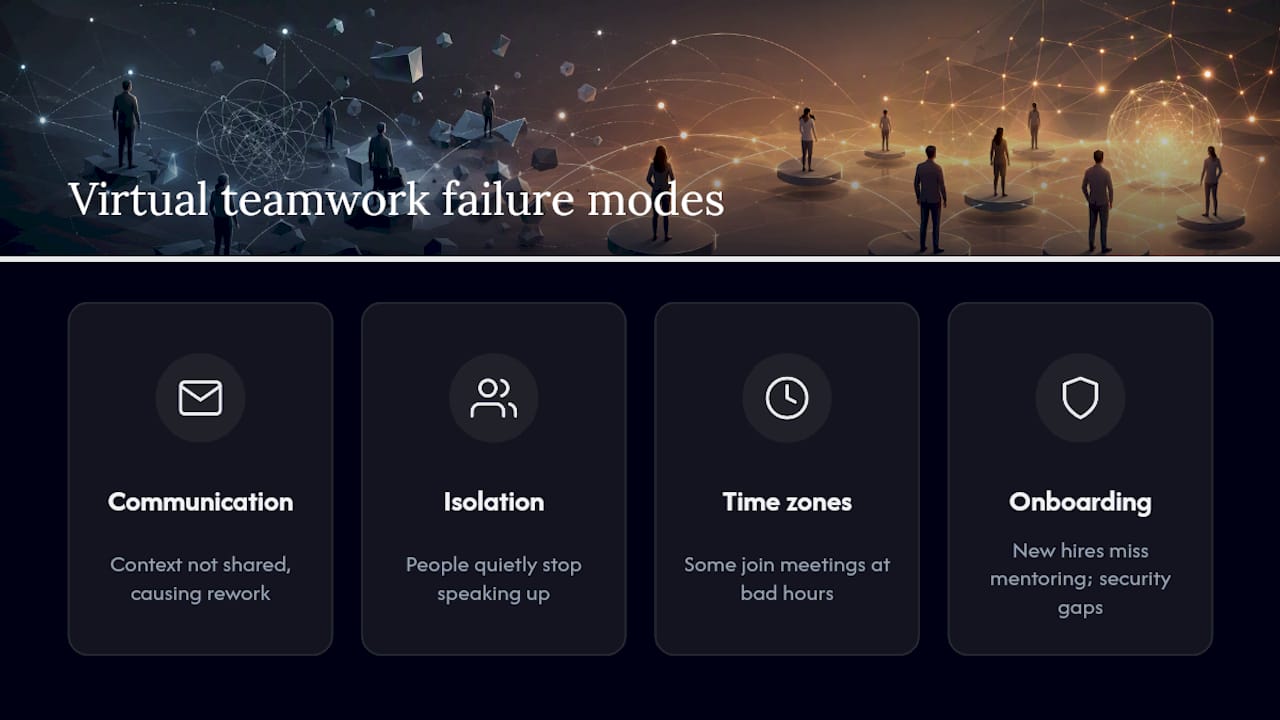
Communication gaps and information silos. Without a hallway or a shared lunchroom, context that used to spread informally has to be deliberately pushed out, and it often isn’t. One engineer knows why a decision was made; three others don’t, and nobody notices the gap until it causes rework.
Social isolation and quiet disengagement. Relying entirely on digital channels strips out the small, casual interactions that build familiarity, and that absence can erode trust over time if nothing replaces it. People don’t usually announce they feel disconnected. They just stop speaking up in meetings.
Time zone friction. Scheduling a meeting that works for Berlin, Denver, and Singapore usually means someone joins at an inconvenient hour, every time, and resentment builds quietly if the burden always falls on the same people.
Onboarding gaps and security blind spots. New hires miss the informal mentoring that happens organically in an office, and distributed teams often skip basic security hygiene, like consistent device policies or access controls, because no one owns that responsibility clearly.
Pro Tip: The single most common failure mode is silent disengagement, and it’s the hardest to catch remotely because there’s no body language to read. Build a habit of asking direct, specific questions in one-on-ones, like “what’s the most frustrating part of your week,” instead of the generic “how’s it going,” which almost always gets a generic answer.
None of these problems are unique to virtual teams; co-located teams deal with silos and disengagement too. Distance just removes the accidental fixes, like a manager noticing someone’s mood in the break room, so every fix has to be intentional instead.
How to Manage Virtual Teams: A Repeatable Playbook
Tools don’t fix virtual teams. Leadership, structure, and consistent communication habits do far more of the work, and that finding shows up repeatedly across management research on distributed team performance. Here’s a sequence that holds up across most team types.
Set explicit communication norms before anything else. Decide which channel handles which kind of message (urgent versus routine), how fast people are expected to respond, and what “acceptable” meeting behavior looks like. Write it down. Ambiguity here is where most friction starts.
Give every recurring meeting a real agenda, a timebox, and a rotating facilitator. A meeting without a stated purpose burns goodwill fast on a distributed team, since attending often means someone is sacrificing an evening or an early morning.
Define roles, responsibilities, and measurable outcomes clearly and in writing. On a co-located team, role confusion gets sorted out through overheard conversations. On a virtual team, it festers until someone asks in frustration who actually owns a task.
Build trust deliberately through small, repeated rituals. Occasional synchronous social time, like an unstructured virtual coffee chat or a five-minute non-work check-in at the start of a call, measurably reduces isolation and strengthens the sense of psychological safety that lets people admit mistakes or ask for help.
Onboard new members with a structured plan, not an ad-hoc one. Practitioner research on distributed team performance points to a 30/60/90-day plan paired with a designated “buddy” as consistently outperforming informal onboarding, both for how fast someone becomes productive and for how long they stay.
Run recurring health checks. A short retrospective every two weeks and a quick pulse survey once a month catch friction before it turns into a resignation letter.
Track a handful of KPIs and actually use them to adjust. Response time to messages, meeting attendance and punctuality, on-time task completion, and self-reported clarity on priorities are all easy to measure and directly tied to the failure modes covered above.
The table below groups these practices by what they’re actually solving for, since not every team needs to start in the same place.
| Practice area | What it fixes | Suggested cadence |
|---|---|---|
| Communication norms | Ambiguity over channels and response time | Set once, revisit quarterly |
| Meeting structure | Wasted time, uneven participation | Every meeting |
| Role and goal clarity | Confusion over ownership | Set at kickoff, review monthly |
| Trust-building rituals | Isolation, weak psychological safety | Weekly or biweekly |
| Structured onboarding | Slow ramp-up, early attrition | Once per new hire, over 90 days |
| Retrospectives and pulse checks | Undetected friction | Every two to four weeks |
If you’re building these habits from scratch, a practical guide to virtual team collaboration walks through several of these steps in more depth, and a deeper look at collaboration best practices covers how to sequence them for a team that’s just going remote for the first time.
Choosing the Right Tools for Virtual Collaboration
The tool question always comes after the process question, not before it. A team with clear norms and weak tools will outperform a team with excellent tools and no norms, but the right stack still removes a lot of unnecessary friction once the basics are in place.
Start with the synchronous versus asynchronous split. Media richness theory explains why this distinction matters: richer channels like video carry tone and nuance but cost real-time attention from everyone involved, while leaner channels like email or a shared document let people contribute on their own schedule at the cost of losing some nuance.
A workable stack usually covers these categories:
- Chat for quick, low-stakes coordination that doesn’t need a full meeting.
- Video conferencing for decisions with nuance, difficult conversations, or anything where tone matters.
- Shared documents for collaborative drafting where multiple people need to contribute asynchronously.
- Project and task trackers to keep ownership and deadlines visible without a status meeting.
- Shared calendars to make time zone overlap and availability visible at a glance.
- File sharing with clear version control so nobody is working off an outdated draft.
When picking specific tools, weigh four things: how rich the communication needs to be for that use case, how well the tool integrates with what the team already uses, what security controls it offers, and how quickly a new member can actually learn it. A tool that’s powerful but takes two weeks to learn is often a worse choice than a simpler one everyone adopts on day one. A breakdown of how collaboration tools support modern teamwork covers these categories in more detail if you’re building a stack from zero.
A quick workflow example: a weekly planning meeting runs on video, decisions and action items get logged in a shared tracker immediately after, and day-to-day status updates happen asynchronously in chat so nobody has to schedule a call just to say a task is done.
Leadership and Culture: What Actually Predicts Success
Tools and processes only carry a virtual team so far. What separates teams that hold together for years from teams that quietly burn out their members is leadership behavior and cultural norms, and this is the part most guides underweight.
Leaders of strong virtual teams tend to over-communicate rather than under-communicate. They repeat context that feels obvious to them because they know it isn’t obvious to someone three time zones away who missed the last two conversations. They also default to written documentation over verbal instruction, since a written decision survives time zone gaps in a way a verbal one doesn’t.
Cultural norms matter just as much as leadership habits. Teams that build a norm of responding within an agreed window, regardless of time zone, avoid the slow-burn frustration of watching a message sit unanswered for two days. Teams that make recognition visible, praising good work in a shared channel rather than a private message, build a stronger sense of shared identity than teams where recognition happens invisibly. Building trust online takes deliberate effort in any remote relationship, and the same principle applies inside a team, not just between a business and its customers.
Role clarity also does more cultural work than people expect. When two people believe they own the same task, or nobody believes they own it, the ambiguity gets resolved through frustration rather than conversation on a virtual team, because there’s no shared physical space where the confusion naturally surfaces and gets sorted out.
Optiostation’s 30-Day Starter Plan for New Virtual Teams
There are mobile apps for task, team, and time management built for students and young professionals, sometimes structured around Roman themes and using terms like second-in-command and Centurions. It’s built specifically for people juggling coursework, part-time jobs, or early-career workloads who need one place to manage tasks, deadlines, and team coordination without switching between five different apps.
Here’s a simple starting plan for a team going virtual for the first time:
Week 1: Set communication norms and response-time expectations. Assign clear roles and log them somewhere visible to everyone.
Week 2: Establish a recurring meeting rhythm with a fixed agenda and a rotating facilitator. Set up shared task tracking so ownership is visible without asking.
Week 3: Introduce a light social ritual, even five minutes at the start of a call, and run a first quick pulse check on how communication is landing.
Week 4: Hold a short retrospective. Adjust whatever isn’t working before it hardens into a habit.
A productivity system built around this kind of structure can carry a lot of this weight, since color-coded task categories and smart reminders make role clarity and deadline visibility easier to maintain without a manager chasing updates manually.
How Virtual Teamwork Reshapes Organizational Culture
Culture doesn’t disappear when a team goes virtual. It just moves into different channels, and organizations that treat this shift as an afterthought usually end up with a weaker, thinner version of whatever culture they had in person.
Visibility becomes the first casualty. In an office, culture spreads through incidental moments: a joke overheard, a quick favor, a shared frustration in the elevator. None of that transfers automatically online, so organizations that don’t replace it deliberately often end up with employees who technically work together but barely know each other.
Trust also becomes more explicit and less assumed. In person, trust builds partly through repeated small interactions that nobody consciously tracks. Remotely, trust has to be built through consistency: doing what you said you’d do, on the timeline you said, over and over, because that’s often the only evidence a distant teammate has to go on.
Decision-making culture shifts too. Distributed teams that document decisions in writing, rather than relying on hallway consensus, tend to develop a culture that’s more inclusive of people who couldn’t attend a live discussion, whether because of time zone or scheduling conflict. That habit, once it takes hold, often outlasts the original reason it started and becomes a genuine strength.
The organizations that navigate this well treat culture as something to design for a distributed context, not something to preserve unchanged from an office setting. The ones that struggle usually just assume culture will carry over on its own, and then wonder later why engagement scores dropped.
Legal and Security Considerations You Shouldn’t Skip
Virtual teamwork introduces a set of practical risks that a co-located team rarely has to think about, and skipping them tends to cause damage quietly, well before anyone notices.
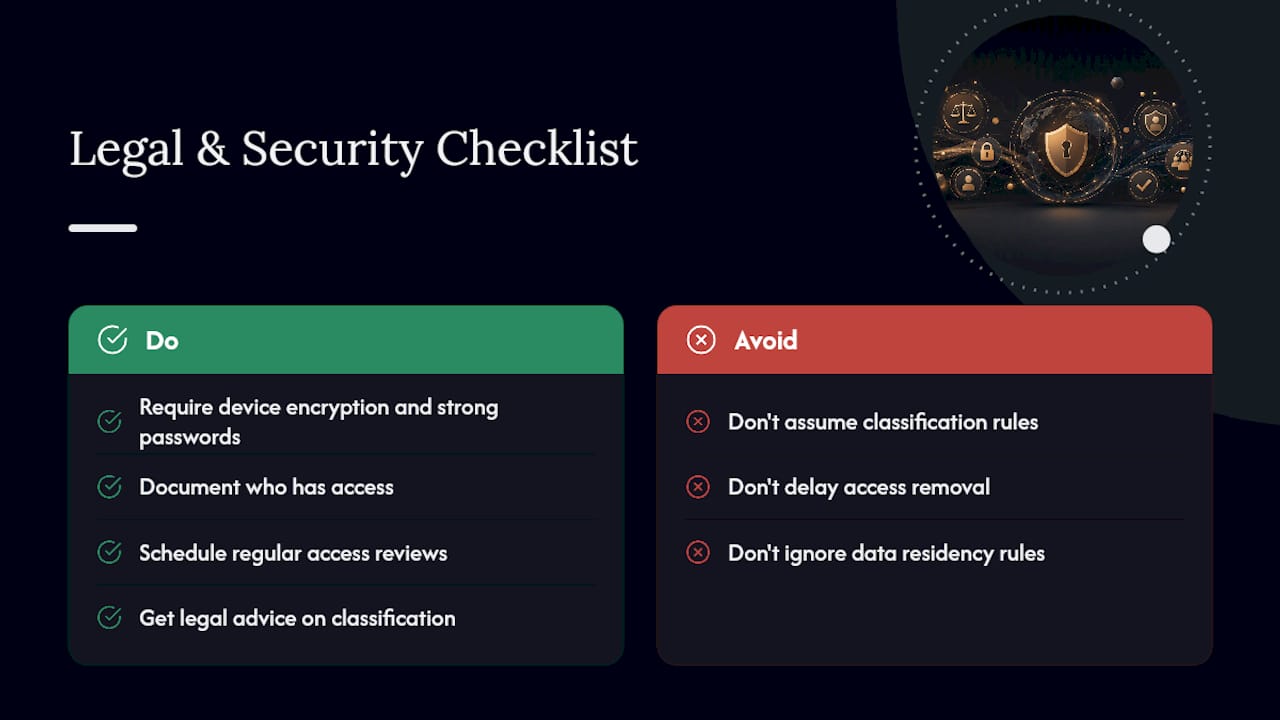
Data security across devices and locations. When team members work from personal laptops, home networks, or shared spaces, sensitive files travel across more unsecured environments than they would in a single office. A baseline policy on device encryption, password management, and access controls for shared files closes most of the obvious gaps.
Employment and contractor classification. Teams that span regions or countries often mix employees and independent contractors, and local labor rules around classification, overtime, and benefits vary significantly by jurisdiction. This is a legal question specific to wherever each team member is actually located, and it deserves a real answer from a qualified professional rather than a guess based on how another team handled it.
Data residency and privacy rules. Depending on where team members and customers are located, data protection rules may dictate where information can be stored or processed. This matters more for teams handling customer data than for a purely internal task list, but it’s worth checking before assuming it doesn’t apply.
Access control tied to team changes. Networked and parallel teams rotate members in and out more than other types, and access to shared tools should be reviewed every time someone leaves, not batched into an annual cleanup that leaves old access open for months.
None of this requires a legal department for a five-person team. It requires someone taking ten minutes to write down who has access to what, and revisiting it on a schedule instead of never.
When Virtual Teamwork Is (and Isn’t) the Right Choice
Not every task benefits from going virtual, and treating remote collaboration as a default rather than a deliberate choice is where a lot of teams go wrong. Before committing, run through three questions: Does the work itself require tight, real-time coordination, or can it be broken into pieces people complete independently? Is the team mature enough (with clear roles and established trust) to handle reduced oversight? And is everyone actually equipped, technically and logistically, to participate fully?
If the answer to any of those is shaky, a hybrid setup, where the team meets in person periodically and works remotely the rest of the time, often outperforms going fully virtual. Hybrid gives you some of the flexibility without losing all the informal trust-building that happens face-to-face.
The honest answer is that most teams figure this out by testing, not by planning perfectly upfront. Start with lighter structure, watch where friction actually shows up, and adjust the practices in this guide to match what your team needs rather than what a generic playbook assumes.
— Optiostation
Turning These Practices Into a Daily Habit With Optiostation
Reading a list of best practices is easy. Sticking to them without a system is where most teams quietly slide back into ad-hoc chaos within a few weeks. Optiostation is built to make the practical side of virtual teamwork, the roles, the reminders, the shared visibility, something you don’t have to remember to do manually every day.

The app organizes tasks, deadlines, and projects with color-coded categories so a Centurion (that’s you, in Optiostation’s Roman-themed system) can see at a glance what belongs to work, school, or a team project without digging through five different tools. Smart reminders handle the follow-up nudges that virtual teams usually lose track of, like a handoff that’s supposed to happen at the start of someone else’s day. Shared task boards give teammates the same visibility an office hallway used to provide for free, and hashtag-based search means you can pull up everything tied to a specific project or teammate in seconds instead of scrolling through old messages.
If you’re trying to keep a distributed group of classmates, a part-time team, or an early-career project on track, start with a clear system for tracking tasks at work and see how the structure fits your own team’s rhythm. Download Optiostation and set up your first project board today.
Sources
The claims and recommendations throughout this guide draw on management research and practitioner literature focused specifically on distributed and virtual team performance. For readers who want to go deeper into the original material:
- Virtual team – Wikipedia
- Management research article (2025) on virtual work prevalence
- How to manage virtual teams – MIT Sloan Management Review
- IGI Global: Virtual teams—technology and leadership
FAQ
What is virtual teamwork in simple terms?
Virtual teamwork is collaboration between people who rely on technology, rather than shared physical space, to work toward a common goal. A virtual team can cross boundaries of geography, time zone, organization, or culture, and most teams sit somewhere on a spectrum between lightly virtual and fully distributed.
What is the biggest benefit of virtual teamwork?
Access to talent regardless of location is usually the biggest advantage, since it lets organizations hire the best person for a role instead of the best person within commuting distance. It pairs with lower overhead costs and the ability to keep work moving across time zones in a follow-the-sun pattern.
What are the most common challenges in virtual teams?
Communication gaps, social isolation, time zone scheduling friction, and inconsistent onboarding are the four issues that show up most often. Most of these stem from losing the informal, incidental interactions that happen naturally in a shared office.
How do you build trust on a virtual team?
Trust builds through consistency and small, repeated rituals rather than one big gesture. Occasional social interaction and structured check-ins measurably reduce isolation, and following through on commitments reliably matters more remotely than it does in person.
Can an app like Optiostation actually help manage a virtual team?
Some apps support the practical side of virtual teamwork, including task tracking, shared team visibility, and smart reminders, built around task, team, and time management systems for students and young professionals. It won’t replace clear communication norms or good leadership, but it gives a team a shared place to keep roles, deadlines, and projects visible.
