

The fastest way to improve teamwork and collaboration is to align a small set of shared goals, clarify who owns what, and build short daily habits that create predictable handoffs. Everything else, including the tools, the frameworks, and the retrospectives, works better once those three things are in place.
Start here, in the next 24–72 hours:
- Write one shared goal for the team this week, specific enough that everyone can say whether you hit it or not.
- Run a two-minute role check: ask each person to name their top responsibility and one thing they need from someone else. (“I’m owning X. I need Y from you by Thursday.”)
- Set a daily standup of 10 minutes or less. Use this script in Slack: “Yesterday: [what I finished]. Today: [what I’m on]. Blocked by: [anything].”
- Pick one channel for decisions and one for chat. Stop letting both live in the same thread.
- Schedule a 30-minute retrospective for the end of the week. One question: what slowed us down?
- Name one person as the handoff owner for your current project so nothing falls between desks.
Key Takeaways
Strong teamwork and collaboration improve when you align goals, clarify roles, run consistent rituals, and measure what changes, before adding any new tools.
| Point | Details |
|---|---|
| Goals and roles first | Write one shared goal with a KPI attached and assign clear ownership before changing anything else. |
| Rituals beat tools | A 10-minute standup and a 30-minute weekly retro catch problems earlier than any app alone. |
| Measure from a baseline | Track cycle time, handoff failures, and rework rate for two weeks before interventions, then compare. |
| Remote teams need async norms | Set a meeting window, protect focus blocks, and default to written updates for anything non-urgent. |
| Optiostation centralizes the plan | Optiostation’s task and goal templates map directly to the 30/60/90 checklist so the plan stays active. |
Table of Contents
- What do “teamwork” and “collaboration” actually mean?
- Why improving how your team works together pays off fast
- How to improve teamwork and collaboration: prioritized, practical strategies
- Which tools actually help, and how should you use them?
- What do remote and hybrid teams need to do differently?
- How do you know if teamwork is actually getting better?
- Your 30/60/90-day plan to build better teamwork
- The Optiostation playbook: running this plan in one place
- What actually changes when a leader runs this playbook
- Optiostation makes the playbook easier to run from day one
- Sources
What do “teamwork” and “collaboration” actually mean?
These two words get used interchangeably, but they describe different modes of working, and mixing them up leads to poorly designed meetings and misaligned incentives.
Teamwork is coordinated effort toward a shared goal, where each person has a defined role and clear accountability. Think of a product launch: the designer delivers assets by Tuesday, the developer ships by Thursday, the marketer publishes Friday. Each person executes their lane. The handoffs are the critical moments.
Collaboration is co-creation, where people with different skills actively build something together. Think of a cross-functional brainstorm to solve a customer retention problem. No one owns the answer at the start. The goal is to combine perspectives until a better solution emerges than any one person could have reached alone.
Why does the distinction matter? Because the fix for a broken teamwork problem (unclear roles, missed handoffs) is different from the fix for a broken collaboration problem (no psychological safety, wrong people in the room). You can read a fuller breakdown of how these two modes interact in Optiostation’s understanding team collaboration guide.
Why improving how your team works together pays off fast
Better coordination is not a soft benefit. HubSpot’s research on team communication found that workers spend some hours each week clarifying messages that were unclear the first time. Across a five-person team, that’s 16 hours of rework every week, time that could go toward actual output.
Beyond the time savings, the concrete payoffs include:
- Faster delivery: fewer handoff failures mean work moves through the pipeline without waiting for clarification.
- Higher quality: peer review and shared context catch errors before they become customer problems.
- Lower turnover: people stay on teams where they feel heard and know what’s expected. Engagement and retention track closely with how well a team communicates.
- Career upside for you: whether you’re a young professional or a new team lead, being the person who makes a team run better is visible. It gets noticed faster than individual output alone.
For a deeper look at the advantages of strong teamwork, Optiostation’s resource covers both the organizational and personal angles.
How to improve teamwork and collaboration: prioritized, practical strategies
Coursera’s enterprise research confirms that clear roles, defined goals, regular check-ins, and trust-building are the most reliable levers. Here’s how to apply them in order of impact.
1. Align on one shared goal before anything else
A team without a shared goal defaults to individual priorities. Write one team goal per sprint or month, tied to a measurable outcome. Zoom’s collaboration research recommends linking team goals directly to specific KPIs so everyone has a clear target to rally around. “Ship the feature” is not a goal. “Ship the feature with fewer than three post-launch bugs by March 28” is.
2. Clarify roles with a lightweight RACI
For every major deliverable, name one Responsible (does the work), one Accountable (owns the outcome), and anyone who needs to be Consulted or Informed. A one-line template: “[Name] is accountable for [outcome] by [date]. [Name] does the work. [Name] reviews before it ships.” That single sentence eliminates most handoff confusion.
Gallup’s strengths research adds a useful layer here: making individual strengths visible, not just roles, helps teams coordinate faster and reduces friction. Ask each person to name one thing they’re genuinely good at and one thing they’d rather hand off. That conversation takes 15 minutes and changes how work gets assigned for months.
3. Build communication norms, not just channels
Shared norms prevent the slow death-by-Slack that most teams experience. Decide: what goes in chat (quick questions, FYIs), what goes on the project board (tasks, status, blockers), and what gets documented (decisions, rationale, outcomes). HBR’s team design research makes a point worth repeating: redesigning how people interact, specifically by prioritizing team familiarity and explicit handoffs, often produces bigger performance gains than adding more tools.
4. Run short rituals consistently
A 10-minute daily standup and a 30-minute weekly retrospective are not bureaucracy. They are the two rituals that catch problems before they compound. The standup surfaces blockers. The retro surfaces patterns. Forbes’ research on collective intelligence shows that deliberate practice of communication skills, including retrospectives, builds a team’s collective problem-solving ability more effectively than just doing project work together.
5. Create psychological safety with a simple norm
Psychological safety is not about being nice. It’s about whether people will say “I don’t know” or “I think we’re heading the wrong way” without fear. One practical norm is to open every retrospective with a “Bring/Need” round. Each person says one thing they’re bringing to the team this week and one thing they need. It normalizes asking for help before a blocker becomes a crisis.

Stanford’s IRiSS research on cooperation shows that structural interventions, like transparent incentives and visible ownership, nudge people toward cooperation rather than siloed competition. If your team’s incentives reward individual output over shared outcomes, you’re working against yourself.
6. Give feedback with a script, not a vibe
Feedback without structure turns into either avoidance or conflict. Use this two-part script: “When [specific behavior], the impact on the team is [specific outcome]. What would help is [specific change].” That’s it. No sandwich method, no softening preamble.
Pro Tip: Before adding any new tool to your team’s stack, spend one week fixing your coordination habits first. A new app on top of broken norms just creates a better-organized mess.
Which tools actually help, and how should you use them?
The right tool stack reduces noise rather than adding to it. Here’s where each major tool earns its place in a U.S. workplace, plus guidance on avoiding overlap. For a fuller breakdown of how collaboration tools work in practice, Optiostation’s guide covers selection criteria and setup.
- Slack: real-time chat, quick questions, and team announcements. Not for decisions or documentation.
- Asana: task and project tracking with dependencies. Best for teams that need to see who owns what and when it’s due.
- Trello: visual kanban boards for simpler workflows. Works well for small teams or single-project sprints where a full project management suite is overkill.
- Notion: shared knowledge base and documentation. Where decisions, meeting notes, onboarding docs, and process guides live.
- ClickUp: an all-in-one option that combines task management, docs, and goals. Useful when a team wants one hub instead of three separate tools.
- Mural: visual collaboration and whiteboarding for brainstorms, retrospectives, and workshops. Especially effective for remote and hybrid teams who need a shared canvas.
The single-source-of-truth principle: pick one tool as your central hub for task ownership and project status. Everything else feeds into it or links from it. Centralizing work in a searchable hub and documenting decisions reduces confusion and prevents information hoarding, a pattern well-documented in Atlassian’s collaborative culture research. If your team has to check three places to find out whether a task is done, the hub isn’t working.
What do remote and hybrid teams need to do differently?
The biggest mistake remote teams make is running async work like it’s synchronous. Video calls for every question, Slack messages that expect instant replies, and no written record of decisions all create the same coordination failures as a bad open-plan office, just slower.
Async vs. sync guidelines:
- Use video for kickoffs, retrospectives, conflict resolution, and anything that needs real-time nuance.
- Use written updates for status, decisions, and anything a teammate in a different time zone needs to act on without a meeting.
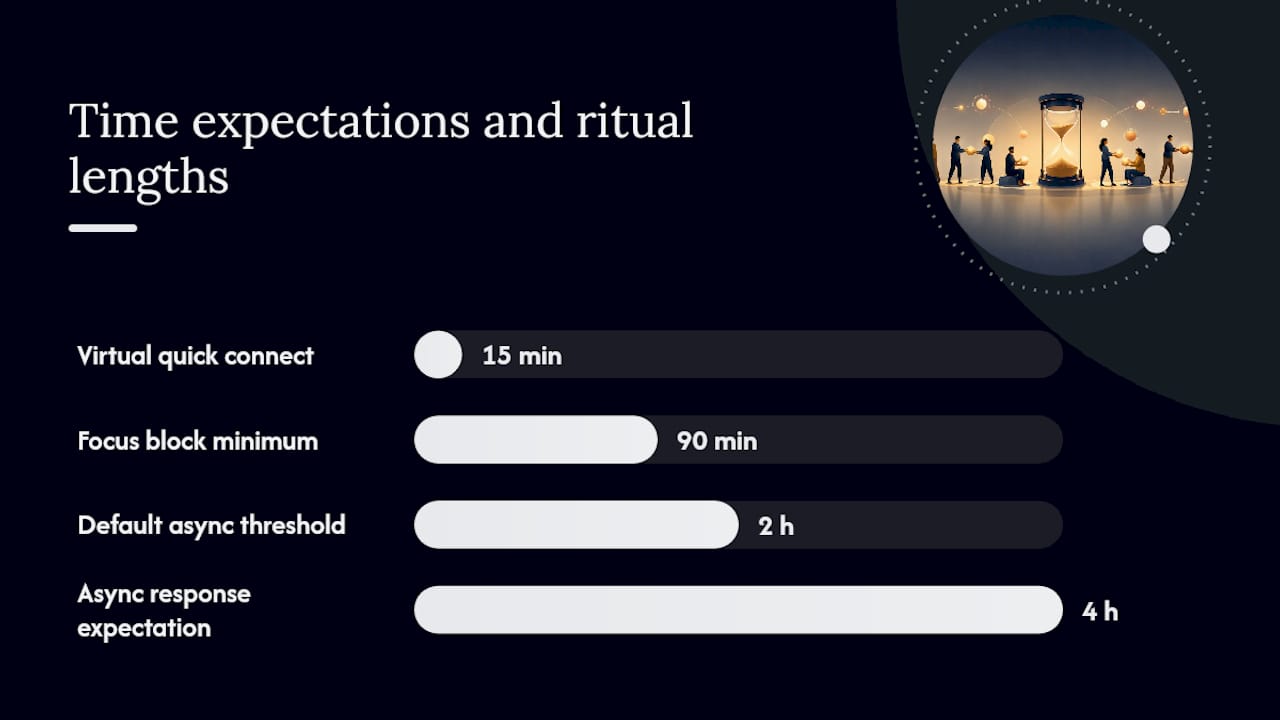
- Default to async for anything that doesn’t need an answer in the next two hours.
Remote rituals that replace hallway conversations:
- Daily async standup: post in Slack by 10 AM local time using the three-line script from the opening section. No meeting required.
- Weekly async update: every Friday, each person posts a three-bullet summary: what shipped, what’s next, what needs input. Keeps the whole team informed without a Friday all-hands.
- Virtual quick connect: a 15-minute optional video drop-in, twice a week, for anyone who wants to talk through something informally. No agenda. Replaces the coffee-machine conversation.
Time-zone and focus-time rules:
- Set a meeting window that overlaps for all time zones on the team (e.g., 10 AM–12 PM ET for a US-based team with West Coast members).
- Protect at least two focus blocks per day, minimum 90 minutes each, where no meetings are scheduled and Slack notifications are muted.
- Set a response-time expectation in writing: async messages get a reply within four hours during business hours, not instantly.
How do you know if teamwork is actually getting better?
Measuring team improvement is not complicated, but it requires a baseline. Before you change anything, spend two weeks tracking the metrics below. Then run your interventions for 30 days and compare.
| KPI | What it measures | How to collect it | Cadence |
|---|---|---|---|
| Cycle time | How long a task takes from start to done | Project board timestamps | Weekly |
| Handoff failure rate | Tasks that stall or get returned due to unclear ownership | Retro notes + board data | Bi-weekly |
| Time-to-decision | How long it takes the team to reach a decision on a blocker | Meeting notes timestamps | Weekly |
| Rework frequency | Tasks that have to be redone after “completion” | Project board revision history | Weekly |
| Psychological safety score | Team members’ comfort speaking up | Anonymous 5-question survey | Monthly |
| Engagement signal | Participation in standups, retros, and async updates | Attendance + response rate | Weekly |
Zoom’s collaboration framework recommends linking these team-level metrics directly to KPIs so the data connects to outcomes the organization already tracks, not just team-feel metrics. Present results to the team, not just to leadership. When people see their own data, they adjust faster.
Your 30/60/90-day plan to build better teamwork
Days 1–30: Align and clarify
- Write one shared team goal with a measurable KPI attached.
- Run a role-clarity session: RACI for the top three active projects.
- Set communication norms in writing (what goes where).
- Launch the daily standup and weekly retro rituals.
- Baseline your KPIs (cycle time, handoff failures, rework rate).
Alignment kickoff agenda (30 min): (1) Share the team goal — 5 min. (2) Each person names their top responsibility and one dependency — 10 min. (3) Agree on communication norms — 10 min. (4) Schedule recurring rituals — 5 min.
Expected outcome: fewer “who’s handling this?” messages within two weeks.
Days 31–60: Practice and reinforce
- Run two retrospectives and act on at least one finding from each.
- Introduce strengths mapping: each person names one strength and one growth area.
- Add peer review to one workflow that currently skips it.
- Check KPIs against baseline and share results with the team.
- Adjust communication norms based on what’s not working.
Expected outcome: measurable drop in rework frequency and handoff failures.
Days 61–90: Measure and scale
- Run a psychological safety survey and discuss results openly.
- Document the team’s working agreements in a shared Notion or ClickUp page.
- Identify one process to hand off to a junior team member (builds capacity).
- Present a one-page KPI summary to leadership.
- Set goals for the next quarter using the same shared-goal format.
Expected outcome: the team runs its own rituals without reminders, and KPIs show a clear trend.
If progress stalls: go back to role clarity first. Most stalls trace to ambiguous ownership, not motivation. Indeed’s research on manager behavior confirms that managers who set clear expectations and model collaboration materially improve team outcomes, so the leader’s behavior is the first variable to check.
The Optiostation playbook: running this plan in one place
Optiostation is built for exactly the kind of structured, habit-driven teamwork this guide describes. Here’s where it fits in the workflow:
- Task ownership: assign every checklist item above to a named person with a due date inside Optiostation. Nothing lives in someone’s head or a chat thread.
- Daily standup: use Optiostation’s task view as the standup agenda. Each person updates their tasks before the call; the meeting becomes a 5-minute exception review.
- KPI tracking: log cycle time and rework frequency directly against tasks. The data is already there; you’re just reading it.
- Templates: Optiostation includes role-assignment and goal-setting templates that map directly to the RACI format and the 30/60/90 milestones above.
Best fit: teams of 3–15 people, weekly sprint cadence, and a primary pain point of unclear ownership or missed handoffs. If your team is losing time to “wait, who’s doing that?” conversations, Optiostation is the right size of tool.
What actually changes when a leader runs this playbook
Running this playbook as a team lead changes the texture of the work, not just the process. Before: status updates happened in scattered Slack threads, and the same questions surfaced every Monday. After: the standup takes eight minutes because everyone already knows the status. Handoff questions drop because the RACI is visible and agreed on.
The less obvious shift is what happens to the team’s confidence. When people know their role, see the shared goal, and have a place to flag blockers without judgment, they stop waiting for permission to move. Indeed’s research frames this well: managers who model collaboration and recognize team behavior, not just individual output, create the conditions where that confidence compounds over time.
The hardest part of running this playbook is not the tools or the templates. It’s staying consistent with the rituals when the quarter gets busy. That’s when most teams abandon the retro and the standup, and that’s exactly when they need them most.
Optiostation makes the playbook easier to run from day one
Most teams don’t fail at collaboration because they lack a strategy. They fail because the strategy lives in a doc no one opens after week two. Optiostation keeps the plan alive by turning it into daily tasks, visible ownership, and tracked progress, all inside one mobile app built for young professionals and team leads who need structure without overhead.

Optiostation’s Roman-themed task and team management system, where you’re the Centurion and the app is your Optio (second-in-command), gives you role assignment, goal tracking, and standup-ready task views in one place. No stitching together four tools. No chasing people for updates. The 30/60/90 milestones above map directly to Optiostation’s built-in templates.
Start with the collaboration tools and task tracking guide to see how Optiostation fits your team’s current workflow, then set up your first sprint in under 20 minutes.
Sources
- What Is Team Collaboration? (+ 11 Proven Strategies) | Zoom
- Design Teams That Work Better Together
- How to improve teamwork — Coursera (enterprise article)
- Gallup
- How to improve team communication | HubSpot
- Teamwork Is Hard Work. Here’s How To Build The Skills To Do It Well. | Forbes
- Competition or cooperation: fostering collaborative workplace – Stanford IRiSS
Recommended
- Understanding Team Collaboration Guide – Optio Station: Best Project Management App for Prioritization
- How collaboration tools boost team communication and tasks – Optio Station: Best Project Management App for Prioritization
- Collaboration Best Practices 2026: Boost Productivity 30% – Optio Station: Best Project Management App for Prioritization
- Understanding Collaboration Workflow for Teams – Optio Station: Best Project Management App for Prioritization
