

TL;DR:
- A project schedule is a detailed plan that organizes tasks, owners, durations, dependencies, and milestones to ensure timely completion. Building and maintaining it with core fields, clear ownership, and weekly updates helps keep projects on track and reveals potential delays early. Using schedules effectively improves time management skills for students and early professionals alike.
A project schedule example is a structured plan that organizes tasks, owners, durations, dependencies, and milestones to guide a project from start to finish on time. Whether you are managing a class group project or your first work assignment, a clear schedule is the difference between controlled progress and last-minute chaos. The industry term for this document is a “project schedule,” and it sits inside the broader project plan. A project plan is the single source of truth for objectives, scope, and governance, while the schedule focuses on operational timelines and task sequencing. This article breaks down every component you need, with a real sample project timeline and practical advice built for students and early-career professionals.
What are the essential data points in a project schedule example?
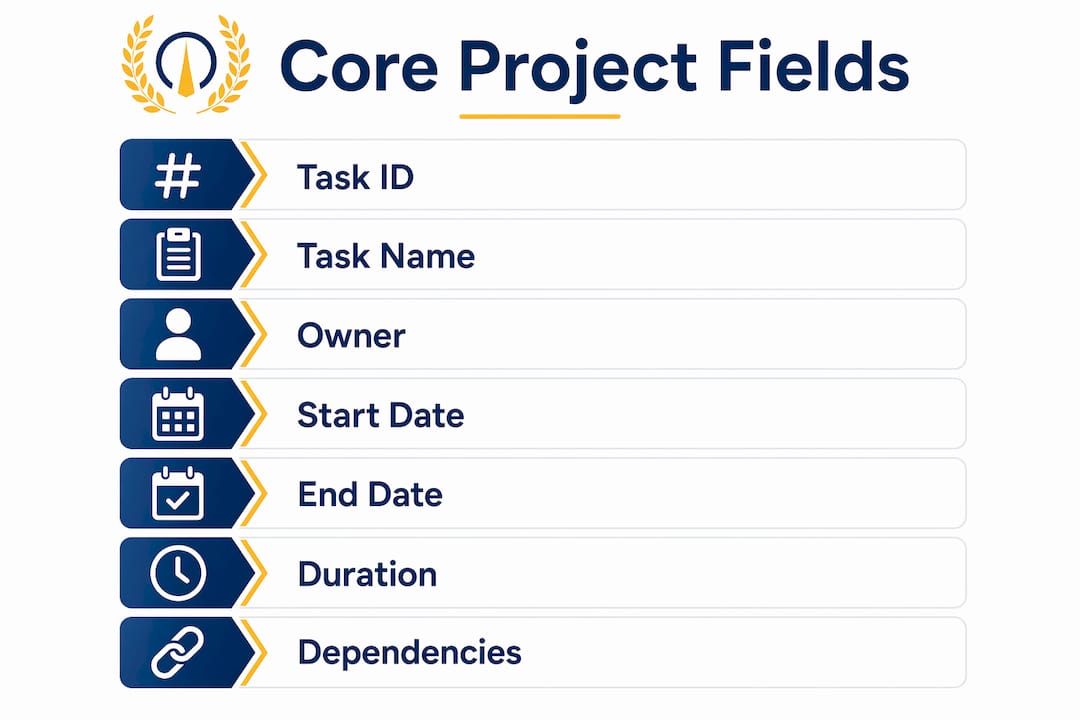
A functional project schedule requires six core fields at minimum: Task ID, Task Name, Owner, Start Date, End Date, Duration in working days, and Dependencies. Each field earns its place by answering a specific question a team member or stakeholder will ask. Skip one, and the schedule develops blind spots.
The six core fields explained
Task ID gives every task a unique reference number. This makes it easy to cite dependencies without writing out full task names. Task Name should always be an action phrase, such as “Draft project charter” rather than “Project charter.” Action phrases remove ambiguity about what done looks like.
Owner is the person responsible for completing the task. Each task needs exactly one named owner to maintain accountability. Shared ownership creates confusion and delays because no single person feels the full weight of the deadline.
Duration must always be expressed in working days, not calendar days. A five-day task that starts on a Thursday does not finish the following Monday. Using working days prevents the most common scheduling error beginners make, which is building a timeline that looks right on paper but falls apart around weekends and holidays.
Dependencies tell you which tasks must finish before another can start. Mapping them explicitly is what separates a real schedule from a wishful list of dates.
Optional fields that add real value
The table below shows which fields are required and which add depth without being mandatory.
| Field | Type | Purpose |
|---|---|---|
| Task ID | Core | Unique reference for linking dependencies |
| Task Name (action phrase) | Core | Defines what “done” looks like |
| Owner | Core | Single-person accountability |
| Start Date / End Date | Core | Sets the timeline boundary |
| Duration (working days) | Core | Realistic time estimate |
| Dependencies | Core | Prevents sequencing errors |
| Status | Optional | Shows current progress at a glance |
| % Complete | Optional | Tracks partial progress numerically |
| Milestone flag | Optional | Marks zero-duration checkpoints |
| Priority | Optional | Helps owners triage when tasks overlap |
| Effort hours | Optional | Separates elapsed time from actual work |
Pro Tip: Add the “% complete” column from day one, even if you only update it weekly. It forces an honest conversation about progress and catches slippage before it becomes a crisis.
How to create a project schedule step by step
Building a schedule from scratch feels large until you break it into a repeatable process. The steps below apply whether you are working in a spreadsheet or a project management timeline template.
-
Define your project phases. Group related work into phases such as Initiation, Planning, Design or Development, Testing, and Closure. Phases give the schedule a logical spine and make it easier to communicate progress to anyone who is not deep in the details.
-
Break each phase into tasks of 1–5 working days. Tasks longer than five days are hard to track and easy to underestimate. If a task takes three weeks, break it into smaller deliverables with their own owners and end dates.
-
Assign owners before setting dates. Talk to the person doing the work before you write a date next to their name. Owners give more realistic estimates than managers do, and they commit more firmly to dates they helped set.
-
Map dependencies explicitly. Write the Task ID of every predecessor next to each task. This step uncovers the critical path, which is the longest chain of dependent tasks that defines the earliest possible finish date. Ignoring dependencies is the leading cause of timeline failures.
-
Add milestones. Milestones are zero-duration checkpoints that mark significant events such as project charter approval, design sign-off, testing completion, and final deployment. They give stakeholders clear progress signals without requiring them to read every task row.
-
Baseline the schedule. Once the schedule is approved, save a copy of the original dates. Comparing current dates against the baseline tells you exactly how much the project has drifted and why.
-
Apply conditional formatting for Gantt bars. A well-structured schedule uses conditional formatting to shade cells automatically based on start and end dates. This creates a visual Gantt bar without specialized software, and it updates itself as you change dates.
Pro Tip: Never let two people share ownership of the same task. If a task genuinely requires two people, split it into two tasks with separate owners and a dependency between them.
What does a sample project timeline look like in practice?
A typical mid-sized project spans 8–12 weeks across five phases: Initiation (1–2 weeks), Planning (1–3 weeks), Design or Development (3–6 weeks), Testing (1–2 weeks), and Closure (1–2 weeks). The table below shows a realistic 10-week example you can adapt for a class project, an internship deliverable, or an early-career work assignment.

| Phase | Task | Owner | Duration (working days) | Dependency |
|---|---|---|---|---|
| Initiation | Draft project charter | Alex | 3 | None |
| Initiation | Stakeholder kickoff meeting | Alex | 1 | Task 1 |
| Initiation | Milestone: Charter approved | — | 0 | Task 2 |
| Planning | Define scope and deliverables | Jordan | 4 | Task 3 |
| Planning | Build project schedule | Jordan | 3 | Task 4 |
| Planning | Milestone: Plan sign-off | — | 0 | Task 5 |
| Development | Design wireframes or draft | Sam | 10 | Task 6 |
| Development | Internal review and revisions | Sam | 5 | Task 7 |
| Development | Milestone: Design approved | — | 0 | Task 8 |
| Testing | User or peer testing | Riley | 5 | Task 9 |
| Testing | Fix issues and retest | Riley | 3 | Task 10 |
| Testing | Milestone: Testing complete | — | 0 | Task 11 |
| Closure | Final delivery and handover | Alex | 2 | Task 12 |
| Closure | Project retrospective | All | 1 | Task 13 |
| Closure | Milestone: Project closed | — | 0 | Task 14 |
Notice that the Development phase overlaps slightly with the tail end of Planning. That is intentional. Real projects do not wait for every planning document to be perfect before any work begins. The dependency column controls exactly which tasks can start early and which must wait.
For students working in groups, this structure translates directly. Replace “Alex” with a group member’s name, replace “Design wireframes” with “Write literature review,” and the logic holds. The Excel task list approach works well for this kind of adaptation because it requires no special software and is easy to share.
What are the most common project schedule mistakes?
Most schedule failures trace back to a small set of repeatable errors. Recognizing them early saves you from the stress of a collapsing timeline.
-
Ignoring dependencies. A schedule without dependencies is a list of guesses. When Task B cannot start until Task A finishes, and you do not record that link, you create a timeline that looks complete but breaks the moment any task slips. Visual schedules like Gantt charts expose these links and make the full picture visible at once.
-
Shared ownership. Two names on one task means zero accountability. When the deadline arrives, each person assumes the other handled it.
-
Calendar days instead of working days. A two-week task is not 14 days. It is 10 working days. Confusing the two adds phantom buffer to your schedule and makes every deadline feel later than it is.
-
Rushing the planning phase. Timelines slip most often when the schedule is built too quickly. Thorough upfront planning creates a schedule that bends without breaking when reality changes.
-
Never updating the schedule. A schedule you built in week one and never touched again is not a schedule. It is a historical document. Update it weekly, at minimum.
The most valuable scheduling habit is not building the schedule. It is the discipline to update it every week and compare it against the baseline. That comparison tells you whether you are managing the project or just watching it happen.
Pro Tip: If you are balancing a project schedule alongside coursework or multiple work assignments, block a fixed 30-minute slot each week to update your schedule. Treat it like a class or a meeting. Skipping it is how small slips become missed deadlines. Reviewing bad time management patterns can help you spot the habits that undermine even a well-built schedule.
Key Takeaways
A project schedule built on six core fields, single task ownership, working-day durations, and explicit dependencies is the most reliable tool for keeping any project on track.
| Point | Details |
|---|---|
| Six core fields are non-negotiable | Task ID, Name, Owner, Dates, Duration, and Dependencies form the minimum viable schedule. |
| One owner per task | Shared ownership kills accountability; assign one named person to every task. |
| Use working days, not calendar days | Calendar-day estimates inflate timelines and hide real scheduling errors. |
| Milestones anchor progress | Zero-duration checkpoints give stakeholders clear signals without reading every task row. |
| Update weekly against the baseline | Comparing current dates to the original plan is the only way to catch drift early. |
Why schedules changed how I think about time
The first time I built a real project schedule, I was surprised by how much I did not know about my own project. I thought I had a clear picture of what needed to happen. Then I mapped the dependencies and found three tasks I had assumed could run in parallel that actually had to run in sequence. That discovery added two weeks to my honest timeline and saved me from promising a deadline I could not keep.
What I have seen consistently with students and early-career professionals is that the schedule is treated as a formality. You build it to satisfy a requirement, then ignore it. That approach guarantees stress. The schedule is not the deliverable. It is the instrument you use to protect the deliverable.
The other thing worth saying plainly: a schedule does not need to be perfect to be useful. A rough schedule with real owners and honest durations beats a polished one built on assumptions. Start simple. Use the six core fields. Assign one owner per task. Update it every week. The discipline of maintaining a schedule, even an imperfect one, builds the time management instincts that carry you through every project after this one.
Adapting professional methods to student or early-career projects is not overkill. It is practice. The Centurions who use Optiostation treat every project, large or small, as a chance to sharpen those instincts.
— Optiostation
Optiostation: your second-in-command for project scheduling
Optiostation is built for students and early-career professionals who need a clear, mobile-first way to manage tasks, deadlines, and team responsibilities without the complexity of enterprise tools.
The Optio app lets you assign tasks to specific team members, set durations, and track progress in one place, which mirrors the six-field structure this article describes. If you are ready to move beyond spreadsheets, the task management guide on Optiostation walks you through selecting the right approach for your workload. For a focused look at daily execution, the guide on managing tasks effectively covers the habits that keep a schedule alive after you build it. Optiostation acts as your Optio, your second-in-command, so you can focus on leading the mission.
FAQ
What is a project schedule example?
A project schedule example is a structured document listing tasks, owners, durations in working days, dependencies, and milestones for a specific project. It serves as the operational timeline that guides a team from kickoff to delivery.
How many phases does a typical project schedule have?
A typical mid-sized project schedule covers five phases: Initiation, Planning, Design or Development, Testing, and Closure, spanning 8–12 weeks in total.
What is the difference between a project plan and a project schedule?
A project plan defines objectives, scope, and governance, while a project schedule focuses on task sequencing, durations, and operational timelines. The schedule is one component inside the broader plan.
Why should I use working days instead of calendar days?
Working-day estimates exclude weekends and holidays, which keeps duration figures realistic. Calendar-day estimates create false buffer and cause deadlines to slip without any visible warning.
What makes a Gantt chart useful for project scheduling?
A Gantt chart visualizes task sequences, dependencies, and durations on a timeline, which makes the critical path visible at a glance. That visibility helps teams catch conflicts and resource gaps before they cause delays.
Recommended
- Top 5 Excel project management schedule templates for 2026 – Optio Station: Best Project Management App for Prioritization
- Project Management Timeline Template: Boost Group Efficiency – Optio Station: Best Project Management App for Prioritization
- Command Log – Optio Station: Best Project Management App for Prioritization
- Project management plan example PDFs: templates for students – Optio Station: Best Project Management App for Prioritization
