

TL;DR:
- Taskade is an all-in-one productivity platform that combines task management, notes, project planning, and real-time collaboration with AI-powered automation. It is especially designed for remote teams, creative agencies, and startups, offering features like embedded video calls and AI app building through Genesis. The platform stands out for its integration of AI workflows and communication tools, making it a strong choice for teams seeking to streamline their processes without switching between multiple apps.
Most productivity tools promise to do everything and end up doing nothing particularly well. You get a task list here, a chat window somewhere else, and a project board in a third app. Before you know it, you’re spending more time switching between tools than actually getting work done. Taskade takes a different approach. Rather than patching together features from separate apps, it puts task management, real-time collaboration, and AI-powered automation into one workspace. This breakdown covers what is Taskade, how it works, who it’s built for, and whether it’s actually worth your time.
Table of Contents
- Key takeaways
- What is Taskade exactly?
- A closer look at Taskade features
- How to use Taskade for real work
- How Taskade compares to other tools
- My honest take on Taskade
- Ready to take command of your tasks?
- FAQ
Key takeaways
| Point | Details |
|---|---|
| Taskade is an all-in-one platform | It combines tasks, notes, project planning, and team collaboration in a single workspace. |
| AI automation is a core feature | Taskade automates over 700 workflow types across departments, cutting administrative overhead significantly. |
| Built for remote and distributed teams | Startups, creative agencies, and small teams get the most out of Taskade’s real-time tools. |
| Taskade Genesis extends its power | This AI layer lets you build apps and calculators from a text prompt in under two minutes. |
| Pricing has a free tier | Taskade offers a free plan, with paid options that include flat-rate app publishing at no per-submission cost. |
What is Taskade exactly?
Taskade is a unified productivity platform that combines task management, project planning, note-taking, and team collaboration in one place. Rather than forcing you to toggle between a project board and a messaging app, it puts everything under one roof. Think of it as a workspace where your tasks, documents, and conversations live together instead of scattered across three or four different subscriptions.
What separates Taskade from traditional task managers is its native AI integration. Most apps bolt on an AI assistant as an afterthought. Taskade builds it into the core experience. You can generate project outlines, automate repetitive tasks, and even build custom workflow apps directly from a text prompt. The platform combines task management, note-taking, and real-time collaboration with templates, progress tracking, outlines, and AI workflow automation.
There is also a separate layer called Taskade Genesis. This is the AI-centric extension of the platform focused on creating apps and automating workflows at a deeper level. With Taskade Genesis, you can build a pricing estimator in under two minutes from a single prompt, complete with database storage. It is not a low-code sandbox. It is a full AI app builder sitting inside your project workspace.
Here is what the core platform includes:
- Task lists and subtasks with assignees, due dates, and priority flags
- Multiple project views including list, board, mind map, and outline formats
- Document and note creation within the same workspace as your tasks
- Progress tracking across projects and team members
- AI workflow generation that turns a text description into a structured project plan
A closer look at Taskade features
Real-time collaboration that actually works
Taskade’s collaboration model is worth examining closely because it goes further than most tools in this space. Live editing, chat, and video conferencing are all embedded directly inside every project workspace. You do not leave the task to start a call. You do not jump to Slack to discuss a document. The conversation happens where the work is happening.
This matters more than it sounds. Research consistently shows that the “tool-switching tax” is a real productivity drain for remote teams. Every time you switch apps to communicate, you lose context and time. Taskade reduces tool-switching for remote teams by keeping everything inside one workspace, which is a genuinely different way to think about collaboration software.
Pro Tip: Set up a dedicated Taskade workspace for each active project rather than using one catch-all workspace. This keeps video calls, chat, and task context tied to the right project, so nothing gets lost in a general feed.
AI automation and workflow building
The automation layer in Taskade covers 700+ task types across marketing, sales, support, and HR. That number matters because it means the automation is not limited to basic trigger-and-action flows. You can build workflows that generate content, assign tasks based on conditions, or summarize meeting notes automatically.

Taskade Genesis takes this further by letting you create standalone apps from a natural language prompt. A pricing calculator, a lead scoring tool, a client intake form, all of these can be built without writing code. The flat-rate pricing on published apps means no surprise fees when you share a public-facing tool with clients or partners.
The one limitation worth flagging here: Taskade Genesis lacks a visual drag-and-drop editor. If the AI generates a layout you do not like, you fix it by re-prompting or adjusting configuration manually. For teams comfortable with AI-driven workflows, this is fine. For anyone used to dragging blocks around a canvas, it takes adjustment.
What the feature set looks like in practice
- AI-generated project plans from a single text description
- Templates for recurring workflows across marketing, product, HR, and more
- Live document editing with multiple team members simultaneously
- Video and voice calls without leaving the workspace
- Workflow automation tied directly to task status and project progress
- App creation via Taskade Genesis with database storage included
How to use Taskade for real work
Understanding Taskade features is one thing. Knowing how to actually apply them is where most people get stuck. Here is a practical breakdown by use case.
-
Remote teams managing ongoing projects: Start by creating a workspace for each active project. Use Taskade’s board or list view depending on your team’s preference, assign tasks with deadlines, and activate the built-in chat so discussions stay connected to the work. The video conferencing built into every workspace means your team standup happens inside the project instead of a separate calendar invite.
-
Startups building internal tools: Taskade Genesis is where startups get the most leverage. If your team needs a client proposal calculator, a budget estimator, or a project scoping form, you can prompt Taskade Genesis to build it. According to research on calculator builders, functional apps with automations and database storage can be ready in under two minutes.
-
Creative agencies managing client deliverables: Use Taskade’s template library to create repeatable workflows for onboarding new clients, managing creative reviews, or tracking revision rounds. Templates mean you stop recreating the same project structure from scratch every time.
-
Individual users and students: Taskade works well as a personal task manager with an AI assistant built in. You can ask it to generate a study plan, organize your week, or break down a large project into smaller steps. The to-do list functionality is clean and fast enough to replace dedicated single-purpose apps.
-
Teams integrating with other tools: Taskade connects with platforms like Google Calendar, Slack, GitHub, and Zapier. If your team already uses these, Taskade can sit at the center of the workflow rather than replacing everything overnight.
Taskade targets remote teams, creative agencies, and startups specifically, and you can see that in the feature prioritization. The onboarding is fast, the templates cover common use cases immediately, and the AI means new users can get a structured project up and running without a training session.
How Taskade compares to other tools
If you are evaluating Taskade against other project management options, a direct comparison helps cut through the noise.
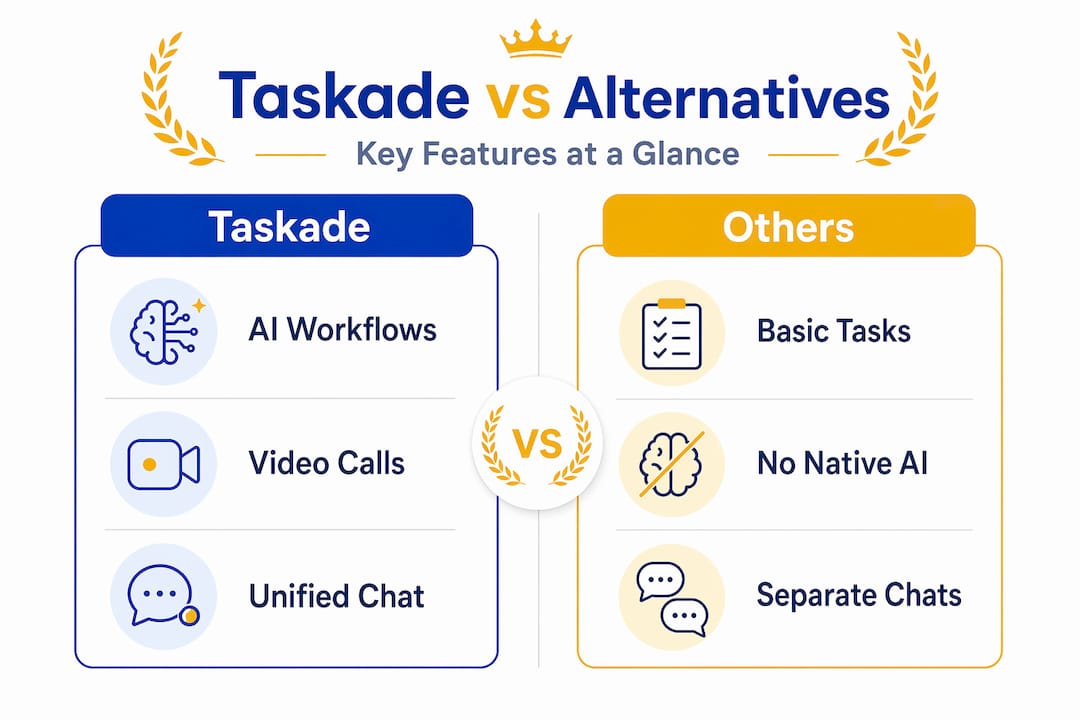
| Feature | Taskade | ClickUp | Asana | Trello |
|---|---|---|---|---|
| Built-in video calling | Yes | No | No | No |
| AI workflow automation | Yes (deep) | Limited | Limited | No |
| App building (Genesis) | Yes | No | No | No |
| Visual drag-and-drop editor | No | Yes | Yes | Yes |
| Free plan available | Yes | Yes | Yes | Yes |
| Flat-rate app publishing | Yes | No | No | No |
| Best for | AI-first teams | Power users | Enterprise | Visual planners |
The table makes the tradeoffs obvious. Taskade wins on AI depth and built-in communication. It loses to alternatives that prioritize visual project management. Tools like Asana and ClickUp have polished drag-and-drop interfaces that Taskade does not match, especially within Taskade Genesis.
On pricing, Taskade is competitive. The free tier covers basic use, and the paid plans include the Genesis app builder. The flat-rate publishing model benefits teams sharing public tools, since you are not charged per form submission the way some competitors price their tools.
The honest Taskade review conclusion: it is the strongest option if your team wants AI-integrated workflows and real-time communication in one place. If you need a visual kanban board as your primary interface, you will want to look elsewhere first.
My honest take on Taskade
I’ve watched a lot of productivity tools get hyped for features that sound transformative in a demo and turn out to be friction in daily use. Taskade is different in one specific way: the collaboration and task layers genuinely belong together here. This is not two separate products duct-taped into one dashboard.
What I’ve found is that most people underuse the AI automation side. They set up task lists and call it done. The real value sits in the workflow automation, where you can automate repetitive work across entire categories of tasks instead of just checking boxes faster. Teams that treat Taskade as a simple to-do list are leaving most of its capability on the table.
My one real concern is the Genesis editor experience. If you’re building apps and the AI generates something slightly off, fixing it means re-prompting rather than dragging and resizing. That works fine for people who think in prompts. It creates friction for anyone who learned to build things visually. Knowing which camp your team falls into before you commit is the decision that matters most.
Taskade is best suited for teams comfortable with AI-driven environments who want to reduce the number of tools they juggle every day. For students and young professionals managing projects solo or in small groups, it covers more ground than most single-purpose apps at a fraction of the cost.
— Optiostation
Ready to take command of your tasks?
If this Taskade breakdown helped clarify what the platform offers, the next step is figuring out where it fits in your broader productivity setup. Optiostation covers the full range of task management software options across tools, pricing tiers, and use cases so you can compare what actually fits your workflow.
Whether you’re a student juggling coursework or a young professional managing a distributed team, the right tool makes a measurable difference. Check out Optiostation’s guide on how to manage tasks effectively and find out which platform earns a spot in your command center.
FAQ
What is Taskade used for?
Taskade is used for task management, project planning, team collaboration, and AI-powered workflow automation. It combines these functions in a single workspace, reducing the need to switch between multiple apps.
Is Taskade free?
Yes, Taskade offers a free plan that covers core task and project management features. Paid plans unlock deeper AI capabilities, Taskade Genesis app building, and additional workspace options.
How does Taskade differ from Asana or Trello?
Taskade includes built-in video calling and AI workflow automation that Asana and Trello do not offer natively. The tradeoff is that Taskade lacks the visual drag-and-drop project boards those tools are known for.
What is Taskade Genesis?
Taskade Genesis is the AI app-building layer of Taskade that lets users create workflow automations, calculators, and data-collecting apps from a text prompt. Published apps use flat-rate pricing with no per-submission fees.
Is Taskade good for remote teams?
Yes. Taskade is specifically designed with remote teams in mind, embedding live chat and video conferencing inside every project workspace to reduce tool-switching and keep communication tied to the work.
Recommended
- Task Management Software: Everything You Need to Know – Optio Station: Best Project Management App for Prioritization
- Understanding Why Manage Tasks for Better Productivity – Optio Station: Best Project Management App for Prioritization
- Best Task Management Software: Complete Guide – Optio Station: Best Project Management App for Prioritization
- 7 Project Tracker Examples for Boosting Productivity – Optio Station: Best Project Management App for Prioritization
