

TL;DR:
- Time audits help students gain a clear understanding of where their hours go, improving study engagement.
- Using consistent, honest tracking methods over a week reveals patterns, leaks, and priorities for effective schedule redesign.
You know the feeling: Sunday rolls around, you’ve been “busy” all week, yet somehow your to-do list is just as long as it was Monday morning. For a BMC Psychology study of 1,016 college students, time audits showed measurable improvement in study engagement by giving students a clearer picture of where their hours actually go. This guide walks you, the Centurion, through a complete, app-powered time audit: from picking the right tools to reading your data and rebuilding your week with purpose.
Table of Contents
- What you need to start your first time audit
- Step-by-step: How to conduct a time audit using apps
- Analyzing and interpreting your time audit results
- Turning your time audit into a smarter routine
- Why most time audits fail—and how to make yours stick
- Tools for smarter time management: Your next steps
- Frequently asked questions
Key Takeaways
| Point | Details |
|---|---|
| Set up before tracking | Gather the right apps and decide on a tracking method to ensure a smooth time audit experience. |
| Log every activity | Track all your activities honestly and consistently for a realistic picture of your week. |
| Analyze for gaps | Review your results, categorize time, and compare planned versus actual usage to find improvement opportunities. |
| Turn data into change | Use your insights to redesign your weekly routine and set up habits that stick. |
| Repeat to stay on track | Schedule regular re-audits to stay in control and adapt as your goals change. |
What you need to start your first time audit
Before you dive into tracking every minute, let’s make sure you’re set up for success with the right tools and approach.
The good news is that you don’t need expensive software or a fancy setup to run a solid time audit. What you do need is a method you’ll actually stick with and a commitment to honest tracking, even on the days when you scroll for an hour instead of studying.
Your three main tracking options:
- Pen and paper: A simple notebook where you jot down what you’re doing every 15 to 30 minutes. Low tech, zero cost, surprisingly effective.
- Spreadsheet: Google Sheets or a similar tool where you log start and end times per activity. Great for sorting and filtering data later.
- Mobile apps: Dedicated time tracking apps that let you tap to start and stop timers, assign categories, and generate visual reports automatically.
As a practical time-audit process for students and young professionals explains, the first decision you make is choosing between manual, automated, or hybrid tracking. Each approach has real trade-offs:
| Tracking method | Accuracy | Effort level | Best for |
|---|---|---|---|
| Manual (paper/sheet) | High intent, lower recall | Medium | Detail-oriented trackers |
| Automated (app background) | High volume, lower intent | Low | Busy schedules, multitaskers |
| Hybrid (manual + app) | Balanced | Medium | Most students and professionals |
Mobile apps give you the fastest feedback loop and the most readable reports, which is why they work so well for this process. If you want a broader look at your options, our time tracking software guide breaks down the best tools for students and young professionals in 2026.
One thing people often overlook before starting: the mindset. Honest, non-judgmental tracking is the entire point. If you only log the hours you’re proud of, your audit becomes a highlight reel, not a data source. Track everything, including the Netflix binge and the 45-minute “quick scroll.”
Time requirement: Plan for 5 to 7 days of tracking. One or two days won’t capture the full range of your schedule, but a full week gives you enough data to spot real patterns.
Pro Tip: Before day one, spend 10 minutes setting up your categories (studying, class, meals, social media, fitness, etc.) and scheduling two daily reminders on your phone to log entries. Cold-starting on day one without a template is the number one reason people quit early. Pairing this with strong memorization techniques can also help you retain what you observe about your own patterns.
Step-by-step: How to conduct a time audit using apps
With your tools in place, it’s time to launch your audit, broken down into clear steps you can follow right now.
Understanding what is time tracking at a basic level makes this process click faster. At its core, you’re creating a log of where your time goes so you can compare reality against your intentions.
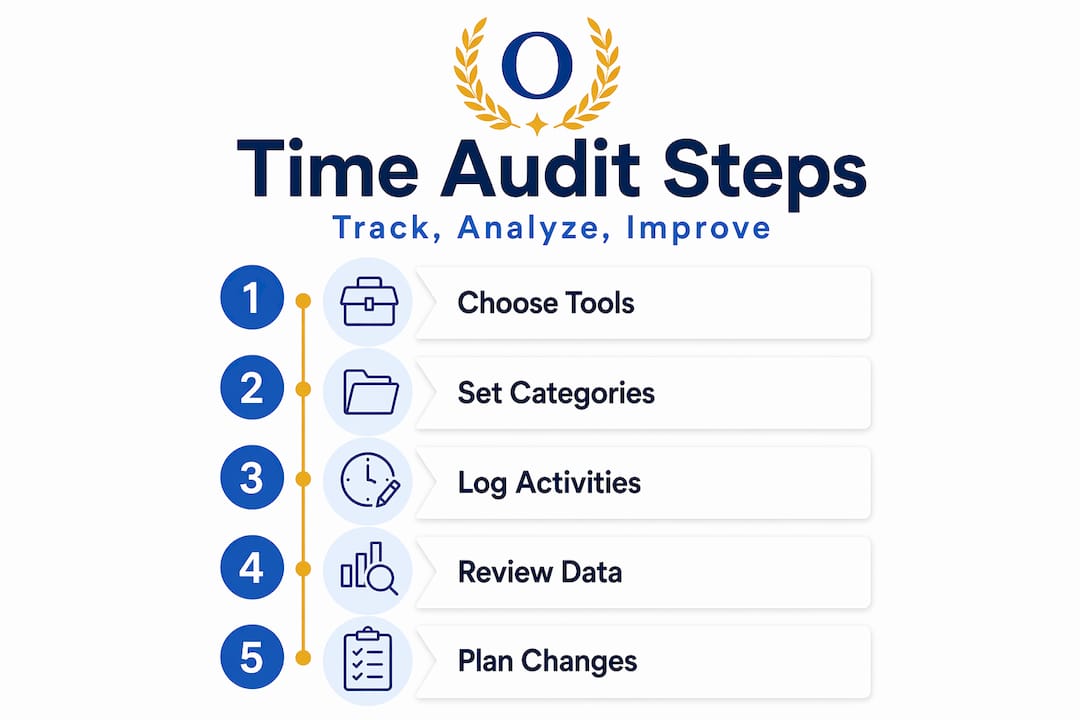
The six steps of a solid time audit:
- Choose your app or method. Pick one and commit. Switching tools mid-audit corrupts your data. If you’re going app-based, look for something that supports custom categories and daily summaries.
- Set up your categories before day one. Common categories: Deep Work, Classes/Meetings, Shallow Work (email, admin), Social Media, Meals, Fitness, Sleep, and Drift (unplanned downtime). Keep it to 6 to 10 categories so tagging stays fast.
- Track every activity for 5 to 7 days. This is non-negotiable. A practical time-audit process recommends tracking for a full representative period, meaning days that reflect your typical schedule, not just your best days.
- Tag and categorize as you go. Don’t wait until the end of the day to log everything. Memory fades fast and you’ll undercount interruptions and transitions. Log entries in real time or at least every 2 to 3 hours.
- Compare your logged time against your intended goals. After day 7, sit down with your data. How many hours did you plan for deep study? How many did you actually get? This gap is your most important finding.
- Plan your changes. Use the gap analysis to decide what to cut, protect, or restructure in next week’s schedule.

When it comes to step-by-step tracking approaches, the key insight is consistency over perfection. You won’t log every minute perfectly. That’s fine.
Here’s a comparison of the three tracking approaches to help you decide which fits your life:
| Approach | Captures intent | Captures volume | Handles interruptions | Setup time |
|---|---|---|---|---|
| Manual | Yes | Partially | Partially | Low |
| Automated | No | Yes | Yes | Medium |
| Hybrid | Yes | Yes | Yes | Medium-high |
For most Centurions, the hybrid approach wins. You get the accuracy of manual logging for important blocks (study sessions, classes) and the passive data of automated tracking for things like phone use and app behavior. Our TickTick time tracking guide is a great starting point if you want a hybrid setup that doesn’t take forever to configure.
Pro Tip: If logging every 30 minutes feels too intrusive, batch your entries in two sessions per day: once at lunch and once before bed. You’ll lose a little precision but gain long-term consistency, which matters more.
One important concept to understand here is the Hawthorne Effect: the well-documented tendency for people to change their behavior simply because they know they’re being observed. When you’re tracking yourself, you’ll naturally “perform” a little. You might study harder or scroll less just because the timer is running. That’s not a disaster, but it does mean you should also check your best time off tracking software options to get a clearer picture of your rest and recovery patterns too.
Analyzing and interpreting your time audit results
Once your data is logged, the real magic is in what you do next: making sense of the numbers.
Pull up your totals by category. Don’t judge yet. Just look. Most students are surprised to find that fragmented schedules and meeting load account for the biggest unexpected time losses, not laziness. Context switching, the act of jumping between unrelated tasks, can cost up to 20 to 30 minutes of recovery time per switch.
Common time leaks to look for:
- Untracked social media use that adds up to 2 or more hours daily
- Excessive back-to-back commitments with no transition time logged
- “Shallow Work” blocks disguised as productive time (answering emails, reorganizing notes)
- Drift periods in the early afternoon that could be restructured as deep work
- Sleep inconsistency that shortens morning productivity windows
Use this framework to categorize everything in your log:
| Time category | Description | Typical ROI |
|---|---|---|
| Deep Work | Focused study, writing, coding, problem-solving | Very high |
| Meetings/Classes | Structured group time | Medium |
| Shallow Work | Admin, email, logistics | Low to medium |
| Drift | Unplanned scrolling, wandering, zoning out | Very low |
Understanding the role of time tracking in your productivity journey means asking harder questions than just “how much time did I waste.” It means asking which activities are actually moving you toward your goals.
Is this hour, right now, getting me closer to where I want to be in six months? If not, what would?
That question, applied to each category in your audit, is how you find the real high-return changes. It’s not about being productive every minute. It’s about being intentional with your highest-value hours.
Questions to ask about your audit data:
- Which category took the most hours? Was that intentional?
- When during the day was most of my Deep Work completed?
- How much of my Drift time happened at predictable times (afternoons, post-lunch)?
- Did I lose hours to transitions and context switching between tasks?
- Were my “busy” hours actually producing results or just filling time?
A good track performance habit means treating your schedule like an exam: review, adjust, and improve. The same logic applies here. The role of timeboxing is also worth exploring once you have your data, since it gives you a structured way to defend your Deep Work hours against interruptions.
Turning your time audit into a smarter routine
Now that you know what a typical week really looks like, it’s time to turn your findings into lasting improvements.

A BMC Psychology study found that time audits work as a behavioral input to improve study engagement, with self-control and reduced phone dependence as key mediators. In plain terms: the audit alone won’t change your habits, but using it intentionally will.
Steps to turn your audit into a redesigned weekly routine:
- Identify your two to three highest-ROI time blocks. These are the hours when your data shows you were most focused and productive. Protect these first.
- Batch similar tasks together. Group email, admin, and shallow work into one or two daily windows instead of letting them bleed into deep work time.
- Break up high-drift afternoons. If your data shows consistent drift between 2 and 4 p.m., schedule a 20-minute walk or a specific task to anchor that block.
- Set protected time. Block your top focus hours in your calendar before anyone or anything else can claim them. Treat them like a class you cannot skip.
- Plan your re-audit. Add a recurring monthly calendar reminder to repeat a 5-day audit. One audit gives you a snapshot. Monthly audits show growth.
Understanding the types of schedules available to students and professionals helps you choose the right structure for your revised week. Some people thrive on rigid time blocks; others do better with a flexible anchor system.
Behavioral tricks that actually work:
- Theme your days. Dedicate certain days to certain types of work (Mondays for planning, Tuesdays and Thursdays for deep study).
- Use the first 90 minutes. Most Centurions have their sharpest focus in the first 90 minutes after waking. Guard that window.
- Add buffer time. Your audit likely shows transitions eating into your schedule. Build 10 to 15-minute buffers between major tasks.
Our weekly planning checklist and weekly agenda setup guides walk you through exactly how to structure the week your audit reveals you actually need.
For exam-heavy periods, check out this exam prep workflow approach to align your newly designed schedule with peak performance windows.
Pro Tip: Write three “non-negotiable” daily habits based on your audit findings and put them on a sticky note next to your workspace. Specificity beats vague intentions every time.
Why most time audits fail—and how to make yours stick
Here’s the uncomfortable truth that most productivity guides skip over: the majority of time audits produce zero lasting change. Not because the method is flawed, but because people do them once, feel briefly enlightened, and then slide back into their old patterns within two weeks.
The biggest culprit is selective tracking. People tend to run their audit during a “good week” when they feel motivated, then use that data to represent their normal life. It doesn’t. Your audit needs to include the Wednesday you had a headache, the Friday you lost two hours to group chat drama, and the Sunday you spent more time avoiding work than doing it.
The second failure point is judgment. When you log a category called “Drift” and realize it adds up to 14 hours in a week, the instinctive response is shame, followed by abandoning the audit entirely. As honest logging research makes clear, tracking without judgment is not just a feel-good suggestion. It directly improves data validity and long-term follow-through. The audit isn’t grading you. It’s informing you.
The Hawthorne Effect also plays a role here. When you’re actively tracking, you naturally behave a little better. Your audit data will likely be slightly more flattering than your real baseline. That’s why iteration matters more than perfection. Run monthly audits and compare them over time. The trends across multiple audits are far more useful than any single week’s data.
Real habit change comes from reflection and repeated small adjustments, not one dramatic restructuring session. Centurions who stick with quarterly or monthly audits consistently report better results than those who treat it as a one-time fix.
Tools for smarter time management: Your next steps
Ready to keep improving? Here’s how the right tools and resources can cement your new habits and take your productivity even further.
You’ve done the hard work of auditing your time. Now the goal is to make sure those insights don’t disappear into a forgotten spreadsheet. The right digital tools turn a one-week experiment into an ongoing system that actually works for you.
Optio, your second-in-command for task, team, and time management, is built specifically for students and young professionals who are serious about owning their schedule. Whether you’re ready to explore the best task management software for your workflow, learn how to manage tasks effectively after your audit, or go deeper into the role of time tracking in your productivity system, Optio Station has the guides and tools to support every step. Your audit gave you the data. Now let Optio help you act on it with strategies built for Centurions who mean business.
Frequently asked questions
How long should a time audit last for best results?
Tracking for 5 to 7 days gives you a representative view of your schedule without becoming overwhelming or disruptive to your normal routine.
What’s the difference between manual and automated time tracking apps?
Manual tracking captures your intentions but depends on your memory, while automated tools capture volume but often miss the context or intent behind what you were doing. A hybrid approach fills the blind spots of both.
Should you track weekends and time off during an audit?
Yes. Include downtime and weekends because they directly affect your weekday energy and routine. A complete 7-day track gives you a more accurate picture than five workdays alone.
How can time audits actually improve study habits?
Audits reveal exactly how much time you’re putting into key study activities and expose the distractions pulling you away. Research shows that time management predicts study engagement, with self-control and reduced mobile phone dependence as key drivers of improvement.
Recommended
- Time Audit: Boosting Productivity for Centurions – Optio Station: Best Project Management App for Prioritization
- Best time off tracking software to boost productivity – Optio Station: Best Project Management App for Prioritization
- Understanding the Role of Time Tracking in Productivity – Optio Station: Best Project Management App for Prioritization
- 7 Steps to a Powerful Weekly Planning Checklist for Success – Optio Station: Best Project Management App for Prioritization
