

TL;DR:
- Most meetings fail due to unclear objectives, large groups, passive participation, and fixed roles, leading to unproductiveness. Implementing a structured workflow with small groups, clear roles, SMART goals, and time management transforms meetings into productive sessions. Consistent evaluation and simple, repeatable practices ensure ongoing improvement and efficient collaboration.
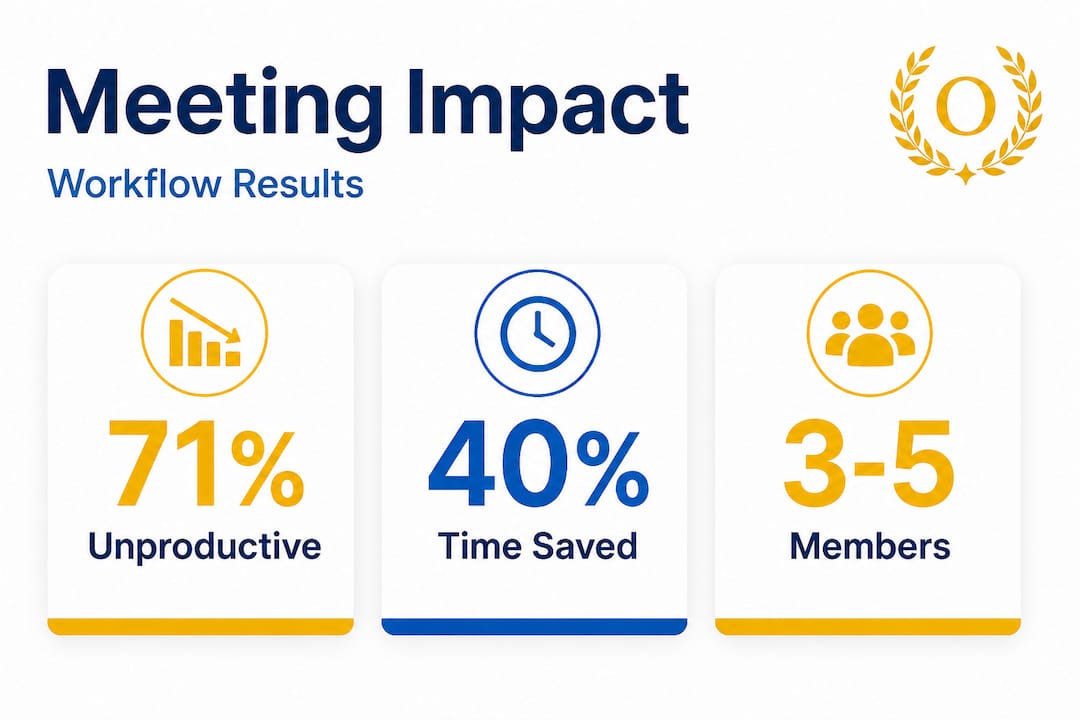
Every week, professionals and students sit through meetings that go nowhere. No decisions made, no real progress, just an hour of everyone’s time evaporating into thin air. 71% of meetings are unproductive, and the average professional spends more than 21 hours per week in them. This guide gives you a practical, repeatable workflow to fix that, whether you’re running a group study session, a team check-in, or a project kickoff with colleagues.
Table of Contents
- Why most meetings fail: Understanding the pitfalls
- What you need for an efficient meeting workflow
- Step-by-step workflow: Running a productive meeting
- Troubleshooting: Avoiding common mistakes and inefficiencies
- Verification: Measuring and improving meeting effectiveness
- The uncomfortable truth: What actually works vs. what sounds good
- Upgrade your workflow for real results
- Frequently asked questions
Key Takeaways
| Point | Details |
|---|---|
| Small, focused groups | Limiting meetings to 3-5 participants helps maximize accountability and engagement. |
| SMART goals and roles | Setting clear objectives and rotating roles keeps every meeting purposeful and inclusive. |
| Structured workflow | Use agendas, time blocks, and follow-ups to drive productivity instead of wasting time. |
| Track and verify results | Consistently measure outcomes, collect feedback, and improve your process each week. |
| Continuous improvement | Iterate your meeting workflows with evidence-based tweaks for long-term gains. |
Why most meetings fail: Understanding the pitfalls
Before building something better, you need to know exactly what’s breaking down. Most meetings don’t fail because people are lazy or careless. They fail because nobody set them up to succeed.
Here are the most common culprits:
- No clear objective. When people walk in without knowing what the meeting is supposed to produce, the conversation drifts. You can read more about team goal alignment tips to see how alignment starts before anyone sits down.
- Group size is too large. Every person you add beyond five starts diluting accountability. Larger groups create bystanders, not contributors.
- Passive participation. When only two people talk and everyone else listens, you don’t have a meeting. You have a lecture nobody signed up for.
- No role rotation. One person always takes notes, one person always leads, and everyone else coasts. Uneven engagement kills energy fast.
As research confirms, meetings lack clear goals and defined roles far more often than not, and that single problem cascades into everything else going wrong.
“A meeting without an agenda is like a road trip without a map. You’ll go somewhere, but probably not where you needed to go.”
Understanding why managing meetings matters isn’t just theory. It’s the foundation of every efficient session you’ll ever run. Once you recognize these patterns in your own group, you’re already halfway to fixing them.
Pro Tip: Before your next meeting, write down one sentence that completes this phrase: “This meeting will be successful when we have…” If you can’t finish that sentence, you’re not ready to meet yet.
Now that you see why meetings fail, let’s prepare for success.
What you need for an efficient meeting workflow
Structure doesn’t happen by accident. It requires a few ingredients, and when you have them all in place, productive meetings become the norm rather than the exception.
The ideal group study or work session looks like this: 3 to 5 members, SMART goals, rotating roles, Pomodoro time blocks, and a consistent weekly schedule. That formula applies whether you’re prepping for finals or managing a product sprint.
Here’s what you need before any meeting begins:
- Group size: Keep it between 3 and 5 people. Small enough for accountability, large enough for diverse input.
- Defined roles: Assign a facilitator, a note-taker, and a timekeeper at minimum. Rotate these roles every session.
- A written agenda: Circulate it at least 24 hours in advance. No surprises.
- SMART goals for the session: These are goals that are Specific, Measurable, Achievable, Relevant, and Time-bound. Read up on SMART goal tips to get the framework right from the start.
- Collaboration tools: Shared documents, a messaging app, and a scheduling tool that everyone can access.
- Pomodoro time blocks: Work in 25-minute focused sprints with 5-minute breaks. This keeps energy and attention from flagging.
| Element | Recommended setup | Why it matters |
|---|---|---|
| Group size | 3 to 5 members | Maximizes accountability and input |
| Session length | 60 to 90 minutes | Prevents fatigue and scope creep |
| Goal format | SMART goals | Creates measurable outcomes |
| Time blocks | 25 min work / 5 min break | Sustains focus throughout |
| Role rotation | Every session | Distributes ownership evenly |
| Frequency | Weekly recurring sessions | Builds consistency and momentum |
For students especially, setting academic SMART goals before each session turns vague study plans into concrete progress markers. Instead of “let’s review chapter four,” you get “each person will summarize two key concepts from chapter four in three minutes or less.”
Pro Tip: Build your meeting template once and reuse it every session. A 10-minute setup investment at the start of the semester or quarter saves you hours of confusion over weeks.
With the right tools and structure, meetings become productive platforms instead of time sinks.

Step-by-step workflow: Running a productive meeting
This is the core of what makes the difference. Follow this process every time, and you’ll see your meetings transform from uncertain, rambling conversations into focused, outcome-driven sessions.
- Set your agenda 24 hours in advance. List each topic, who is responsible for it, and how long it gets. Cap the agenda at three to five items. If something doesn’t fit, it goes into the next session.
- Assign roles before the meeting starts. Rotate the facilitator, note-taker, and timekeeper from the previous session. Send everyone a confirmation message so nobody shows up unprepared.
- Distribute materials early. Readings, slides, or any reference content should be shared at least one day before the meeting. People should come in with context, not needing to be briefed from scratch.
- Open by clarifying the session goal. The facilitator reads the goal out loud and confirms everyone understands what a successful outcome looks like.
- Review previous action items first. Before moving forward, check what was assigned last time. Did it get done? This builds accountability without creating drama.
- Execute in time blocks. Use 25-minute Pomodoro sprints. After each sprint, take a 5-minute break. During the sprint, the timekeeper keeps the group on topic and signals when to wrap up each agenda item.
- Use active recall to test understanding. In study sessions, quiz each other. In work meetings, have each person restate the key point or decision in their own words before moving on. Weekly consistency and active recall are two of the biggest drivers of meeting effectiveness.
- Record every decision and follow-up item. The note-taker logs what was decided, what was left open, and who is responsible for each next step.
- Close with a summary and next steps. The facilitator reads back the key decisions and action items. Everyone confirms. Set the date, time, and goal for the next session before leaving.
- Send a recap within one hour. A brief written summary sent to the group right after the meeting keeps everyone aligned and gives people a reference point.
Research shows that reducing meeting time by 40% can boost overall productivity by 71%. The fastest way to cut meeting time is to run tighter sessions with clearer outcomes, not to cancel meetings entirely.
Here’s how a structured meeting compares to an unstructured one:
| Factor | Unstructured meeting | Structured workflow |
|---|---|---|
| Goal clarity | Vague or assumed | Written and confirmed |
| Time management | Runs over regularly | Timekeeper enforces limits |
| Participation | Dominated by 1-2 people | Roles distribute ownership |
| Follow-up | Informal or forgotten | Logged and sent within an hour |
| Outcome | Varies widely | Consistent and measurable |
For more on running meetings efficiently with digital tools, check out these mobile meeting tips and this digital productivity checklist to make sure nothing falls through the cracks.
With the workflow mapped, it’s vital to avoid common errors that sabotage even well-designed meetings.
Troubleshooting: Avoiding common mistakes and inefficiencies
Even with a solid workflow, things go wrong. Knowing what to watch for means you can course-correct fast instead of losing the whole session.
Here are the most common pitfalls and how to handle them:
- Meetings running past schedule. The timekeeper’s job is to flag when you’re approaching the end of a block. If a topic needs more time, schedule it for next session instead of letting the whole meeting bleed over.
- Skipping role rotation. When the same person always leads, the rest of the group disengages. Rotate every single session. No exceptions. It’s uncomfortable at first, and that discomfort is exactly what makes everyone more invested.
- Failing to capture action items. If it’s not written down, it didn’t happen. Every meeting must end with a documented list of who owns what and when it’s due.
- Overloading the agenda. Trying to cover seven topics in 60 minutes is how you end up covering none of them properly. Pick the three most important items and protect that list.
Meeting efficiency depends on clear goals, concise time blocks, and following up against action items. When one of those breaks down, the rest follows.
Pro Tip: At the end of each meeting, spend two minutes doing a quick “retrospective” where everyone answers one question: what slowed us down today? Over time, this builds a pattern you can actually fix.
For more strategies on staying on track, explore these student productivity hacks and these productivity hacks for entrepreneurs that apply just as well to team workflows.
Once you troubleshoot issues, verify success and adapt for continuous improvement.
Verification: Measuring and improving meeting effectiveness
Running a meeting is one thing. Knowing whether it actually worked is another. Most people skip this step entirely, which means they repeat the same problems every week without realizing it.
Here’s how to build a real feedback loop:
- Track outcomes against goals. At the end of each session, check your SMART goal. Did you hit it? Partially? Not at all? This single check tells you more than any survey.
- Log attendance and participation. If one person hasn’t spoken in three meetings, something needs to change. Digital tools make this easy to spot.
- Solicit feedback after each session. A quick two-question check-in works well: “What went well?” and “What should we change next time?” Keep it short or people won’t do it.
- Review completion rates on action items. If follow-up tasks are consistently incomplete, the problem isn’t motivation. It’s that assignments aren’t specific enough or deadlines aren’t realistic.
- Iterate your workflow every month. Your process should get tighter over time. Look at the last four sessions and identify one thing to change.
Statistic callout: Reducing meetings by 40% can boost productivity by over 70%. The math is simple: fewer, better meetings beat more, worse ones every time.
Use a SMART goal guide to build benchmarks into every session from the start, so verification is built into the process rather than bolted on afterward.
Let’s step back and share our perspective so you can apply these insights in real-world settings.
The uncomfortable truth: What actually works vs. what sounds good
Here’s something most productivity content won’t tell you: the fanciest meeting frameworks often do the least good. At Optio, we’ve seen it over and over. Teams adopt elaborate systems, color-coded roles, complex agenda templates, AI summarizers, and three-tier accountability structures, and then produce worse results than a group of four people with a whiteboard and a timer.
The truth is that simplicity scales and complexity collapses under pressure. When deadlines hit and stress rises, nobody has the bandwidth to maintain an intricate system. What survives is what’s easy to repeat.
SMART goals, Pomodoro blocks, and rotating roles aren’t exciting. They don’t have a cool name or a Silicon Valley origin story. But they work because they’re specific, they create a rhythm, and they force everyone to take ownership at some point. That last piece is the one most people underestimate. When you know you’ll be the facilitator next week, you pay more attention this week. Role rotation is one of the highest-leverage changes you can make to any recurring meeting.
The other thing that consistently outperforms theory? Frequency and consistency. A weekly meeting that runs on the same structure builds trust and momentum. A monthly “alignment session” that changes format every time builds nothing.
If you’re looking to build a system that actually sticks, start with the academic productivity workflow that walks you through setting up repeatable processes rather than one-time heroics. Simple, repeatable, and evidence-based beats clever every single time.
Upgrade your workflow for real results
You’ve got the strategy. Now you need the right tools to put it into practice without adding friction to your day.

Optio is your second-in-command, built specifically for students and young professionals who want to run tighter meetings, manage tasks, and stay on top of team commitments without juggling five different apps. As a Centurion, you get a Roman-themed command center that keeps your goals, your team, and your time all in one place. Explore the best task management software to find the right fit for your workflow, and put the meeting productivity tips from this guide into action with tools designed for exactly how you work.
Frequently asked questions
How many people should be in an efficient meeting?
Keeping it to 3 to 5 members is optimal for both academic and workplace meetings, because it maximizes individual accountability while still allowing for diverse input.
Why do most meetings waste time?
71% of meetings are unproductive primarily because of poor structure, unclear goals, and groups that are too large to hold everyone accountable.
What is a meeting workflow and why is it important?
A meeting workflow is a repeatable step-by-step process that covers planning, execution, and follow-up, and structure and weekly consistency are what turn that process into reliable, measurable results.
How can I keep meetings focused and productive?
Set SMART goals and use active recall alongside rotating roles and clear time blocks so every session ends with decisions and assigned follow-up tasks.
How do I measure meeting effectiveness?
Compare your results against the goals you set at the start, track action item completion rates, and remember that reducing meeting time by 40% can boost productivity by 71%, so efficiency is as important as attendance.
Recommended
- Meeting Productivity Checklist: Maximize Results With Smart Digital Tools – Optio Station: Best Project Management App for Prioritization
- Meeting productivity: top tips with mobile task tools – Optio Station: Best Project Management App for Prioritization
- Why manage meetings? Boost productivity and teamwork fast – Optio Station: Best Project Management App for Prioritization
- Boost productivity: your daily workflow optimization guide – Optio Station: Best Project Management App for Prioritization
- Optimize PDF size workflow: step-by-step guide for 2026
