

TL;DR:
- Effective project communication is a structured system crucial to project success and team coordination.
- A good communication plan defines who, what, when, how, and responsible for information flow.
- Regular review and adaptation of communication strategies, especially in remote and Agile environments, improve outcomes.
Most people think project communication just means sending emails or posting updates in a group chat. Wrong. Real project communication is a system, and without one, poor communication causes between 29% and 57% of all project failures, costing organizations $1.2 trillion globally each year. Whether you’re managing a group project for class or leading your first professional team, a solid project management communication plan template is the single tool that separates teams that finish strong from teams that fall apart at the seams.
Table of Contents
- What is a project management communication plan?
- What to include in your communication plan template
- How to adapt your communication plan for Agile, Waterfall, and remote teams
- Common pitfalls and expert tips for a successful communication plan
- Why most communication plan templates fail—and what really works
- Take your project management skills further
- Frequently asked questions
Key Takeaways
| Point | Details |
|---|---|
| Communication drives success | Poor communication is the main reason projects fail—planning it boosts your team’s results. |
| Template with essentials | Focus your template on audiences, channels, frequency, feedback, and escalation. |
| Adapt for your context | Customize your communication plan for Agile, Waterfall, and remote teams. |
| Avoid common mistakes | Keep plans lean, review regularly, and clarify roles to ensure effectiveness. |
| Real impact needs iteration | The best plans evolve—feedback and adaptation matter more than a static template. |
What is a project management communication plan?
A project management communication plan is a structured document that defines how information flows across your team throughout the life of a project. It’s not a vague “let’s stay in touch” agreement. It’s a deliberate framework that spells out who receives what information, when, through which channel, and who is responsible for making sure it happens.
It’s worth clarifying how this differs from a broader project management plan. A project management plan covers the full scope of governance: tasks, deliverables, budgets, and timelines. A communication plan sits inside that larger framework and focuses specifically on the flow of information. Think of it as the nervous system of your project. Without it, even the best-planned projects lose coordination fast.
A well-built communication plan typically includes:
- Audiences: Who needs to receive information? List each stakeholder, team member, or instructor.
- Channels: Where does communication happen? Email, Slack, Zoom, shared documents, in-person meetings.
- Frequency: How often does each audience receive updates? Daily, weekly, at milestones?
- Message type: Status updates, feedback requests, decisions, risk alerts.
- Owner: Who is responsible for sending or facilitating each communication?
- Escalation path: What happens when communication breaks down or decisions stall?
Reviewing real-world project plans shows how often communication is treated as an afterthought rather than a core element of planning. The result? Confusion, missed deadlines, and team friction that slows everything down.
“Ineffective communication is cited as the root cause of 56% of project failures.” That’s not a minor inefficiency. That’s more than half of all project failures traced directly back to how teams talk to each other.
Even if you’re working from solid project proposal templates, a missing communication strategy turns good intentions into missed expectations fast.
What to include in your communication plan template
Now that you recognize the importance, let’s break down exactly what every communication plan template should cover and how to get started.
Given that PMs spend 90% of their time communicating, it makes sense to build a plan that makes that time count. The key is structure without complexity. Your plan should be lean, actionable, and easy for every team member to follow at a glance.
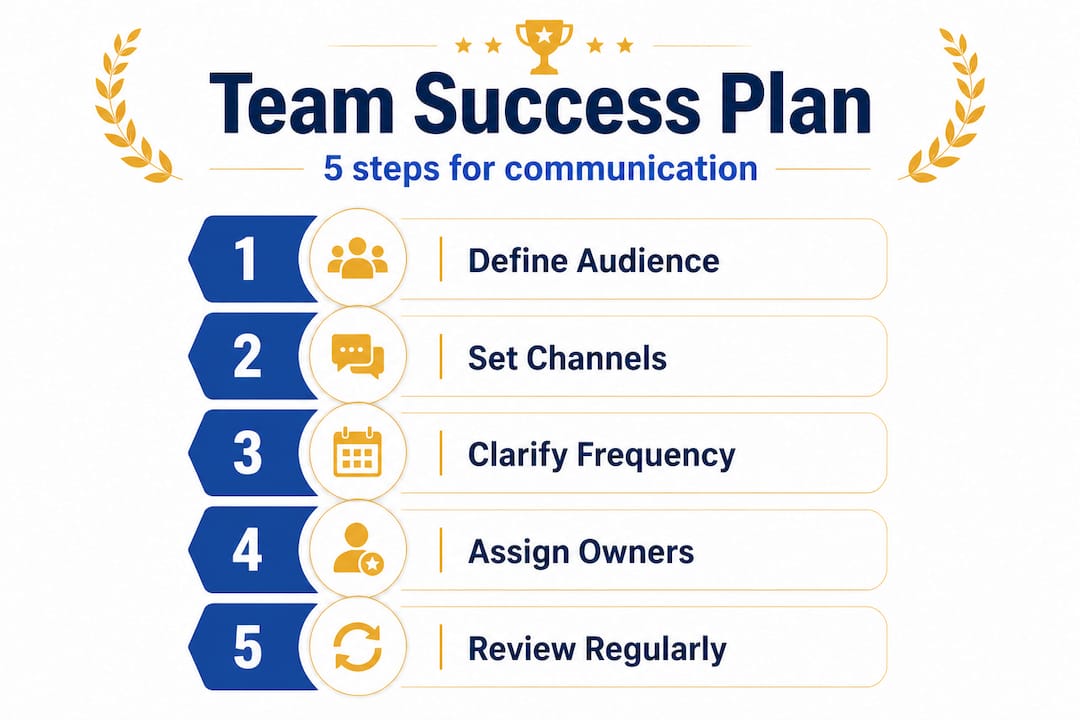
Here’s the numbered sequence to build your template from scratch:
- Define communication goals. What do you want communication to achieve? Alignment, transparency, fast decision-making?
- Identify your audiences. List everyone involved: team members, instructors, clients, stakeholders.
- Map channels to audiences. Not everyone needs every message. Match the right medium to the right person.
- Set frequency. Decide how often each audience receives updates. Be specific.
- Assign ownership. Name the person responsible for each communication type.
- Build an escalation path. Document what happens when a message goes unanswered or an issue escalates beyond the team.
- Add a feedback loop. Include how and when the team reviews whether the plan is actually working.
Here’s a sample template table to make this concrete:
| Audience | Message type | Channel | Frequency | Owner |
|---|---|---|---|---|
| Full team | Status update | Slack | Daily | Project lead |
| Instructor/client | Progress report | Weekly | Team lead | |
| Stakeholders | Milestone review | Zoom call | Per milestone | Project manager |
| Team members | Task assignments | Task manager | As needed | All members |
| Leadership | Risk escalation | Email + call | Immediately | Project lead |
This format works whether you’re a college student coordinating a semester-long group project or a young professional managing an entry-level assignment. Paste this into a shared doc and fill it in during your kickoff meeting. It takes 30 minutes. The clarity it creates lasts the entire project.
Use a project plan checklist alongside this template to make sure nothing critical falls through the gaps. Pair it with timeline templates to align communication milestones with your actual deliverable schedule.
Pro Tip: Keep your communication plan to 5-10 pages maximum. If it’s longer, you’ve added detail that nobody will read. The best communication plan is the one your team actually uses.
How to adapt your communication plan for Agile, Waterfall, and remote teams
Once you know what to include, the next challenge is adjusting your plan for real-world teams and projects with different needs and work styles.
Not all projects run the same way. Agile and Waterfall are the two most common project methodologies (structured approaches to managing work), and they require very different communication rhythms. Adding a remote or async layer on top changes things further.
Here’s a side-by-side comparison to help you calibrate:
| Factor | Agile | Waterfall |
|---|---|---|
| Meeting frequency | Daily standups, sprint reviews | Monthly steering meetings, phase gates |
| Primary channels | Slack, Jira, collaborative boards | Formal reports, email, structured meetings |
| Update style | Short, frequent, informal | Detailed, structured, scheduled |
| Flexibility | High, plan evolves constantly | Low, plan is fixed upfront |
| Documentation | Lightweight, living documents | Heavy, version-controlled documents |
Agile teams use daily check-ins while Waterfall teams typically operate on monthly steering cycles. Neither is wrong. They’re just built for different project types. If you’re in a fast-moving startup internship or a semester-long design sprint, Agile communication fits naturally. If you’re supporting a large research project with fixed milestones, Waterfall’s formal reporting style keeps everyone accountable.

Remote teams add another layer entirely. Understanding remote teamwork essentials is critical because geographic separation breaks the informal communication that happens naturally in shared spaces. Without a hallway conversation or a quick desk check-in, remote teams rely entirely on documented, intentional communication.
For remote teams, here are the must-have adaptations:
- Default to async first. Use recorded video updates, shared docs, or voice notes instead of requiring real-time meetings.
- Over-document decisions. Write down every significant call, choice, or direction change in a shared location everyone can access.
- Set clear response time expectations. Define what “urgent” means and how fast each channel should get a reply.
- Establish video check-in norms. Even async-first teams benefit from one synchronous touchpoint per week to build trust.
- Use dedicated tools for different functions. Separate channels for project updates, casual team conversation, and escalations reduce noise dramatically.
Explore resources on coordinating remote teams and review the best collaboration tools for remote teams to pick the stack that matches your team’s work style.
Pro Tip: Build your escalation path before you need it. Define in writing what happens if a key message gets no response within 24 hours. Who steps in? What channel gets used next? Setting this up when things are calm means you won’t scramble when things get urgent.
Common pitfalls and expert tips for a successful communication plan
Armed with the right template and adaptations, it’s critical to steer clear of common mistakes and apply proven best practices to make sure your plan works in the real world.
Even teams that start with a great template can undermine it through predictable missteps. Recognizing these patterns before they hit you is half the battle.
Common mistakes to avoid:
- Too much detail. A 30-page communication plan sounds thorough. In practice, nobody reads it. Keep it lean.
- Unclear escalation paths. When an issue arises and no one knows who handles it, the problem grows. Define escalation clearly upfront.
- Wrong communication frequency. Daily updates for a monthly project feel like noise. Quarterly check-ins for a sprint team leave everyone in the dark. Calibrate frequency to your project pace.
- Ignoring remote context. Assuming your in-office communication style works for remote teammates is a guaranteed way to leave someone out of the loop.
- Setting it and forgetting it. A plan that made sense on day one may be completely irrelevant by week four. If nobody reviews it, nobody adjusts it.
Best practices that actually work:
Review your plan at every major project milestone, not just at kickoff. Assign one person to own the communication plan and keep it updated. Clarify responsibilities in writing so no one can claim they didn’t know what they were supposed to do. Invite honest feedback from your team about whether the current rhythm is working or creating friction.
Applying smart teamwork tips alongside your plan makes a measurable difference in how your team functions under pressure. Small habits, like always posting a meeting summary within 24 hours or maintaining a shared decision log, build the kind of trust that holds teams together when things get complicated.
Organizations with poor communication have a 50% higher project failure rate than those that communicate effectively. That’s not a small gap. It’s the difference between a project that lands well and one that collapses before the finish line.
The best communication plans aren’t the most elaborate ones. They’re the ones teams actually follow.
Why most communication plan templates fail—and what really works
Here’s an uncomfortable truth most project management guides won’t say directly: a perfect communication plan template can actually make things worse.
When teams spend more energy formatting the plan than using it, the document becomes a security blanket rather than a working tool. It looks organized. It satisfies stakeholders. And then it sits in a shared drive, untouched, while the team makes decisions through random Slack threads and rushed hallway conversations.
The plans that work in practice share one trait: they were built to be changed. Teams that revisit their communication approach at each phase of the project, check whether the current channels are still working, and genuinely listen when someone flags a breakdown, those teams outperform teams with a polished but rigid plan every time.
There’s also a feedback loop problem that most templates completely ignore. Communication planning usually runs one direction: leadership tells the team what to expect. But real project success depends on information flowing back up. When team members can flag when the weekly report isn’t useful or when a Slack message should have been an email, and actually be heard, the plan gets smarter over time.
This is the insight that separates experienced project leaders from beginners. It’s not about having the right format. It’s about building a culture where communication is treated as a living practice, not a one-time deliverable. If you’re building toward a career in project management, this mindset is worth more than any certification. It shows up clearly in strong portfolio templates for career growth that demonstrate adaptability alongside technical skill.
Stop chasing template perfection. Build a plan that’s good enough to start, and commit to the habit of improving it.
Take your project management skills further
You’ve got the framework. Now it’s time to put it to work. The best communication plans don’t exist in isolation. They’re connected to broader project management skills like task coordination, team collaboration, and time tracking.

Optio is your second-in-command, built specifically for Centurions like you who are managing real projects, real teams, and real deadlines. Whether you’re coordinating a group assignment or leading an entry-level team, Optio gives you the tools to organize tasks, communicate clearly, and stay on track without the chaos. Explore our team collaboration guide to build stronger working relationships, check out the complete task management software guide to find the right tools for your stack, and learn the tactics behind managing tasks effectively so every project you lead finishes on time and on point.
Frequently asked questions
What’s the difference between a communication plan and a project management plan?
A communication plan focuses on how and when project information is shared, while a project management plan covers overall project governance, tasks, and deliverables. The communication plan is operational, while the management plan is governance-heavy.
How detailed should a project communication plan template be?
It should focus on essential info only, ideally 5-10 pages maximum, using only what the team needs to stay informed and aligned.
Why do most projects fail without effective communication?
Miscommunication leads to missed deadlines, wasted resources, and unclear goals, causing up to 57% of project failures across industries.
How often should a project communication plan be updated?
Review at each phase or major milestone to keep the plan relevant, accurate, and actually useful to your team.
Do remote teams need special communication plans?
Yes. Remote teams require clearer documentation and async tools for information sharing to replace the informal communication that happens naturally in shared physical spaces.
Recommended
- How to Manage Team Tasks Effectively for Success – Optio Station: Best Project Management App for Prioritization
- 7 Practical Work Goal Examples for Students and Professionals – Optio Station: Best Project Management App for Prioritization
- Streamline your presentation planning workflow: step-by-step – Optio Station: Best Project Management App for Prioritization
- Project Management Plan Example: Success Blueprint For Students – Optio Station: Best Project Management App for Prioritization
- 6 étapes clés pour une checklist inclusion en entreprise réussie
