

TL;DR:
- Consistent project tracking reduces errors, stress, and improves goal completion.
- Combining prioritization, scheduling, focused work, and weekly reviews creates an effective system.
- Use one reliable method, stay disciplined, and regularly review to maintain progress.
You have three assignments due this week, a group project falling apart in the group chat, and a work deliverable your manager asked about twice. Sound familiar? This is the reality for most college students and young professionals today, and the instinct to multitask your way out of it is exactly the wrong move. Research consistently shows that juggling multiple tasks without a clear system leads to more errors, more stress, and fewer completed goals. This guide gives you a practical, research-backed playbook for keeping track of every project on your plate without losing your mind.
Table of Contents
- Why project tracking matters more than you think
- Top methods and frameworks for keeping track
- Step-by-step: Building your personal project tracking system
- Staying consistent: Avoiding pitfalls and improving over time
- What most guides miss about project tracking for young pros and students
- Upgrade your project tracking with the right tools
- Frequently asked questions
Key Takeaways
| Point | Details |
|---|---|
| Centralized tracking is key | A single unified system prevents confusion and missed deadlines for every project. |
| Choose effective methods | Frameworks like the Eisenhower Matrix and Time Blocking help prioritize and organize tasks effortlessly. |
| Consistency beats complexity | Simple routines and weekly reviews do more for reliable progress than overcomplicated tools. |
| Adapt for solo or group work | Your tracking habits should support both personal assignments and shared group responsibilities. |
| Upgrade your toolkit wisely | Move to digital tools or apps as your needs grow, but only after mastering the basics. |
Why project tracking matters more than you think
Most people treat project tracking as optional. They rely on memory, scattered sticky notes, or a dozen different apps they check inconsistently. Then something slips through the cracks and the consequences stack up: a missed deadline, a failed group deliverable, or a manager who loses confidence in you. The cost of poor tracking is not just one bad grade or one awkward meeting. It compounds.
When you lack a reliable tracking system, you spend a surprising amount of mental energy just trying to remember what needs to happen next. Psychologists call this “open loops,” and every unresolved task quietly drains your focus throughout the day. A simple, consistent tracking system closes those loops and frees up cognitive space for actual work.
Here is what a solid project tracking habit actually gives you:
- Clarity on what needs to happen today versus next week
- Reduced stress because nothing is hiding in your memory waiting to ambush you
- Better performance since you can allocate your best hours to your hardest tasks
- Accountability that keeps group members and yourself on the same page
- Momentum because seeing tasks move from “in progress” to “done” genuinely motivates more progress
“A unified tracking system prevents inconsistencies like duplicate defects and builds the discipline early that leads to reliable data and outcomes over time.”
That last point is worth sitting with. Discipline built early pays dividends for years. The student who learns to track projects in college becomes the professional who never misses a client deadline. The person who skips tracking in their early career keeps scrambling until something forces them to stop.
Project tracking also forms the foundation for more focused, deeper work. When you know exactly what is on your plate, you stop checking your inbox or task list every 20 minutes out of anxiety. You sit down, you execute, and you move on. That shift alone changes your relationship with productivity.
Top methods and frameworks for keeping track
Not all tracking methods work for every person or every type of project. The key is knowing your options so you can choose the right tool for the job. Here is a comparison of the most effective, evidence-based approaches:
| Method | Best for | Strength | Weakness |
|---|---|---|---|
| Eisenhower Matrix | Prioritizing tasks by urgency and importance | Quick, clear decision-making | Doesn’t schedule time |
| Pomodoro Technique | Focused work sessions | Builds momentum, limits burnout | Rigid for long, creative tasks |
| Time Blocking | Managing a packed schedule | Protects deep work time | Requires calendar discipline |
| Weekly Reviews | Maintaining long-term progress | Catches slippage before it hurts | Easily skipped when busy |
| Kanban Board | Visual project progress | Great for group projects | Can get cluttered without cleanup |
According to time management research, the most effective approach combines several of these methods: use the Eisenhower Matrix to prioritize, Pomodoro sessions to execute focused work, time blocking to schedule your week, and weekly reviews to course-correct. Together, they cover both the planning and doing sides of project management.
Here is how to layer two of these methods together in a way that actually sticks:
- Start with the Eisenhower Matrix on Sunday evening. List every active project and task. Sort them into four boxes: urgent and important, important but not urgent, urgent but not important, and neither. Focus your week on the top two categories.
- Block time on your calendar for each major project. Use your school or work calendar and physically reserve 60 to 90 minute blocks for your top priorities. Treat these like class or meetings you cannot skip.
- Use Pomodoro sessions inside each time block. Work for 25 minutes, break for 5, and repeat. This keeps energy high and prevents the half-hour “I’ll just check Instagram” spiral.
- Log your progress at the end of each time block. A single sentence like “Drafted intro and section 2 of research paper” is enough. This creates a record and keeps your tracking current.
- End each week with a 15-minute review. Look at what moved forward, what stalled, and what needs a time block next week. Your weekly project reviews do not need to be elaborate. They just need to happen.
If you are a visual learner, pairing any of these approaches with innovative study organization ideas can make the whole system feel more intuitive and personally motivating.
Pro Tip: Pick one method and use it consistently for two full weeks before adding a second. Stacking too many systems at once is how people end up with an elaborate productivity setup they abandon by Thursday.
A dedicated time blocking guide can walk you through setting up your first week of blocks if you are starting from scratch. It takes about 20 minutes to set up and pays off immediately.
Step-by-step: Building your personal project tracking system
Knowing methods is one thing. Building a system you will actually use is another. This section gives you a concrete, repeatable process for getting all your projects out of your head and into a structure you can trust.
Step 1: Define every active project. Write down every project you are currently responsible for, including academic, professional, and group work. Do not filter. Get it all out. Most people discover they have more active projects than they realized, which is exactly why a system matters.
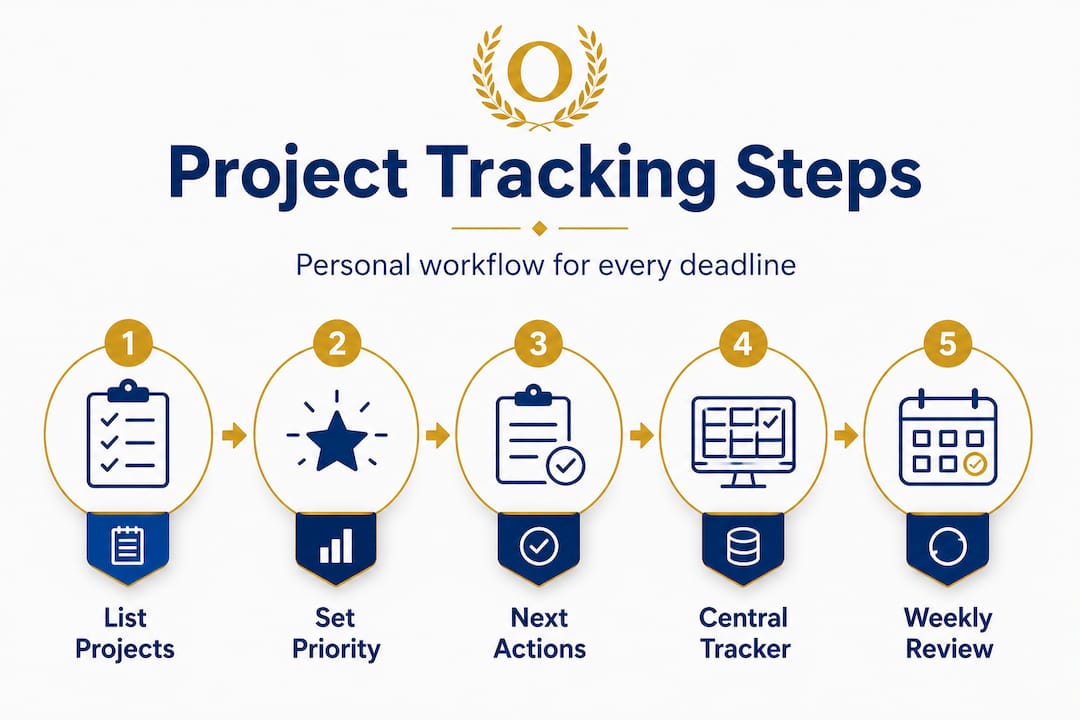
Step 2: Assign a priority level. Use a simple scale: high, medium, or low. High-priority projects have real consequences if they slip (a final exam project, a client deliverable). Low-priority projects can wait without immediate harm. This step saves you from treating everything as urgent.
Step 3: Break each project into specific next actions. Not “work on paper,” but “write the methodology section for 45 minutes.” Vague tasks stay undone. Specific tasks get done. Following task checklist steps is a reliable way to develop this habit if you are new to it.
Step 4: Enter everything into a single tracker. This could be a spreadsheet, an app, or even a notebook. The format matters less than the fact that it is one place. Scattered tracking is not tracking.

Step 5: Schedule your first weekly review. Pick a recurring time, Sunday evening or Friday afternoon, and put it in your calendar. This is non-negotiable. If you skip it, your system decays within days.
Here is a weekly review template you can adapt immediately:
| Project | Current status | Priority | Next action | Due date |
|---|---|---|---|---|
| Research paper | Draft in progress | High | Write conclusion section | Friday |
| Group presentation | Waiting on teammates | High | Follow up with Mia on slides | Wednesday |
| Internship report | Not started | Medium | Outline main sections | Next Monday |
| Reading assignment | 50% complete | Low | Finish chapters 4 and 5 | Thursday |
This kind of review table takes under 15 minutes to fill out and gives you an instant, honest picture of where things stand. Use your assignment tracker setup to create a digital version that syncs across your devices.
The importance of regular project review cannot be overstated. According to consistent planning research, weekly reviews combined with structured time management create better focus and planning outcomes than reactive, day-by-day approaches.
For group projects specifically, share the review table with your teammates and update it together during a brief weekly sync. This removes the “I thought someone else was handling that” excuse entirely.
Pro Tip: Set a recurring 10-minute alarm on Friday afternoons labeled “project pulse check.” Even a quick scan of your tracker keeps small problems from becoming week-ruining emergencies.
Staying consistent: Avoiding pitfalls and improving over time
The hardest part of any tracking system is keeping it alive after the initial excitement fades. Week one feels organized. Week three feels optional. Week five, you are back to sticky notes and panic.
Here are the most common reasons project tracking systems fall apart:
- Tool-hopping: Switching apps or methods every two weeks because something “better” appeared. The best system is the one you stick with.
- Skipping weekly reviews: Missing even two reviews in a row causes your tracker to go stale, and stale trackers get ignored.
- Lack of centralization: Keeping tasks in email, a notes app, a planner, and two different apps simultaneously. When everything is everywhere, nothing is tracked.
- Over-engineering: Building a 15-column spreadsheet with color codes, tags, and dependency maps. This creates maintenance work, not results.
- Perfectionism paralysis: Waiting until you have the “right” system before starting. Start now, imperfectly.
As tracking research confirms, inconsistent or fragmented tracking creates data gaps, duplicate confusion, and errors that compound over time. Discipline applied early produces far more reliable outcomes than sophistication applied sporadically.
When you fall behind, here is a simple recovery process. First, do not throw out the system. Acknowledge the gap, open your tracker, and update each project’s status honestly. Then schedule a catch-up block within 48 hours to address anything overdue. A two-day recovery is far better than abandoning the system and starting from zero.
Your system should also evolve. A first-semester tracking setup should look different from one you build after six months of practice. As you learn your patterns (when you procrastinate, which types of tasks you underestimate, how long reviews actually take), you can tune the system to match.
Pro Tip: For group projects, schedule a five-minute check-in at the start of each week where every member shares one update and one blocker. This creates natural accountability without requiring a full meeting. Learn more about managing group projects to build check-ins that actually get results.
What most guides miss about project tracking for young pros and students
Here is the uncomfortable truth most productivity content avoids: the tool does not matter. The app is not the point. Whether you use Notion, a spreadsheet, a paper notebook, or Optio, the system only works if you use it consistently and honestly.
The productivity industry has a financial interest in making you believe that the right software will transform your habits. But a $200-per-year app used inconsistently delivers worse results than a free spreadsheet updated every Sunday without fail. Most people who struggle with project tracking are not failing because their tool is wrong. They are failing because they treat their tracking system as optional.
Real-world progress, for students and professionals alike, comes from small, regular inputs rather than elaborate setups used occasionally. A 10-minute weekly review beats a color-coded masterpiece that collects dust. This is worth repeating because almost every productivity article sends the opposite message by focusing on frameworks and software instead of the boring but essential habit of showing up to your system every single week.
There is also a myth that more tracking equals more control. It does not. Tracking 40 tasks across five projects every day creates its own form of anxiety. The goal is clarity, not completeness. Track the things that matter. Focus on your top three priorities each week and let lower-stakes items stay in a simple backlog.
“Discipline, not complexity, is the actual engine of consistent progress. Simplicity maintained is always better than sophistication abandoned.”
The mindset shift that changes everything is this: stop trying to build the perfect system and start building the lightest system you will actually use. If reviewing prioritizing assignments helps you trim your weekly tracker to what really matters, that is a more valuable skill than learning any new app.
Start small. Stay consistent. Adjust when necessary. That is the entire framework, and no one needs to sell you a subscription for it.
Upgrade your project tracking with the right tools
You have the strategy. Now let your tools do some of the heavy lifting.
Optio is built specifically for students and young professionals who are done with generic productivity apps that were not designed with their reality in mind. As your second-in-command, Optio handles the structure so you can focus on the mission. Whether you need to keep track of tasks across work and school, explore essential time management apps to find what fits your style, or follow a step-by-step task management software guide to build a system that scales with your goals, Optio’s resources and platform are designed to meet you exactly where you are. Centurions do not leave their projects to chance.
Frequently asked questions
What’s the simplest way to start tracking multiple projects?
List all current projects in one place, then use the Eisenhower Matrix to prioritize them and schedule weekly reviews to monitor progress consistently.
How often should I review my project progress?
Weekly reviews are the most effective frequency, giving you enough time between sessions to make real progress while catching problems before they become deadlines.
Is one tool enough or should I combine multiple systems?
Start with one system you can use reliably every week and only add a second method once the first is a genuine habit, not a chore.
Why do project tracking systems fail?
Most systems fail from inconsistent use or lack of centralization rather than flawed tools, as fragmented tracking creates duplicate confusion and data gaps that undermine the entire system.
What’s the best way to manage group projects?
Use a shared tracker that every team member can update and schedule brief weekly check-ins where each person shares one progress update and one current blocker.
Recommended
- Project time management: proven strategies for students and pros – Optio Station: Best Project Management App for Prioritization
- Command Log – Optio Station: Best Project Management App for Prioritization
- 7 Project Tracker Examples for Boosting Productivity – Optio Station: Best Project Management App for Prioritization
- How to Prioritize Assignments Effectively for Success – Optio Station: Best Project Management App for Prioritization
- Mastering Time Management for Coaches: Boost Efficiency – Hoop Mentality
