

TL;DR:
- Most urgent tasks are often others’ emergencies, not your priorities.
- Effective time management controls attention through skills like planning, prioritization, and goal-setting.
- Using simple frameworks and mobile tools personalized to your energy rhythms enhances sustainable productivity.
Most of what fills your to-do list today isn’t actually your emergency. A 30-day tracking experiment found that 73% of “urgent” tasks were someone else’s emergencies dressed up as priorities. That’s a jarring number, especially if you’ve spent entire afternoons reacting to pings, requests, and last-minute asks instead of working on what actually moves the needle for you. This guide breaks down the real skills behind effective time management, the frameworks that hold up under pressure, the mobile tools worth your time, and the expert strategies that help you personalize everything so it actually sticks.
Table of Contents
- What defines effective time management skills?
- Top time management frameworks and methods
- Integrating mobile tools for personalized productivity
- Expert insights: Personalizing your approach and avoiding common traps
- What most guides miss: Why the right tool and method aren’t enough
- Take your time management skills to the next level with Optio Station
- Frequently asked questions
Key Takeaways
| Point | Details |
|---|---|
| Prioritize strategically | Use methods like the Eisenhower Matrix to focus on important tasks, not just urgent requests. |
| Integrate mobile tools | Combining apps like Todoist or Trello with proven frameworks boosts productivity and organization. |
| Personalize for peak performance | Adapt your approach to match your energy levels and schedule, enhancing results and reducing burnout. |
| Avoid common traps | Don’t over-schedule or fall for multitasking; review your strategy regularly for sustainable improvement. |
What defines effective time management skills?
Effective time management isn’t just writing a to-do list and hoping for the best. It’s a set of learnable skills that, when practiced consistently, change how you move through your day. The role of time management goes far deeper than scheduling. It’s about controlling your attention, not just your calendar.
The core skills break down like this:
- Planning: Deciding in advance what needs to happen and when
- Goal-setting: Turning vague intentions into specific, measurable targets
- Prioritization: Ranking tasks by impact, not just urgency
- Time blocking: Reserving focused chunks of time for specific work
- The Pomodoro Technique: Working in 25-minute sprints followed by short breaks
A meta-analysis of 107 studies confirmed that planning, goal-setting, and prioritization measurably boost both productivity and wellbeing. These aren’t soft skills. They produce hard results.
The difference between academic and professional demands matters here. In school, deadlines are fixed and feedback is structured. At work, you often set your own pace, and nobody grades you weekly. That shift trips up a lot of young professionals who were great students but feel scattered the moment external structure disappears.
It’s also worth separating three skills people often blur together:
| Skill | What it actually means | When it matters most |
|---|---|---|
| Organization | Keeping tasks, files, and schedules in order | Daily task tracking |
| Deep work | Sustaining focus on cognitively demanding tasks | Projects and studying |
| Energy management | Matching task intensity to your mental energy | Peak performance hours |
Research shows that time management correlates with higher GPA, reduced burnout, and stronger overall performance. If you’re building these skills now, you’re investing in outcomes that pay off in every setting you’ll enter. A good starting point is getting clear on your time management goals examples so you’re working toward something concrete.
Top time management frameworks and methods
Knowing what time management skills are is one thing. Knowing how to build them is another. These frameworks give you a structure to actually apply what you understand.
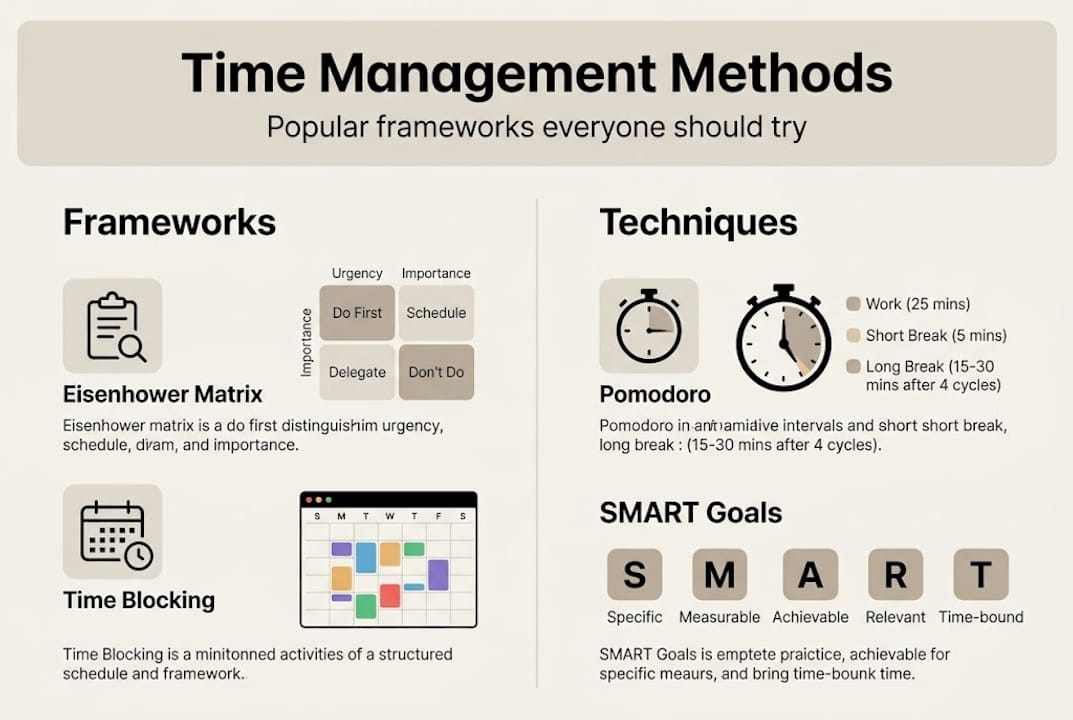
1. The Eisenhower Matrix
This tool sorts every task into four quadrants based on urgency and importance. Tasks that are important but not urgent (Q2) are where your biggest gains live. Most people ignore them because they’re not screaming for attention. That’s the trap.
2. Time blocking
Instead of a fluid to-do list, you assign specific time slots to specific tasks. It makes your day predictable and reduces decision fatigue.
3. The Pomodoro Technique
Work 25 minutes, break 5 minutes, repeat. The same meta-analysis of 107 studies found this approach particularly suited to deep focus work. It’s simple enough to start today.
4. SMART goals
Goals that are Specific, Measurable, Achievable, Relevant, and Time-bound prevent you from chasing vague targets that never feel finished.
Here’s how popular tools map to these frameworks:
| Tool | Best paired with | Key strength |
|---|---|---|
| Trello | Time blocking, visual planning | Kanban boards for project flow |
| Todoist | Eisenhower Matrix, SMART goals | Task tagging and priority flags |
| Notion | Long-form planning, study notes | Flexible workspace |
| Forest | Pomodoro Technique | Gamified focus sessions |
| Google Calendar | Time blocking | Shared scheduling |
The impact of using these tools together is real. Students who used Trello for task management scored 9.22 points higher on final exams compared to those who didn’t. That’s not a minor edge.
Pro Tip: Start with just one framework. The Eisenhower Matrix works well for beginners because it forces a decision: is this actually important, or just loud? Pair it with a study schedule and you’ll cover 80% of what most students and professionals need.
For a step-by-step breakdown of the matrix, the Eisenhower Matrix guide walks you through applying it to real tasks without overcomplicating the process.
Integrating mobile tools for personalized productivity
Frameworks work best when they’re frictionless. That’s where mobile tools come in. The goal isn’t to use more apps. It’s to use the right ones in ways that reinforce your chosen method.
Here’s a breakdown of the top options:
- Todoist: Over 50 million downloads and a 4.6 star rating. Named Wirecutter’s top pick for task management. Use it to label tasks by Eisenhower quadrant and set recurring reminders.
- Trello: Visual boards that translate directly into time blocking. Great for team projects and multi-step assignments.
- Notion: Best for students who want a single workspace for notes, tasks, and goals.
- Forest: Gamifies focus sessions. Plant a virtual tree during work; let it die if you pick up your phone. Surprisingly effective.
- Engross: Combines a Pomodoro timer with distraction logging so you can see exactly what’s pulling your attention.
- Google Calendar: Non-negotiable for time blocking. Color-code your blocks by category to get a visual read on your week.
The real power comes from pairing apps with methodologies. Use Todoist for Eisenhower prioritization, layer in a Pomodoro timer for deep work sessions, and use Trello for visual time blocking on bigger projects.
The biggest mobile productivity mistake isn’t using the wrong app. It’s using too many apps and spending more time managing tools than doing actual work.
Pro Tip: Audit your apps once a week. If an app hasn’t helped you complete a task in the past seven days, remove it. Friction kills follow-through. The organization tools for students guide compares the best options side by side if you want to narrow down your stack. For a sharper prioritization approach, the priority matrix for productivity resource shows how to build it into your mobile workflow.
Avoid over-scheduling. Filling every hour of your calendar feels productive but creates a brittle system. One unexpected task collapses the whole plan. Leave buffer time.

Expert insights: Personalizing your approach and avoiding common traps
Sustainability is the real test of any time management system. Most approaches work for two weeks and then fade. Here’s what actually keeps them alive.
1. Know your chronotype
Your chronotype is your natural energy rhythm. Morning people (larks) hit peak cognitive performance earlier. Evening people (owls) hit it later. Personalizing your schedule around these windows produces more output with less effort. Doing hard work during your low-energy hours is like running uphill on purpose.
2. Novice vs. expert strategies
If you’re new to structured time management, lean on rigid systems like time blocking and daily checklists. They remove decision fatigue. As you get more experienced, shift toward energy alignment. Let your peak hours dictate when you tackle demanding work rather than sticking to a fixed slot just because it’s scheduled.
3. Run a weekly audit
Set 15 minutes aside each Sunday to review what happened. What did you finish? What kept getting bumped? What tasks were actually someone else’s urgency disguised as yours? That 73% figure only gets better when you start noticing the pattern in your own list. The weekly planning checklist gives you a repeatable structure for this.
4. Target Q2 tasks deliberately
Important, non-urgent tasks (studying ahead, building skills, exercising) are always the first to get pushed. Block time for them explicitly or they’ll vanish under reactive work.
5. Kill multitasking
Research consistently shows it reduces output quality. Do one thing. Finish it. Move on.
Pro Tip: Aim to schedule only 60 to 70% of your day. The remaining 30 to 40% absorbs the unexpected without destroying your plan. Pair this habit with clear SMART goals for time management to stay directional even on chaotic days.
“Manage your energy, not your time” is the shift that separates people who stay productive long-term from those who burn out trying to optimize every hour.
What most guides miss: Why the right tool and method aren’t enough
Here’s what we’ve observed: most people who struggle with time management aren’t lazy or disorganized. They’re running the wrong operating system for their actual life. They found a popular framework, downloaded an app, and expected the results to follow automatically. They don’t.
Energy management matters more than rigid time allocation, especially in knowledge work where output quality depends on your mental state. A task done at the wrong time takes twice as long and produces half the result.
Apps prevent your study scheduling from collapsing under pressure, but they don’t create motivation or replace judgment. The students and professionals who genuinely improve are the ones who treat their system as a living experiment, not a fixed solution. They review it, adjust it, and stay curious about what’s actually working.
Awareness is the real skill. Not automation.
Take your time management skills to the next level with Optio Station
If you’re ready to move from understanding these strategies to actually living them, Optio Station is built for exactly that. It’s the second-in-command for Centurions who want to manage tasks, teams, and time without juggling five separate apps.

Explore Optio Station’s library of guides and tools, from choosing the best task management software to learning how to manage tasks effectively in real academic and professional contexts. If you’re serious about building lasting productivity habits, the SMART goals for productivity resources give you a concrete place to start. Your next mission starts here.
Frequently asked questions
How do I describe my time management skills in an interview?
Mention specific frameworks you use, the mobile apps that help you track and prioritize work, and measurable results like completing projects ahead of schedule. Planning and prioritization are recognized as core performance drivers, so naming them specifically makes your answer credible.
Which mobile tools are most effective for time management?
Todoist, Trello, Notion, Forest, Engross, Google Calendar, and Microsoft To Do are consistently top-rated. Todoist alone has 50 million-plus downloads and a 4.6 rating, making it the most widely trusted option for task tracking.
What is the Eisenhower Matrix and how does it help prioritization?
It categorizes every task by urgency and importance into four quadrants, helping you focus on what’s strategically valuable rather than what’s just loud. Tracking your tasks reveals how many “urgent” items don’t actually belong in your quadrant at all.
How can I personalize my time management methods?
Identify your chronotype, schedule demanding tasks during your peak energy hours, and audit weekly to spot patterns and drop what isn’t working for your specific rhythm.
Does time management always reduce stress?
Not automatically. App-based time management prevents wellbeing from declining but doesn’t always reduce stress on its own. Combining structured scheduling with energy management and regular reviews produces the most consistent stress relief.
Recommended
- 7 Best Time Management Goals Examples for Centurions – Optio Station: Best Project Management App for Prioritization
- Understanding Time Management for Young Professionals – Optio Station: Best Project Management App for Prioritization
- Understanding the Role of Time Management in Success – Optio Station: Best Project Management App for Prioritization
- 7 Time Management Goals for Employees Examples to Boost Productivity – Optio Station: Best Project Management App for Prioritization
- 7 Key Benefits of a Fast-Track MBA for Busy Professionals
