

Cutting the number of meetings your team holds by 40% can boost productivity by 71%. That stat should stop you cold, because most students and young professionals are doing the opposite: scheduling more meetings, not fewer, and wondering why nothing gets done. The truth is that meetings are not the problem. Poorly managed ones are. This guide breaks down exactly how to run meetings that actually move the needle, whether you’re coordinating a group project in college or navigating your first team role at work.
Table of Contents
- Why meeting management matters: The productivity connection
- Core elements of effective meeting management in academic and workplace settings
- Hybrid, virtual, and edge-case meetings: What the research reveals
- When meetings matter—and when they don’t
- How to measure and continuously improve your meetings
- Our take: What most guides miss about effective meetings
- Ready to level up your meeting management?
- Frequently asked questions
Key Takeaways
| Point | Details |
|---|---|
| Effective meetings boost results | Well-managed meetings improve productivity, motivation, and psychological safety for teams and classes. |
| Fewer, focused meetings are better | Cutting unnecessary meetings and setting clear agendas leads to less burnout and more actionable outcomes. |
| Tailor your meeting style | Choose the right format—hybrid, virtual, or in-person—based on the group’s needs and the goals of each meeting. |
| Evaluate and improve continuously | Use frameworks and feedback to review and refine meetings, ensuring ongoing team growth and collaboration. |
Why meeting management matters: The productivity connection
Meetings are one of the most powerful tools you have. They can align a team in minutes, unlock creative solutions, and build the kind of trust that makes collaboration feel effortless. But that same tool, used carelessly, becomes a drain. You leave feeling tired, behind on work, and unsure what was even decided.
For students and young professionals, the stakes are real. Every hour spent in an unfocused meeting is an hour not spent on study goals and achievement, deep work, or actual deliverables. Research shows that bad meetings cause burnout and reduce well-being, while well-run ones build psychological safety and engagement.
“The meeting itself is not the enemy. The lack of structure, purpose, and follow-through is.”
Here is a quick comparison to make the difference concrete:
| Factor | Poorly managed meeting | Well-managed meeting |
|---|---|---|
| Agenda | None or vague | Clear, shared in advance |
| Time | Runs over | Starts and ends on time |
| Participation | One or two voices | Everyone contributes |
| Outcome | Unclear next steps | Defined actions and owners |
| Energy after | Drained | Motivated |
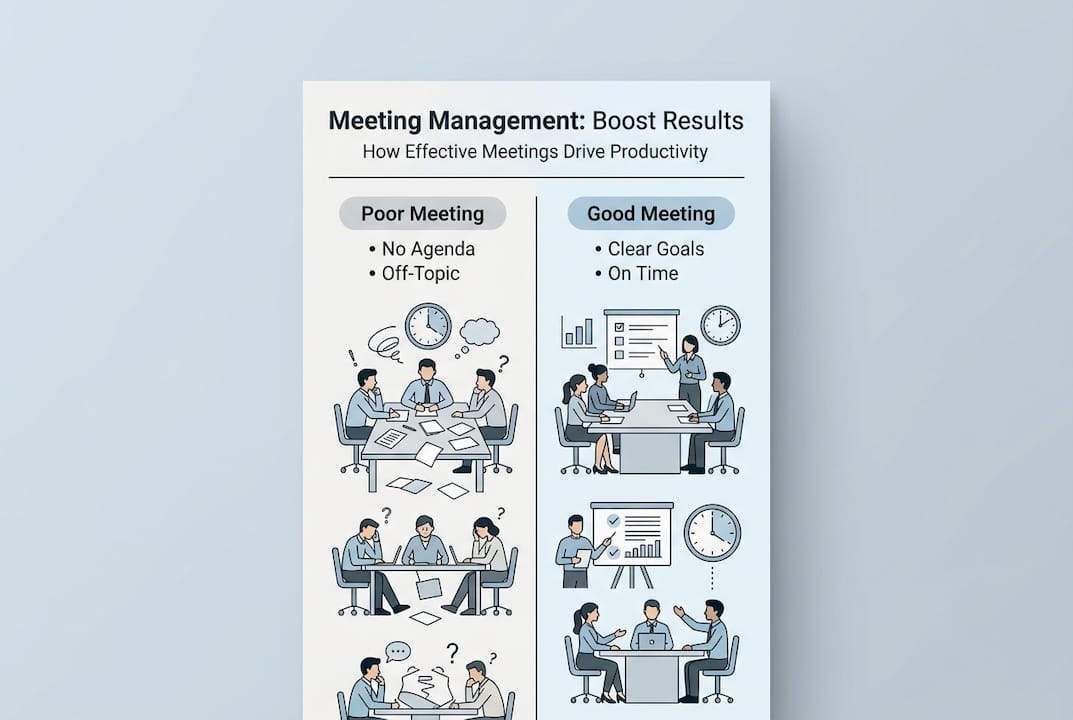
The positive side effects of well-managed meetings go beyond the meeting room. Teams report smoother collaboration, faster decisions, and less anxiety around group work. When you know a meeting will be focused and short, you actually look forward to it.
Key benefits of better meeting management:
- Clearer decisions with less back-and-forth
- Stronger team relationships built on respect
- Reduced stress and meeting fatigue
- More time for deep, focused work
- Higher accountability across the group
Core elements of effective meeting management in academic and workplace settings
Knowing the stakes is one thing. Knowing what to actually do is another. The good news is that best practices for meetings are well-established: joint agenda setting, round-table participation, respect for time, and open attendance consistently produce better outcomes in both academic and professional settings.
Start with the agenda. Do not write it alone. When team members help shape the agenda, they arrive prepared and invested. Share it at least 24 hours before the meeting so everyone can think ahead. If you need help organizing your time around these prep tasks, tools that help you manage class schedules or build a schedule management plan template can make a real difference.
Here is a numbered framework to run any meeting more effectively:
- Set the agenda collaboratively at least one day in advance
- Open with a round-table check-in so every voice is heard from the start
- Assign a timekeeper to keep discussions on track
- Start and end on time, no exceptions
- Close with clear action items, each with a named owner and deadline
- Rotate facilitation roles so everyone builds leadership skills
- Document decisions using a structured format like using a command log
Pro Tip: Open your next meeting with one simple check-in question, like “What is one thing you need from this meeting today?” It takes 60 seconds and immediately raises engagement and focus.
Time respect is non-negotiable. Meetings that run long signal that preparation was weak. Keep them as brief as the topic allows. A 20-minute focused meeting beats a 60-minute rambling one every single time.

Hybrid, virtual, and edge-case meetings: What the research reveals
The way we meet has changed. Whether you are in a dorm study room, a coffee shop, or a company’s remote-first Slack workspace, you are likely mixing in-person and virtual attendance. This creates new challenges that general meeting advice does not cover.
Research shows that 67% of high-performing teams use pre-meeting check-ins to align before the call even starts. Async formats, like recorded updates or shared docs, reduce fatigue and give introverts time to contribute thoughtfully. For tips on making distributed collaboration work, explore virtual team tips and strategies for coordination for remote teams.
| Meeting type | Strengths | Challenges |
|---|---|---|
| In-person | High trust, rich nonverbal cues | Scheduling conflicts, travel time |
| Hybrid | Flexible, inclusive | Tech gaps, unequal participation |
| Virtual | Accessible, recordable | Screen fatigue, distractions |
Pro Tip: For agenda-heavy virtual meetings, record the session only if no sensitive topics are discussed. Share the recording with absent members so no one falls behind.
Common hybrid and virtual pitfalls, and how to fix them:
- Unequal participation: Use structured turn-taking so remote attendees are not talked over
- Tech failures: Test audio and video five minutes before every call
- Meeting fatigue: Replace status updates with async messages and save sync time for decisions
- No follow-up: Send a written summary within one hour of the meeting ending
- Distraction: Encourage cameras on and minimize open tabs during calls
The biggest mistake is treating all meetings the same. Tailor the format to the problem, not to habit.
When meetings matter—and when they don’t
Here is a counterintuitive truth: not every meeting should be cut. Some meetings that feel routine or even boring are actually essential for full team engagement. Skipping them can quietly erode the group’s sense of connection and shared purpose.
The real skill is knowing when to meet and when to send a message instead. Async tools work brilliantly for status updates, document reviews, and quick polls. But for emotional conversations, major decisions, and relationship building, real-time interaction is irreplaceable. Strong team collaboration depends on knowing the difference, and the teamwork benefits you gain from well-timed sync meetings are hard to replicate any other way.
“Sync meetings are where trust is built and decisions are made. Async is where information is shared. Confusing the two costs teams more than they realize.”
Use this quick test before scheduling your next meeting:
- Does this topic require real-time input or back-and-forth discussion?
- Are there emotions or tensions that need to be addressed directly?
- Is a key decision being made that affects the whole group?
- Does this involve building trust or onboarding someone new?
- Could a shared doc, poll, or voice note handle this just as well?
If you answered yes to the first four, meet. If the last one covers it, go async. This simple filter alone can reclaim hours every week.
How to measure and continuously improve your meetings
Running a good meeting once is a win. Building a system that makes every meeting better over time is a game changer. The best teams do not just hold meetings. They review them.
Start with the 70/30 agenda rule: dedicate 70% of your meeting time to the most critical issues and 30% to secondary or emerging topics. This keeps the focus sharp and prevents minor items from hijacking the agenda. Pair this with a decision framework like RACI (Responsible, Accountable, Consulted, Informed) to clarify who owns each outcome. Combining this with timeboxing for meetings and the right task management tools creates a repeatable system that scales.
Here is a simple three-step review process to run after every meeting:
- Rate the meeting on a 1 to 5 scale for focus, participation, and clarity of outcomes
- Identify one thing that slowed the meeting down or was unclear
- Adjust the next agenda based on that feedback before the next session
Pro Tip: After your next team meeting, send a two-question poll: “Was this meeting necessary?” and “Did you leave with clear next steps?” The answers will tell you everything you need to know.
Tracking meeting effectiveness does not need to be complicated. Even a simple shared note after each session builds a culture of accountability and continuous improvement that most teams never develop.
Our take: What most guides miss about effective meetings
Most meeting advice focuses on tactics: shorter agendas, better timekeeping, fewer invites. That stuff matters. But the biggest mistake we see students and young professionals make is confusing attendance with engagement. Showing up is not the same as contributing. A room full of quiet, disengaged people is not a meeting. It is a performance.
Meetings are only as powerful as the actions and trust they produce afterward. If your team leaves without clear ownership of next steps, the meeting failed regardless of how organized the agenda was. Ruthless prioritization of meeting topics is not just a productivity hack. It is a sign of respect for everyone’s time and energy.
The real payoff of great meeting management is rarely visible in the meeting itself. It shows up later, in faster decisions, fewer misunderstandings, and a team that actually why manage tasks with clarity and confidence. Build that habit now, and it will follow you through every stage of your career.
Ready to level up your meeting management?
You now have a practical framework for running meetings that actually work, whether you are leading a study group, a class project, or a professional team. The next step is putting these strategies into a system you can use every day.

Optio is built for Centurions like you who want to command their time, not surrender it to endless meetings. From organizing your tasks to coordinating your team, Optio gives you the tools to act on everything this guide covers. Explore best task management software options, learn why manage tasks with intention, and discover how to manage tasks effectively so every meeting you run leads to real results.
Frequently asked questions
How do I decide if a meeting is really necessary?
A meeting is necessary when it requires real-time discussion, decisions, or relationship building. For status updates and information sharing, async alternatives are almost always faster and less draining.
What is the 70/30 agenda rule?
The 70/30 rule means spending 70% of meeting time on your most critical issues and 30% on secondary topics, keeping focus sharp and outcomes clear.
How can meetings avoid burnout for students and professionals?
Hold only necessary meetings, keep them focused and time-bound, and ensure everyone has a voice. Well-managed meetings build psychological safety rather than draining it.
What are the best ways to ensure participation in academic meetings?
Joint agenda setting and round-table starts give every member a stake in the outcome. Rotating facilitation roles also builds confidence and shared ownership.
Should sensitive meetings be recorded?
No. Only record non-sensitive sessions where privacy is not a concern. Always inform participants before recording any meeting.
Recommended
- 7 Practical Work Goal Examples for Students and Professionals – Optio Station: Best Project Management App for Prioritization
- 7 Best Collaboration Tools for Remote Teams Explained – Optio Station: Best Project Management App for Prioritization
- How to Manage Team Tasks Effectively for Success – Optio Station: Best Project Management App for Prioritization
- Step-by-step agenda creation: 71% productivity boost – Optio Station: Best Project Management App for Prioritization
