
{
“@type”: “Article”,
“image”: {
“url”: “https://csuxjmfbwmkxiegfpljm.supabase.co/storage/v1/object/public/blog-images/organization-4842/1773911864285_Manager-reviewing-project-management-template-at-desk.jpeg”,
“@type”: “ImageObject”,
“caption”: “Manager reviewing project management template at desk”
},
“author”: {
“url”: “https://optiostation.com”,
“name”: “Optiostation”,
“@type”: “Organization”
},
“@context”: “https://schema.org”,
“headline”: “Master project management task list templates in 2026”,
“publisher”: {
“url”: “https://optiostation.com”,
“name”: “Optiostation”,
“@type”: “Organization”
},
“inLanguage”: “en-US”,
“articleBody”: “Master project management task list templates with proven prioritization methods, free tools, and best practices to boost productivity and prevent burnout in 2026.”,
“description”: “Master project management task list templates with proven prioritization methods, free tools, and best practices to boost productivity and prevent burnout in 2026.”,
“datePublished”: “2026-03-19T09:19:57.198Z”
}

College students face an overwhelming reality: 86% struggle with time management, juggling classes, group projects, internships, and social commitments. A well-structured project management task list template transforms this chaos into clarity. These templates provide a systematic framework to organize tasks, track deadlines, and prioritize work effectively. This guide explores essential components of task list templates, proven prioritization methods, and practical steps to implement them for academic and early career success.
Table of Contents
- Understanding Core Components Of A Project Management Task List Template
- Prioritization Techniques: Eisenhower Matrix And ABC Method Explained
- Choosing And Using Free Project Management Templates For Students And Young Professionals
- Avoiding Burnout And Maintaining Productivity With Task List Best Practices
- Explore Top Project Management Tools And Resources
- Frequently Asked Questions
Key takeaways
| Point | Details |
|---|---|
| Core template elements | Task name, assignee, priority, status, and deadlines form the foundation of effective task tracking. |
| Prioritization frameworks | Eisenhower Matrix and ABC method help classify tasks by urgency and impact to boost productivity. |
| Free template options | Google Sheets, Notion, and specialized student planners offer versatile multi-project management. |
| Burnout prevention | Limiting daily high-priority tasks to 3-5 and conducting weekly reviews maintains sustainable performance. |
| Implementation strategy | Start by inputting all syllabus items, color-coding by class, and batching similar tasks together. |
Understanding core components of a project management task list template
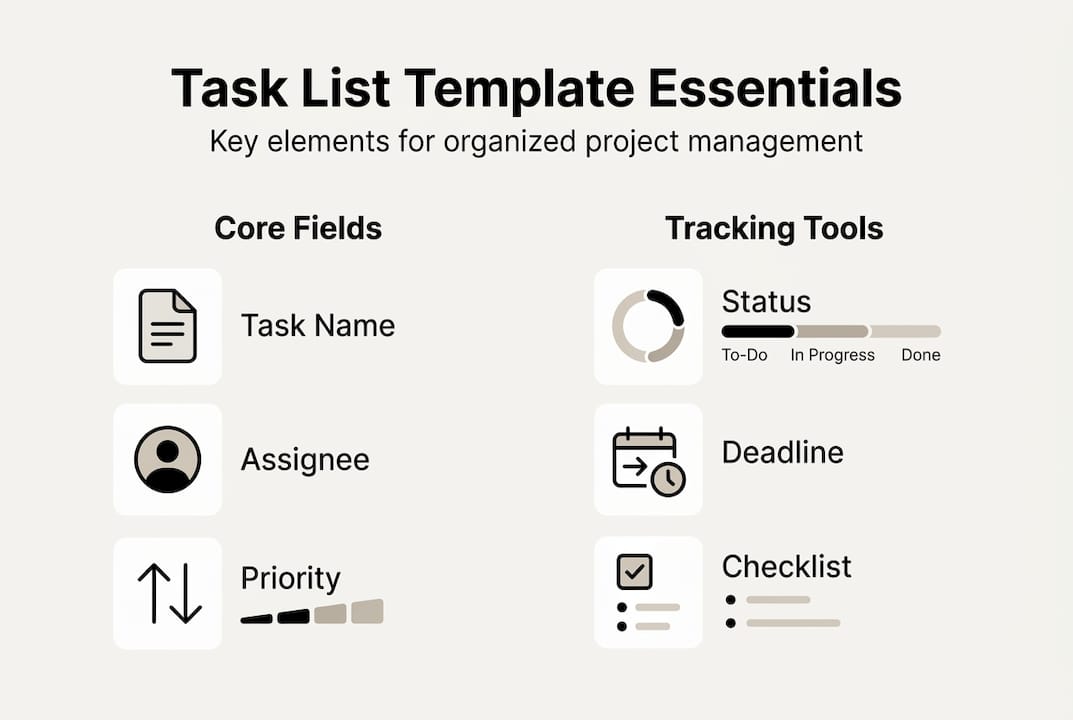
Every effective task list template shares fundamental elements that transform scattered to-dos into organized action plans. Project management task list templates typically include task name, description, assignee, priority, status, start date, deadline, and phase. These fields work together to create visibility across all responsibilities.
The task ID provides a unique identifier for tracking and referencing specific items in team discussions. Task names should be action-oriented and specific, like “Draft introduction for sociology paper” rather than vague labels like “Work on essay.” Descriptions add context about deliverables, requirements, or constraints that clarify expectations.
Assignee fields matter even for individual work because they create accountability and help you visualize workload distribution in group projects. Priority levels signal which tasks demand immediate attention versus those that can wait. Status tracking shows progress at a glance, using categories like Not Started, In Progress, Blocked, or Complete.

| Field | Purpose | Example |
|---|---|---|
| Task ID | Unique identifier | HIST-101-01 |
| Task Name | Action-oriented label | Research primary sources |
| Assignee | Accountability owner | Sarah M. |
| Priority | Urgency level | High |
| Status | Current state | In Progress |
| Start Date | When work begins | Jan 15, 2026 |
| Deadline | Completion target | Jan 22, 2026 |
| Phase | Project stage | Research |
Start and deadline dates establish timeline boundaries and help you spot scheduling conflicts before they become crises. Project phase categorization organizes tasks by workflow stages like Planning, Execution, Review, or Submission. This structure proves invaluable when managing multiple concurrent projects.
Best practices for template setup include:
- Use consistent priority labels across all projects for easy comparison
- Set realistic deadlines with buffer time for unexpected delays
- Update status daily to maintain accurate progress visibility
- Include dependencies to identify tasks that block other work
- Add notes fields for quick reference to resources or instructions
Pro Tip: Color-code your template by class or project type so you can instantly recognize which commitments need attention when scanning your dashboard. This visual organization reduces cognitive load and speeds up daily planning. sophie rain sextape
Integrating a project management checklist template alongside your task list creates a comprehensive system. Checklists handle recurring processes while task lists track unique deliverables, giving you complete coverage of responsibilities.
Prioritization techniques: Eisenhower matrix and ABC method explained
Knowing what to work on next separates productive students from overwhelmed ones. Two proven frameworks help you classify tasks by urgency and importance: the Eisenhower Matrix and ABC method. These systems integrate seamlessly into task list templates to guide daily decisions.
The Eisenhower Matrix divides tasks into four quadrants based on urgency and importance. Quadrant 1 contains Do tasks that are both urgent and important, like assignments due tomorrow. Quadrant 2 holds Schedule tasks that matter long-term but lack immediate deadlines, such as starting research for a paper due in three weeks. Quadrant 3 includes Delegate items that feel urgent but contribute little to your goals, like non-essential meeting requests. Quadrant 4 represents Delete activities that waste time without adding value.
The ABC method offers a simpler three-tier system. A-tasks are high impact and urgent, demanding completion today or tomorrow. B-tasks matter but have moderate urgency and can be scheduled for later this week. C-tasks are low priority items that would be nice to finish but won’t derail your success if delayed.
| Framework | Categories | Best For |
|---|---|---|
| Eisenhower Matrix | 4 quadrants (Do, Schedule, Delegate, Delete) | Complex projects with multiple stakeholders |
| ABC Method | 3 tiers (A: urgent/critical, B: moderate, C: low) | Individual daily planning and quick decisions |
| Combined Approach | Matrix for weekly planning, ABC for daily execution | Balancing strategic and tactical priorities |
Applying these methods daily transforms abstract priorities into concrete action steps:
- Review all tasks each morning and assign Eisenhower quadrants or ABC labels
- Tackle A-tasks or Quadrant 1 items during your peak energy hours
- Schedule specific time blocks for B-tasks and Quadrant 2 work to prevent neglect
- Evaluate C-tasks and Quadrant 3/4 items for elimination or delegation
- Reassess priorities after completing major deliverables or receiving new assignments
For student scenarios, an exam tomorrow lands in Quadrant 1 and gets an A label. Starting a group project due in two weeks belongs in Quadrant 2 with a B classification. Attending an optional club social might be Quadrant 3 or 4 with a C rating. Scrolling social media clearly falls into Quadrant 4 and should be deleted from your productive hours.
Pro Tip: Limit yourself to 3-5 A-tasks per day maximum. Overloading your priority list creates stress and guarantees some important work gets pushed to tomorrow, defeating the purpose of prioritization. Quality focus beats quantity every time.
Exploring priority matrix methods reveals additional frameworks like the MoSCoW method (Must, Should, Could, Won’t) and Value vs. Effort grids. Experimenting with different systems helps you discover which resonates with your thinking style.
Choosing and using free project management templates for students and young professionals
The right template makes task management feel effortless rather than burdensome. Recommended free templates include Google Sheets/Excel trackers, Notion Projects & Tasks, Course To-Do List Planner, and t0ggles Student Planner. Each offers unique advantages for different organizational styles and project types.
Google Sheets and Excel templates provide familiar spreadsheet interfaces with powerful filtering and sorting capabilities. You can create custom views for different classes, color-code rows by priority, and share templates with group project teammates. The flexibility lets you add columns for specific needs like textbook chapters or lab equipment requirements.
Notion combines database functionality with wiki-style documentation, perfect for students managing research alongside task execution. You can link tasks to class notes, embed relevant documents, and create kanban boards that visualize project phases. The free personal plan includes unlimited pages and blocks for comprehensive project coverage.
t0ggles Student Planner specializes in academic workflows with pre-built views for assignments, exams, and extracurriculars. It automatically calculates workload distribution across weeks and flags potential scheduling conflicts. The recurring task feature handles weekly problem sets or reading assignments without manual re-entry.
Multi-project views prove essential when juggling four to six classes plus internships or part-time work. Templates supporting this capability let you filter by project, view all deadlines in a master calendar, and track overall workload balance. This bird’s eye perspective prevents overcommitment and identifies light weeks where you can tackle long-term goals.
Repeatable assignment templates save massive time for recurring work patterns. Create a master template for essay projects with stages like Research, Outline, First Draft, Peer Review, and Final Edit. When a new paper assignment arrives, duplicate the template and adjust deadlines. This standardization ensures you never skip critical steps and builds efficient habits.
Starting your semester with templates:
- Input every syllabus deadline into your master template within the first week
- Assign color codes by class for instant visual recognition
- Batch similar tasks together, like scheduling all reading assignments for specific days
- Create recurring entries for weekly discussion posts or lab reports
- Set up automated reminders three days before major deadlines
Pro Tip: Conduct a 15-minute weekly review every Sunday evening to update task statuses, adjust priorities based on new assignments, and identify upcoming heavy workload weeks. This ritual keeps your template accurate and prevents surprises.
Exploring free project management tools beyond templates reveals apps with mobile access, collaboration features, and integration with calendar systems. Combining a solid template foundation with the right tools creates a comprehensive productivity system.
Learning to organize multiple projects effectively requires understanding how templates scale from single assignments to complex multi-course management. The key lies in consistent naming conventions, regular maintenance routines, and ruthless elimination of unused template sections.
Avoiding burnout and maintaining productivity with task list best practices
Powerful templates become counterproductive when misused. Overloading urgent and high-impact tasks leads to burnout, diminishing the productivity gains templates promise. Sustainable task management requires intentional workload balancing and regular system maintenance.
The biggest trap students fall into involves filling Quadrant 1 and the A-task category with too many items. When everything feels urgent and critical, nothing truly is. This creates decision paralysis and constant stress as you bounce between competing priorities without making meaningful progress on any single item.
Research shows that cognitive overload from excessive task switching reduces efficiency by up to 40%. Your brain needs time to enter deep focus states where complex academic work happens. Constantly shifting between urgent tasks fragments attention and exhausts mental resources faster than sustained concentration on fewer priorities.
“The key to productivity isn’t doing more things, it’s doing the right things with full attention. Limiting daily A-tasks to 3-5 items creates space for deep work while maintaining progress on critical deadlines.”
Best practices for sustainable task management:
- Cap A-tasks at 3-5 per day and be ruthless about what truly qualifies as urgent
- Share group project templates with all team members to distribute workload visibility
- Set realistic deadlines with 20% buffer time for unexpected complications
- Batch similar tasks like all reading assignments or problem sets into focused blocks
- Schedule B-tasks during low-energy periods rather than letting them become urgent
- Use C-tasks as productive breaks between intensive A-task work sessions
Structured weekly reviews prevent template decay and priority drift. Every Sunday, spend 15 minutes reviewing completed tasks, updating statuses, and reassessing upcoming priorities. This ritual catches scheduling conflicts early and ensures your template reflects current reality rather than outdated plans.
Balancing urgent and non-urgent tasks maintains long-term success. While A-tasks and Quadrant 1 items demand immediate attention, neglecting Quadrant 2 strategic work creates future crises. Allocate at least 30% of your weekly schedule to important but not urgent activities like starting research early, building professional networks, or learning new skills.
Group projects require special attention to prevent uneven workload distribution. Shared templates with clear assignee fields and status tracking create accountability without micromanagement. Weekly sync meetings to review the template together keep everyone aligned and surface blockers before they derail timelines.
Implementing a daily planning routine that starts with template review ensures priorities stay fresh. Spend five minutes each morning identifying your top three tasks and scheduling specific time blocks for completion. This proactive approach beats reactive scrambling when deadlines suddenly loom.
Recognizing burnout warning signs helps you adjust before productivity collapses completely. Watch for persistent exhaustion despite adequate sleep, inability to focus on tasks you normally enjoy, and growing resentment toward academic responsibilities. When these appear, ruthlessly eliminate C-tasks, negotiate deadline extensions if possible, and temporarily reduce your A-task limit to two per day.
Explore top project management tools and resources
Mastering task list templates represents just the beginning of your productivity journey. Optio Station specializes in project management tools designed specifically for students and young professionals who need practical systems that work with their unique challenges. The platform focuses on prioritization frameworks that prevent overwhelm while maintaining academic excellence.

Exploring recommended time management apps complements your template foundation with features like automated reminders, calendar integration, and progress tracking. These tools sync across devices so your task list stays accessible whether you’re in class, at the library, or working from your apartment.
Our comprehensive task management software guide evaluates options based on student-specific criteria like free tier generosity, collaboration features for group projects, and learning curves that won’t consume study time. We test each platform with real academic scenarios to provide honest assessments.
Discover project organization strategies that scale from individual assignments to complex team deliverables. These proven frameworks help you implement the template concepts covered here while adapting to your personal workflow preferences and course demands.
Frequently asked questions
What is a project management task list template?
A project management task list template is a structured tool that organizes tasks, deadlines, priorities, and progress tracking in a standardized format. It includes fields like task name, assignee, status, priority level, and due dates to create visibility across all responsibilities. Templates eliminate the need to build tracking systems from scratch for each new project, saving time while ensuring consistent organization.
How do I prioritize tasks using a project management template?
Use frameworks like the Eisenhower Matrix to classify tasks by urgency and importance, or apply the ABC method to label items as high, moderate, or low priority. Assign these priority labels within your template’s dedicated priority field and update task statuses daily. Review priorities each morning to identify your top 3-5 tasks and schedule specific time blocks for completion during peak energy hours.
Which free project management templates are best for students?
Google Sheets and Excel trackers offer familiar interfaces with powerful customization for academic needs. Notion provides database functionality combined with note-taking for research-heavy projects. t0ggles Student Planner specializes in academic workflows with pre-built assignment and exam views. Choose templates supporting multi-project views and reusable task structures for recurring assignments like weekly problem sets.
How can I avoid burnout when managing multiple projects?
Limit daily high-priority tasks to 3-5 items maximum to prevent cognitive overload and decision paralysis. Perform weekly 15-minute reviews every Sunday to reassess priorities, update statuses, and redistribute workload across lighter weeks. Build 20% buffer time into all deadlines and batch similar tasks together to reduce context switching that fragments attention and exhausts mental resources.
How often should I update my task list template?
Update task statuses daily, ideally during a five-minute morning planning session and a brief evening review. Conduct comprehensive weekly reviews every Sunday to add new assignments, adjust priorities based on changing circumstances, and archive completed tasks. This dual rhythm maintains accuracy for daily decisions while ensuring strategic alignment with semester-long goals and preventing surprises from overlooked deadlines.
Can I use the same template for academic and professional projects?
Yes, core template elements like task name, priority, status, and deadlines apply universally to academic coursework and early career responsibilities. Customize field labels to match your context, such as “Class” versus “Client” for the project category. Maintain separate template instances or use filtering views to keep academic and professional tasks organized while leveraging the same underlying structure and prioritization methods.
Recommended
- Project Task List Template: Boost Your Productivity Today – Optio Station: Best Project Management App for Prioritization
- Top free project management Excel dashboard templates 2026 – Optio Station: Best Project Management App for Prioritization
- Project Management Checklist Template for Success – Optio Station: Best Project Management App for Prioritization
- Excel project management dashboard template for students 2026 – Optio Station: Best Project Management App for Prioritization
