

TL;DR:
- Effective time management combines structured scheduling and goal-setting with minimizing coordination waste to boost productivity. Prioritizing sleep, exercise, and environment quality enhances focus and decision-making, while choosing the right tools like Grammarly and Asana supports implementation. Focusing on one technique at a time and building flexibility reduces burnout, leading to sustained efficiency.
Efficiency is defined as the ability to produce maximum output from a given amount of time and effort, and time management directly shapes academic and professional outcomes at every stage of your career. The most effective ways to improve efficiency combine structured scheduling techniques like time-blocking and the Pomodoro Technique with deliberate reduction of coordination waste and recovery-focused habits. Tools like Grammarly, Asana, and dedicated task management apps give you the infrastructure to execute these strategies consistently. Whether you are navigating a packed semester or your first year in a demanding role, the methods in this guide are grounded in research and built for real-world use.
How can structured time management techniques improve your efficiency?
Time-blocking is the single most underused scheduling method among students and young professionals. The concept is simple: assign specific tasks to fixed time slots in your calendar, treating each block as a non-negotiable appointment. What makes it powerful is specificity. Implementation intentions specifying when, where, and how to study double or triple follow-through rates compared to vague plans like “I’ll work on the report later.” Vague intentions create decision fatigue; specific blocks eliminate it.
The Pomodoro Technique builds on this by structuring work into 25-minute focused intervals followed by five-minute breaks. Each cycle is called a Pomodoro, and after four cycles you take a longer 15 to 30 minute break. The method works because it presents work in manageable, repeated cycles with visible endpoints, which reduces the psychological resistance that causes procrastination. If you struggle to start a task, setting a timer for 25 minutes is far less intimidating than committing to “work until it’s done.”
SMART goals add another layer of structure by making your targets Specific, Measurable, Achievable, Relevant, and Time-bound. Pairing SMART goal examples with an urgency and importance matrix, where you categorize tasks by deadline pressure and actual value, helps you decide what to work on first rather than defaulting to whatever feels easiest. A meta-analysis on time management found a correlation of r = 0.250 between structured time management and learning outcomes, with the strongest effect among undergraduates. That correlation is not trivial. It means students who plan deliberately outperform those who rely on effort alone.
- Choose one day per week to map your time blocks for the coming week.
- Assign your highest-priority task to your peak energy window, typically morning for most people.
- Use the Pomodoro Technique for tasks that require deep focus or that you tend to avoid.
- Review your SMART goals every Sunday and adjust deadlines based on actual progress.
Pro Tip: Tailor your time management strategy to your current stage. Undergraduates benefit most from rigid structure; early-career professionals often need more flexibility built into their blocks to handle unexpected requests.
What role does cutting “work about work” play in increasing efficiency?
“Work about work” is the term Asana uses to describe all the coordination activity that surrounds actual skilled work: status update emails, redundant meetings, duplicated files, and manual check-ins. Employees spend 60% of work time on this kind of coordination overhead and only 27% on the skilled tasks they were hired to perform. For students, the equivalent is time spent reorganizing notes, re-reading instructions, and chasing group project updates instead of actually writing or analyzing.
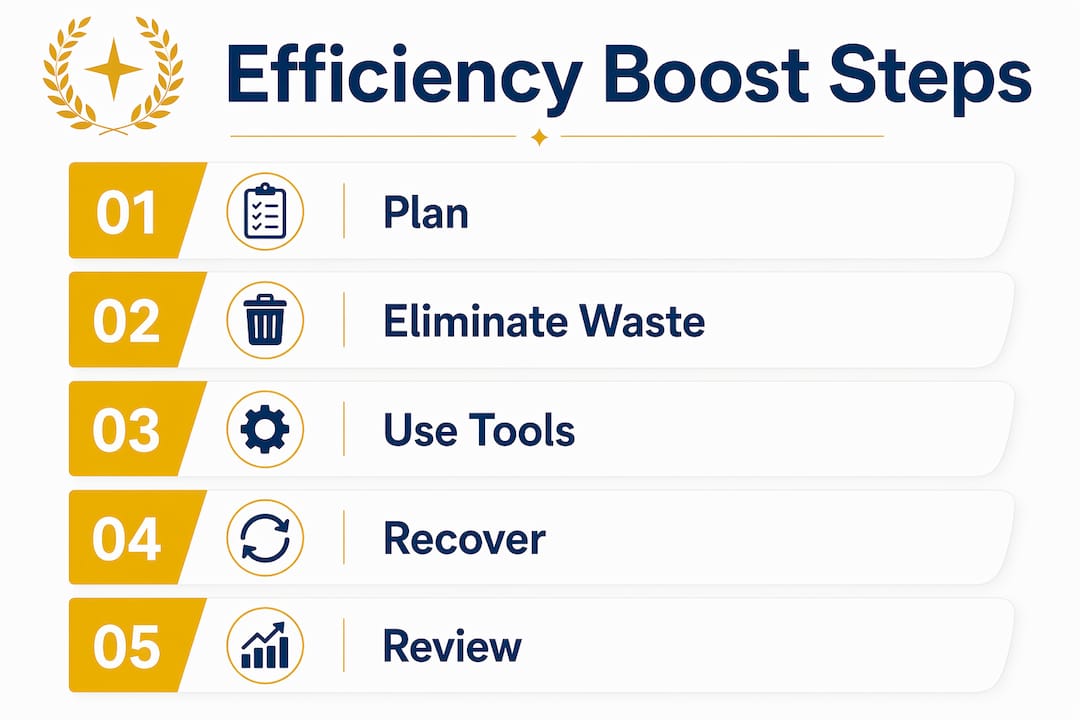
The fix is not to add more productivity tools. Most efficiency gains come from eliminating coordination waste before layering on new systems. Start by auditing your week: list every recurring task and ask whether it directly produces output or just manages the process of producing output. Meetings without clear agendas, email threads that could be a shared document, and manual data entry that could be automated are all prime targets.
13% of work time is lost to pure duplication, meaning tasks completed twice because of unclear ownership or poor communication. Workflow audits and automation address this directly. Tools like Zapier can connect apps and trigger automatic actions, such as moving a completed task to a “done” column or sending a reminder when a deadline approaches, without any manual input.
| Coordination waste type | Example | Fix |
|---|---|---|
| Redundant meetings | Weekly status calls with no agenda | Replace with async updates in a shared doc |
| Duplicated work | Two team members writing the same report section | Assign clear ownership upfront |
| Manual reminders | Emailing teammates about deadlines | Use automated task reminders in Asana or similar tools |
| Disorganized files | Searching for the latest version of a document | Use a single shared folder with a clear naming convention |
- Audit your weekly schedule and flag every task that does not directly produce output.
- Replace status meetings with written updates when the team does not need real-time discussion.
- Use Asana, Notion, or a similar platform to centralize task ownership and reduce back-and-forth.
- Automate repetitive manual tasks using tools like Zapier or built-in app integrations.
Pro Tip: Before you download a new productivity app, spend 30 minutes auditing repetitive tasks you already do. Eliminating one wasteful habit saves more time than adding one new tool.
How do sleep, exercise, and environment affect your productivity?
Efficiency is not purely a scheduling problem. Your cognitive capacity, the raw material that makes focused work possible, depends on physical inputs that most students and young professionals chronically underinvest in. Sleep boosts memory retention, focus, and mood while reducing the irritability that derails collaboration. Pulling an all-nighter before an exam or a big presentation does not compensate for a week of poor sleep. It compounds the deficit.
Regular exercise and a consistent diet positively affect brain function, focus, and motivation. You do not need a complex fitness program. A 20-minute walk before a study session or a work block measurably improves concentration. The mechanism is straightforward: physical activity increases blood flow to the prefrontal cortex, the part of the brain responsible for planning, decision-making, and sustained attention.
Your physical environment also shapes output quality. Research on workplace design consistently shows that natural light, reduced noise, and even the presence of plants improve focus and reduce stress. If you work from a dorm room or a home office, small changes like positioning your desk near a window or using noise-canceling headphones can produce noticeable gains.
- Protect seven to nine hours of sleep as a non-negotiable block in your schedule, not a reward for finishing work.
- Add at least 20 minutes of physical movement to your daily routine, ideally before your most demanding work block.
- Audit your workspace for distractions: phone notifications, browser tabs, and background noise are the three biggest focus killers.
- Schedule genuine breaks between work sessions. A 10-minute break after 90 minutes of focused work restores attention more effectively than pushing through fatigue.
What tools and apps help students and young professionals work more efficiently?
The right tool does not replace a good system, but it does make a good system easier to maintain. For writing efficiency, Grammarly catches grammar and clarity issues in real time, which reduces editing time significantly for students writing papers or professionals drafting reports. For task and project coordination, Asana provides a centralized workspace where you can assign tasks, set deadlines, and track progress without relying on email threads.

Digital calendars like Google Calendar and Apple Calendar remain the foundation of any time-blocking system. Their real power comes from using color-coding to separate study blocks, meetings, and recovery time at a glance. Pairing a calendar with a dedicated time management app that handles task prioritization gives you both the schedule and the task list in one workflow.
For students managing group projects and young professionals coordinating with teams, a platform that centralizes communication, deadlines, and file sharing eliminates the coordination waste described earlier. Optiostation is built specifically for this audience, combining task management, team coordination, and time tracking in a single mobile app with a prioritization-first design.
| Tool | Best for | Key feature |
|---|---|---|
| Grammarly | Writing efficiency | Real-time grammar and clarity suggestions |
| Asana | Team task coordination | Task assignment, deadlines, and progress tracking |
| Google Calendar | Time-blocking | Color-coded scheduling with reminders |
| Zapier | Task automation | Connects apps to trigger automatic actions |
| Optiostation | Student and professional task management | Prioritization-focused mobile task and team management |
How to troubleshoot common mistakes when trying to improve efficiency
The most common mistake is trying to fix everything at once. Adopting time-blocking, SMART goals, a new task app, an exercise routine, and a sleep schedule simultaneously creates an unsustainable cognitive load. You burn out within two weeks and abandon all of it. The research is clear: structured training with practice beats vague advice, and that applies to building efficiency habits too. Start with one technique, practice it for two weeks, then add the next.
Rigidity is the second trap. Time-blocking works until an unexpected deadline or a social obligation disrupts your schedule, and if your system has no flexibility built in, one disruption collapses the whole week. Build buffer blocks into your calendar, 30-minute unassigned slots between major tasks, to absorb the unexpected without derailing your plan.
- Start with one technique: time-blocking or the Pomodoro Technique, not both simultaneously.
- Build buffer time into your daily schedule to handle interruptions without losing the rest of the day.
- Review your system weekly. If a technique is not working after two weeks, adjust it rather than abandoning it entirely.
- Recognize that time management skills are learned behaviors, not fixed traits. Poor planning is a habit you can change with deliberate practice.
Pro Tip: Track your actual time for one week before making any changes. Most people are surprised by how much time disappears into low-value activities they were not aware of.
Key takeaways
Structured time management, reduced coordination waste, and consistent recovery habits are the three pillars of sustainable efficiency for students and young professionals.
| Point | Details |
|---|---|
| Time-blocking with specificity | Specifying when, where, and how you will work doubles or triples follow-through rates. |
| Cut coordination waste first | Employees spend 60% of work time on coordination overhead; eliminating it yields faster gains than adding new tools. |
| Sleep and exercise are inputs | Adequate sleep and regular movement directly improve focus, memory, and decision-making capacity. |
| Start with one technique | Adopting multiple systems simultaneously leads to burnout; master one method before adding another. |
| Match tools to your context | Grammarly, Asana, and Optiostation each serve different efficiency needs; choose based on your primary bottleneck. |
What actually works after years of watching people manage their time
Most articles on how to improve efficiency at work treat it as a purely logistical problem. Add a better app, follow a stricter schedule, wake up earlier. What I have observed, working with students and young professionals across academic and early-career contexts, is that the people who sustain high efficiency are not the ones with the most elaborate systems. They are the ones who know themselves well enough to build a system that fits their actual life, not an idealized version of it.
The Pomodoro Technique is genuinely useful, but not for everyone. Some people hit their stride after 45 minutes of focused work and find the 25-minute cutoff disruptive. The research supports structured intervals, but the specific interval is adjustable. What matters is the principle: focused work followed by deliberate rest, not grinding until you collapse.
The piece of advice I find most undervalued is treating sleep and recovery as productivity inputs rather than productivity rewards. Skipping sleep to get more done is the equivalent of skipping maintenance on a machine you depend on. The short-term output gain is real. The long-term cost is higher. Build your efficiency system around your biology, not against it, and you will outperform the person running on caffeine and willpower within a month.
— Optiostation
Put your efficiency plan into action with the right tools
You now have the framework: structured scheduling, reduced coordination waste, recovery habits, and the right tools for your context. The next step is execution, and that is where most plans stall without a system to track tasks and hold you accountable.
Optiostation is built for exactly this moment. As your second-in-command, it handles task prioritization, team coordination, and time tracking so you can focus on the work that actually matters. Whether you are a student managing coursework and group projects or a young professional juggling deadlines and team responsibilities, the best task management software guide on Optiostation walks you through the top options and how to choose the right fit. If you are ready to put structure behind your goals, managing tasks effectively starts with a single decision: pick one tool, commit to it for two weeks, and build from there.
FAQ
What is the most effective way to improve efficiency at work?
The most effective method is reducing “work about work,” the coordination overhead that consumes 60% of the average employee’s time, before adding new productivity tools. Clear task ownership, purposeful meeting agendas, and basic automation produce faster gains than any scheduling technique alone.
How does the Pomodoro Technique help with efficiency?
The Pomodoro Technique structures work into 25-minute focused intervals followed by short breaks, which reduces procrastination by making tasks feel manageable. It is particularly effective for tasks you tend to delay starting.
Does sleep really affect productivity?
Sleep directly improves memory retention, focus, and mood, all of which are prerequisites for efficient work. Treating sleep as a productivity input rather than a reward is one of the highest-return changes you can make to your daily routine.
How long does it take to see results from time management techniques?
A 10-hour structured time management training program produces measurable improvements in academic behavior and reduced procrastination in nursing students, suggesting that consistent practice over two to four weeks produces visible results. Starting with one technique and applying it deliberately accelerates the timeline.
What tools are best for students trying to improve efficiency?
Grammarly reduces writing time, Google Calendar supports time-blocking, and Optiostation combines task management with team coordination in a mobile-first format built for students and young professionals. The best tool is the one that addresses your specific bottleneck, whether that is writing, scheduling, or task tracking.
Recommended
- Command Log – Optio Station: Best Project Management App for Prioritization
- 10 Best Apps Students Need for Academic Success – Optio Station: Best Project Management App for Prioritization
- Productivity System Explained: Boost Academic Success – Optio Station: Best Project Management App for Prioritization
- 7 Types of Productivity Techniques Every Centurion Should Know – Optio Station: Best Project Management App for Prioritization
